Introduction
Employees today are drowning in digital chaos. Workers now toggle between 18 different applications daily, losing approximately 4 hours per week to context switching. Meanwhile, 47% of digital workers struggle to find the information needed to perform their jobs effectively, and critical announcements get buried in overflowing inboxes. This organizational fragmentation costs companies dearly—ineffective communication alone wastes $10,140 per employee annually in lost productivity.
Modern intranets were built to solve this. They bring scattered tools together, centralize knowledge, and give employees one place to get things done—from company-wide communications and HR self-service to knowledge management and frontline engagement.
Key Takeaways
- Intranets replace fragmented emails with a single source of truth, reaching employees across multiple channels
- Instant access to policies, documents, and resources—with version control so outdated information never circulates
- Modern intranets support HR self-service for onboarding, benefits, and requests—reducing administrative workload
- Recognition, pulse surveys, and mobile access keep both office-based and frontline workers connected and engaged
Streamline Internal Communication Across the Organization
Intranets serve as the primary channel for distributing company-wide announcements, leadership updates, and critical alerts. Rather than relying on fragmented email chains where messages get lost or overlooked, intranets provide a centralized platform that ensures consistent message delivery across the entire organization.
Targeted Communication That Reaches the Right People
Modern intranets allow HR and communications teams to segment content by role, department, or location. Instead of broadcasting generic messages to everyone, organizations can deliver relevant information to specific audiences—manufacturing floor updates go to plant workers, regional policy changes reach the affected locations, and department-specific announcements stay within the appropriate teams. This targeted approach reduces information overload while ensuring employees receive the content they actually need.
Urgent Alerts for Time-Sensitive Situations
When emergencies strike, intranets can display prominent, color-coded alerts for security incidents, weather events, or operational changes. These urgent notifications ensure critical information cannot be missed, appearing at the top of feeds and pushing through to mobile devices. For distributed teams across multiple sites, this kind of real-time reach can be the difference between a contained incident and a costly disruption.
Solving the Search Problem
Staying informed is only half the battle — employees also need to find information fast. Employees spend 1.8 hours every day searching for information — that's 9.3 hours per week lost to hunting through files, emails, and shared drives. A well-structured intranet with strong search functionality reclaims this time by indexing all content in one searchable location. Employees find what they need in seconds, not hours.
Multi-Channel Delivery for Maximum Reach
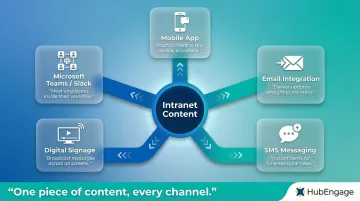
A full-featured intranet doesn't stop at the web portal. It delivers content through:
- Mobile apps for on-the-go access
- Email integration for inbox delivery
- SMS messaging for critical updates
- Digital signage in physical locations
- Integrations with Microsoft Teams and Slack
This multi-channel approach ensures no employee is left out, regardless of whether they work at a desk, in the field, or on a manufacturing floor. Platforms like HubEngage automatically format content for each channel — one piece of content, every channel, no manual reformatting required.
Centralize Knowledge Management and Document Storage
Intranets function as the organization's single source of truth—a centralized repository where employees find policies, standard operating procedures, forms, templates, and company handbooks. Rather than hunting through shared drives, email attachments, or outdated folders, employees access everything they need from one organized location.
Version Control Eliminates Outdated Information
One of the biggest risks with decentralized knowledge is conflicting information. When multiple versions of the same policy circulate through email or live in different folders, employees can't trust what they're reading.
Intranets solve this by ensuring one authoritative, regularly updated version of every document is always accessible. Version control mechanisms handle updates automatically, so when policies are revised, employees always get the current version—no manual intervention needed.
Search and Discoverability Make Knowledge Accessible
Effective knowledge management goes beyond storage. Employees find what they need in seconds using intelligent search, trending content signals, or AI-powered query tools. Modern intranets feature a single search field that indexes content, people, and tools from one central place. Research shows that intranets following a centralized content-management model allow employees to complete tasks in 78 seconds on average, compared to 123 seconds with distributed models.
Peer Knowledge-Sharing Through Structured Formats
Intranets support knowledge-sharing beyond formal documentation through:
- Team wikis that capture institutional knowledge and best practices before they walk out the door
- Self-service FAQ sections that resolve common questions without HR or IT tickets
- Discussion forums where experienced employees share insights accessible to new hires and remote workers alike
These peer-driven knowledge bases capture expertise that would otherwise exist only in individual employees' heads. When experienced workers leave, their knowledge stays accessible to the teams that follow.
HubEngage's intranet includes built-in wikis and an AI Assistant that lets employees ask questions in plain language and get answers instantly—no folder navigation required.
Drive Employee Engagement, Recognition, and Culture Building
Global employee disengagement cost the world economy $438 billion in lost productivity in 2024. Disengaged employees make more errors, deliver lower-quality work, and leave organizations at higher rates. Modern intranets serve as proactive tools for reversing this trend by creating spaces where employees feel connected, valued, and heard.
Social and Interactive Features Transform Passive Portals
When employees can comment, react, and post — not just read — they actually return to the intranet. Modern platforms include social timelines, news feeds, photo galleries, polls, and contests that give people a reason to engage daily rather than bookmark and ignore. The result is a living communication channel, not a static notice board.
Key interactive features include:
- Activity feeds that showcase employee contributions
- Comment threads that encourage discussion
- Photo galleries celebrating team events and milestones
- Polls and surveys that gather quick feedback
- Event management with RSVP functionality
Employee Recognition Creates Visible Appreciation
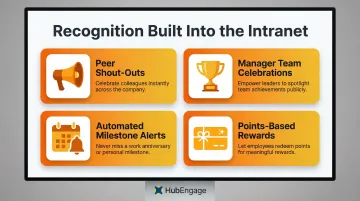
Recognition built into the intranet makes appreciation visible company-wide — peer shout-outs, milestone celebrations, and manager callouts appear in shared feeds rather than private emails. Well-recognized employees are 45% less likely to have turned over after two years, and regular recognition can save a 10,000-employee company up to $16.1 million annually in reduced turnover costs.
Recognition programs within intranets enable:
- Colleagues to recognize each other publicly
- Managers to celebrate team achievements
- Automated milestone celebrations for birthdays and work anniversaries
- Points-based reward systems with redeemable incentives
Pulse Surveys Provide Real-Time Sentiment Data
Annual engagement surveys tell you what went wrong six months ago. Pulse surveys embedded in the intranet give HR leaders current sentiment data — catching issues while there's still time to act. 48% of employees were asked for feedback more than once a year in 2025, up from 35% in 2024, reflecting a broader shift toward continuous listening.
Pulse surveys allow organizations to:
- Track sentiment trends month-to-month or quarter-to-quarter
- Identify emerging issues before they become major problems
- Measure the impact of engagement initiatives in real time
- Gather feedback on specific topics or changes
Gamification Drives Consistent Adoption
Platforms like HubEngage apply gamification across the entire employee experience — not just isolated features. Employees earn points for viewing content, completing surveys, giving recognition, and joining social activities. Those points feed leaderboards and convert into tangible rewards like gift cards, giving employees a consistent reason to stay active on the platform rather than drifting away after onboarding.
Simplify HR Processes and Employee Onboarding
Intranets act as a digital HR hub where employees access pay stubs, submit time-off requests, review benefit options, download tax forms, and find the employee handbook—all without routing every request through an HR representative. This HR self-service capability reduces administrative workload while improving the employee experience.
Key self-service functions include:
- Accessing HR policies and benefits information
- Submitting requests and forms electronically
- Reviewing company guidelines and procedures
- Finding answers to common HR questions through AI-powered search
Shifting high-volume, repetitive inquiries to automated channels saves an average of 5.8 minutes per resolution, freeing HR teams to focus on strategic initiatives rather than answering the same questions repeatedly.
Onboarding as a Key Intranet Use Case
A dedicated onboarding section on the intranet helps new hires navigate their first weeks. It can include personalized welcome messages, progressive onboarding checklists, key contact directories, and links to training materials. This structured approach reduces administrative burden—and the data backs it up.
Organizations with a strong onboarding process improve new hire retention by 82% and productivity by over 70%. Since 70% of new hires decide whether a job is the right fit within the first month, organizations have a narrow window to make a positive impression.
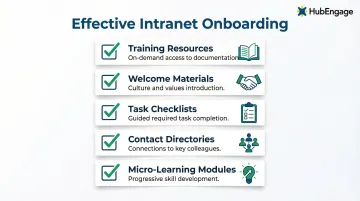
Effective intranet onboarding includes:
- Training resources and documentation accessible on-demand
- Welcome materials introducing company culture and values
- Checklists that guide new hires through required tasks
- Contact directories connecting them with key colleagues
- Micro-learning modules for progressive skill development
Supporting Remote and Distributed Hires
For organizations with remote or geographically spread teams, the intranet is often the first "place" a new employee experiences. That makes onboarding content critical to early engagement and retention. Mobile-first intranet solutions give remote hires access to onboarding resources regardless of location or time zone.
For distributed teams, this consistency matters. Key advantages include:
- Identical onboarding content delivered to every hire simultaneously
- Time zone–agnostic access so no employee falls behind on day one
- Mobile-accessible checklists and materials for deskless or field-based workers
- Centralized culture content that builds belonging from the start
Boost Team Collaboration, Productivity, and Frontline Worker Access
Intranets support cross-functional teamwork through shared project spaces, instant messaging, document co-editing, and integration with productivity tools. This reduces the need to switch between multiple applications and keeps all project-related communication in one place.
Collaboration features include:
- Instant messaging for real-time communication
- Discussion boards for asynchronous collaboration
- Shared workspaces where teams coordinate projects
- Document collaboration with version control
- Integrations with Microsoft Teams and Slack
The Productivity Payoff
Improved communication and collaboration through social technologies could raise the productivity of interaction workers by 20 to 25 percent. A centralized intranet directly reduces time wasted searching for information, repeating requests, or attending status-update meetings. When employees know where to find information and how to reach colleagues, they spend less time on coordination and more time on meaningful work.
That productivity gain, however, only reaches employees who can access the intranet in the first place — which is where many organizations run into problems.
Reaching Frontline and Deskless Workers
Approximately 80% of the global workforce is considered "deskless" or frontline—employees working in manufacturing, healthcare, retail, and hospitality who don't sit at computers all day. Yet 63% of frontline workers say messages from leadership don't make it to them, creating a dangerous communication gap.
Mobile-first intranet solutions give frontline employees access to schedules, safety protocols, and company news directly from their smartphones — no company-issued desktop or email address required.
HubEngage's mobile-first design addresses this directly, enabling frontline workers to receive updates, recognize peers, complete surveys, and access resources from any device.
The cost of failing to reach them shows up in retention and safety data:
- 63% of employees considering leaving cite poor internal communication as a contributing factor
- 16% of nurses have missed safety protocol updates due to ineffective communication channels
Performance Tracking and Analytics
Intranets allow communications teams and managers to track content engagement, monitor what employees are searching for, and identify knowledge gaps. This shifts internal communications from gut-feel decisions to evidence-based ones.
Analytics reveal which channels are most effective for reaching employees, which content resonates, and where employees struggle to find information — enabling organizations to refine their strategies based on actual behavior rather than assumptions.
Frequently Asked Questions
What do companies use intranets for?
Companies use intranets for internal communication, document and knowledge management, HR self-service, employee engagement, team collaboration, and supporting both office-based and frontline workers. All of this runs through one centralized platform.
What are two advantages of a company using an intranet?
Intranets reduce time spent searching for information by centralizing resources, and increase employee engagement by creating a connected, interactive space for communication, recognition, and collaboration.
Which of the following can typically access a company's intranet?
Authorized employees can access a company's intranet—office staff, remote workers, and frontline workers via mobile apps. Role-based permissions control what each user sees.
How is a modern intranet different from older intranet solutions?
Older intranets were static, hard to navigate, and rarely updated. Modern intranets are mobile-friendly, socially interactive, AI-enhanced, and designed for two-way communication rather than one-way broadcasting.
Can intranets support frontline and deskless workers?
Yes, modern intranets with mobile-first design give frontline workers access to schedules, policies, company news, and peer recognition through their smartphones—even without a company-issued desktop or email address.