Introduction
Most enterprise communication tools were designed for desk workers—employees with regular access to computers, corporate email, and web-based portals. But approximately 80% of the global workforce is deskless, working on manufacturing floors, in hospital wards, retail stores, hospitality venues, and logistics centers. This structural disconnect creates a costly engagement gap: disengaged employees cost the global economy $8.8 trillion annually in lost productivity.
Employee experience platforms (EXPs) with mobile app access are built to close that gap. These unified systems consolidate communications, recognition, engagement, learning, and HR self-service into one environment workers can reach from their phones—no desk required.
This guide breaks down what makes a modern EXP effective: from must-have mobile features and AI tools to a practical buyer's checklist for frontline-heavy organizations.
TLDR:
- Employee experience platforms unify communications, recognition, surveys, and HR tools into one mobile-accessible system
- Mobile access is critical for the 80% of workers who are deskless and lack regular computer access
- Must-have features: native mobile apps, multi-channel delivery, recognition, AI-powered search, and gamification
- Frontline-heavy industries see the highest ROI from mobile-first EXPs that reach employees where they work
- Consolidating fragmented tools into one platform cuts software costs by up to $60 per user per month
What Is an Employee Experience Platform?
An employee experience platform (EXP) is a unified digital system that consolidates communications, recognition, engagement, learning, and HR self-service into a single environment. Instead of juggling disconnected tools for announcements, surveys, recognition programs, and policy access, organizations deliver everything through one integrated platform.
How EXPs Differ from HRIS and Intranets
An HRIS manages employee data, payroll, benefits administration, and compliance. An EXP focuses on how employees feel, connect, and perform daily. Where an HRIS tracks transactions, an EXP drives engagement.
Similarly, a standalone intranet serves as a content repository. Modern EXPs go further by integrating recognition, surveys, instant messaging, AI assistance, and gamification—creating an active engagement layer rather than a passive information hub.
Multi-Channel by Design
Leading EXPs deliver content across multiple channels to meet employees wherever they work:
- Mobile apps for frontline and remote workers
- Web portals for desk-based employees
- Email and SMS for time-sensitive updates
- Digital signage for shared workspaces like factories and clinics
This ensures employees receive information through their preferred channel, whether they're on the factory floor, in a patient room, or working remotely.
The Consolidation Trend
HR and communications leaders are moving away from point solutions. Forrester notes that the HCM market is undergoing a "seismic shift" from back-office systems to strategic systems of engagement. Buyers now expect unified, consumer-grade experiences that integrate communications, collaboration, and HR service delivery.
The market reflects that urgency: the employee experience platform space is projected to grow from $6.40 billion in 2023 to $11.71 billion by 2030, driven by organizations prioritizing retention and digital workplace transformation.
Why Mobile App Access Has Become Essential for Employee Experience
The Deskless Workforce Reality
The majority of employees worldwide work in roles that don't provide regular computer access:
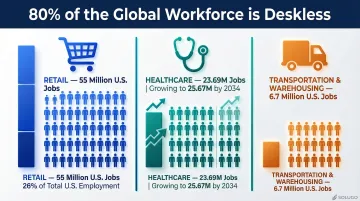
- Retail: 55 million jobs in the U.S. alone (26% of total employment)
- Healthcare: 23.69 million U.S. jobs, projected to reach 25.67 million by 2034
- Transportation & Warehousing: 6.7 million U.S. jobs
A desktop-only EXP functionally excludes these employees from company culture, communications, and recognition programs. Mobile access is a prerequisite for workforce inclusion, not an optional enhancement.
Mobile Access Drives Measurable Engagement
When employees can receive recognition, respond to surveys, access policy updates, or complete training from their phones during a shift, participation rates increase dramatically.
Research shows that mobile and SMS survey delivery achieves 40-50% response rates in mobile-first markets, compared to just 15-25% for email-based surveys. For deskless workers, mobile isn't just convenient—it's often their only connection to the organization.
The Consumer App Comparison
Modern employees compare workplace apps to the consumer apps they use daily. If the company app is slow, hard to navigate, or desktop-only, adoption drops. A mobile-first design approach—not just a mobile-compatible website—is what drives sustained usage.
Key difference: Mobile-responsive web portals adapt desktop interfaces to smaller screens. Native or progressive web apps are built specifically for mobile workflows, with touch-optimized navigation, push notifications, and offline access capabilities.
Multi-Channel Reach Extends Mobile Strategy
Mobile apps serve as the anchor, but push notifications, SMS fallback, and digital signage ensure messages reach employees regardless of device or location. Organizations with multiple sites or shift workers benefit especially from this layered approach. Critical safety alerts go out via SMS, while recognition posts appear on break room displays and in the mobile app at the same time.
The Retention and Culture Signal
Gallup research shows that well-recognized employees are 45% less likely to have turned over two years later. Mobile access enables the consistent, frequent recognition that produces that outcome. When leadership invests in a mobile-accessible platform, it also shows frontline and distributed employees they matter as much as office-based staff.
Must-Have Features in a Mobile-Enabled Employee Experience Platform
Mobile-First Design and Branded App Experience
A mobile-responsive web portal simply adjusts a desktop layout for smaller screens. A native or progressive web app is built from the ground up for mobile, with:
- Touch-optimized navigation
- Push notification support
- Faster load times
- Offline content access
- Device-native features (camera, location services)
Branded, white-labeled apps reinforce company identity and consistently drive higher download and login rates than generic third-party interfaces — a meaningful difference when adoption determines ROI.
Multi-Channel Communications with Auto-Formatting
Platforms that auto-format a single piece of content for mobile push notification, email, SMS, and digital display save HR teams significant time while ensuring consistent reach.
Time-sensitive safety alerts and company announcements need to reach every employee immediately. One-click, multi-channel distribution ensures no one is left out because they didn't check email or weren't near a computer.
Recognition, Rewards, and Social Engagement Tools
Peer-to-peer recognition accessible via mobile—including likes, comments, digital badges, and points—creates a culture of appreciation that works regardless of physical location.
The numbers back this up:
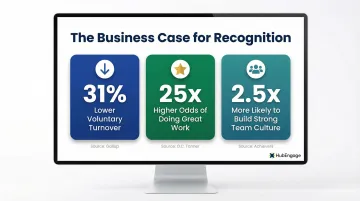
- Companies with recognition-rich cultures see 31% lower voluntary turnover
- Integrated recognition yields 25x higher odds of doing great work and 26x higher odds of planning to stay
- Peer recognition increases the likelihood of a strong team culture by 2.5x
Recognition features tied to a rewards catalog—like gift card integrations—increase participation further by providing tangible value.
Surveys, Pulse Checks, and Two-Way Feedback
Mobile-native survey tools with short, push-delivered pulse questions achieve significantly higher response rates than email-based surveys. Real-time sentiment data helps HR leaders act quickly rather than waiting for annual engagement reports.
For best results, keep mobile surveys under 3 minutes and mix rating scales with open-ended questions. Weekly or bi-weekly pulse surveys maintain a continuous feedback loop without survey fatigue.
AI-Powered Search and Content Delivery
An embedded AI assistant allows employees to ask questions like "What's the PTO policy?" or "Where do I find my W-2?" and receive instant, accurate answers sourced from company content. This reduces HR ticket volume and improves the employee experience at the point of need.
HubEngage's AI Assistant, for instance, is built into the platform to serve employees, HR teams, and internal communications leaders simultaneously — answering employee questions, helping HR teams create content faster, and surfacing analytics insights about which messages resonate and which fall flat.
Security, Compliance, and Integration
Enterprise-grade mobile EXPs must support:
Security & Access:
- Single sign-on (SSO) for frictionless login
- Multi-factor authentication (MFA)—workforce adoption reached 70% in 2025
- Role-based access controls to protect sensitive information
- Data encryption (at rest and in transit)
Compliance:
- GDPR compliance for European operations
- CCPA compliance for California-based employees
- HIPAA compliance for healthcare organizations
- ISO 27001 certification for information security management
Integration:
Connections to existing HRIS, payroll, and communication tools (Workday, ADP, Microsoft Teams, Slack) keep employee data flowing without duplication or manual admin effort:
- Automated syncing keeps org charts, profiles, and permissions current
- Bidirectional data flow eliminates redundant data entry across systems
- Pre-built integrations reduce implementation time significantly
How Mobile EXPs Serve Frontline and Distributed Workforces
The Frontline Challenge
Frontline-heavy industries—healthcare, manufacturing, catering, retail, energy—face a specific challenge: shift workers rarely share a common communications moment. Real-time push notifications and offline-accessible content become critical for operational updates, safety alerts, and compliance training.
When frontline employees participate in the same recognition programs, see the same leadership messages, and access the same learning modules as corporate staff, organizational culture stays consistent rather than splitting into two separate experiences.
Real-World Applications
Organizations like Extended Stay America, Brightline, and other HubEngage customers operate large distributed workforces across multiple locations. Mobile EXPs enable:
- Instant safety alerts delivered via push notification and SMS to all on-shift employees
- Recognition programs where housekeeping staff, front desk teams, and maintenance crews can celebrate each other's wins
- Shift-specific communications segmented by location, role, or time zone
- Digital signage in break rooms displaying company news, recognition posts, and upcoming events
Training and Onboarding on Mobile
New hires in frontline roles can complete onboarding paperwork, watch orientation videos, and access compliance training directly from their phones before their first shift. This reduces administrative burden on managers and accelerates time-to-productivity. The results across organizations are consistent:
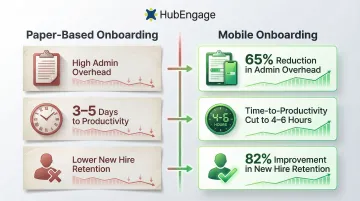
- Moving from paper-based to mobile onboarding reduces administrative overhead by up to 65%
- Digital onboarding cuts time-to-productivity by 35–50% (from 3–5 days to as few as 4–6 hours)
- Strong onboarding programs improve new hire retention by 82%
The Role of AI and Gamification in Driving Mobile Platform Adoption
The Adoption Problem
Deploying a platform is not the same as employees using it. Without mechanisms to make engagement habitual, even well-designed apps see usage decline after launch. Global retention benchmarks show that mobile app retention falls to 26% on day one, 13% by day 7, and settles at just 7% by day 30.
How Gamification Solves Adoption
Points, badges, leaderboards, and challenges applied across communications, recognition, surveys, and learning activities give employees a reason to return to the app daily.
The difference between surface-level and platform-wide gamification:
- Surface-level: A single points feature in the recognition module
- Platform-wide: Points, badges, and leaderboards applied to every interaction—viewing announcements, completing surveys, recognizing peers, engaging in social posts, and finishing training modules
HubEngage is the first fully gamified multi-channel employee communications and engagement platform, applying game mechanics across the entire experience rather than a single module.
Research supports the impact:
- Meta-analysis published in Educational Psychology Review found significant positive effects of gamification on cognitive (g = 0.49), motivational (g = 0.36), and behavioral (g = 0.25) outcomes
- Gartner predicts that by 2028, 40% of large warehouse operations will deploy gamification tools to motivate workforces
How AI Enhances Value
Gamification drives employees back to the app; AI determines what they see when they get there. Three capabilities make the biggest difference:
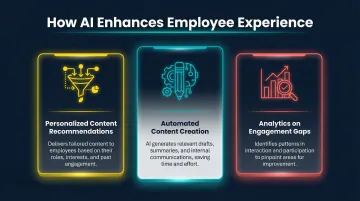
- Personalized content recommendations: Algorithms analyze behavior and preferences to surface relevant announcements, recognition posts, and learning content for each employee
- Automated content creation: HR teams draft announcements, craft email campaigns, and generate survey questions faster with AI assistance
- Analytics on engagement gaps: Identify which messages resonate, which channels perform, and which employee segments are disengaged — without adding administrative overhead
Gartner predicts that by 2028, more than 20% of digital workplace applications will use AI-driven personalization algorithms to generate adaptive experiences for workers.
How to Choose the Right Employee Experience Platform with Mobile Access
Not every platform delivers equally across mobile reach, AI capabilities, and frontline usability. Before committing, pressure-test vendors against these criteria.
Evaluation Checklist
Ask vendors these key questions:
Mobile App Quality:
- Is the app native (iOS/Android) or web-based?
- Is it white-labeled with our company branding?
- Does it support offline content access?
- What is the average app store rating?
Channel Reach:
- Which channels are supported (mobile, web, email, SMS, digital signage)?
- Is content auto-formatted for each channel, or does it require manual adjustments?
- Can we send one message across all channels simultaneously?
Gamification Depth:
- Is gamification applied to a single feature or across the entire platform?
- What game mechanics are included (points, badges, leaderboards, challenges)?
- Can points be redeemed for tangible rewards?
AI Capabilities:
- Does the platform include an AI assistant for employee self-service?
- Can AI help HR teams create content faster?
- Does AI provide analytics insights and recommendations?
Integration Ecosystem:
- Which HRIS and payroll systems integrate natively (Workday, ADP, BambooHR)?
- Does it support SSO with our identity provider?
- Are integrations real-time or batch-processed?
Analytics:
- What engagement metrics are tracked?
- Can we segment data by location, role, or department?
- Are analytics available in real-time or delayed?
Scalability for Frontline Workers:
- Does the platform support personal device (BYOD) access?
- Can employees without company email addresses log in?
- Is there QR code or SMS-based login for easy access?
Total Cost of Ownership
Once you've assessed capabilities, run the numbers. Organizations average 106 SaaS apps, and Gartner predicts 25% of IT overspending by 2027 will result from unused entitlements and overlapping tools. A platform that consolidates recognition, communications, surveys, learning, and analytics into one system typically reduces net software spend compared to running separate standalone tools.
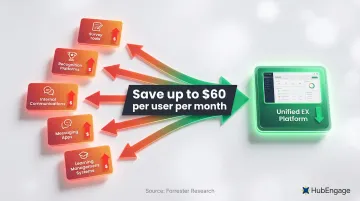
Calculate your current spend:
- Survey tools (Culture Amp, SurveyMonkey)
- Recognition platforms (Bonusly, Kudos)
- Internal communications (email, intranet hosting)
- Messaging apps (Slack, Microsoft Teams licenses)
- Learning management systems
Forrester research shows that consolidating communication and collaboration tools can save up to $60 per user per month.
Common Pitfalls
Even strong platforms fail in practice when these issues go unaddressed:
- Login friction kills frontline adoption. Platforms requiring complex credentials or lacking SSO support create real barriers for shift workers. Look for QR code login, SMS-based access, or personal device enrollment.
- Generic content frustrates employees. Without role-based segmentation, manufacturing floor workers get the same feed as corporate staff. Ensure your platform supports deep audience targeting.
- IT bottlenecks slow communications teams. If every announcement requires a ticket, publishing velocity drops. Choose a platform where HR and comms teams can publish independently.
Frequently Asked Questions
What are employee experience platforms?
Employee experience platforms are unified digital systems that bring together communications, recognition, engagement, learning, and HR tools into a single environment. They help organizations support employees across every stage of their journey, from onboarding through daily engagement to career development.
What are the best employee experience platforms with mobile app access?
Leading platforms include those offering native mobile apps with branded interfaces, multi-channel delivery, recognition tools, AI capabilities, and gamification. The best choice depends on workforce type—frontline-heavy organizations should prioritize mobile-first, multi-channel platforms like HubEngage that support deskless workers.
What are the key benefits of using AI in employee experience platforms?
AI serves three practical functions: it answers employee policy and HR questions instantly, helps communications teams draft content faster, and surfaces analytics insights so leaders can understand and act on engagement patterns without manual reporting.
How do I log in to the workplace app?
Most modern employee experience platforms support single sign-on (SSO), allowing employees to log in with their existing work credentials. Some platforms also support personal device access for frontline workers who don't have company-issued devices, using QR codes or SMS-based login.
Why is mobile app access important for frontline employees?
Frontline employees don't have regular access to desktops or email, so a mobile app is often their only connection to company communications, recognition programs, training, and culture. Mobile access is a prerequisite for genuine workforce inclusion and engagement.
How does gamification improve adoption of an employee experience platform?
Gamification—points, badges, challenges, and leaderboards applied across communications, recognition, and learning—gives employees ongoing incentives to return daily. Platforms like HubEngage apply gamification across the entire experience, not just isolated features, which is what drives consistent participation rather than one-time logins.
Ready to unify your employee experience? Look for a platform that consolidates communications, recognition, surveys, and learning in one place—with a native mobile app, multi-channel reach, platform-wide gamification, and AI tools built in from the start, not bolted on.