Introduction
It's 6 AM on a Saturday, and the hospitality manager at a mid-sized hotel chain realizes a housekeeper called in sick. She quickly opens her scheduling system, reassigns the shift to another employee, and sends an email update. By noon, she discovers the replacement never saw the message—the shift went uncovered, guests complained about room readiness, and the front desk manager is scrambling to explain the delay to angry customers. The scheduling worked. The communication didn't.
Schedule changes happen constantly in frontline industries—retail, healthcare, manufacturing, and hospitality. Yet most organizations still rely on slow or passive channels: email, bulletin boards, or intranet posts. More than 80% of frontline workers don't have a desk or company email, which makes those channels largely ineffective.
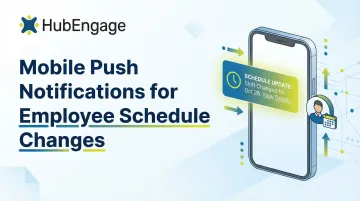
Mobile push notifications fix this by reaching employees the moment a change happens, on the device they already carry everywhere.
This guide covers what types of schedule notifications to send, how to write them, when to send them, and what to look for in a platform that makes it work reliably.
Key Takeaways
- Mobile push notifications deliver schedule updates to frontline and deskless employees the moment changes happen
- Effective notifications are concise, specific, and tied to a clear action (confirm, swap, check schedule)
- Over-notifying damages engagement as much as under-notifying—timing and relevance are critical
- Prioritize platforms that offer multi-channel delivery, read receipts, and role-based targeting
The Real Cost of Missed or Delayed Schedule Change Notifications
The $3,600-Per-Worker Absenteeism Crisis
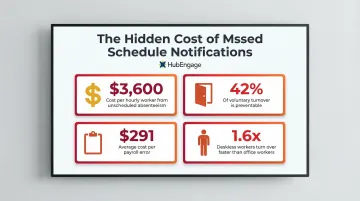
When schedule changes don't reach employees in time, the operational impact is immediate and expensive. Unscheduled absenteeism costs roughly $3,600 per year for each hourly worker, and frontline industries suffer the most. Healthcare support roles experience a 4.3% absence rate, building and grounds cleaning 4.0%, and food service 3.8%—all significantly higher than the national average of 3.2%. Uncovered shifts lead to last-minute scrambles, mandatory overtime, and service disruptions that directly impact customer satisfaction.
The Email Gap in Frontline Communication
The deskless worker problem compounds these challenges. More than 80% of frontline workers don't have a desk or company email, making traditional corporate communication channels ineffective before messages even leave the outbox. 16% of U.S. adults are "smartphone-only" internet users, meaning they own a smartphone but don't subscribe to home broadband. For these employees, push notifications on their personal mobile device aren't a convenience—they're a necessity.
Payroll Chaos and Compliance Exposure
Communication failures create downstream payroll problems. When employees don't receive schedule changes in time, managers scramble to fix timesheets retroactively. The numbers behind that scramble are hard to ignore:
- Each payroll error costs an average of $291 to correct
- Missing or incorrect time punches cost organizations $78,700 per 1,000 employees annually
- The average payroll accuracy rate sits at just 80.15%—nearly 1 in 5 payrolls requires manual correction
Schedule Frustrations Drive Preventable Turnover
Poor schedule communication erodes employee trust and accelerates turnover. 42% of voluntary turnover is preventable, with nearly a quarter tied to staffing, workload, or scheduling problems. When employees feel blindsided by last-minute changes they weren't properly notified about, trust breaks down fast.
The risk is steeper for frontline teams. Deskless workers experience a turnover rate 1.6 times higher than office-based counterparts, and 41% report having little or no control over their work schedule. Giving workers reliable, timely schedule updates is one of the simplest levers for reducing that gap.
Types of Mobile Push Notifications Every Shift-Based Workforce Needs
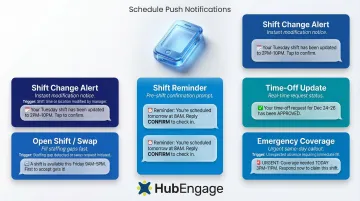
Shift Change Alerts
When a manager modifies a scheduled shift—changing the time, location, or role—an automated push notification should immediately reach the affected employee with specific details. Avoid generic messages like "your schedule changed." Instead, include:
- Date and day of week
- New shift time (start and end)
- Location if relevant (store number, department, building)
- Clear CTA: "Tap to confirm" or "View full schedule"
Example: "Your Sat 3/15 shift moved to 2 PM–10 PM. Tap to confirm."
Open Shift and Shift Swap Notifications
When a shift becomes available due to a call-out or staffing gap, a targeted push to eligible employees drives faster fill rates than group texts or manager phone calls. Over one third of shifts are filled in less than an hour using smart scheduling software. Target notifications based on:
- Role or certification (only send to qualified staff)
- Availability status (employees who marked themselves available)
- Location or department (relevant team members only)
Example: "Open shift: Tue 3/18, 6 AM–2 PM, Warehouse B. Tap to claim."
Shift Confirmation and Reminder Alerts
Automated pre-shift reminders reduce no-shows. Kenco reduced unplanned absences from 64.1 to 39.4 hours per month—a 39% reduction—by implementing automated workflows and proactive communications. Send reminders at two intervals:
- 24 hours before shift: Gives employees time to flag conflicts
- 2 hours before shift: Final confirmation that they're aware and ready
These confirmation requests give managers a clear headcount picture before the shift starts — enough lead time to arrange coverage rather than scrambling at the last minute.
Time-Off and Availability Request Updates
Employees submit time-off requests and then wait — often without knowing where things stand. Closing that gap with status notifications keeps both sides informed and reduces follow-up messages to managers. Notify employees when their request is:
- Approved — confirmed with the relevant dates
- Denied — with a prompt to check for alternative options
- Pending — so they know it's in review, not lost
Example: "Your time-off request for 3/22–3/24 has been approved."
Emergency or Last-Minute Coverage Notifications
When urgent coverage is needed—a call-out an hour before a shift—a broadcast push to a targeted group of available employees compresses response time from hours to minutes. In emergency recall drills, instant messaging apps achieved a median response time of 8.5 minutes, significantly faster than individual phone calls.
Example: "URGENT: Need coverage for 12 PM–8 PM shift today. Reply YES to claim."
How to Write Push Notifications That Employees Will Actually Read
Keep It Under 50 Characters and Front-Load Critical Information
Push notifications have roughly two seconds to capture attention on a lock screen. Android lock screens display approximately 50 characters maximum before truncation, while iOS allows roughly four lines of text. Airship recommends getting the most important, actionable part of the message across in the first 40 characters to avoid truncation.
Ineffective: "Schedule update available—please check your schedule for this week"
Effective: "Your Sat shift moved to 2 PM – Tap to confirm"
Be Specific and Action-Oriented
Vague notifications get ignored. Every schedule-change push should include what changed, when it applies, and a single clear CTA. Examples:
- "Your Thu 3/20 shift canceled – No action needed"
- "New shift assigned: Fri 3/21, 10 AM–6 PM – Confirm now"
- "Swap request approved: You now work Sun 3/23 – View details"
- "Open shift available: Sat morning, Bakery – Tap to claim"
Match the Tone to the Urgency Level
Not every schedule change is an emergency. Calibrate language appropriately:
Low urgency (routine reminders):
- "Reminder: Your shift starts tomorrow at 9 AM"
- "Next week's schedule is now available"
Medium urgency (standard changes):
- "Your Wed shift time changed to 1 PM – Confirm receipt"
- "Swap request pending – Manager review needed"
High urgency (immediate coverage needs):
- "URGENT: Coverage needed today 3 PM–11 PM – Reply to claim"
- "Last-minute shift cancellation – Check schedule now"
Avoid Jargon, Abbreviations, and Internal Codes
Employees receiving a push notification are often mid-task. The message must be immediately understandable — no app-opening required.
Bad: "Shift reassignment: Dept 47B, Loc 3, Shift Code 2A"
Good: "Your shift moved to Warehouse 3, 2 PM start"
Respect Opt-In Preferences and Legal Boundaries
In some jurisdictions, employees have protections around after-hours communication. Fair Workweek laws in Los Angeles County, Chicago, Philadelphia, and Oregon strictly mandate 14-day advance schedule notice, rest between shifts, and predictability pay for late changes. Push notifications sent outside scheduled hours — unless for a true emergency — can create resentment and legal exposure.
Employers must also keep records showing the date and time each schedule was posted and individually transmitted to each employee. That makes your notification platform's timestamp logging a compliance asset, not just a feature.
Timing and Frequency: When to Push and When to Hold Back
Establish a Notification Cadence That Matches Operational Urgency
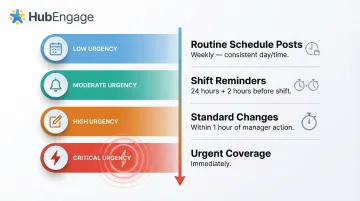
Routine reminders (next week's schedule published) can be batched and sent at predictable times. Urgent alerts (shift cancellations, emergency coverage) should fire immediately. A "send everything instantly" approach burns through employee goodwill and leads to notification muting.
Recommended cadence:
| Notification Type | Timing |
|---|---|
| Routine schedule posts | Weekly, consistent day/time |
| Shift reminders | 24 hours and 2 hours before shift |
| Standard changes | Within 1 hour of manager action |
| Urgent coverage | Immediately |
Define Quiet Hours as a Policy, Not an Afterthought
Unless an employee is on-call or an emergency arises, notifications should be paused outside of agreed work hours. Organizations can build quiet-hour policies into their communication platform settings to automate this boundary. Platforms like Beekeeper offer Automatic Do Not Disturb Mode that mutes notifications as soon as frontline workers clock out, maintaining boundaries between work and personal time.
Notification Overload Has a Real Business Cost
The same discipline that protects off-hours also applies during working hours. When employees receive too many push alerts, they mute the app or disable notifications entirely. Android push opt-in rates dropped from 85% to 67% in a single year, and sending just one weekly push notification can cause 10% of users to disable app push notifications. To prevent disengagement:
- Send only relevant alerts to the right people (not broadcast everything to everyone)
- Batch non-urgent updates into daily or weekly digests
- Give employees some control over notification preferences where possible
- Monitor opt-out rates and adjust frequency accordingly
What to Look for in an Employee Communication Platform for Schedule Alerts
Multi-Channel Delivery with Fallback Logic
A push notification that goes unread shouldn't be the end of the communication chain. Look for platforms that automatically escalate to SMS or email if a push notification goes unopened after a defined window, ensuring no employee misses a critical schedule update regardless of their device or notification settings.
Read Receipts, Delivery Tracking, and Analytics
Managers need to know which employees received and opened a notification—especially for urgent shift changes. Organizations that implement comprehensive notification systems with read receipt tracking typically see a 30-40% reduction in schedule-related errors and miscommunications. That confirmation data lets managers follow up only with employees who haven't acknowledged the change—reducing unnecessary calls and keeping everyone accountable.
Targeted Sending by Role, Location, or Group
Broadcasting every schedule notification to all employees creates noise. The right platform lets managers send shift-specific alerts only to affected employees, filtered by:
- Department or job role
- Location or worksite
- Availability status or shift assignment
This prevents notification fatigue while ensuring critical messages reach the right people at the right time.
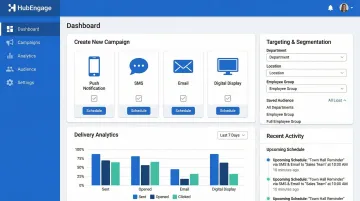
HubEngage's platform supports all three of these capabilities—push, SMS, email, and digital display delivery from a single interface, with real-time delivery insights and audience-level targeting built in. For organizations managing large or distributed frontline teams, that consolidation matters.
Frequently Asked Questions
What is the best employee schedule app with notification features?
Look for scheduling apps that offer multi-channel delivery (push, SMS, email), role-based targeting, read receipts, and integration with existing HR or scheduling systems. Platforms like HubEngage go further by unifying all employee communications — scheduling alerts, recognition, and announcements — in a single mobile-first app, so teams aren't juggling multiple tools.
How do push notifications reduce no-shows for employee shifts?
Automated shift reminders sent 24 hours and 2 hours before a shift give employees enough time to confirm or flag a conflict. This allows managers to arrange coverage proactively rather than reacting to an empty shift, reducing no-shows and last-minute scrambles.
What types of schedule changes should trigger a push notification?
Key triggers include shift time or location changes, shift cancellations, new open shifts, swap approvals, last-minute coverage requests, and pre-shift reminders. Each notification should be specific and action-oriented to drive employee response.
How can employers avoid push notification fatigue among employees?
Set a deliberate cadence, define quiet hours to respect off-duty time, and send only relevant alerts to the right people — not blanket broadcasts to everyone. Give employees some control over their preferences, then monitor opt-out rates and adjust frequency as needed.
Can push notifications for schedule changes work for deskless or frontline employees?
Yes—push notifications are especially valuable for deskless workers such as nurses, warehouse staff, or retail associates who don't have regular access to email or an intranet. A mobile app with push capability is often the only reliable way to reach them in real time.
How do I write an effective push notification for a shift change?
Keep the title under 40–60 characters and front-load the critical detail — what changed and when. Include one clear CTA (confirm, view schedule, or respond), and always name the specific shift date and time so employees don't have to guess.