The cost of poor remote collaboration is real and measurable. In 2024, global employee engagement fell to 21%, costing the world economy an estimated $438 billion in lost productivity. Remote work caused cross-group collaboration time to drop by approximately 25%, making organizational networks more static and siloed. Meanwhile, 87% of frontline workers aren't sure their company culture applies to them.
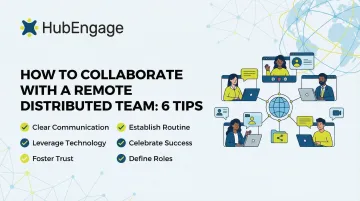
This article covers 6 practical tips that HR and communications leaders can apply to build genuinely collaborative distributed teams, plus the tools and cultural habits that make it sustainable.
Key Takeaways
- Effective remote collaboration runs on intentional structure: clear norms, documented goals, and built-in recognition
- Balance synchronous meetings with asynchronous work to prevent burnout while maintaining alignment across time zones
- Recognition and belonging need to be built directly into daily workflows—not treated as afterthoughts
- Outcome-based accountability replaces presence-based monitoring, strengthening trust and performance
- Unified engagement platforms consolidate communications, recognition, and culture-building in one place
What Is Remote Distributed Team Collaboration?
Remote distributed team collaboration is the practice of enabling people across different locations, time zones, and work environments to work together toward shared goals using digital tools and intentional processes. This differs fundamentally from simply "working from home" — it involves permanent geographic distribution, often spanning regions or countries, with teams that may never meet in person.
Without a shared physical space, the spontaneous touchpoints that build trust and alignment (hallway conversations, body language cues, impromptu problem-solving) must be deliberately recreated through systems, rituals, and technology. That's a meaningful shift in how teams operate.
The scale of the challenge shows up in the data. The average desk worker now uses 11 applications to complete their tasks, and digital workers toggle between different apps nearly 1,200 times per day. That fragmentation creates cognitive overload and communication gaps that quietly erode collaboration over time.
6 Tips for Collaborating Effectively with Your Remote Distributed Team
Tip 1: Establish Clear Communication Norms
Distributed teams struggle when everyone assumes communication preferences are shared. Without documented norms, confusion reigns: Should this be a Slack message or an email? Does silence mean agreement or that the message was never seen? Is it acceptable to message colleagues at 10 p.m. in your time zone?
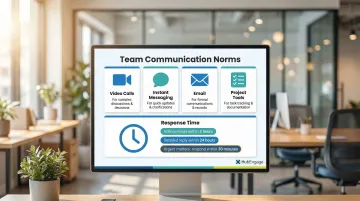
Define which channels serve which purposes:
- Video calls for complex discussions requiring nuance and real-time feedback
- Instant messaging for quick updates and time-sensitive questions
- Email for formal communications, external correspondence, and non-urgent information
- Project management tools for task assignments and status updates
Make these norms documented and visible to all employees. Establishing a common understanding of how to use different communication channels allows distributed teams to communicate more effectively and avoid conflicts.
Response time expectations matter just as much as channel selection. When teams span multiple time zones, clarify overlapping working hours and define clear response windows — for example, acknowledge messages within 2 hours during working hours, with detailed replies within 24 hours. This reduces anxiety, prevents communication gaps, and stops the always-on habit that leads to burnout.
Tip 2: Balance Synchronous and Asynchronous Work
Synchronous work requires real-time collaboration and simultaneous presence—think video meetings, brainstorming sessions, and live discussions. Asynchronous work includes communication and tasks that don't require immediate response, such as recorded updates, documentation, and project comments.
Distributed teams often default too far toward synchronous collaboration. Microsoft data shows that 60% of meetings are unscheduled or ad hoc, and employees spend 57% of their time communicating versus 43% creating. Half of all meetings take place between 9–11 a.m. and 1–3 p.m., hijacking the peak productivity windows most people need for deep work.
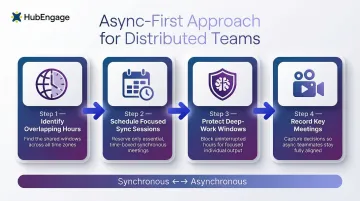
A deliberate async-first approach corrects this. Here's a practical framework:
- Identify the overlapping hours across time zones for live collaboration
- Schedule focused synchronous sessions for decisions, brainstorming, and complex problem-solving
- Protect deep-work windows where asynchronous contributions are expected
- Record all key meetings so employees in different time zones stay informed without attending at odd hours
GitLab's "handbook first" system — over 2,700 web pages of documented processes — shows what's possible when async becomes the default. Employees consume information and contribute on their own schedules, without waiting for a meeting to move forward.
Tip 3: Build a Culture of Recognition and Belonging
Remote workers—especially those on frontline or field teams—frequently feel invisible and disconnected from company culture. Fully remote employees are more likely to report experiencing anger, sadness, and loneliness than hybrid and on-site workers. Without deliberate recognition, their contributions go unacknowledged and disengagement follows.
The business case is clear: employees who receive recognition from their manager at least once a week are 61% engaged, compared to just 38% for those who receive feedback but recognition less often. For frontline workers specifically, 39% report that being praised in front of their peers makes them feel more valued than receiving a bonus.
Build belonging through systematic practices:
- Regular public shoutouts during team meetings or company-wide channels
- Peer-to-peer recognition moments where employees celebrate each other's contributions
- Virtual team rituals such as celebrating work anniversaries, project milestones, and personal achievements
- Creating psychological safety where every voice is heard regardless of location
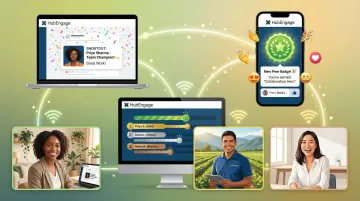
Recognition only works when it's consistent, not occasional. HubEngage's Recognition Hub gives managers and peers a shared space to celebrate achievements publicly across mobile apps, web portals, and digital signage. Employees earn points and badges for recognizing colleagues, which keeps participation high across distributed teams.
Tip 4: Align Around Shared Goals and Accountability
Without shared physical space, goal alignment drifts quickly. Only 46% of employees clearly know what is expected of them at work, representing a 10-point drop from 56% in March 2020. This expectation crisis undermines collaboration and performance.
Distributed teams need documented, visible objectives—such as OKRs (Objectives and Key Results) or project milestones—so every team member knows their role, the team's priorities, and how their work connects to the bigger picture. Improving clarity of expectations from current levels to best-practice levels can lead to a 9% increase in profitability and an 11% improvement in work quality.
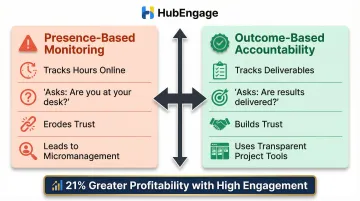
Shift from presence-based to outcome-based accountability:
- Stop asking "Are you at your desk?" and start asking "Are you delivering results?"
- Use transparent project tracking tools that show progress without micromanagement
- Establish clear success metrics for each role and project
- Conduct regular check-ins focused on outcomes, obstacles, and support needs
This shift is both fairer for remote workers and more effective for organizational performance. Companies with high employee engagement see 21% greater profitability and 17% higher productivity. Presence-based monitoring drains trust, whereas outcome-based visibility strengthens it.
Tip 5: Prioritize Remote Employee Well-Being
Remote workers face a hidden well-being crisis. Fully remote workers report burnout at 61%, compared to 57% for hybrid workers. The always-on culture contributes significantly: 76% of remote workers report having worked overtime or outside regular hours at least once in the past week, and meetings starting after 8 p.m. have increased by 16% year over year.
Implement proactive well-being practices:
- Regular one-on-one check-ins that go beyond task reviews—genuinely ask how employees are doing
- Pulse surveys to surface stress or disengagement early, allowing intervention before burnout escalates
- Clear policies around working hours and digital boundaries to prevent always-on culture from eroding health
- Encourage employees to block focus time and disconnect after hours
Gallup recommends managers hold at least one meaningful conversation per week with each remote employee — 15 to 30 minutes minimum — to prevent the psychological separation that quietly erodes engagement. For organizations that want to catch warning signs earlier, HubEngage's Survey Hub deploys pulse surveys through mobile apps, SMS, and email so leaders can identify emerging well-being concerns before they escalate into attrition.
Tip 6: Centralize Communication on One Multi-Channel Engagement Platform
Tool fragmentation—where teams are scattered across email, chat apps, SMS, and separate survey or recognition tools—is one of the most common and costly barriers to remote collaboration. Employees lose approximately seven hours every week navigating fragmented tools and duplicated workflows, and 45% of workers report that toggling between apps makes them less productive.
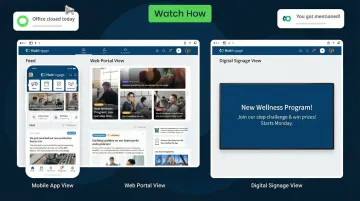
A unified engagement platform closes this gap by bringing communications, recognition, surveys, and team engagement into one system. HubEngage does this across mobile apps, SMS, email, web intranet, and digital signage through one-click multi-channel publishing. Content auto-formats for each channel, so your message reaches employees where they actually engage — without extra work from your team.
Key capabilities for distributed teams:
- Multi-channel reach across mobile, web, email, SMS, Microsoft Teams, Slack, and digital displays
- AI-powered search that helps employees find information instantly
- Platform-wide gamification that drives adoption and participation
- Mobile-first design for frontline and deskless workers who rarely sit at a computer
- Modular architecture that allows organizations to start with specific hubs and expand as needs grow
Consolidating tools also cuts costs — organizations typically spend an estimated $40 per user maintaining multiple disconnected platforms — while improving adoption and engagement across their distributed workforce.
Common Challenges to Watch Out For
Three challenges trip up most distributed teams. Recognizing them early makes the difference between a team that drifts apart and one that builds genuine cohesion across distance.
Time zone sprawl breeds meeting overload. 74% of companies now have team members across at least three time zones, and nearly a third of meetings already span multiple zones. Default to async processes and rotate meeting windows so no single region always bears the burden.
Lack of visibility pushes managers toward micromanagement. Without physical proximity, it's easy to over-monitor — but micromanagement undermines trust and disempowers employees, while covert surveillance risks legal exposure and increased attrition. Outcome-based metrics and consistent check-in rhythms replace the need for visual supervision.
Cultural differences go unaddressed until they cause conflict. Distributed teams span varying norms around directness, hierarchy, and decision-making. Western managers often apply individualistic frameworks, yet 70% of the global workforce is collectivist and hierarchical. Building cultural awareness into onboarding — not retrofitting it after friction appears — is what keeps global teams aligned.
Tools That Help Distributed Teams Collaborate Better
Distributed teams rely on four main categories of tools:
| Category | Examples | Primary Use |
|---|---|---|
| Communication platforms | Slack, Microsoft Teams, Zoom | Messaging and video |
| Project management | Asana, Monday.com | Task tracking and accountability |
| Cloud document collaboration | Google Workspace, Microsoft 365 | Real-time co-creation |
| Employee engagement platforms | HubEngage | Recognition, surveys, culture-building, and multi-channel communications |
The goal is reducing fragmentation, not adding more apps. Teams should audit their current tool overlap, identify gaps, and consolidate where possible. Mobile-first solutions are essential for distributed workforces that include frontline or field-based employees.
HubEngage is built specifically for distributed and frontline workforces. Its multi-channel reach (mobile, SMS, email, digital displays), platform-wide gamification, AI assistant, and modular design let organizations unify communications, recognition, and engagement in one place — rather than managing a patchwork of separate tools. It also integrates with HRIS systems and workplace tools like Microsoft Teams and Slack, so it fits into your existing setup without a rip-and-replace migration.
Frequently Asked Questions
What are the best tools and platforms for remote team collaboration?
Remote collaboration tools fall into four categories: communication (Slack, Teams, Zoom), project management (Asana, Monday.com), document sharing (Google Workspace, Microsoft 365), and employee engagement platforms. The right choice depends on your team size, workforce type, and whether your priority is productivity, culture, or both.
Which platform is widely used for team collaboration?
Slack and Microsoft Teams dominate messaging, Zoom leads video, and Asana or Monday.com handle project tracking. Distributed and frontline-heavy organizations often add a dedicated engagement platform like HubEngage to reach employees across mobile apps, SMS, and digital signage — channels standard tools don't cover.
What are the four types of collaboration tools?
The four primary categories are communication tools (messaging and video), project and task management tools, document and file sharing tools, and employee engagement or culture platforms. Each serves a different collaboration need, and the most effective stacks combine tools across all four categories.
What are the best practices for distributed teams?
Set clear communication norms, balance synchronous and async work, and document team goals in a shared space. Layer in recognition and belonging practices, and use a centralized platform that reaches every employee regardless of location or device.
How do you handle different time zones in a distributed team?
Identify overlapping working hours for live collaboration, default to asynchronous communication for non-urgent tasks, rotate meeting times to share the inconvenience equitably, and record all key meetings so employees in different time zones stay informed without attending at odd hours.
How do you build team culture in a remote distributed team?
Distributed culture doesn't happen passively — it requires consistent recognition programs, transparent leadership communication, and virtual rituals that give every employee a voice. Engagement tools that make culture visible across all locations are what sustain it long-term.