Introduction
HR and internal communications teams face a persistent challenge: 401(k) meeting announcements are often sent as a single generic email that gets ignored—especially by frontline or deskless employees who may never see it. The result? Low attendance, poor plan participation, and missed opportunities for employees to understand valuable retirement benefits.
The real barrier is awareness, not apathy. Approximately 60% of 401(k) non-participation is driven by lack of awareness or understanding of plan features. The right announcement—sent at the right time, through the right channels—is what separates a well-attended meeting from one that gets skipped.
That's exactly what this guide addresses. It covers what to include in a 401(k) meeting announcement, when to send it (including legal notice requirements), how to reach your entire workforce across multiple channels, and ready-to-use templates to save time.
Key Takeaways
- Awareness gaps—not apathy—drive low 401(k) meeting attendance; your announcement strategy directly affects turnout
- Include clear logistics, a compelling "why attend" statement, and RSVP instructions in every announcement
- Follow a 3-touch sequence: save-the-date 3-4 weeks out, full announcement 1-2 weeks before, reminder 1-2 days prior
- Reach frontline workers through SMS, mobile apps, and digital signage—not just email
- Use multi-channel platforms to ensure 100% workforce reach
Why a Well-Crafted 401(k) Meeting Announcement Matters
Low awareness—not disinterest—is the primary reason employees skip 401(k) meetings. Plans with automatic enrollment achieve a 94% participation rate, compared to 64% for voluntary enrollment plans, demonstrating that when employees are guided through the process, they participate. A clear, timely announcement is what moves employees from unaware to present.
Every 401(k) announcement serves two purposes:
- Informational — employees know when, where, and how to show up
- Motivational — employees understand what's in it for them personally
Announcements that only cover logistics miss the motivational half. When employees can't connect attendance to a concrete benefit—like capturing employer match dollars or understanding 2025 contribution limits—they deprioritize it.
There's also a compliance dimension. Certain 401(k) notices are legally required under ERISA and IRS rules. Failing to send them on time—or to the right people—can expose employers to penalties. Not every meeting announcement carries legal weight, but many do — and HR teams that conflate routine invites with required notices risk missing deadlines that trigger IRS penalties.
What to Include in Your 401(k) Meeting Announcement
A strong announcement covers more than date and time. These five elements give employees the context they need to show up prepared—and actually want to attend.
Meeting Logistics
Every announcement must include:
- Date and time (include time zone for remote teams)
- Location (in-person room number or virtual meeting link)
- Who should attend (all employees, new hires, eligible-but-not-enrolled employees, etc.)
- Attendance expectation (optional or expected)
Specify clearly whether attendance is voluntary or required.
A Clear "Why You Should Attend" Statement
Employees respond to what's in it for them, not HR's administrative need for attendance. Spell out the direct employee benefit:
- Employer match details ("Learn how to get free money from your employer")
- Changes to the plan that affect take-home pay or retirement savings
- Contribution limit updates for the current year ($24,500 for 2026, up from $23,500)
- Enrollment deadlines or open enrollment windows
- New SECURE 2.0 Act provisions (student loan matching, emergency savings accounts)
Example: "Attend to learn how to maximize your employer's 401(k) match—worth up to 6% of your salary—and understand the new $24,500 contribution limit for 2026."
Key Agenda Items or Topics to Be Covered
Brief bullets on what will be discussed reduce anxiety for employees unfamiliar with 401(k) terminology:
- Plan overview and eligibility requirements
- Investment options available
- Contribution rate changes and catch-up contributions
- Vesting schedule
- New SECURE 2.0 Act provisions (if applicable)
- How to enroll or change your contribution rate
RSVP or Registration Instructions
Include a simple call-to-action so attendance can be tracked and logistics managed:
- Link to register or calendar invite
- Reply-to email address
- Manager confirmation process
Contact for Questions
Provide the name, email, or phone number of the HR contact or plan administrator who can answer pre-meeting questions. This is especially important for employees who may be unfamiliar with retirement plan language.
When to Send 401(k) Meeting Announcements: Timing and Notice Requirements
ERISA-Required Notice Timing
Certain 401(k) disclosures have specific delivery deadlines set by the IRS and DOL. Failing to meet these deadlines can result in penalties and compliance issues.
| Notice Type | Delivery Window | Recipient Rules |
|---|---|---|
| Safe Harbor Notice | At least 30 days (and not more than 90 days) before the beginning of each plan year | Each employee eligible to participate |
| QACA / Auto-Enrollment Notice | Sufficiently early so the employee has a reasonable period of time to elect changes | Each employee eligible to participate |
| Summary Plan Description (SPD) | Within 90 days of becoming covered by the plan; 120 days for newly subject plans | Participants and beneficiaries receiving benefits |
| Summary of Material Modifications (SMM) | Not later than 210 days after the close of the plan year in which the modification was adopted | Participants and beneficiaries receiving benefits |
| 404a-5 Fee Disclosure | Annually (at least once in any 14-month period) for general info; Quarterly for actual charges | Participants and beneficiaries with authority to direct investments |
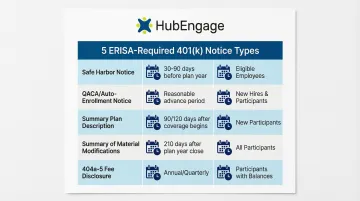
Safe Harbor and QACA notices require proactive distribution 30-90 days before the plan year. SPDs and fee disclosures follow enrollment-triggered and annual/quarterly cadences instead.
Recommended Announcement Timeline (Non-Legal Best Practice)
For general 401(k) education or enrollment meetings, use a 3-touch communication sequence:
- Save-the-date (3-4 weeks out): Brief notice with date, time, and one compelling benefit hook
- Full announcement (1-2 weeks out): Complete details including agenda, RSVP link, and motivational messaging
- Reminder (1-2 days before): Short, friendly nudge restating time/location and benefit angle
Who Must Receive the Notices
Timing decisions depend on who needs to receive each notice. Plan documents define the eligible population, but in general, three groups are relevant:
- Participants (actively enrolled employees)
- Eligible employees who haven't enrolled
- Beneficiaries
Send announcements to all eligible employees—not just those already contributing—to drive new enrollment.
Common Timing Mistakes to Avoid
- Send multiple touchpoints — a single notice close to the meeting date gives employees no time to plan
- Account for employees on leave, night shifts, or without regular email access; single-channel announcements miss them entirely
- Confirm receipt for legally required disclosures; electronic delivery requires documented proof for compliance
Electronic Delivery Rules
The DOL allows electronic delivery of required notices under specific conditions. Employees must have work-related computer access or consent to electronic delivery. Administrators may use a "notice-and-access" model (posting on a website and sending a notice of internet availability) or direct email delivery.
Before going paperless on required notices, confirm these two conditions are met:
- Delivery compliance is verified — confirm employees meet access or consent requirements before switching channels
- Bounced emails are resolved promptly — administrators must take reasonable steps to resolve the issue or treat the individual as having opted out of electronic delivery
How to Deliver the Announcement Across Your Workforce
The Channel Gap for Frontline and Deskless Workers
Many 401(k) announcements are sent only via company email—but 54% of deskless workers have limited email access. Employees on the warehouse floor, in hospitality, healthcare, or manufacturing may never check email regularly.
While 69% of organizations rely primarily on email, this approach excludes a significant portion of the workforce. HR teams must think beyond email to ensure equitable access to benefits information.
Multi-Channel Delivery Options to Consider
The best approach combines at least 2-3 channels:
- Company email: Effective for desk-based employees with regular email access
- Mobile push notifications (employee app): Reaches employees on their personal devices
- SMS/text message: Achieves a 98% open rate, compared to 64% for internal corporate emails
- Digital signage in break rooms or common areas: Visible to employees during breaks and shift changes
- Printed fliers posted on bulletin boards: Low-tech but effective for employees without digital access
- Manager-led team huddle reminders: Personal touch ensures message reaches frontline teams
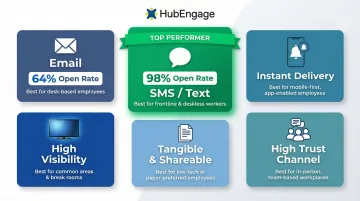
Platforms like HubEngage let HR teams send a single 401(k) announcement simultaneously across mobile apps, email, SMS, and digital displays, with content auto-formatted for each channel. This is particularly useful for organizations with large frontline or distributed teams spread across multiple locations.
Delivery Confirmation and Read Receipts
Once your announcement is out, tracking who received and opened it is just as important as sending it—especially for legally required notices. Use platforms that offer delivery analytics so HR can identify non-responders and follow up before the meeting or enrollment deadline.
Sample 401(k) Meeting Announcement Templates
Use these templates as starting points and customize the bracketed fields for your organization. Each format is designed for a different channel — from formal email to quick SMS reminders.
General 401(k) Enrollment Meeting Email Announcement
Subject: Get Free Money: Your 401(k) Enrollment Meeting Invitation
Hi [Employee Name],
Want to know how to get up to $3,000 in free money from [Company Name] this year? Join us for our 401(k) enrollment meeting to learn how our employer match works and how to maximize your retirement savings.
Meeting Details:
- Date: [Day, Month Date, Year]
- Time: [Time with time zone]
- Location: [Room number or virtual meeting link]
- Who should attend: All employees eligible for 401(k) enrollment
What you'll learn:
- How to capture the full employer match (up to 6% of your salary)
- 2026 contribution limits and catch-up options
- Investment options available to you
- How to enroll or change your contribution rate
- New SECURE 2.0 provisions (student loan matching, emergency savings)
RSVP by [Date]: [Link to registration or calendar invite]
Can't make it? We'll record the session and send a link to all registered attendees.
Questions? Contact [HR Contact Name] at [email] or [phone].
See you there, [HR Team]
Short-Form SMS/Push Notification Version
For teams that are mobile or deskless, a short SMS or push notification drives quick RSVPs without requiring employees to open email.
401(k) Meeting [Date] at [Time]—Learn how to get free $ from employer match. RSVP: [short link] Questions? [HR email]
Reminder Message Template (1-2 Days Before)
Send this 24-48 hours before the meeting to catch anyone who hasn't registered yet.
Subject: Reminder: 401(k) Meeting Tomorrow at [Time]
Hi [Employee Name],
Just a friendly reminder: Our 401(k) enrollment meeting is tomorrow at [Time] in [Location/Link].
This is your opportunity to learn exactly how to capture your full employer match — money that's already set aside for you.
- When: [Day, Date] at [Time]
- Where: [Room or link]
Haven't RSVP'd yet? Register here: [Link]
See you tomorrow, [HR Team]
Tips to Boost Employee Attendance and Participation
Lead with Employee Benefit Language, Not Plan Administration Language
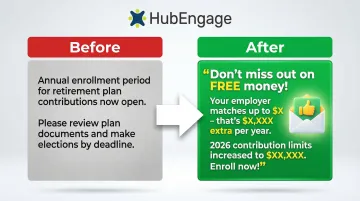
Announcements that open with "The HR Department is pleased to inform you of an upcoming 401(k) plan meeting…" generate less engagement than ones that open with "Want to know how to get free money from your employer? Here's your invitation…"
Before: "The HR Department is pleased to inform you of an upcoming 401(k) plan meeting to review plan features and enrollment procedures."
After: "Join us to learn how to capture up to $3,000 in free employer match dollars this year—and how the new $24,500 contribution limit for 2026 can help you save more."
Offer Flexible Attendance Options
Provide both in-person and virtual attendance options where possible, and record the session for employees who cannot attend live. Virtual live meetings now account for 65% of 401(k) education session attendance, with 18% of participants increasing their contributions following virtual 1:1 engagements.
Note flexible options in the announcement itself to remove the barrier of "I can't make that time."
Use Interactive Elements to Drive Engagement
Teams using platforms with gamification features (like HubEngage) can layer interactive elements into the announcement itself to make it feel two-way rather than purely informational. This approach measurably improves both click-through and attendance rates.
Consider adding:
- A brief knowledge quiz about the 401(k) plan sent ahead of the meeting
- A completion acknowledgment tied to a recognition point for employees who RSVP or confirm they've read the announcement
Frequently Asked Questions
What should I ask during a 401(k) employee meeting?
Come prepared with these questions:
- How does the employer match work, and what's the vesting schedule?
- What investment options are available, and how do I choose between them?
- What are the contribution limits for my age bracket?
- How do I change my contribution rate or investment elections?
- What new SECURE 2.0 features apply to our plan (student loan matching, emergency savings accounts)?
How can I encourage employees to contribute to the 401(k) plan?
Frame the employer match as "free money" and show retirement savings projections to illustrate long-term impact. Auto-enrollment defaults alone can lift participation from 64% to 94%. Offer enrollment support during or immediately after the meeting so employees can act while the information is fresh.
What are the notice requirements for a 401(k) plan?
ERISA and IRS regulations require several annual disclosures including Summary Plan Descriptions, Safe Harbor notices (30-90 days before the plan year), and fee disclosures (annually and quarterly). Consult your plan administrator or ERISA counsel to ensure compliance with specific timing and delivery requirements for your plan.
How far in advance should a 401(k) meeting announcement be sent?
Use a 3-touch sequence: save-the-date 3-4 weeks out, full announcement with details 1-2 weeks before the meeting, and a reminder 1-2 days prior. This approach maximizes reach and gives employees time to plan attendance while keeping the meeting top-of-mind.
What should a 401(k) meeting announcement email include?
Include meeting date, time, and location (or virtual link); who should attend; a clear benefit statement for employees (like employer match details); key agenda topics; RSVP instructions; and an HR contact for questions. Lead with employee benefit language, not administrative jargon.
How do you reach employees who don't have company email for 401(k) announcements?
Several channels reliably reach non-desk employees:
- SMS/text alerts (98% open rate)
- Mobile app push notifications
- Digital signage in break rooms and common areas
- Printed fliers on bulletin boards
- Manager team huddles
Platforms like HubEngage deliver across all these channels simultaneously with auto-formatted content, so frontline and deskless workers receive the same information as office-based staff.