Introduction
Most companies rely on a single-language email survey to reach their entire workforce. For organizations with multilingual, frontline, or deskless teams, that approach silently excludes the employees whose feedback matters most.
The numbers tell the story: 22.3% of the U.S. population speaks a language other than English at home. Non-native English speakers show a 30.1% nonresponse rate to English-only surveys, versus 12.5% for native speakers—an 18-percentage-point gap that directly undermines data quality and representation.
Combining multilingual support with SMS delivery isn't as simple as hitting "translate." Results vary widely based on translation method, question design, platform setup, and how surveys are distributed and analyzed. This article covers:
- When multilingual text surveys make sense for your workforce
- What setup is required before you send a single message
- The exact steps to run them end to end
- Variables that impact translation quality and response rates
- Mistakes that kill participation before the survey even launches
Key Takeaways
- Multilingual SMS surveys deliver questions in each employee's preferred language, boosting response rates across diverse workforces
- Text surveys outperform email for frontline and deskless workers who lack corporate email or desktop time
- Success depends on accurate translation, SMS-compatible question formats, language routing logic, and opt-in compliance
- Auto-translation accelerates setup, but human review is essential for sensitive or nuanced questions
- Sharing results back in each employee's language drives participation above 80% in follow-up surveys
Why Multilingual Text Surveys Work Best for Diverse and Frontline Workforces
Multilingual text surveys aren't the right fit for every organization. They deliver the most value when a meaningful portion of the workforce speaks English (or the company's primary language) as a second language, or when employees lack consistent access to email and desktop devices.
Workforce profiles where this method excels:
- Manufacturing and warehouse teams with multilingual shifts operating across multiple locations
- Hospitality and catering staff with high turnover and diverse native languages
- Healthcare workers in clinical and support roles without corporate logins
- Distributed retail teams working customer-facing roles with minimal desk time
- Global teams spanning multiple regions and language groups
The U.S. frontline workforce totals 112 million workers (70% of the total workforce), yet 80% report their company provides few connection opportunities at work. These are also the employees most likely to be surveyed in a language they don't speak fluently.
That gap has measurable consequences. Research shows an 18-percentage-point nonresponse difference between native and non-native English speakers — meaning the employees whose feedback matters most are the least likely to complete a survey written in the wrong language.
Situations where this method becomes less critical:
- Small, linguistically homogeneous teams where a single language reaches everyone
- Organizations without an SMS-capable survey platform
- Situations where compliance consent for text messaging cannot be obtained from all workers
How to Conduct Multilingual Employee Surveys via Text
Step 1: Audit Your Workforce Languages and Define Survey Objectives
Identify the languages spoken across your workforce by analyzing HRIS data, onboarding forms, or a brief opt-in language preference question sent via text. Focus on languages spoken by clusters large enough to affect data quality—typically groups representing 5% or more of your workforce—not every possible language.
Define what the survey needs to measure before selecting question formats:
- Engagement or pulse sentiment
- Safety compliance or incident reporting
- Onboarding experience
- Manager effectiveness
- Benefits satisfaction
The objective determines how many questions are appropriate and which languages require human review versus auto-translation. Compliance-related or safety surveys demand professional translation review; pulse engagement surveys with simple rating scales can often use auto-translation with lighter review.
Step 2: Design Questions for SMS Format and Cross-Cultural Clarity
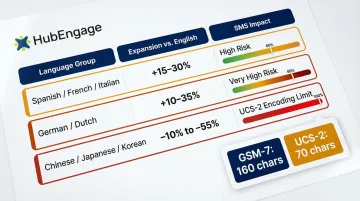
SMS character limits force brevity that actually improves survey quality. Standard GSM-7 encoding allows 160 characters per segment, but using non-Latin characters (Chinese, Japanese, Arabic) or smart quotes forces UCS-2 encoding, which slashes the limit to 70 characters per segment.
Design principles for SMS surveys:
- Each question should be a single, direct sentence
- Use simple response formats: 1–5 scale, Yes/No, A/B/C choice
- Avoid compound questions or multiple concepts in one item
- Limit open-ended questions—use sparingly and only when short, unstructured responses are acceptable
Translation text expansion rates:
| Target Language | Expansion vs. English | SMS Impact |
|---|---|---|
| Spanish/French/Italian | +15% to +30% | High risk of exceeding single-segment limit |
| German/Dutch | +10% to +35% | Very high risk due to compound nouns |
| Chinese/Japanese/Korean | -10% to -55% contraction | Forces UCS-2 encoding (70-character limit) |
Review questions for cultural neutrality, too. Idiomatic phrases, humor, or references that read naturally in English may carry different connotations in Spanish, Haitian Creole, or Tagalog. Cultural review is a distinct step from translation—it requires someone who understands both the language and the workplace context.
Step 3: Set Up Translations and Language Routing in Your Platform
Two translation paths exist:
Auto-translation (fast, scalable, suitable for straightforward rating questions):
- DeepL consistently outperforms Google Translate for domain-specific content, achieving higher accuracy scores and requiring less post-editing time
- Appropriate for simple questions with clear, literal meaning
- Still requires bilingual staff review before launch
Human or professionally reviewed translation (required for sensitive or compliance-related questions):
- Essential for questions about safety, fairness, manager relationships, or policy compliance
- OSHA requires training in a "comprehensible" language; HHS Section 1557 mandates human review of machine translation when accuracy is essential or rights are involved
- Catches errors on culturally loaded terms, negatives, and compound phrases that invert meaning
Many SMS survey platforms offer auto-translation for 50–100+ languages, but HR teams should always have a bilingual staff member or professional reviewer sign off on final question wording before launch.
Language routing works through:
- Stored language preference in HRIS or employee profile
- Response to an opt-in language choice at survey start
- Manual segmentation based on location or role
The platform must support sending language-specific text flows, not just a translated PDF link. HubEngage's employee experience platform, for example, handles SMS surveys across multiple languages with one-click deployment to mobile, web, email, and SMS—so HR teams can launch and analyze multilingual surveys from a single system rather than coordinating across separate tools.
Step 4: Build Your Contact List and Confirm SMS Opt-In Compliance
Before any text survey is sent, organizations must have documented consent from employees to receive SMS communications. In the U.S., the Telephone Consumer Protection Act (TCPA) requires prior express consent for informational texts using an autodialer. Consent should be collected in the employee's preferred language, not just in English, to be legally valid and ethically sound.
Contact list requirements:
- Clean phone number formatting with correct country codes for international numbers
- Language preference tags linked to each contact record
- HRIS integration or manual segmentation to ensure survey invites reach the right language group
Inaccurate or incomplete language tagging is the most common data gap that undermines multilingual survey programs.
Step 5: Send, Monitor, and Follow Up
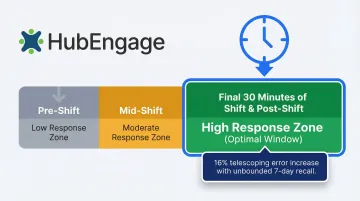
Timing matters: Research on shift workers shows that the first prompt of the day generates the highest response rates. For frontline workers, mid-shift or post-shift texts (within 30 minutes of shift end) outperform morning blasts because the work experience is still fresh.
Avoid sending surveys during high-stress periods:
- End-of-quarter rushes
- Holiday peaks
- Major operational changes or announcements
Follow-up approach for low-response segments:
- Send a single reminder text in the employee's language 48–72 hours after initial send
- Beyond that, consider whether the question or timing is creating friction
- Pulse surveys should not exceed one per week to avoid fatigue
What You Need Before Launching a Multilingual Text Survey
Preparation directly determines whether the survey produces usable, representative data. Missing any of these requirements means results will be skewed or legally problematic.
Platform and Tool Requirements
The survey platform must support:
- SMS delivery — not just a link to a web survey
- Multi-language question flows, not just translated PDFs
- Language-specific contact segmentation
- Real-time analytics that can filter responses by language group
HubEngage's employee experience platform supports SMS surveys with multi-language capabilities and one-click multi-channel reach—making it possible to deploy and analyze multilingual text surveys from a single system without stitching together separate tools.
Workforce Language and Contact Data
Minimum data needed:
- Employee mobile numbers with correct country codes
- Language preference indicator for each employee
- HRIS integration or manual segmentation to ensure survey invites reach the right language group
Audit your language tagging before launch — gaps here are the most common reason multilingual survey data comes back unfiltered and unusable.
Compliance and Consent Readiness
Confirm that opt-in consent is on file for each employee before any SMS is sent. The consent record should specify the type of messages (surveys) employees agreed to receive, and a clear opt-out mechanism must exist in every message.
Additional requirements apply depending on your context:
- Regulated industries (healthcare, financial services): verify whether survey content must meet specific disclosure requirements
- GDPR jurisdictions: employers cannot rely on "consent" for employee data processing due to the inherent power imbalance — use "Legitimate Interests" or "Performance of a Contract" as the legal basis instead
Key Variables That Determine Multilingual Text Survey Quality
A well-designed survey can still produce unreliable data if these four variables aren't managed. HR teams moving from single-language to multilingual SMS surveys most often stumble here.
Translation Method and Review Rigor
Auto-translation tools routinely mishandle culturally loaded terms, negatives, and compound phrases — and an unreviewed translation can fully invert a question's meaning. When that happens, responses from that language group become invalid and can't be compared to any other segment. The entire survey's cross-group analysis breaks down.
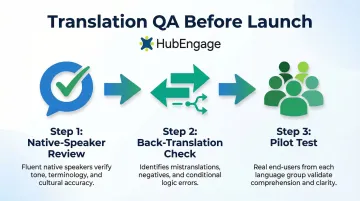
Key review steps that prevent this:
- Native-speaker review of every translated question, not just automated QA
- Back-translation check for questions with negatives or conditional logic
- Pilot test with 3–5 employees per language group before full launch
Question Length and SMS Character Constraints
Some languages run 20–30% longer than English for equivalent content. A question that fits cleanly in one SMS segment in English may split into two segments in Spanish or German, breaking reading flow mid-question.
Multi-segment messages increase friction and drop-off — especially for workers on older devices or low-data plans. Test every question in each target language against the 160-character SMS limit before launch.
Language Segmentation Accuracy
Sending a Spanish-language survey to an employee who primarily speaks Haitian Creole produces the same exclusion problem the multilingual approach was designed to solve. Language preference data in your HRIS is often stale or incomplete — a brief opt-in preference capture at onboarding prevents most mismatches.
Poor segmentation creates data gaps for specific workforce populations, making it impossible to identify whether a particular language group has distinct engagement concerns.
Send Timing Relative to Shift and Role
Frontline workers in manufacturing, hospitality, or healthcare have irregular schedules. A survey sent during peak shift hours gets ignored; one sent within 30 minutes of shift end catches employees when the experience is still fresh.
Longer recall periods introduce "telescoping" errors — employees misdate or misremember events. Research on recall bias shows that unbounded 7-day recall produces reported values approximately 16% higher than bounded recall, driven by forward telescoping. Timing surveys close to the experience removes this distortion before it reaches your data.
Common Mistakes When Running Multilingual Employee Text Surveys
- Skipping native-speaker review of machine-translated questions — especially for topics like safety, fairness, or manager relationships, where word choice directly shapes how employees respond
- Translating English-length questions into SMS without reformatting them, which produces multi-segment messages that appear broken or cut off on some devices
- Analyzing responses from multiple language groups as a single dataset, which buries group-specific patterns — for example, safety concerns unique to Spanish-speaking warehouse staff hidden inside aggregate numbers
- Ignoring the opt-back-in process for employees who previously unsubscribed from texts — messaging opted-out numbers wastes SMS credits, creates compliance risk, and permanently excludes those employees from future surveys
How to Analyze and Communicate Multilingual Survey Results
Data collection is only half the process—what happens after responses come in determines whether the survey builds or erodes trust with a multilingual workforce.
Segment and compare results by language group: Filter response data by language in the analytics dashboard to identify whether engagement scores, concerns, or satisfaction patterns differ significantly between workforce populations. Differences between language groups often signal systemic communication or inclusion gaps, not random variation.
Communicate survey results back to employees in their language—not just in an all-hands deck in English. Closing the loop means sending a follow-up text (or multi-channel notification) in each employee's language that summarizes key findings and the actions the company is taking.
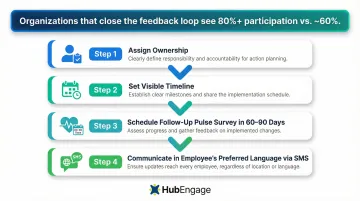
Research shows that organizations closing the feedback loop see participation rates rise above 80%, compared to around 60% for those that don't communicate actions taken. Separately, employees are 24% more likely to speak up when they believe managers act on their input.
Action planning steps:
- Assign ownership of follow-up actions to specific managers
- Set a visible timeline for changes
- Schedule a follow-up pulse survey in 60–90 days to measure whether the action moved the needle
- Communicate all of this to employees in their preferred language through the same SMS channel used for the original survey
If leaders conduct a survey but take no visible action, engagement drops and turnover climbs. The real risk isn't survey fatigue. It's action fatigue: employees stop responding because they've learned it doesn't matter.
Conclusion
Multilingual employee text surveys work best when the workforce language landscape is well understood, the platform supports true language routing (not just translated links), and question design accounts for both SMS constraints and cultural nuance.
Most multilingual SMS survey programs stall for the same reasons:
- Treating translation as an afterthought rather than a design requirement
- Skipping compliance steps for SMS consent across language groups
- Analyzing multilingual responses as a single undifferentiated pool
Closing these gaps turns your survey into a genuine feedback channel for every employee—including the 22.3% of U.S. workers who speak a language other than English at home and the 112 million frontline workers who rarely sit at a desk.
Frequently Asked Questions
How do you design employee surveys for diverse cultures and languages?
Effective design starts with cultural review—not just translation—ensuring questions avoid idioms, assume no shared cultural context, and use response scales that are universally understood (for example, numeric ratings rather than culturally loaded descriptors like "strongly agree").
How should I communicate employee survey results?
Results should be shared with employees in their preferred language through the same channel used for the survey, summarizing top findings and specific actions the company is committing to. Results should be shared with employees in their preferred language through the same channel used for the survey, summarizing top findings and the specific actions the company is committing to. Aim to publish within two weeks of survey close to maintain credibility.
What languages should I include in my employee text surveys?
Prioritize languages spoken by groups large enough to affect data representation—typically 5% or more of the workforce. Confirm which languages are needed through HRIS records or a language preference opt-in, rather than defaulting to the most common languages globally.
How many questions should a multilingual employee text survey have?
SMS surveys should contain 3–5 questions maximum. Pulse surveys work best with 1–3 questions, while more comprehensive engagement surveys can extend to 7–10 questions if delivered as a mobile-optimized survey link rather than pure SMS text.
How do you ensure translation accuracy in multilingual SMS surveys?
At minimum, run auto-translated content past a bilingual employee or professional translator before sending. Pay particular attention to questions involving negatives, emotional language, or role-specific terminology—these are the areas translation engines most often get wrong.
Is employee consent required before sending text surveys?
Yes, SMS opt-in consent is legally required in the U.S. under TCPA and under equivalent regulations in most other jurisdictions. Consent must be documented, specific to the type of messages being sent, and ideally collected in the employee's primary language.