Introduction
Modern organizations face a critical challenge: managing fragmented communication tools across distributed, hybrid, and frontline workforces. Employees are interrupted every 2 minutes on average, and 48% report their work feels chaotic and fragmented. When your team juggles 117 emails and 153 Teams messages daily, productivity suffers—and so does employee engagement.
Unified communication platforms have evolved well beyond voice and video. With the global UCaaS market projected to reach $262.37 billion by 2030, growing at 19.8% annually, the options are expanding fast — and so is the complexity of choosing the right one.
This guide breaks down the 8 best unified communication platforms for 2026, what each does well, and how to find the right fit for your workforce.
Key Takeaways
- Unified communication platforms consolidate voice, video, messaging, and collaboration into one system — cutting tool sprawl and improving team efficiency
- Top platforms in 2026 pair AI-powered workflows with broad channel coverage and deep integrations to keep teams connected
- For organizations with frontline or deskless workers, internal engagement features matter as much as calling capabilities
- Key criteria: deployment flexibility, channel coverage, AI-powered workflows, pricing transparency, and scalability
- The 8 platforms covered: HubEngage, Microsoft Teams, Zoom, RingCentral, Slack, Nextiva, Cisco Webex, and Google Workspace
What Is a Unified Communication Platform?
A unified communication (UC) platform integrates multiple communication modes into a single interface—voice, video, instant messaging, email, file sharing, and presence awareness. Instead of toggling between separate apps for calls, chats, and meetings, employees access everything from one place.
The industry distinguishes between traditional UC (on-premise or hybrid deployments) and UCaaS (cloud-delivered services). In 2026, cloud-based public UCaaS holds 72% of global revenue, as organizations shift toward subscription-based, scalable solutions that support remote and hybrid work.
Organizations with large frontline or distributed workforces need more than video conferencing and team chat. For these teams, the right platform must address internal communications, employee engagement, and multi-channel reach to non-desk employees—capabilities most standard UC tools don't prioritize.
Top 8 Best Unified Communication Platforms for 2026
We selected these platforms based on feature breadth, AI capabilities, deployment options, pricing transparency, and ability to serve both desk-based and frontline workforces.
HubEngage
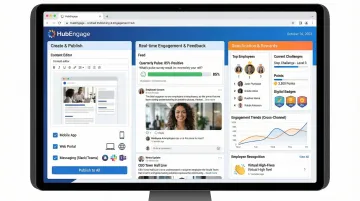
HubEngage is an AI-powered, fully gamified employee communications and engagement platform built specifically for internal communications. It covers mobile apps, web intranet, email, SMS, and digital signage from a single hub — trusted by organizations across healthcare, manufacturing, retail, and hospitality.
Unlike traditional UC tools focused on video calls or external messaging, HubEngage unifies internal communications with recognition, surveys, instant messaging, and learning. Key differentiators include:
- Platform-wide gamification that drives adoption across every feature — not just one module
- AI Assistant for employee self-service, HR support, and automated content creation
- One-click multi-channel publishing that auto-formats content for each delivery channel
| Key Features | Multi-channel publishing (mobile, web, SMS, email, digital displays), gamification engine, AI Assistant, employee recognition, surveys, instant messaging, intranet |
|---|---|
| Pricing | Modular pricing; available on request, structured per module/hub |
| Best For | HR and internal communications teams managing frontline, deskless, or distributed workforces |
Microsoft Teams
Microsoft Teams is Microsoft's flagship collaboration and communication hub, tightly integrated with the Microsoft 365 ecosystem and used by hundreds of millions of users globally. Deep integration with Office apps, enterprise-grade security, full-featured video conferencing, and Teams Phone for cloud calling make it a natural choice for organizations already on M365.
Teams Essentials starts at $4.00/user/month, while Microsoft 365 Business Standard costs $12.50/user/month. Teams Phone adds $10/user/month, and Microsoft 365 Copilot AI is available as a $21/user/month add-on.
| Key Features | Video meetings, team chat, file sharing, Teams Phone (VoIP), M365 app integration, Copilot AI |
|---|---|
| Pricing | Teams Essentials: $4/user/month; Business Standard: $12.50/user/month; Teams Phone: $10/user/month add-on |
| Best For | Enterprises already embedded in the Microsoft ecosystem |
Zoom
Zoom is the video-first UC platform that expanded into phone (Zoom Phone), team chat, and webinars — now positioning itself as a full UCaaS solution with AI-powered features. Best-in-class video quality, easy onboarding, Zoom AI Companion for meeting summaries, and broad device compatibility give it an edge for video-first teams.
Zoom's Phone + Workplace plans range from $15/user/month (Basic) to $22.49/user/month (Business Plus), with AI Companion included at no additional cost in paid plans.
| Key Features | HD video conferencing, Zoom Phone, team chat, webinars, Zoom AI Companion, whiteboard |
|---|---|
| Pricing | Phone + Workplace Basic: $15/user/month; Business Plus: $22.49/user/month |
| Best For | Organizations prioritizing video-first communication and ease of use |
RingCentral
RingCentral is one of the most established UCaaS providers, offering a complete platform combining phone, video, messaging, and contact center capabilities under RingEX. Reliable 99.999% uptime, 300+ app integrations, AI-powered analytics and conversation intelligence, and strong support for both SMBs and enterprises make it a proven choice.
RingEX plans include Core ($20/user/month), Advanced ($25/user/month), and Ultra ($35/user/month), with AI features available as add-ons starting at $39/month.
| Key Features | Cloud phone system, video meetings, team messaging, AI receptionist, analytics, 300+ integrations |
|---|---|
| Pricing | Core: $20/user/month; Advanced: $25/user/month; Ultra: $35/user/month |
| Best For | SMBs to mid-market companies seeking a proven, full-suite UCaaS solution |
Slack
Slack is the messaging-first workplace communication tool, now part of Salesforce, known for its channel-based organization, deep app integrations, and developer-friendly platform. Powerful workflow automation (Workflow Builder), Salesforce CRM integration, Slack AI for search and summarization, and 2,600+ apps in its directory make it the strongest fit for teams already in the Salesforce ecosystem.
Slack Pro costs $7.25/user/month, Business+ is $15/user/month, and Enterprise Grid pricing is available on request. Slack AI is included in paid plans.
| Key Features | Channel-based messaging, Huddles (audio/video), Slack AI, workflow automation, Salesforce integration, 2,600+ app integrations |
|---|---|
| Pricing | Pro: $7.25/user/month; Business+: $15/user/month; Enterprise Grid: Contact sales |
| Best For | Tech-forward teams and organizations already using Salesforce |
Nextiva
Nextiva is a unified communications provider built around voice reliability and customer experience, offering calling, video, messaging, and CX tools through its NEXT platform. A 99.999% uptime SLA, AI-powered CX tools (including AI receptionist and agent assist), and a focus on integrating customer-facing and internal communications in one view make it a strong pick for businesses where voice reliability is non-negotiable.
Nextiva's Core plan starts at $15/user/month, Engage at $25/user/month, and Power Suite CX at $75/user/month. AI features are available as add-ons at $99/month.
| Key Features | Cloud phone, video, messaging, AI receptionist, contact center, journey orchestration, analytics |
|---|---|
| Pricing | Core: $15/user/month; Engage: $25/user/month; Power Suite CX: $75/user/month |
| Best For | Businesses that need high-reliability voice with integrated customer experience capabilities |
Cisco Webex
Cisco Webex is an enterprise-grade UC and collaboration platform with deep security, compliance, and hardware ecosystem support — trusted by large enterprises and regulated industries. End-to-end encryption, AI-powered meeting features (noise cancellation, real-time translation), contact center capabilities, and Webex-certified hardware integration make it a go-to for regulated industries where security isn't optional.
Webex offers a free tier, with paid plans starting at $12/month (Meet), $22.50/month (Suite: Meet + Call), and Enterprise pricing available on request. All plans include end-to-end encryption and AI features.
| Key Features | Secure video conferencing, calling, messaging, AI meeting assistant, contact center, end-to-end encryption |
|---|---|
| Pricing | Free: $0; Meet: $12/month; Suite (Meet + Call): $22.50/month; Enterprise: Contact sales |
| Best For | Large enterprises and regulated industries requiring advanced security and compliance |
Google Workspace (Meet + Chat)
Google Workspace is Google's integrated productivity and communication suite, combining Google Meet (video), Google Chat (messaging), and Voice (VoIP calling) within the broader Workspace ecosystem. Seamless integration with Google Docs/Drive/Calendar, Gemini AI for meeting summaries and content drafting, and competitive pricing make it the lowest-friction option for organizations already in the Google ecosystem.
Business Starter costs $7/user/month, Business Standard $14/user/month, and Business Plus $22/user/month. Google Voice adds $20/user/month. Gemini AI is included in Business and Enterprise editions.
| Key Features | Google Meet (video), Google Chat (messaging), Google Voice (calling), Gemini AI, Drive/Docs integration |
|---|---|
| Pricing | Business Starter: $7/user/month; Business Standard: $14/user/month; Business Plus: $22/user/month; Voice: $20/user/month add-on |
| Best For | Organizations built on the Google ecosystem seeking a low-friction UC solution |
How We Chose the Best Unified Communication Platforms
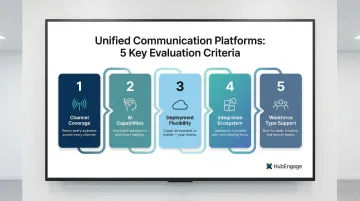
We evaluated platforms across five criteria:
1. Channel coverage and communication modes supported Does the platform cover voice, video, messaging, and collaboration? For organizations with frontline workers, does it extend to mobile apps, SMS, and digital signage?
2. AI capabilities and automation 81% of desk workers using AI tools report improved productivity. We prioritized platforms offering meeting summaries, virtual assistants, and automated workflows.
3. Deployment flexibility Cloud-first dominates, but hybrid and on-premise options matter for regulated industries. We evaluated whether platforms support diverse deployment models.
4. Integration ecosystem and API availability Platforms must connect with existing HRIS, CRM, and productivity tools. We assessed integration breadth and API accessibility.
5. Ability to serve diverse workforce types Deskless workers comprise 70-80% of the global workforce—approximately 2.7 billion employees. We evaluated whether platforms reach frontline and distributed employees, not just office-based staff.
One common mistake: organizations choose platforms based on video meeting quality or brand name, without checking whether the tool actually reaches every employee—including those without a corporate email or desk.
The right platform delivers measurable results across your entire workforce:
- Reduces IT costs by consolidating fragmented tools
- Improves response times and productivity through AI automation
- Ensures no employee misses critical communications, regardless of role or location
- Recovers lost productivity—context switching costs roughly 9% of annual work time, nearly five weeks per year
Conclusion
The best unified communication platform for 2026 depends on your workforce composition, existing tech stack, and what "unified" truly means for your organization. A video-first tool is not the same as a platform that reaches every employee on every channel.
Evaluate platforms not just on feature lists but on scalability, total cost of ownership (including hidden costs from maintaining multiple tools), and measurable adoption rates. Most organizations find that consolidating disconnected tools reduces per-user spend and improves the overall employee experience.
For organizations focused on internal employee communications — particularly those with frontline, deskless, or distributed teams — HubEngage is built specifically for that challenge. It covers engagement, recognition, surveys, and multi-channel delivery beyond calls and video. Explore a demo to see how it fits your workforce.
Frequently Asked Questions
What is a unified communication platform?
A UC platform is a system integrating multiple communication modes (voice, video, messaging, email, file sharing) into a single interface, eliminating app-switching and improving team efficiency. It consolidates tools that would otherwise require separate logins and workflows.
What are the three main components of unified communications?
The core components are real-time communication (voice/video), messaging and collaboration (chat/file sharing), and presence/availability awareness—all integrated into one platform.
What's the difference between UCaaS and CCaaS?
UCaaS (Unified Communications as a Service) serves internal team collaboration, while CCaaS (Contact Center as a Service) is built for managing external customer interactions at scale. If your priority is employee-facing communication, UCaaS is the right fit; customer-facing operations typically require CCaaS.
Is unified communication worth the investment?
For most organizations, consolidating fragmented tools into a single UC platform reduces software licensing costs, cuts IT overhead, and improves productivity. Poor internal collaboration reduces employee productivity for 40% of businesses, making UC a strategic investment.
What are unified communications as a service platforms?
UCaaS platforms deliver communication tools via the cloud on a subscription model, so there's no on-site hardware to install or maintain. Unlike legacy on-premise systems, UCaaS scales with your workforce and eliminates large upfront infrastructure costs.
What are the unified communications trends in 2026?
Key trends include AI-powered features (meeting summaries, virtual assistants, automated workflows), deeper integration with employee experience tools, expanded support for frontline workers, and the convergence of UC and contact center capabilities into single-vendor platforms.