Introduction
Employees in distributed and large organizations waste hours each week trying to find the right colleague, department, or expertise — and the numbers back it up. Knowledge workers lose up to 30% of their workday searching for information, and 47% of digital workers struggle to find the data they need to do their jobs effectively. That gap drains productivity and creates communication delays that stall projects and frustrate teams.
A well-built employee directory — living inside your intranet — directly solves this problem. This guide covers what an employee directory is, the must-have features that separate outdated contact lists from modern collaboration tools, and how to build one employees actually trust and use.
Key Takeaways
- An employee directory is a searchable database of workforce information—names, titles, departments, contact details—typically hosted on your company intranet
- Inside an intranet, directories cut time-to-connect and reduce silos across distributed or hybrid teams
- Modern directories offer AI-powered search, mobile access, rich profiles, and integration with communication platforms—not just static lists
- Accuracy depends on automated HRIS sync, clear ownership, and periodic audits
What Is an Employee Directory and Why It Belongs on Your Intranet
An employee directory is a structured, searchable database of workforce information—the definitive reference for "who's who" in your organization. It includes names, roles, departments, locations, and contact details, enabling employees to quickly find colleagues, identify subject-matter experts, and understand organizational structure.
The intranet is the natural home for your directory because it already serves as the hub where employees access company news, policies, tools, and resources. Housing the directory alongside these assets creates a logical, unified experience—employees visit one place to find both people and information, rather than toggling between disconnected systems.
Modern directories have moved well beyond static org charts and spreadsheets. Today's tools are dynamic and HR-integrated, offering:
- Real-time updates when employees change roles, join, or leave
- Searchable filters by name, skill, department, or location
- Sync with existing HR systems to eliminate manual data entry
- Visibility into reporting structures across sites and time zones
That shift is especially visible in distributed and hybrid teams, where physical proximity no longer provides natural visibility into who does what.
The operational cost of not having a functional directory is substantial. The average interaction worker spends nearly 20% of the workweek looking for internal information or tracking down colleagues. In a 40-hour week, that's eight hours lost per employee—compounded across hundreds or thousands of workers, the productivity drain becomes staggering.
Employee Directory vs. Employee Profile — What's the Difference?
The directory is the searchable index—the "find me" layer that helps employees discover colleagues efficiently. An employee profile is the detailed page for a specific individual, showing their bio, skills, current projects, manager relationships, and other context.
The directory helps people locate someone quickly using filters and search. Rich profiles then provide the context to confirm they've found the right match—bio, skills, projects, reporting relationships. That depth builds personal connection, which matters most in remote or multi-site environments where employees may never meet face-to-face.
Key Benefits of an Intranet Employee Directory
A searchable directory eliminates the "who should I email about X?" problem. Employees find subject-matter experts, team leads, or cross-functional partners in seconds, removing friction from collaboration and accelerating decision-making.
That speed also shapes how new people experience the company. New hires use the directory to understand organizational structure, identify key stakeholders, and feel less isolated in their first weeks. Strong onboarding improves new hire retention by 82% and productivity by 70%, and a well-organized directory is a foundational part of that experience.
The value extends beyond individuals. When the directory integrates with a communications platform, HR and comms teams can segment and target messages by department, location, or role—ensuring the right people receive the right information without overwhelming everyone with irrelevant updates.
Reaching deskless and frontline workers is where a mobile-accessible directory becomes especially critical. The numbers make the case:
- 80% of the global workforce is deskless
- 83% of deskless workers lack a corporate email address
- 63% report that leadership messages never reach them
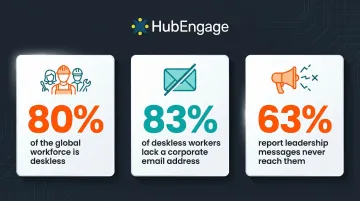
For manufacturing, retail, healthcare, and hospitality workers who don't share a physical office, the directory is often their first touchpoint for feeling part of the broader team.
It also reduces pressure on HR. Self-service access to contact and org structure information cuts the volume of ad hoc queries ("Can you give me Sarah's phone number?"). HR professionals spend up to 57% of their time on administrative tasks, and self-service capabilities can recapture up to 30% in HR labor efficiencies—freeing teams for higher-value strategic work.
Must-Have Features of a Modern Employee Directory
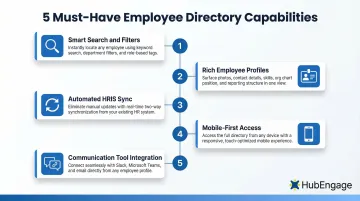
Not all directory features carry equal weight. These five capabilities separate tools employees actually use from ones they ignore.
Smart Search and Filters
Basic alphabetical lists no longer suffice. Employees need to search by skills, location, department, project, or language spoken. Good search UX delivers instant results, fuzzy matching (finding "Jon" when you type "John"), and filter panes that let users narrow results by multiple criteria simultaneously. For organizations with hundreds or thousands of employees, this isn't a convenience—it's the foundation of the whole tool.
Rich, Updatable Employee Profiles
Profiles should go beyond contact details to include photos, bios, skills, certifications, current projects, time zones, and social links. Employees should be able to update their own profiles to keep data current and build their personal brand internally. This self-service capability reduces HR burden and improves accuracy at the same time.
Automated Sync with HR Systems
Manual data entry leads to outdated directories: wrong titles, departed employees still listed, new hires missing for weeks. Auto-sync with your HRIS or Active Directory eliminates that drift. With a 13% average voluntary turnover rate and internal mobility increasing 6% year-over-year, workforce data changes constantly. Automated synchronization keeps the directory accurate without anyone having to remember to update it.
Mobile-First Access
For frontline and deskless workers who don't sit at desks, the directory must be accessible via mobile app, not just the desktop intranet. HubEngage delivers the employee directory through mobile apps, digital displays, and SMS so every employee can reach it from their preferred channel—whether they're on a manufacturing floor, in a retail store, or on a hospital ward.
Integration with Communication Tools
The most effective directories are embedded within a broader employee experience platform. Finding a colleague and messaging or recognizing them should happen in one place. Large enterprises deploy an average of 211 applications, and employees lose 4 hours per week reorienting after toggling between tools. Unified platforms cut that context-switching tax significantly.
How to Build and Maintain an Effective Intranet Employee Directory
Plan Your Data Structure First
Nail down these decisions before you touch any platform:
- Which fields to include (core contact info vs. optional enrichment fields)
- Who can edit what (employees vs. HR vs. IT)
- What integrations are needed (HRIS, Active Directory, communication tools)
- How the directory stays current when employees change roles or leave
DIY vs. Purpose-Built: Know the Trade-offs
The right choice depends on your team's capacity and long-term needs:
- DIY (e.g., SharePoint lists): Low initial cost and full control, but requires manual maintenance and lacks smart search, mobile optimization, and auto-sync
- Purpose-built platforms: Smart search, auto-sync, and mobile access built in — but require vendor evaluation and implementation investment
Weigh total cost of ownership, not just the upfront price.
Governance Keeps It Accurate Long-Term
Assign a designated directory owner responsible for accuracy. Set up triggers for new-hire onboarding (automatic profile creation) and offboarding (automatic deactivation). Run audits quarterly or semi-annually to catch orphaned accounts, outdated titles, and missing information.
Choosing the Right Employee Directory and Intranet Platform
What to Evaluate Before You Buy
- Ease of setup and time-to-value
- HRIS and Active Directory integration depth
- Mobile accessibility for frontline workers
- Search quality (speed, relevance, filters)
- Profile richness and self-service update capability
- Scalability as your organization grows
- Total cost of ownership (licensing, implementation, maintenance)
The Case for Consolidation
Once you know what matters, the next question is whether to assemble a stack of point solutions or commit to a single platform. Managing separate tools for directory, intranet, communications, recognition, and surveys creates hidden costs—data silos, integration complexity, multiple vendor relationships, and software sprawl. Consolidating onto one platform reduces friction, eliminates duplicate data entry, and improves employee adoption because they access everything in one place.
HubEngage: One Platform for Directory, Intranet, and Beyond
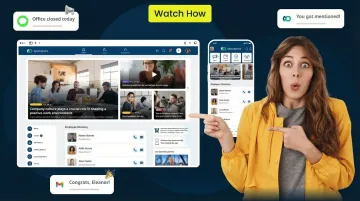
HubEngage combines an intranet with a built-in employee directory, AI-powered search, and multi-channel reach across mobile, web, email, SMS, and digital displays. HR and comms teams can reach deskbound and frontline employees through a single system. The platform integrates with HRIS systems to automate data sync, supports deep segmentation for targeted communications, and brings recognition, surveys, and instant messaging together—so employees have one place to go for everything.
Frequently Asked Questions
What is an employee directory?
An employee directory is a searchable, centralized list of workforce information—names, job titles, departments, and contact details—typically hosted on a company intranet and used to help employees find and connect with colleagues quickly.
What is the difference between an employee directory and an intranet?
The intranet is the broader internal platform hosting news, documents, tools, and resources. The employee directory is a specific feature within that platform, though the two work best when deeply integrated.
Can you find a list of employees at a company?
Within a company, employees can search the internal employee directory on their intranet. External access is typically restricted for privacy reasons, though some companies publish limited org information publicly.
What should be included in an employee directory?
Core fields include full name, job title, department, office location, email, phone number, and photo. Optional enrichment fields include skills, bio, manager, time zone, and languages spoken to enhance findability and connection.
Can I access the intranet from home?
Modern intranets are cloud-based and accessible from any device and location via a browser or mobile app, typically requiring only an employee login or SSO credentials for secure access.
Are intranets still a thing?
Intranets are very much still in use—and investment is accelerating. Modern platforms have evolved beyond static portals into dynamic employee experience hubs with AI, mobile apps, social features, and analytics. The employee experience management market is growing at nearly 10% annually, reflecting that shift.