Introduction: Why Intranet Security Can't Be an Afterthought
Modern intranets have evolved far beyond digital bulletin boards. They now serve as the operational backbone of organizations: housing HR records, coordinating sensitive workflows, managing employee data, and facilitating cross-departmental collaboration. That shift has made them a prime target for both external breaches and insider threats.
According to IBM's 2025 Cost of a Data Breach Report, malicious insider attacks cost organizations an average of $4.92 million per breach — the most expensive initial threat vector tracked.
The core problem is straightforward: without granular control over who can see and do what, organizations expose themselves to compliance failures, data leakage, and unauthorized access from their own staff.
22% of all breaches involve stolen or compromised credentials, and in web application attacks specifically, that figure jumps to 88%. Poorly configured permissions don't just create gaps — they multiply them.
This article explains what role-based access control (RBAC) means in an intranet context, the key security features to evaluate when choosing a platform, and how to balance robust protection with employee adoption—because the most secure system in the world fails if employees bypass it entirely.
Key Takeaways
- RBAC restricts intranet access based on job role, ensuring employees see only content relevant to their function
- Strong intranet security includes granular permissions, SSO, MFA, audit logs, and compliance certifications
- RBAC drives personalized content delivery, so each employee sees communications and resources matched to their role
- Poorly configured permissions cause both internal breaches and intranet adoption failure
- The strongest intranet platforms enforce strict access controls without creating friction that drives employees away
What Is Role-Based Access Control (RBAC) in an Intranet?
Role-Based Access Control (RBAC) is an authorization framework that assigns permissions to organizational roles rather than individual users. According to NIST's ANSI INCITS 359-2004 standard, RBAC manages security at a level corresponding closely to the organization's structure — each user is assigned one or more roles, and each role carries specific privileges.
Access rights are tied to what someone does, not who they specifically are. That distinction simplifies both setup and governance at scale.
Two Core Layers of Intranet RBAC
RBAC operates on two distinct levels:
- Functional access — Controls which menus, pages, content types, and workflows a user can interact with
- Data scoping — Determines which specific records, departments, or locations a user can view or act on
This dual-layer approach ensures that a department manager can publish content to their team but cannot access HR salary data, while an HR admin can view employee directories and policies but cannot modify system configurations.
The Principle of Least Privilege
At the heart of RBAC lies the principle of least privilege, defined in NIST SP 800-53 Rev. 5 as allowing "only authorized accesses for users that are necessary to accomplish assigned organizational tasks." Employees are granted only the minimum access needed to do their job, reducing exposure to breaches and limiting how far a compromised account can reach inside the system.
Common Intranet Role Tiers
Most intranet deployments use four core role tiers:
- Frontline worker — Read-only access to shift schedules, company news, and training materials
- Department manager — Publish content to their team, view team-level reports, manage department calendars
- HR administrator — Access employee directories, policies, onboarding workflows, and benefits information
- System administrator — Full configuration rights, permission management, and platform-wide settings
Understanding what each tier can and cannot do makes the contrast with older permission models concrete.
RBAC vs. Traditional Permission Models
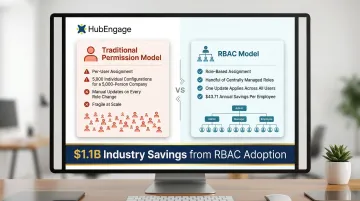
Traditional models assign permissions user by user, which becomes unmanageable at scale. A company with 5,000 employees would require 5,000 individual permission configurations, each needing manual updates when roles change. RBAC allows the same organization to manage access through a handful of defined roles that can be updated centrally. NIST research estimated that RBAC implementation saved the industry $1.1 billion, yielding an annual operating benefit of $43.71 per employee through reduced downtime and more efficient policy administration.
Key Security Features to Look for in Secure Intranet Software
Granular Access Controls and Content Targeting
Look for platforms that allow permission settings at multiple levels:
- Platform-wide access controls
- Content category restrictions
- Individual page or document permissions
- Audience segment targeting
This ensures sensitive HR policies never surface in a general employee feed, and confidential executive communications remain visible only to leadership.
Single Sign-On (SSO) and Multi-Factor Authentication (MFA)
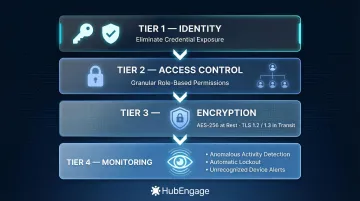
The platform should integrate with existing identity providers like Microsoft Entra ID, Okta, or Active Directory. This is non-negotiable: 88% of Basic Web Application Attacks involve stolen credentials. SSO eliminates password fatigue and reduces credential exposure, while MFA adds a critical second layer of verification that stops most credential-based attacks.
Audit Logs and Access Monitoring
Every content view, file download, permission change, and login attempt should be logged with timestamps and user identifiers. According to IBM's 2025 research, the global average time to identify and contain a data breach is 241 days (181 days to identify, 60 days to contain). Granular logs let your team pinpoint exactly which accounts, files, or content were accessed during a breach window — turning a months-long investigation into a targeted response.
Key audit capabilities include:
- User activity tracking across all content types
- Permission change history
- Failed login attempt monitoring
- Content access patterns
- File download records
Compliance Certifications Relevant to Regulated Industries
Strong audit logs are a prerequisite — but compliance certifications prove a vendor has had their security controls independently verified. Look for:
SOC 2 Type II — Confirms the vendor's security, availability, and confidentiality controls have been audited over time, not just at a single point.
ISO/IEC 27001:2022 — Annex A Control 5.15 specifically requires access control procedures that restrict employees to only the information their role requires.
HIPAA Security Rule — Mandatory for healthcare organizations; [45 CFR 164.312(a)(1)] requires technical policies that limit system access to authorized users only.
GDPR Article 25 — Requires "data protection by design and by default," meaning access must be restricted to the minimum necessary for each specific purpose — by architecture, not just policy.
Data Encryption and Intrusion Detection
The platform should encrypt data both in transit (TLS) and at rest. Beyond static encryption, look for active threat detection that flags and blocks high-risk access attempts in real time — not just after the fact.
Specific capabilities to look for:
- AES-256 encryption at rest and TLS 1.2/1.3 in transit
- Anomalous access pattern detection (unusual volumes, off-hours activity)
- Automatic lockout on repeated failed login attempts
- Alerts for access from unrecognized devices or locations
How RBAC Works in Practice: Role Types and Real-World Intranet Scenarios
Mapping Organizational Structure to Intranet Roles
A well-implemented RBAC model mirrors the company org chart. Departments, locations, job levels, and team structures all translate into distinct role definitions that control:
- What each group sees on their intranet homepage
- What content they can publish
- Which workflows they can initiate
- Which reports they can access
For example, a manufacturing organization might define roles like Production Floor Worker, Shift Supervisor, Plant Manager, Safety Officer, and Corporate Executive—each with progressively broader access and different functional capabilities.
Role Stacking for Cross-Functional Employees
Role stacking lets admins assign multiple roles to a single user, solving access challenges for cross-functional employees. A team lead who is both a frontline worker and a content publisher for their department receives additive permissions from both roles.
Properly configured, this approach grants necessary access without opening security gaps. Permissions layer additively—they expand what a user can do, but explicit restrictions set at the role level always hold. Common role combinations include:
- Frontline worker + department content publisher
- Regional manager + compliance reviewer
- HR generalist + survey administrator
- IT staff + system configuration editor
Content Targeting as a Security Feature
Role stacking shows how RBAC shapes what employees can do. Content targeting controls what they see—and that distinction matters for both security and experience. When a healthcare worker sees only clinical SOPs and shift updates rather than executive strategy decks, RBAC is functioning simultaneously as a content filter and an access control layer.
What Misconfigured Permissions Look Like
Common permission failures include:
- An employee who can view salary data they shouldn't access
- A contractor who retains intranet access weeks after their engagement ends
- Department managers who can see confidential HR investigations
- Frontline workers exposed to unfinished draft policies
Organizations should use automated role provisioning and deprovisioning tied to HRIS data to prevent these scenarios. 58% of surveyed companies have over 1,000 inactive user accounts, and approximately two-thirds have 500+ accounts with passwords that never expire—orphaned accounts represent significant security exposure.
RBAC and Compliance: What Industries Need to Know
Three regulatory frameworks drive most RBAC adoption decisions. Here's what each one requires in practice.
Healthcare Organizations (HIPAA)
HIPAA's technical safeguards requirement mandates that access controls enable authorized users to access the "minimum necessary information needed to perform job functions" based on their role. An intranet with RBAC helps document access controls for audit purposes and limits the blast radius of any internal breach involving protected health information.
In 2020, the City of New Haven Health Department was fined $202,400 by HHS OCR for failing to terminate a former employee's access credentials, allowing the terminated employee to download the PHI of 498 patients. Stale credentials — not a sophisticated cyberattack — caused the entire incident.
Financial Services and Public Companies (SOX)
The Sarbanes-Oxley Act Section 404 requires management to establish and maintain adequate internal control structures for financial reporting. RBAC enforces segregation of duties by ensuring no single user can both approve and execute a sensitive workflow. For financial teams, this segregation requirement is often the primary driver behind intranet purchasing decisions.
In 2024, the SEC charged R.R. Donnelley & Sons $2.1 million for failing to maintain cybersecurity-related internal accounting controls sufficient to provide reasonable assurances that access to IT systems was permitted only with management's authorization.
Multinational Organizations (GDPR)
GDPR requires that personal data of EU employees be accessible only to those with a legitimate business need. Article 25(2) requires that, by default, only personal data necessary for each specific purpose is processed. This covers the amount of data collected, the extent of processing, and who can access it.
Data scoping within an intranet RBAC system directly satisfies this requirement. Vendors should also offer data residency options alongside permission controls for full compliance coverage.
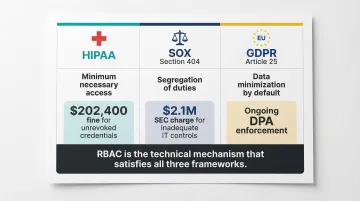
To summarize how each framework maps to RBAC requirements:
| Regulation | Core RBAC Requirement | Example Enforcement |
|---|---|---|
| HIPAA | Minimum necessary access; documented controls | $202,400 fine for unrevoked ex-employee credentials |
| SOX Section 404 | Segregation of duties; management authorization | $2.1M SEC charge for inadequate IT access controls |
| GDPR Article 25(2) | Data minimization by default; access limited to business need | Ongoing DPA enforcement across EU member states |
Balancing Intranet Security with Employee Adoption
The Adoption Paradox
Overely restrictive intranets frustrate employees, who then bypass the platform entirely and resort to unapproved tools—creating the exact security vulnerabilities that controls were meant to prevent.
The numbers back this up: 88% of organizations report Shadow IT usage, and 63% of employees say unauthorized tools are acceptable when official platforms fall short. Security incidents tied to "Shadow AI" add an average of $670,000 to the cost of a data breach.
The design challenge, then, isn't choosing between security and usability—it's building a platform where secure access is the path of least resistance.
What Good Security-Usability Balance Looks Like
Effective secure intranets include:
- Single sign-on so employees authenticate once and move freely across all tools
- Role-based homepages that surface relevant content, cutting through information overload
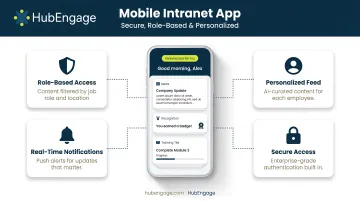
- Mobile access with secure app-based authentication for frontline workers without corporate devices
- Intuitive navigation that makes finding information fast enough to eliminate workarounds
Nielsen Norman Group research found that intranets using centralized content management allowed employees to complete tasks in an average of 78 seconds, compared to 123 seconds on distributed models—reducing the friction that drives employees toward unauthorized tools.
Adoption Analytics as Security Indicators
Intranet platforms with strong RBAC should provide adoption analytics, because low engagement with certain content or sections often points to a permission misconfiguration rather than a communications gap. If critical safety documents show zero views among frontline workers, the first question isn't "did we promote this enough?"—it's "can they actually access it?"
How HubEngage Delivers Secure Intranet with Role-Based Access Controls
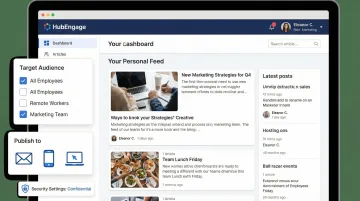
HubEngage's intranet solution enables organizations to configure role-based access controls that determine who can view, publish, and interact with content across each channel—web intranet, mobile app, email, SMS, and digital displays. This ensures that sensitive information reaches only the intended audience regardless of how it's delivered.
The platform's modular architecture allows HR and communications teams to assign roles and permissions at the content, audience, and feature level without requiring IT involvement for day-to-day management. This makes it practical for organizations with distributed, frontline, or deskless workforces that need fast role provisioning when headcount changes frequently.
HubEngage is built for regulated environments, with compliance coverage that includes:
- ISO 27001 certification for information security management
- AICPA SOC compliance for service organization controls
- GDPR compliance for data privacy requirements
- HIPAA compliance for healthcare and sensitive health data
HubEngage's AI Assistant and content targeting engine work alongside RBAC so employees don't just see a secure intranet view—they see a personalized one. Relevant resources, company news, and HR tools surface automatically based on role, location, and department. That combination of security and personalization reduces the friction that pushes employees toward unauthorized workarounds.
Frequently Asked Questions
What is role-based access control (RBAC) in an intranet?
RBAC is a system that assigns intranet access rights based on job role rather than individual identity. It controls both what content users can see and what actions they can take within the platform, simplifying permission management at scale.
How does RBAC differ from traditional user permissions in an intranet?
Traditional models assign permissions user by user, which becomes fragile and error-prone as headcount grows. RBAC uses centrally managed role definitions that apply to groups of users, making consistent security policies far easier to maintain and audit.
What security certifications should I look for in a secure intranet platform?
Look for SOC 2 Type II, ISO 27001, and industry-specific certifications like HIPAA compliance. These are third-party-validated and indicate the vendor has undergone independent security audits.
Can role-based access controls help with compliance requirements like GDPR or HIPAA?
RBAC directly supports compliance by enforcing need-to-know access for protected data, maintaining audit trail requirements, and enabling data scoping that aligns with frameworks like GDPR and HIPAA.
How do role-based permissions affect employee experience and intranet adoption?
Well-configured RBAC actually improves adoption by surfacing relevant content and removing clutter. Poorly configured permissions frustrate employees and push them toward unsanctioned tools, undermining both security and productivity.
What happens to intranet access when an employee changes roles or leaves the company?
Automated provisioning and deprovisioning tied to your HRIS should update access immediately when employment status changes. Accounts that retain sensitive access after an employee exits are a significant breach risk and a common compliance failure point.