Instant messaging for business has become more than just a convenience it’s a necessity. From fast decision-making to engaging frontline employees, businesses can no longer rely solely on email or outdated systems. Instead, they’re adopting office instant messaging and modern business messaging apps to streamline communication, cut down delays, and boost productivity.
Unlike consumer tools such as WhatsApp or Signal, which lack enterprise-level compliance and integration, dedicated enterprise instant messaging software is designed to meet the demands of modern organizations. In this article, we will review the top apps, highlight essential features, and examine future trends. Along the way, we will identify where competitors fall short and why HubEngage is positioned as the all-in-one alternative for organizations of every size.
👉 For more on the bigger picture, you must check out this guide on team communication apps.
Key Takeaways
-
Instant messaging for business improves communication speed, collaboration, and overall workplace productivity significantly.
-
Choosing the right messaging app helps reduce tool overload and streamline internal communication workflows.
-
Enterprise-grade security and compliance are essential when selecting a business messaging platform.
-
HubEngage stands out by combining messaging with engagement tools like surveys and recognition.
-
Mobile-first and multi-channel communication ensures better reach, especially for frontline employees.
-
AI-powered insights help organizations measure engagement and continuously improve communication effectiveness.
What Makes the Best Instant Messaging App for Business?
Based on leading reviews from G2 platform, the strongest platforms share several common traits:
- Organized Conversations: Channels, threads, and tagging options to reduce noise.
- Universal Search: Robust filters to quickly find past conversations.
- Voice and Video Chat: Built-in audio/video calling and screen sharing for smooth collaboration.
- Ease of Navigation: Clear UI with shortcuts and gestures.
- Collaboration Features: File sharing, embedded previews, and integrations with workplace tools.
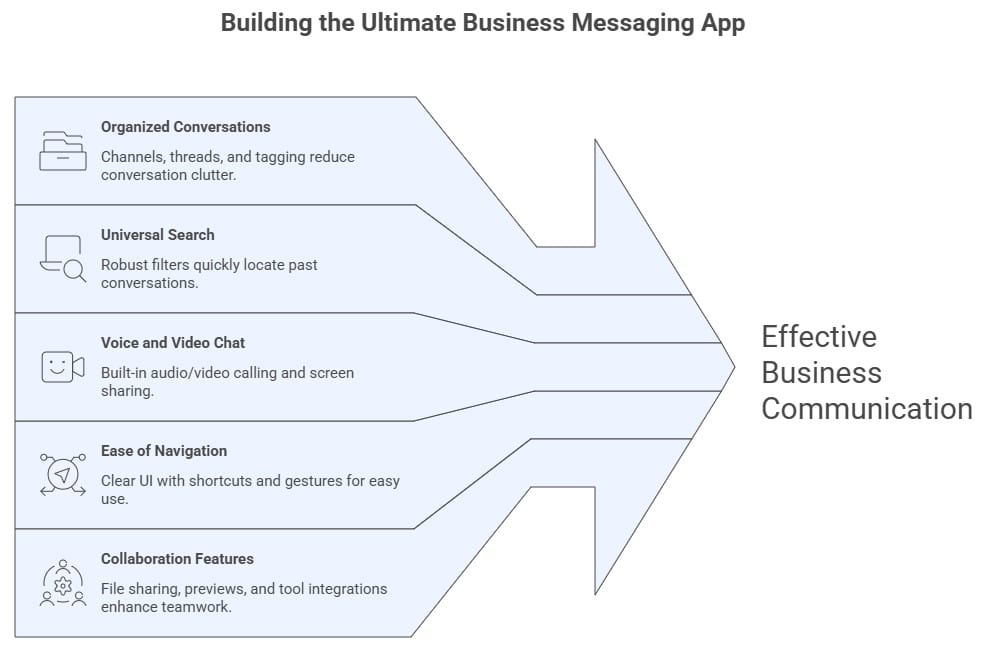
These criteria are essential benchmarks we will use when evaluating the top business messaging apps below.
Top 10 Instant Messaging Apps for Business
Here’s a detailed look at the most notable instant messaging at work platforms, with their best use cases, features, and pricing:
1. HubEngage
HubEngage is a powerful instant messaging app for business that goes beyond basic chat by combining communication with employee engagement. It helps organizations improve adoption, reduce tool overload, and connect frontline and office employees through a single platform. With built-in recognition, surveys, and AI insights, it delivers a complete communication experience.
Pros
-
All-in-one platform: messaging, recognition, surveys, and social features
-
Enterprise-grade security with SSO, GDPR, HIPAA, and SOC 2 support
-
Mobile-first design with multi-channel communication (chat, SMS, email, push)
Cons
-
Less widely known compared to Slack and Microsoft Teams
What it offers?
-
Improves employee adoption with simple UI and built-in engagement tools
-
Reduces tool overload with a unified communication platform
-
Supports frontline employees with mobile and offline access
-
Provides AI-driven insights and analytics for better communication
-
Scales from standalone messaging to a full employee engagement platform
Pricing plans
-
Starts from: $1
2. Slack
Slack is one of the most popular team messaging apps, known for its strong integrations and organized channels. It works well for teams that rely on multiple tools and need a central communication hub.
Pros
- Large library of integrations (2,500+ apps)
- Organized channels and threaded conversations
Cons
- Limited message history on free plan
- Interface can feel cluttered
- Expensive as teams scale
What it offers?
- Strong integration ecosystem
- Flexible team collaboration features
- Widely adopted across industries
Pricing plans
- Free plan available
- Paid plans start from: $8.75
3. Microsoft Teams
Microsoft Teams is ideal for organizations already using Microsoft 365. It combines messaging, video meetings, and file collaboration in one place.
Pros
- Deep integration with Microsoft tools
- Built-in video conferencing
Cons
- Complex and busy interface
- Limited flexibility outside Microsoft ecosystem
- Can feel heavy for simple messaging needs
What it offers?
- Seamless Office 365 integration
- Strong enterprise collaboration tools
- Good for large organizations
Pricing plans
- Free plan available
- Paid plans start from: $4
4. Google Chat
Google Chat is a simple messaging tool included in Google Workspace. It focuses on basic communication with threads and shared spaces.
Pros
- Clean and simple interface
- Easy integration with Google Workspace
Cons
- Limited features compared to competitors
- Requires full Google Workspace subscription
- Not ideal for complex business needs
What it offers?
- Easy to use for Google users
- Basic team messaging capabilities
- Lightweight communication tool
Pricing plans
- Included in Google Workspace
- Paid plans start from: $7
5. Zoho Cliq
Zoho Cliq is a budget-friendly messaging app designed for small and medium businesses. It offers chat, channels, and basic integrations.
Pros
- Affordable pricing
- Built-in task management features
Cons
- Limited enterprise adoption
- Fewer advanced features
- Smaller integration ecosystem
What it offers?
- Cost-effective solution for SMBs
- Simple communication and collaboration tools
- Part of Zoho ecosystem
Pricing plans
- Free plan available
- Paid plans start from: $3
6. Chanty
Chanty is a simple team chat app focused on task management. It allows users to convert messages into tasks for better workflow organization.
Pros
- Easy-to-use interface
- Built-in task management
Cons
- Limited integrations
- Small free user limit
- Lacks advanced enterprise features
What it offers?
- Combines chat and task management
- Simple setup for small teams
- Affordable pricing
Pricing plans
- Free for up to 5 users
- Paid plans start from: $3
7. Mattermost
Mattermost is an open-source messaging platform designed for developers and security-focused teams. It offers high customization and control.
Pros
- Strong security and data control
- Open-source and customizable
Cons
- Complex setup process
- Cluttered user interface
- Requires technical expertise
What it offers?
- Ideal for secure environments
- Customizable workflows
- Self-hosted deployment options
Pricing plans
- Free plan available
- Paid plans start from: $10
8. MirrorFly
MirrorFly is a customizable messaging solution for enterprises and SaaS companies. It offers self-hosted deployment and advanced AI features.
Pros
- Highly customizable platform
- Supports self-hosting
Cons
- Custom pricing only
- Complex implementation
- Some features still in beta
What it offers?
- Enterprise-grade customization
- AI-powered communication features
- Flexible deployment options
Pricing plans
- Custom pricing
9. Twist
Twist is designed for async communication, helping teams reduce distractions by organizing conversations into threads.
Pros
- Focus on organized, async communication
- Clean and distraction-free interface
Cons
- No built-in voice or video calls
- Limited free plan
- Not suitable for real-time collaboration
What it offers?
- Thread-based communication
- Reduces message overload
- Ideal for remote teams
Pricing plans
- Free plan available
- Paid plans start from: $6
10. Discord
Discord is a voice-first communication platform popular with communities and gaming teams, but increasingly used by small teams.
Pros
- Excellent voice quality
- Free and easy to use
Cons
- Not built for business use
- Limited compliance and security
- Lacks enterprise features
What it offers?
- Strong voice communication
- Always-on channels
- Community-style collaboration
Pricing plans
- Free plan available
- Nitro starts from: $2.99
Organizations can start with chat alone, then easily expand into surveys, recognition, social, and more everything within the same platform. This modular approach helps consolidate multiple tools, cutting costs on licensing and integration while boosting adoption. HubEngage not only combines communication with engagement and AI-driven insights, but also delivers substantial savings by eliminating the need for separate platforms.
👉 For additional comparisons, see our article on the best team chat apps.
Editor’s Note: How We Compared These Apps?
This list was created after reviewing dozens of business messaging apps against specific criteria: ease of use, compliance and security, integrations, pricing, and ability to scale. Each platform was tested for real-world features such as search, threads, video calls, and mobile performance.
Best Team Chat App Comparison Table
| App | Best For | Standout Features | Pricing (per user/month) | Weaknesses |
|---|---|---|---|---|
| HubEngage | Unified messaging and engagement | Chat, recognition, surveys and AI | Starts from $1 | Less known vs Slack/Teams but rapidly growing |
| Slack | Teams needing extensive integrations | 2,500+ third-party apps, channels, DMs | Free; Paid from $8.75 | Message history limited on free plan; cluttered UI |
| Microsoft Teams | Microsoft 365 enterprises | Deep Office integration, video meetings | Free; Paid from $4 | Busy interface; tied to Microsoft ecosystem |
| Google Chat | Google Workspace users | Simple interface, threads, Spaces | Free; Paid from $7 | Limited features vs competitors; bundled with entire suite |
| Zoho Cliq | SMBs on a budget | Channels, integrations, task management | Free; Paid from $3 | Less enterprise adoption |
| Chanty | Task-oriented teams | Convert chats to tasks, video calls | Free (5 users); Paid from $3 | Limited integrations, small free tier |
| Mattermost | Open-source & dev teams | Playbooks, high security, customization | Free; Paid from $10 | Complex setup, cluttered UI |
| MirrorFly | SaaS, B2B companies & Enterprises | Self-hosted solution, 1000+ custom AI features | Custom pricing only | Conversation coach feature in beta version |
| Twist | Async-first teams | Threads, inbox-style conversations | Free; Paid from $6 | No built-in calls, history limits on free plan |
| Discord | Always-on voice collaboration | Best audio quality, voice-first channels | Free; Nitro $2.99 | Not built for enterprises; limited compliance |
| Element | Self-hosted workplaces | Fully encrypted, open-source Matrix protocol | Free; Paid from €5 | Complex setup, fewer enterprise integrations |
| Pumble | All-in-one collaboration | Messaging, calls, unlimited history | Free; Paid from $2.49 | Missing advanced enterprise features |
We also compared adoption across industries and checked for recent feature updates to ensure accuracy. We also factored in industry research. For example, Gartner predicts that by 2026, 80% of workers will use AI daily, making AI-powered messaging platforms a future-proof investment.
👉 For an even wider perspective, see our internal communication tools guide where messaging is positioned as one of five essential pillars.
Benefits of Instant Messaging at Work
Switching to instant messaging for business delivers measurable benefits across industries. Key advantages include:
- Speed & Agility: Reduces response times drastically as compared to email.
- Stronger Engagement: Blending chat with recognition and surveys apps encourage employees to stay active and connected.
- Mobile-First Access: Perfect for deskless and frontline employees who may not sit at a computer all day.
- Reduced Costs: Organizations consolidate tools, lowering licensing, integration, and administrative overhead.
A poorly chosen app often leads to frustration, wasted productivity, and hidden costs. It is a reality many remote and hybrid teams know well.
Why Secure Business Messaging Matters?
One of the biggest mistakes organizations make is relying on consumer apps like WhatsApp or Signal for workplace communication. While these tools are popular for personal use, they lack the compliance, administrative controls, and integrations required for enterprise environments. Here is how consumer apps compare to dedicated business messaging apps:
| Feature | Consumer Apps (WhatsApp/Signal) | Business Messaging Apps (HubEngage, Slack, Teams) |
|---|---|---|
| Compliance | No SOC 2, HIPAA, or GDPR alignment | Enterprise-grade compliance (SOC 2, GDPR, HIPAA) |
| Admin Controls | Limited; no centralized management | Centralized control, role-based permissions |
| Integrations | Minimal integrations | Connect with HRIS, LMS, payroll, CRM |
| Security | End-to-end encryption only | Advanced security: SSO, MFA, audit logs |
| Multi-Channel Reach | Messaging only | Chat + surveys + recognition + SMS/email integrations |
In short, consumer apps may feel convenient but expose organizations to risk, compliance issues, and productivity gaps. Hence it is very important that compliance like HIPAA from the U.S. Department of Health & Human Services are properly followed by these apps.
Key Features of a Business Messaging App
When evaluating a business messaging app, focus on these must-have features:
- Security & Compliance: Enterprise-grade security like SSO, SOC 2, GDPR, HIPAA is critical for sensitive communication.
- Integrations: Smooth connections with HRIS, payroll, and LMS tools reduce workflow friction.
- Multi-Channel Communication: Employees should receive updates via chat, SMS, email, or push notifications.
- AI & Analytics: Insights into message performance, engagement, and best send times.
- Scalability: Works for both SMBs and global enterprises.
| Key Feature | Description |
|---|---|
| Security & Compliance | Enterprise-grade security like SSO, SOC 2, GDPR, and HIPAA for safe communication |
| Integrations | Connects easily with HRIS, payroll, LMS, and other workplace tools |
| Multi-Channel Communication | Supports chat, SMS, email, and push notifications for better reach |
| AI & Analytics | Provides insights on engagement, message performance, and best send times |
| Scalability | Suitable for both small businesses and large enterprises |
This is where HubEngage stands apart starting as a secure standalone instant messaging app, but easily expandable into recognition, surveys, and AI-powered insights. This modular design consolidates multiple tools and delivers cost savings.
Challenges of Implementing Office Instant Messaging
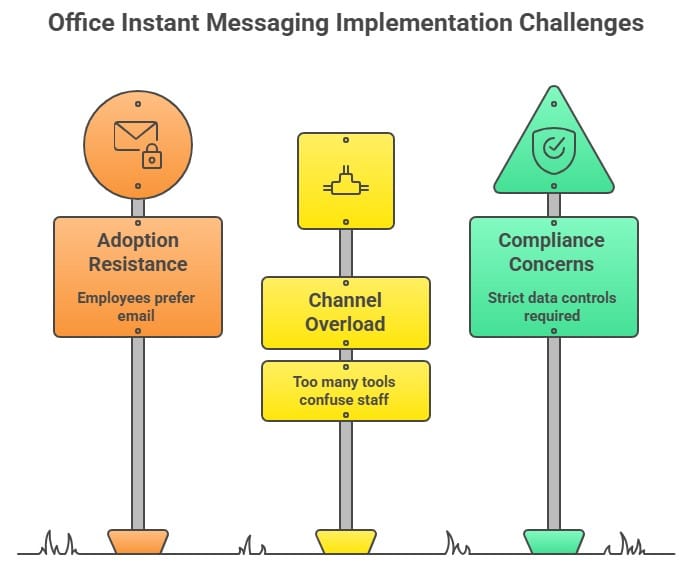
Despite its benefits, rolling out office instant messaging comes with challenges:
- Adoption Resistance: Some employees cling to email. Solution: Gamification & recognition features.
- Channel Overload: Too many tools confuse staff. Solution: HubEngage unifies multiple channels.
- Compliance Concerns: Industries like healthcare & finance require strict data controls. Solution: Enterprise security standards built in.
👉 For organizations evaluating broader tools, our team communication software guide explains how messaging fits into the bigger ecosystem of work communication apps.
How HubEngage solves office messaging tools challenges?
Many organizations struggle with adoption, security, and tool overload when implementing office messaging apps. HubEngage addresses these challenges with a simple, unified, and scalable approach to instant messaging for business by providing following solutions:
1. Solves Low Employee Adoption
One of the biggest challenges is getting employees to actually use the platform. HubEngage improves adoption by offering:
-
A simple and intuitive interface
-
Mobile-first experience for frontline workers
-
Built-in recognition and rewards to encourage engagement
This makes employees more likely to actively participate in workplace communication.
2. Reduces Tool Overload
Many companies use multiple tools for chat, surveys, recognition, and announcements which creates confusion. HubEngage solves this by providing:
-
All-in-one platform for messaging, surveys, recognition, and social interaction
-
Single app experience instead of switching between tools
This reduces complexity and improves productivity across teams.
3. Ensures Enterprise-Grade Security
Using consumer messaging apps can create compliance and security risks. HubEngage is built for business environments with:
-
SSO (Single Sign-On) and role-based access
-
SOC 2, GDPR, and HIPAA compliance support
-
Secure data management and audit controls
This makes it suitable for industries with strict compliance requirements.
4. Supports Frontline and Deskless Employees
Many messaging tools are designed only for office staff. Our platform is built to reach everyone:
-
Mobile app with push notifications
-
Offline access for remote locations
-
Multi-channel delivery (chat, SMS, email)
This ensures no employee is left out of communication.
5. Improves Engagement, Not Just Communication
Traditional messaging apps focus only on chat. HubEngage goes further by combining communication with engagement:
-
Employee recognition and rewards
-
Pulse surveys and feedback tools
-
Social and interactive features
This helps organizations build a more connected and motivated workforce.
6. Provides Actionable Insights with AI
Many tools lack visibility into communication effectiveness. HubEngage includes:
-
Analytics dashboards
-
AI-driven insights on engagement and message performance
-
Optimization of send times and content reach
This helps leaders make smarter communication decisions.
7. Scales with Your Business Needs
Instead of forcing companies into a fixed system, HubEngage offers flexibility:
-
Start with instant messaging only
-
Expand into surveys, recognition, and intranet features over time
This modular approach reduces upfront costs and supports long-term growth.
The Future of Instant Messaging at Work
In 2026, instant messaging will probably be shifting from simple text chat to AI-driven engagement platforms. Expect:
- Automatic translation for global teams.
- Sentiment analysis to measure employee mood.
- Bringing chat, recognition and surveys into unified employee apps.
👉 This trend aligns with the rise of apps for team communication that unify multiple channels and functionalities.
Conclusion
Instant messaging for business is no longer optional but, it is the foundation of modern work communication. While Slack, Teams, and Google Chat remain dominant, they fall short in engagement and multi-channel delivery. HubEngage fills this gap by offering a flexible solution: it can begin as a standalone instant messaging app and scale into an all-in-one business messaging platform that connects employees across channels, integrates recognition and surveys, and provides AI-driven insights with significant cost savings.
➡️ Ready to see the difference? Book a demo of HubEngage’s employee instant messaging app today and unify your workplace communication.
FAQs
What is the difference between instant messaging vs email?
Instant messaging is faster and ideal for real-time collaboration, while email is better suited for formal or long-form communication. 👉 See our instant messaging vs email article for a deep dive.
What is instant messaging for business?
Instant messaging at work refers to the use of secure, real-time chat platforms built for organizational needs. Unlike consumer tools, office instant messaging offers compliance, integrations, and enterprise features for better communication.
What is the most secure business messaging app?
Most default to Slack or Teams, but many overlook compliance needs. HubEngage supports SSO, SOC 2, GDPR, and HIPAA compliance.
Which instant messaging app works best for deskless employees?
HubEngage was designed for frontline and deskless workers, with mobile-first delivery and offline access. It can serve purely as a messaging tool, or expand into recognition, surveys, and more as needs grow.
What is the most affordable instant messaging app for small businesses?
Apps like Chanty and Flock are low-cost, but HubEngage offers SMB pricing with enterprise-grade features.
Can instant messaging apps integrate with employee recognition and surveys?
Yes, HubEngage uniquely offers native recognition and surveys inside the same app.
Are consumer apps like WhatsApp suitable for business messaging?
Consumer tools do not have enterprise security and integrations. Hence, they are not a good choice for compliance-heavy industries.
How do I choose between Slack and Teams for office messaging?
Slack is better for integrations; Teams fits organizations deeply invested in Microsoft 365. However, neither offers multi-channel engagement like HubEngage.
What are the disadvantages of instant messaging at work?
Overuse can cause distraction. Unified platforms like HubEngage balance productivity with engagement.
How is instant messaging used in business?
Instant messaging in business is used to enable real-time communication between employees, teams, and departments. It helps organizations replace slow email threads with faster, more efficient conversations through direct messages, group chats, and channels. Modern business messaging apps go beyond simple chat by integrating with HR systems, project tools, and analytics platforms. This makes instant messaging a core part of internal communication strategies, improving productivity and keeping employees connected in real time.
How does instant messaging support internal communications overall?
Messaging is one of the five pillars of modern internal communication platforms and tools, alongside email, intranets, signage, and recognition.
What is an office messaging app?
An office messaging app is a communication tool designed for workplace collaboration. It enables real-time chat, file sharing, and video calls, unlike consumer apps. HubEngage offers an office messaging app that can start as standalone chat and scale into a broader platform.
What is enterprise instant messaging software?
Enterprise instant messaging software provides secure, compliant communication for large organizations. It includes features like SSO, GDPR compliance, integrations, and multi-channel reach. HubEngage is an example, offering enterprise-grade security while staying modular and cost-effective.
What is an alternative to Google Business Chat?
Google Chat comes bundled as part of the entire Workspace suite, which many organizations find bulky and unnecessary if they only want messaging. This can mean paying for features you don’t need. In contrast, HubEngage is available as a standalone business messaging app with the flexibility to expand into surveys, recognition, and multi-channel communication when you’re ready.
👉 See our alternatives to Google Chat guide for more options and a deeper comparison.
What is the best texting app for business?
The best texting app for business depends on your organization’s needs, but HubEngage stands out because it combines instant messaging with employee engagement features in one platform. Unlike traditional chat tools, HubEngage offers:
-
Secure business messaging with enterprise-grade compliance like SSO, GDPR, HIPAA, SOC 2
-
Multi-channel communication including chat, push notifications, SMS, and email
-
Integrated engagement tools like employee recognition, surveys, and social feeds
-
AI-powered insights to measure communication effectiveness and engagement
-
Mobile-first design ideal for frontline and deskless employees
-
Scalable modular approach to start with messaging and expand as needed
While apps like Slack and Microsoft Teams focus primarily on communication, HubEngage provides a more complete solution by combining messaging with engagement and analytics. This makes it especially valuable for organizations looking to unify communication, reduce tool overload, and improve employee experience all within a single platform.
Related Links:
Team Communication Software | Instant Messaging Software | Office Chat | Best Team Chat App | Alternatives To Google Chat | Instant Messaging Vs Email