In today’s hybrid and fast-paced work environments, office chat software has become the backbone of daily communication. Whether you call it an office chat program, a corporate chat app, or a company chat tool, the goal is the same: enable teams to communicate instantly, collaborate seamlessly, and stay productive.
At the same time, Statista projects the collaboration software market will surpass $23 billion in 2026, showing just how important choosing the right platform has become. With so many work chat apps available, how do you know which one is right for your business?
In this guide, we’ll review the top company chat apps of 2026, compare their strengths and weaknesses, and highlight why HubEngage stands out as a modern, all-in-one alternative. For a deeper look at related platforms, see our guide to team communication apps.
Key Takeaways
-
Office chat software is essential for modern workplaces, enabling real-time communication and faster decision-making.
-
Popular tools like Slack, Microsoft Teams, and Google Chat offer strong collaboration features but may fall short in compliance and engagement.
-
Platforms like HubEngage go beyond messaging by combining chat with surveys, recognition, and multi-channel communication.
-
Choosing the right office chat app depends on security, integrations, scalability, and support for frontline workers.
-
The future of workplace communication is moving toward AI-powered, integrated platforms that unify communication and employee engagement.
Understanding the Concept of Office Chat
Office chat refers to the use of instant messaging platforms within an organization to facilitate real-time communication and collaboration among employees. Unlike traditional email or phone calls, office chat provides a more immediate and casual way for team members to connect, share ideas, ask questions, and provide feedback. With the evolution of workplace communication, employee chat has become essential for organizations that want to enhance collaboration networks.
These platforms typically allow both one-on-one and group conversations. They often go beyond text, offering file sharing, video conferencing, and integration with project management and CRM tools. By centralizing communication, office chat reduces silos, speeds decision-making, and fosters stronger employee connections, very helpful for distributed and remote work environments.
Best Office Chat Apps
With so many great tools for office chat out there in the market, it becomes difficult to pick the right one. Below, we have added some of the best office chat softwares that you should check out.
HubEngage- Best All-in-One Team Messaging App
Unlike standalone chat apps, HubEngage integrates real-time messaging with broader employee engagement tools. It’s not just a work communication app it’s an entire platform with:
- AI-powered chat search and knowledge retrieval
- Compliance and retention policies for regulated industries
- Mobile-first design for deskless and frontline workers
- Integration with email, SMS, digital signage, and intranet
For example, one the clients of HubEngage improved employee adoption by 62% in just 90 days, with sustained engagement of over 80% monthly. These unique outcomes differentiate it from Slack and Teams. For a more complete comparison, check out our guide on Slack vs Teams vs HubEngage.
Slack – Flexible Collaboration at Scale
Slack remains a household name for office chat programs. It’s known for threaded conversations, thousands of integrations, and an easy-to-use interface. However, as organizations scale, costs and compliance challenges grow, making it less ideal for heavily regulated industries.
Microsoft Teams – Best for Microsoft 365 Environments
Teams is the default corporate chat app for companies already on Microsoft 365. With chat, video conferencing, and deep integration with Outlook and SharePoint, it offers an all-in-one experience. Its biggest challenge? A steep learning curve and frequent complaints about clutter.
Google Chat – Streamlined for Google Workspace
Google Chat works well for companies already using Google Workspace. It integrates with Gmail and Google Docs, making it a solid choice for small to medium teams. Yet it lags behind in compliance, retention, and analytics compared to enterprise-focused work chat apps.
Discord – Communities & Small Teams
Initially built for gamers, Discord has gained traction among startups for company chat apps. With strong voice/video features and role-based access, it’s attractive for small groups. However, its lack of enterprise-grade compliance and admin controls keeps it out of larger organizations.
Mattermost / Zulip – Open-Source Flexibility
Mattermost and Zulip provide open-source office chat software options. Companies that want complete control over hosting and customization find them appealing. Still, the technical complexity makes them less attractive for HR or communications managers without strong IT support.
Quick Comparison Table of the Best Office Chat Software
We have added below an easy to go comparison table that you can use to compare some of the best office chat apps.
| Office Chat App | Best For | Key Features | Pricing | Limitations |
|---|---|---|---|---|
| Slack | Flexible collaboration | Channels, integrations, bots | Free + Paid tiers | Costly at scale, limited compliance |
| Microsoft Teams | Microsoft 365 users | File sharing, video meetings, MS integration | Bundled with 365 | Complex setup, adoption hurdles |
| Google Chat | Google Workspace teams | Easy integration, lightweight | Free + Workspace plans | Lacks advanced compliance tools |
| Discord | Communities & startups | Voice/video chat, roles, free tier | Free + Nitro plans | Not enterprise-focused |
| Mattermost/Zulip | Open-source flexibility | Self-hosting, customization | Varies (open-source) | Requires technical setup |
| HubEngage | Office messaging app | Messaging + engagement, AI search, compliance, frontline focus | Custom pricing | Newer brand compared to incumbents |
Key Features Modern Office Chat Apps Must Have in 2026
As workplace communication evolves, not all office chat apps are created equal. Modern solutions must go beyond basic messaging and support a wide range of business needs. Here are the must-have features:
-
Real-Time Messaging & Channels
Support for one-on-one chats, group conversations, and topic-based channels to organize discussions. -
AI-Powered Search & Automation
Smart search, chatbots, and automation help employees find information quickly and reduce repetitive tasks. -
Security & Compliance Controls
Features like encryption, audit logs, and retention policies are critical for regulated industries. -
Multi-Channel Communication
Integration with email, SMS, push notifications, and intranet ensures important messages reach everyone. -
Mobile-First Experience
Essential for deskless and frontline workers who rely on smartphones instead of desktops. -
Integrations with Business Tools
Seamless connection with HR systems, CRMs, and productivity tools improves workflow efficiency.
How Office Chat Improves Productivity, Collaboration & Engagement?
Office chat tools play a key role in improving how teams work together.
Productivity Gains
Instant messaging softwares reduce the delays caused by emails and meetings. Employees can quickly ask questions, share updates, and make decisions in real time.
Better Collaboration
Teams can collaborate across departments and locations using shared channels, file sharing, and integrations. This reduces silos and keeps everyone aligned.
Stronger Employee Engagement
Modern chat platforms create a sense of connection, especially in hybrid and remote environments. Features like recognition, feedback, and social interaction help employees feel more involved.
Reduced Email Overload
By shifting everyday communication to chat, organizations can significantly cut down on unnecessary emails.
When combined with engagement tools, they are useful than just for communication that drives the culture of a workplace.
Top Integrations Every Office Chat App Should Support
Integrations are what turn a simple chat tool into a powerful productivity platform. The best office chat apps connect with the tools your teams already use. Key integrations include:
-
HRIS & Employee Systems
Sync employee data, automate onboarding, and manage communication across departments. -
CRM Platforms
Keep sales and support teams aligned with real-time updates and notifications. -
Project Management Tools
Track tasks, share updates, and collaborate without switching platforms. -
Cloud Storage
Easily share and access files within conversations. -
Email & Calendar Systems
Integrate with Outlook or Gmail to manage meetings and notifications seamlessly. -
Intranet & Knowledge Bases
Centralize company information and make it searchable directly within chat.
A platform that supports these integrations ensures smoother workflows and fewer disruptions.
How to Choose the Right Office Chat Program?
When evaluating office chat apps, focus on these factors:
- Security & Compliance: Look for end-to-end encryption, audit logs, and retention policies.
- Integrations: Ensure compatibility with HRIS, CRM, or payroll systems.
- AI Features: Consider platforms with chatbots or semantic search to reduce repetitive questions.
- Mobile & Frontline: Prioritize tools that support deskless workers across languages and geographies.
- Cost & Scalability: Choose a solution that scales affordably with growth.
| Factor | What to Look For |
|---|---|
| Security & Compliance | End-to-end encryption, audit logs, retention policies |
| Integrations | Compatibility with HRIS, CRM, payroll systems |
| AI Features | Chatbots, semantic search to reduce repetitive tasks |
| Mobile & Frontline | Support for deskless workers, multi-language and global access |
| Cost & Scalability | Affordable pricing that scales with business growth |
Best practices like setting chat availability, using channels responsibly, and maintaining professionalism help maximize value. To dive deeper into security and compliance, see our resource on instant messaging for business.
Why Office Chat Alone Isn’t Enough for Enterprises?
The evolution of workplace communication shows why chat alone isn’t enough. From memos to emails to chat platforms, each stage solved problems but created new gaps. While office chat software accelerates daily collaboration, enterprises also need:
- Company-wide announcements
- Surveys and feedback collection
- Recognition and rewards
- Targeted messaging by department or role
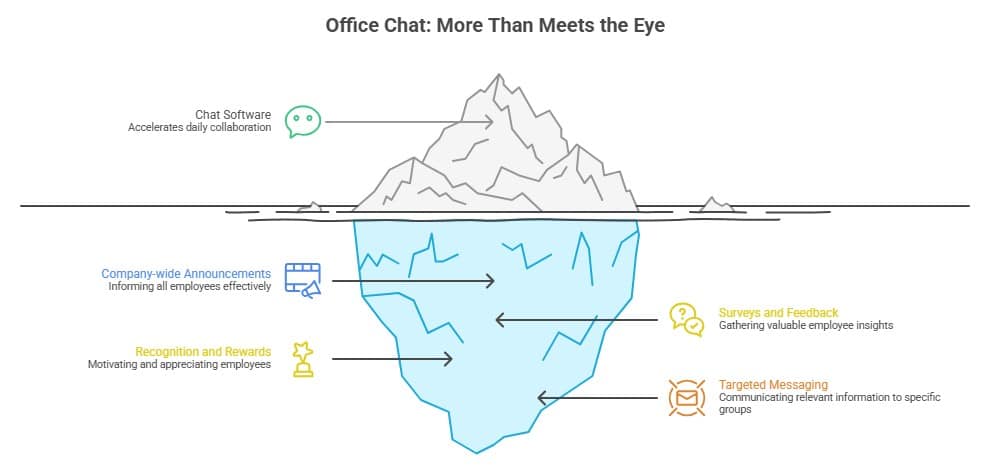
This is where all-in-one platforms like HubEngage excel. For example, when comparing instant messaging vs email, chat is faster, but email still plays a role in formal documentation. HubEngage bridges these gaps by integrating multiple channels in one platform.
How to Measure the Impact of Office Chat Apps?
To understand the value of your office chat software, it’s important to track the right metrics. Here’s how organizations can measure impact:
-
Adoption Rate
Percentage of employees actively using the platform. -
Engagement Metrics
Number of messages, active channels, and participation levels. -
Response Time
Faster responses indicate improved communication efficiency. -
Email Reduction
Compare email volume before and after implementing chat. -
Employee Feedback
Surveys and sentiment analysis help assess satisfaction and usability. -
Productivity Indicators
Time saved on communication, faster project completion, and reduced meeting load.
Best Practices for Productive Office Chat
While team messaging apps are powerful, using them effectively requires clear guidelines. Here are some best practices:
-
Use Channels Wisely
Keep conversations organized by topic, team, or project to avoid clutter. -
Set Communication Norms
Define when to use chat vs email and set expectations for response times. -
Avoid Over-Notification
Encourage employees to customize notifications to reduce distractions. -
Keep Messages Clear & Concise
Short, focused messages improve readability and response speed. -
Encourage Professional Etiquette
Maintain respectful and work-appropriate communication at all times. -
Leverage Integrations & Automation
Use bots and integrations to streamline repetitive tasks. -
Train Employees Regularly
Provide onboarding and best practice guidelines to maximize adoption.
When used correctly, office chat can boost productivity without becoming a source of distraction. For further learning, don’t forget to explore our comprehensive guide on team communication software to see how office chat fits into a broader communication strategy.
HubEngage: An Ultimate Workforce Experience Platform
HubEngage is not only among the best office messaging apps but it also connects every communication channel. Let us find out how it does this:
- Launch instant chats for daily team collaboration
- Send push notifications and SMS for urgent alerts
- Manage recognition, surveys, and rewards from the same hub
- Support frontline and global employees in their preferred languages
- Gamify experiences with leaderboards and rewards to increase adoption
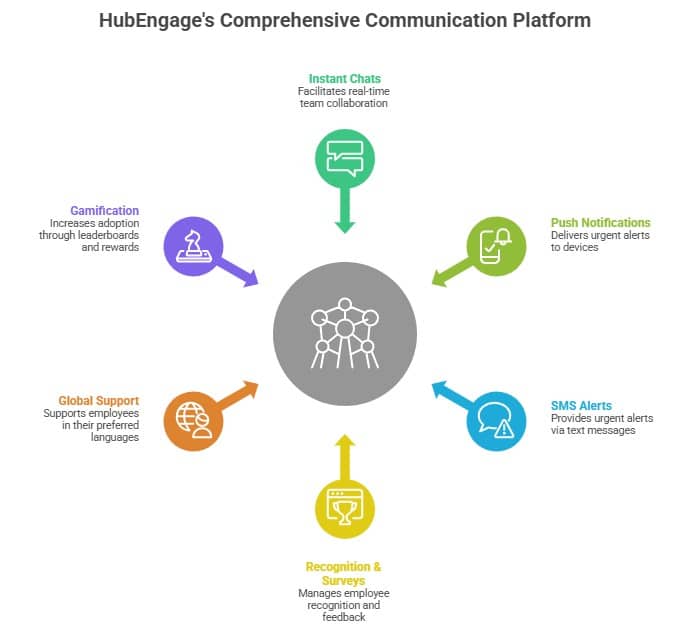
HubEngage is the only office chat app designed to unify communications and engagement. See more about how it compares as a Google Chat alternative.
Conclusion: Time to Upgrade Your Office Chat
Office chat apps are no longer just messaging tools as they are now an essential drivers of productivity and culture. While Slack, Teams, and Google Chat dominate headlines, they fall short for organizations that need compliance, multi-channel engagement, and frontline support. HubEngage fills this gap by combining chat, recognition, surveys, gamification, and AI-powered knowledge into one unified platform.
Ready to transform the way your company communicates? Request a demo today and see why HubEngage is more than just an office chat app it’s the future of employee communication.
FAQs on Office Chat Apps
What is office chat software?
Office chat software is a digital tool for instant messaging, collaboration, and file sharing within organizations. Unlike consumer apps, they include security, compliance, and admin controls.
What are the best office chat apps for 2026?
Top tools include Slack, Microsoft Teams, Google Chat, Discord, Mattermost, and HubEngage, the only all-in-one platform that combines chat with employee engagement.
What are the best office chat apps for frontline workers?
HubEngage leads here thanks to its mobile-first design, offline access, and multi-language support. This makes it the best team chat app for field teams.
How does office chat improve productivity?
You can improve productivity with real-time communication to reduce wasted time . Many organizations that deploy a corporate chat app also report reduced email overload.
Office chat vs email: which is better?
Chat is faster and better for day-to-day collaboration, while email is better for formal communications. Learn more in our guide on instant messaging vs email.
What’s the best Slack vs Teams alternative?
To find out, check out Slack vs Teams vs HubEngage which shows why HubEngage offers greater value by unifying chat with engagement features.
What’s the best Google Chat alternative?
HubEngage stands out as one of the top alternatives to Google Chat for businesses that need compliance and multi-channel messaging.
Are office chat apps secure?
Yes, but security varies. Enterprise-ready tools like HubEngage and Teams provide encryption, retention policies, and admin controls, making them stronger options for compliance.
How do I choose the right company chat app?
Evaluate based on integrations, compliance, scalability, AI search, and frontline support. See our breakdown of team communication software.
What’s the ROI of switching to a corporate chat app?
Switching can reduce email load, speed up workflows, and improve employee engagement. HubEngage customers report time savings of up to 25% in daily communications and measurable increases in retention.
What trends will shape the future of office chat?
AI will play a major role: from chatbots handling administrative tasks to sentiment analysis that tracks employee morale. HubEngage already integrates AI search and chatbot features, showing how the future of office chat software is moving toward intelligence and personalization.
Related Links:
Team Communication Software | Team Messaging Apps | Instant Messaging Software | Instant Messaging For Business | Best Team Chat App | Alternatives To Google Chat | Instant Messaging Vs Email