With an unpredictable environment, organizations can face severe weather, workplace accidents, IT outages, and security threats with little to no warning. In those moments, crisis communication software of your organization becomes the heartbeat of your response plan ensuring that urgent information reaches every employee, instantly and reliably.
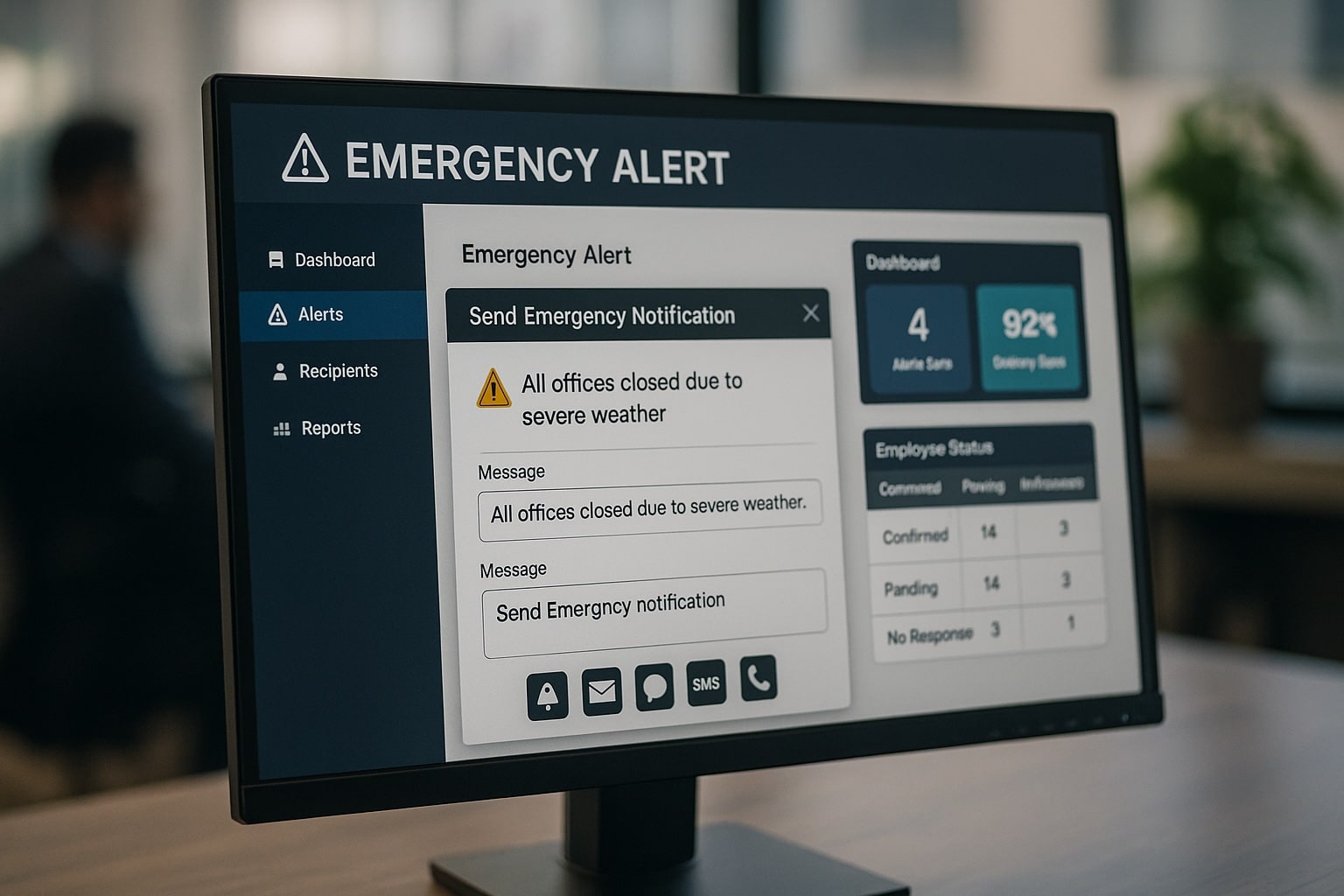
The right employee emergency alert tools go beyond sending a simple message. They deliver critical updates across multiple channels, confirm receipt, and even enable two-way communication for status updates all of which are essential for keeping people safe and protecting business operations.
In this blog we will cover about Employee Communication Platform , its importance, what are its important features and the list of the top platforms. Also, after reading this blog, you will be able to easily choose the right software for your business needs.
Key Takeaways:
- Crisis communication software helps organizations quickly alert employees and manage emergencies across multiple communication channels.
- Multi-channel alerts ensure important messages reach employees through SMS, email, apps, voice, and desktop.
- Features like read receipts, geo-targeting, and two-way messaging improve response speed and clarity.
- Prepared policies, templates, and regular drills help organizations respond effectively during unexpected crises.
- Choosing the right platform protects employees, reduces downtime, and supports stronger business continuity planning.
Why Crisis Communication Software Is Important?
The Real Cost of Downtime
Downtime during a crisis doesn’t just hurt productivity but, it can put lives and revenue at risk. Check out the below interesting data we have found:
As per Inveniot-IT, organizations on an average, face 86 IT outages every year, with almost all of them reporting revenue loss during those events.
This data shows why employee emergency alert tools aren’t optional. They are an integral part of business continuity, ensuring operations can recover quickly and safely.
Key Features of the Best Employee Emergency Alert Tools
Choosing the right crisis communication software isn’t just about ticking a features checklist. It is about ensuring your organization can respond to emergencies with speed, clarity, and precision. Many organizations fail due to inadequate preparedness and poor communication during critical events. We have added below the important features that should be present in such softwares:
Multi-Channel Delivery
Alerts should reach employees through text messaging (SMS), mobile push notifications, email, automated voice calls, chat apps like Microsoft Teams, Slack, desktop pop-ups, and digital signage. This redundancy ensures no one misses critical updates due to device or network issues.
Read Receipts & Delivery Tracking
Real-time dashboards confirm which employees have received and acknowledged the message, allowing targeted follow-ups for those who haven’t.
Two-Way & Geo-Targeted Communication
Two-way capabilities let employees respond with their status or questions. Geo-targeting ensures only the relevant locations receive alerts, preventing unnecessary panic.
Accessibility & Language Support
Multilingual alerts and ADA-compliant formats make communication inclusive for all employees.
Integration with Existing Systems
Direct connections to HRIS, scheduling tools, intranets, and collaboration platforms allow for faster targeting and reduce manual processes.
Templates, Drills & Analytics
Pre-built messages for common emergencies save time, while drills test readiness. Analytics help you refine delivery speed, response rates, and channel effectiveness.
The right employee emergency alert tools can drastically reduce downtime, protect employee safety, and safeguard operations by ensuring messages reach the right people, at the right time, through the right channels. This is why all organizations should invest the time to evaluate platforms carefully because in a crisis, the platform you choose could determine whether your continuity plan succeeds or fails.
Top Crisis Communication & Employee Alert Platforms
We have shortlisted some of the commonly used softwares for crisis communication and employee alert in the below table that you can check out and compare as well.
| Platform | Key Strengths | Multi-Channel Benefit | Best For | Considerations |
|---|---|---|---|---|
| HubEngage | Unified communications, AI targeting, gamified drills | SMS, push, email, Teams, Slack, WhatsApp, signage—all from one dashboard | Mixed desk + deskless workforce | Newer in crisis-specific market |
| Everbridge | Enterprise-grade critical event management | SMS, voice, email, mobile app | Large enterprises, government | High cost, complex setup |
| AlertMedia | Threat intelligence + quick deploy | SMS, push, voice, email | Mid-size to large companies | Less emphasis on drills |
| InformaCast | Strong audio + text alerting | Voice, SMS, email, desktop | Manufacturing, education | Setup complexity |
| Rave Alert | Public safety-grade communication | SMS, voice, email, signage | Government, institutions | Public sector focus |
| OnSolve / One Call Now | AI-assisted notifications | SMS, voice, push, email | Multi-site organizations | Tiered complexity |
| Regroup Mass Notification | Easy templates + 24/7 support | SMS, push, voice, email | Small to mid-size orgs | Less enterprise depth |
| BlackBerry AtHoc | Highly secure alerts | SMS, voice, secure app | Defense, government | Higher cost |
| DeskAlerts | Push + desktop pop-ups | Email, desktop, SMS | Office-based teams | Desktop-centric |
| HyperReach | Geo-targeted messaging | SMS, voice, email | Regional orgs | Narrower feature set |
Policy & Preparedness Planning
A strong policy and preparedness plan is the backbone of any effective crisis communication program. Without it, even the most advanced software can fall short in a real emergency. Organizations need clear guidelines for when and how to communicate, ensuring no time is wasted during critical moments.
Setting it up involves defining your crisis communication policy, preparing pre-built alert templates, conducting simulation drills, and using analytics to refine your approach over time. Here is how you can take the next step:
- Define your policy – Identify specific trigger conditions, assign roles and responsibilities, and map out escalation workflows so everyone knows their part.
- Prepare pre-built templates – Create ready-to-send messages for scenarios like evacuations, system outages, severe weather, and health emergencies.
- Run simulation drills – Test your process regularly like every quarter for high-risk industries, biannually for others to keep teams sharp. Platforms like HubEngage can even gamify these drills to boost participation.
- Leverage analytics – Track delivery speed, response rates, and channel performance to continually improve your response strategy.
When done right, this preparation transforms a crisis communication toolkit from a passive system into a proactive life and business-saving asset.
Choosing the Right Crisis Communication Software
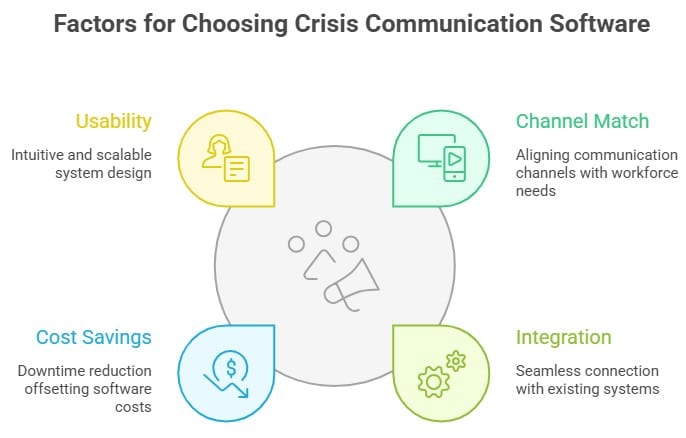
Selecting the right employee emergency alert tools is a decision that should balance the needs of your workforce, the systems you already have in place, and the potential return on investment in reduced downtime and improved safety. Start by assessing your workforce profile such as deskless teams in the field or on the front line often need mobile-first solutions like SMS, push notifications, or WhatsApp, while office-based employees may respond more quickly to alerts through platforms like Microsoft Teams, Slack, or email.
Next, evaluate the integration depth of the tool, ensuring it works seamlessly with your HRIS, collaboration platforms, and IT infrastructure to avoid communication silos. Finally, run a cost-versus-downtime savings analysis; even a modest reduction in downtime can quickly offset the annual licensing fees of a robust system, making it a cost-effective safeguard for your business continuity plan. Consider these points:
- Match channels to your workforce – Deskless teams benefit from SMS, push, and WhatsApp; office-based teams may rely on Teams, Slack, and email.
- Ensure integration – Seamless connections to HRIS, collaboration tools, and IT systems prevent data silos.
- Weigh cost vs. downtime savings – Reduction in downtime can more than cover the platform’s annual cost.
- Test usability – A system must be intuitive, fast to launch, and scalable.
Protect Your People and Operations
Preparing your organization with the right crisis communication approach can make a critical difference when unexpected situations occur. Clear and timely communication helps teams respond faster, reduce confusion, and protect both people and operations.
More importantly, having strong communication systems in place can even help prevent certain crises from escalating in the first place. To understand how effective communication tools support this, you can explore our Internal Communication Software Guide for deeper insights and practical guidance.
Emergencies are unpredictable. Your communication shouldn’t be. Book a HubEngage demo today to see how multi-channel crisis communication software can keep your workforce safe and informed. (CTA Banner)
FAQs
What is the best way to alert employees in an emergency?
Use a multi-channel platform that broadcasts across SMS, push notifications, email, voice calls, chat apps, desktop pop-ups, and signage simultaneously. This ensures coverage even if one channel fails.
How fast should alerts be delivered?
In a true crisis, delivery should occur within seconds of activation. Modern platforms achieve this using cloud infrastructure and multiple communication pathways to avoid delays.
Can messages be sent across multiple channels at once?
Yes. Platforms like HubEngage allow you to compose one message and instantly distribute it across all configured channels, maintaining consistency while saving critical time.
How often should drills be run?
High-risk industries should conduct drills quarterly, others biannually. Drills should test all channels and be followed by an analysis to improve processes.
What features are must-have for employee emergency alert tools?
Multi-channel delivery, read tracking, two-way messaging, geo-targeting, templates, integration capabilities, multilingual support, and analytics dashboards.
How do these tools support business continuity?
By ensuring rapid, reliable communication, they reduce downtime, protect employee safety, and help organizations resume operations quickly thereby, saving both people and revenue.
Related Links:
Employee Communication Platform | Internal Communication Tools | Slack vs Teams | Internal Communication Strategy | Internal Communications Examples | Internal Communication Software Template | Worker Communication Tools