What is an Intranet and why it matters?
An intranet is a private digital workspace that helps employees access information, collaborate, communicate, and stay aligned with company goals. Modern organizations rely on intranet platforms to centralize communication, share knowledge, and streamline internal processes.
According to Gartner’s report, as of 2024, the total percentage of engaged employees fell from 23% to 21% showing how important it is to engage employees well in a company.
If you are wondering how an intranet can help in keeping employees engaged then, it is possible by creating a platform that is easy to access, integrated with work tools, and designed around employee needs.
A modern Employee Intranet provides employees with a single destination for company updates, resources, policies, tools, and collaboration spaces. In this guide, we will explain how to create an intranet step-by-step, covering planning, technology selection, structure, features, costs, and best practices to build a successful company intranet.
How to create an intranet?
Creating an intranet needs careful planning, stakeholder alignment, and the right technology. Below are the essential steps we suggest companies to follow when creating a modern intranet.
1. Identify your purpose
Before starting the project, we must define the purpose of the intranet. Organizations typically build intranets to help with better communication, single knowledge hub, less use of email, have a digital workplace and better teamwork.
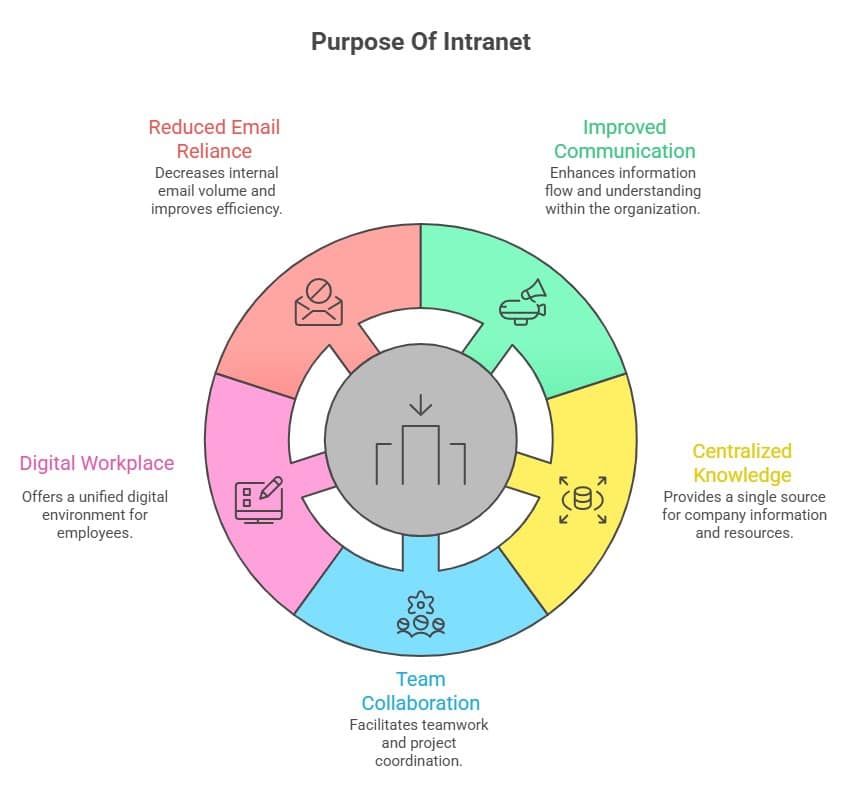
Defining clear objectives helps determine the features, structure, and tools required when deciding how to make an intranet for your organization.
2. Assign ownership
Successful intranet initiatives require clear ownership and governance to ensure long-term success. In most organizations, responsibility for the intranet is shared across teams such as internal communications, HR or employee experience, IT departments, and digital workplace teams. These stakeholders collaborate to manage content, maintain the platform, support employees, and ensure the intranet stays updated, secure, and aligned with organizational goals and communication strategies.
3. Build a business case
To secure leadership support, it is important to demonstrate the value of the intranet initiative. A business case for creating an intranet typically includes:
- Improved employee productivity – Enables employees to quickly access tools, information, and resources needed to complete daily tasks efficiently.
- Better internal communication – Provides a centralized platform for company updates, announcements, and leadership messaging across departments.
- Reduced time spent searching for information – Centralized knowledge and smart search features help employees locate documents and answers faster.
- Increased employee engagement – Interactive features, recognition tools, and personalized content encourage employees to participate and stay connected.
- Streamlined knowledge sharing – Teams can easily share expertise, documents, and updates across departments without communication silos.
As per Cottrill Research, employees spend nearly 2.5 hours per day searching for information needed to do their jobs. A well-designed intranet can significantly reduce this inefficiency.
4. Decide how to host the intranet
Another important decision when learning how to build an intranet is determining where the platform will be hosted. Organizations generally choose between a cloud-based intranet and on-premise intranet.
| Feature | Cloud-Based Intranet | On-Premise Intranet |
| Hosting | Hosted by a vendor or third-party provider | Hosted internally on company-owned servers |
| IT Maintenance | Requires minimal IT maintenance and infrastructure management | Requires dedicated IT resources for maintenance and updates |
| Accessibility | Easily accessible remotely through the internet | Typically accessible within internal networks |
| Scalability | Highly scalable and flexible as organizational needs grow | Limited scalability depending on internal infrastructure |
Most modern organizations prefer cloud intranet solutions due to their flexibility, security, and lower implementation costs.
5. Select an Intranet Software Provider
Choosing the right platform is one of the most critical steps in how to create a company intranet successfully. When evaluating intranet software providers, organizations should consider:
- Ease of use – The intranet should be intuitive so employees can navigate, access information, and complete tasks quickly without requiring extensive training.
- Mobile accessibility – Employees should be able to access the intranet easily from smartphones and tablets anytime, anywhere.
- Integration capabilities – The platform should seamlessly connect with existing business tools like HR systems, Microsoft 365, and collaboration software.
- Customization options – Organizations should be able to tailor branding, layouts, workflows, and content to match company needs.
- Security and compliance – Strong security features protect sensitive company information while meeting compliance and data protection requirements.
- Analytics and reporting – Built‑in analytics help track usage, engagement, and content performance to continuously improve the intranet.
A good intranet platform should be scalable and adaptable to evolving business needs. To know more about this is detail, check out our guide on Intranet Software
6. Migrate or create content
Content plays a crucial role in intranet success. When learning how to set up an intranet, organizations must audit existing content and decide what should be migrated, updated, or created from scratch. Ensuring content is relevant and easy to find significantly improves employee adoption.
Plan the Intranet Structure and Information Architecture
Once the foundation is defined, the next step is to create an intranet is designing the structure of the platform. Information architecture determines how content is organized and how easily employees can find what they need. Best practices include:
- Creating logical navigation menus – Clear menus help employees quickly locate tools, policies, and updates. Example: HR, IT Helpdesk, and Company News appear as primary navigation tabs.
- Using consistent naming conventions – Standardized labels reduce confusion and improve navigation clarity. Example: consistently naming sections “HR Policies” instead of mixing “Policies”, “HR Docs”, or “Guidelines”.
- Implementing powerful search functionality – Advanced search allows employees to instantly find documents, people, or resources. Example: searching “leave policy” immediately displays the correct HR document.
- Organizing content by department or topic – Structuring pages by teams or topics simplifies information discovery. Example: Sales pages contain playbooks, targets, and resources relevant to sales teams.
A well-designed structure ensures employees spend less time searching for information and more time being productive.
Design User Experience and Interface
User experience plays a critical role in whether employees actually use the intranet. A clean and intuitive interface helps employees understand the platform quickly and complete tasks without confusion. When the layout is simple and well organized, employees can easily find information, tools, and updates without spending too much time searching.
Personalized dashboards also improve the experience by showing employees content that is relevant to their role, department, or location. This makes the intranet more useful and encourages employees to return regularly.
Mobile accessibility, fast navigation, and consistent branding also contribute to a better user experience. Employees should be able to access the intranet on their phones, move between pages quickly, and recognize the platform through familiar company design. These elements help create a modern digital workplace that employees actually enjoy using.
Develop Core Features and Functionality
Modern intranets offer far more than document storage. When deciding how to make an intranet effective, organizations should prioritize features that improve communication and productivity.
Essential intranet features should have Company news, Employee data, Knowledge base, Collaboration tools, Document management, Employee recognition, Surveys and feedback tools and Search functionality.
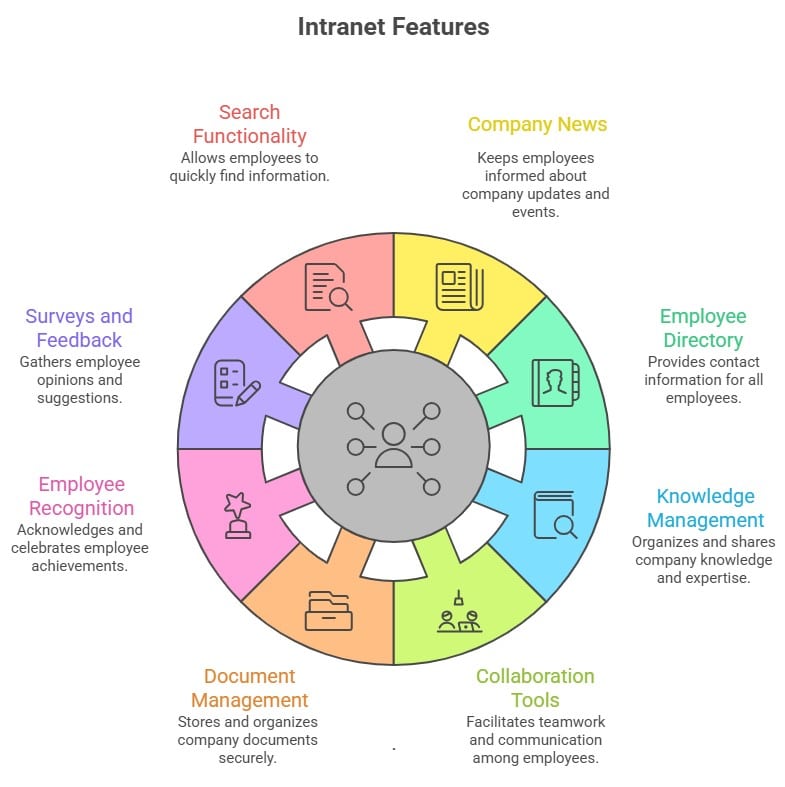
These features transform the intranet into a central digital workplace rather than just a document repository.
Integrate Business Systems
Integrating business tools is essential for a successful intranet because it connects everyday workplace applications in one place. Modern intranet platforms commonly integrate with tools like Microsoft 365, Google Workspace, HRIS systems, CRM platforms, and project management software. This integration helps employees access documents, collaborate with teams, and manage tasks without switching between multiple systems, improving productivity and creating a more efficient digital workplace experience.
Common mistakes to avoid while creating an intranet
While understanding how to create a company intranet is important, avoiding common mistakes is equally critical. Some of the most common pitfalls include:
1. Lack of clear objectives
Without defined goals, the intranet can quickly become disorganized.
2. Poor content governance
Outdated or irrelevant content reduces employee trust.
3. Overly complex navigation
Employees should be able to find information within a few clicks.
4. Ignoring employee feedback
User feedback is essential for continuous improvement.
5. Limited promotion and training
Employees must understand the benefits of the intranet to use it consistently.
Avoiding these mistakes helps ensure the intranet delivers long-term value.
Cost Considerations When Building an Intranet
Organizations evaluating how to build an intranet must consider several cost factors. Typical cost components include:
| Cost Component | Explanation |
| Software licensing or subscription fees | Recurring payment required to access intranet software, updates, support, and platform features. |
| Implementation and setup costs | Expenses for configuring the platform, setting permissions, integrations, and initial deployment setup. |
| Custom development (if required) | Additional costs for building unique features, workflows, or integrations specific to company needs. |
| Content migration and creation | Resources needed to move existing documents and create structured intranet pages and knowledge content. |
| Training and change management | Investment in educating employees, promoting adoption, and helping teams transition to the new intranet platform. |
Building an intranet from scratch can cost anywhere between $50,000 and $250,000 depending on complexity. In contrast, cloud intranet platforms typically offer more predictable subscription-based pricing.
How to easily create an intranet with Hubengage?
Organizations looking for a faster way to implement an intranet often choose a ready-made platform.
HubEngage provides a comprehensive digital workplace platform that enables organizations to create a company intranet quickly without extensive development.
Our platform combines communication, collaboration, recognition, and analytics capabilities in one unified solution.
Conclusion
Creating a successful intranet requires thoughtful planning, the right technology, and a clear focus on employee needs. By defining goals, structuring information effectively, and choosing the right platform, organizations can build an intranet that improves communication, collaboration, and productivity.
A modern intranet should not only store information but also connect employees and simplify everyday work. If you are looking to implement a modern digital workplace, you must explore HubEngage’s intranet platform by asking for a demo.
FAQs
How long does it take to create an intranet?
The timeline depends on the complexity of the platform. A basic intranet setup using modern intranet software can take between 4–8 weeks, while a fully customized intranet built from scratch may take several months.
Should we build or buy an intranet solution?
Most organizations prefer buying a ready-made intranet platform because it reduces development costs, implementation time, and maintenance requirements. Custom-built intranets may offer greater flexibility but require significant resources.
What features are essential in a company intranet?
Key features typically include:
- News and announcements
- Employee directory
- Document management
- Search functionality
- Collaboration tools
- Knowledge management
- Mobile access
How much does it cost to build an intranet?
The cost of building an intranet varies widely depending on whether the organization builds it internally or uses a cloud intranet solution. Costs can range from tens of thousands to several hundred thousand dollars for custom-built platforms.
How do you ensure employee adoption?
To encourage adoption, organizations should focus on user-friendly design, mobile accessibility, relevant content, leadership promotion, and ongoing employee feedback.
Can an intranet integrate with existing business tools?
Yes. Most modern intranet platforms integrate with commonly used business tools such as Microsoft 365, Google Workspace, HR systems, and collaboration platforms.
What security measures are required for an intranet?
Intranet platforms should implement strong security measures including:
- Role-based access control
- Secure authentication
- Data encryption
- Compliance with security standards
- Regular security audits
These measures ensure sensitive company information remains protected.