A communications manager needs to update the intranet by fixing an outdated policy link and making the new guidance more accessible for employees in various locations on mobile devices. Next, the requests start piling up. IT needs to schedule the update, and the security team must review access, but the underlying system hasn’t been upgraded in years. By the time the changes reach employees, the need has passed. Here’s where a cloud intranet comes in. The provider operates the platform infrastructure, while internal teams can focus on keeping information current and making employee journeys easier. Our blog explains how cloud intranets work, how they compare with on-premises systems, and what to look for in cloud-based intranet software.
Key Takeaways
- A cloud intranet is a provider-hosted employee platform that people access through the internet, typically from a browser, mobile app, or approved workplace integration.
- The provider operates the core technical environment. The customer remains responsible for access controls, employee-facing content, data governance, and internal adoption.
- Cloud intranets can help organizations serve employees across locations without maintaining a separate intranet infrastructure.|
- Security requires a shared-responsibility approach. The vendor may secure the service environment, while the customer manages identity, permissions, sensitive information, and employee access.
- The best cloud intranet fits the workforce and its working conditions. A mobile-first retail team, global manufacturing operation, and desk-based professional-services firm will prioritize different capabilities.

What is a Cloud Intranet?
A cloud intranet is an internal employee platform that runs in a software provider’s hosted environment. Employees sign in through the internet rather than relying entirely on servers their employer operates.
The term can also be called a cloud-based intranet, SaaS intranet, or intranet-as-a-service. The model is similar: the provider manages the application and core infrastructure, while the customer configures it to suit their people, processes, information, and policies. A company still decides what the intranet does for employees, such as:
- Which information employees can access?
- Which teams receive a specific update?
- Who can publish or approve content?
- Which employee systems appear in the portal?
- How permissions work across locations and job roles?
NIST defines cloud computing as on-demand network access to shared, configurable computing resources. Software as a service, or SaaS, is one of the major cloud-service models. In a SaaS model, the provider delivers an application that customers use without managing the underlying infrastructure.
| Area | Provider Responsibility | Customer Responsibility |
| Platform environment | Hosts and maintains the core application environment | Reviews vendor reliability, contractual terms, and overall fit |
| Product updates | Delivers security patches, bug fixes, and product releases | Communicates relevant changes to employees and internal stakeholders |
| User access | Provides login and access-control capabilities | Configures user identities, groups, SSO, MFA, roles, and permissions |
| Content | Provides the tools to create, publish, store, and manage content | Maintains policies, news, employee resources, and clear page ownership |
| Integrations | Offers supported connectors, APIs, and integration options | Approves data flows, validates permissions, and monitors connected systems |
| Analytics | Supplies reporting tools and permitted usage data | Uses insights to improve employee journeys, content quality, and communication effectiveness |
A cloud intranet shifts core infrastructure operations to the provider, while the organization remains accountable for access, content, data governance, integrations, and employee adoption.
Benefits of a Cloud Intranet
Hosting a cloud intranet determines how easily people can access information across devices and locations, how much operational work falls to internal IT, and how readily the intranet can support new users, sites, and systems. Below are the practical benefits that make the cloud model worth considering.
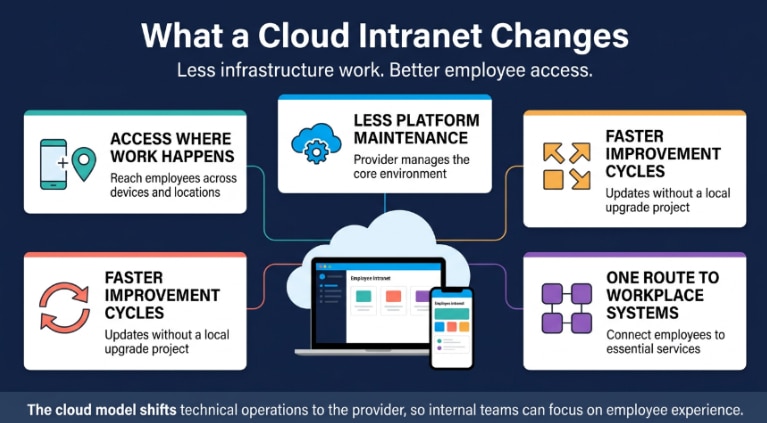
1. Employees Can Reach the Intranet Where Work Happens
Employees may work across offices, sites, customer locations, vehicles, or shared devices. A cloud intranet gives authorized users access to relevant policies, updates, and workplace resources through a browser, mobile app, or approved integration. This matters most when an employee needs a current answer during a shift, visit, or time-sensitive task.
2. Technical Teams Spend Less Time Operating the Platform
With an on-premises intranet, internal teams handle server maintenance, capacity planning, patching, availability monitoring, backups, and recovery. In a cloud model, the provider operates the core platform environment and releases updates as part of the service. IT can concentrate on identity management, security reviews, integrations, access rules, and the wider workplace technology architecture. The organization still needs to assess the vendor and govern how the platform connects to internal systems.
3. Improvement Does Not Depend on a Local Upgrade Project
Legacy intranets can stagnate when changes rely on internal development capacity, release schedules, or custom code. Cloud providers manage product releases, security patches, and platform updates centrally. This can make it easier to improve search, mobile access, language support, or system integrations without rebuilding the underlying environment.
4. The Platform Can Expand as the Workforce Changes
A cloud intranet can support growth without requiring the organization to purchase or maintain more physical infrastructure. That matters when a company opens a new location, acquires another business, enters a new market, or adds employees who need mobile access. This means the intranet can develop alongside the organization instead of forcing a replacement project every few years.
5. Employees Get a Clearer Route to Workplace Systems
Employees may need to use several systems during the week: payroll, HR, benefits, learning, scheduling, expenses, customer tools, service desks, and collaboration platforms. A cloud intranet can become the employee-facing layer that helps people reach the right system at the right moment. A well-designed employee portal software experience can make these common paths much easier to follow.
Key Features of Modern Cloud Intranets
A cloud intranet should simplify work for employees and content owners alike. The platform needs to help people access information, complete actions, and stay connected without creating another busy channel.
| Feature | Employee Value | Buyer Check |
| Targeted communications | Employees receive updates relevant to their role, location, or work setting. | Can teams target content by department, site, role, language, or employee group? |
| Search | Employees can find trusted guidance without unnecessary back-and-forth. | Does search cover current pages, documents, people, forms, and workplace tools? |
| Mobile access | Frontline teams can access information and complete actions during a shift. | Are pages, sign-in, notifications, and common tasks easy to use from a phone? |
| Self-service | Employees can start routine requests without chasing the correct team. | Can users quickly access HR, IT, payroll, learning, scheduling, and support services? |
| Integrations | Employees can reach essential workplace systems from a familiar starting point. | Does the platform support your HRIS, identity provider, learning system, and collaboration tools? |
| Participation | Employees can respond to updates, recognize colleagues, and share feedback. | Are surveys, comments, polls, communities, recognition, and moderation controls available? |
| Governance | Employees can trust that important information is current and accountable. | Can content owners assign review dates, manage permissions, approve changes, and archive old content? |
| Analytics | Teams can identify missing information and employee journeys that need improvement. | Can administrators review search terms, content use, campaign reach, and employee feedback? |
Search Should Help Employees Complete a Task
Search becomes useful when it takes an employee to an answer they can act on. To support useful search results, content teams need to maintain:
- Clear, employee-focused page titles
- Searchable documents and pages
- Current, accurate guidance
- Useful metadata and audience labels
- Named content owners and regular review dates
HubEngage includes an intranet search engine within its employee-intranet offering. Teams should confirm which information sources the platform indexes and how it handles access permissions before implementation.
Personalization Should Reduce Noise
Employees lose attention when they receive a constant stream of updates unrelated to their work. A cloud intranet can prioritize content based on:
- Job role
- Department
- Worksite
- Country
- Language
- Employment status
Personalization gives employees a more relevant starting point while keeping company-wide news and essential updates accessible.
The Intranet Should Match the Urgency of the Message
Different messages need different formats and delivery methods.
- Benefits updates: Use a detailed intranet page with supporting resources and FAQs.
- Shift changes: Send a short, direct update to affected employees.
- Safety notices: Give urgent information prominent placement and reliable delivery to the relevant group.
The intranet should remain the source of complete, current information, while channels such as mobile notifications, email, SMS, or collaboration tools bring employees to the relevant page.
Mobile Access Must Work for Frontline Employees
A mobile intranet should make essential information and tasks practical during a shift.
- Test sign-in, search, updates, and common actions on the devices employees actually use.
- Account for personal phones, shared devices, and different levels of digital access.
- Review notification controls, language support, secure authentication, and offline access where needed.
Self-Service and Integrations Should Reduce Friction
Employees should be able to move from workplace guidance to the correct system without searching across separate portals.
- Link common needs—such as leave, payroll, training, expenses, IT support, and scheduling—to the relevant process or platform.
- Prioritize integrations that support frequent or high-friction employee tasks.
- Review permissions, data flows, and ownership before connecting systems.
Governance Keeps Workplace Information Trustworthy
Employees need to know that a policy or process page is current, reliable, and owned by the right team.
- Assign a named owner to important pages and documents.
- Set review dates, approval workflows, permissions, version history, and archive controls.
- Define internal governance standards, since platform features alone cannot keep information accurate.
Analytics Should Identify Employee Friction
Usage data can reveal where employees cannot find information or where communications are failing to reach the intended audience.
- Review search queries and failed searches.
- Track page visits, engagement, policy acknowledgments, feedback, and campaign results.
- Use these findings to improve high-demand content and common employee journeys after launch.
Participation Needs Clear Boundaries
Participation features can turn the intranet into a more useful two-way communication space when they have a clear purpose and ownership.
- Use surveys, polls, comments, recognition, and communities where they support a specific employee need.
- Make it clear where employees can ask questions and who is responsible for responding.
- Set moderation rules before enabling open participation across the platform.
HubEngage supports web and mobile intranet access, along with communication delivery through email, SMS, digital displays, Microsoft Teams, Slack, and WhatsApp. This gives organizations options for different work settings and message types.
Cloud vs On-Prem Intranet: Pros and Cons
Cloud and on-premises intranets have different strengths. The key trade-off is provider-managed convenience versus direct control.
Cloud intranet: Offers simpler maintenance, provider-managed updates, easier mobile and multi-location access, and flexible scaling. Trade-offs may include recurring subscription costs, reliance on the provider, and less control over the underlying environment.
On-premises intranet: Provides greater control over hosting, data handling, and customization. However, internal teams must manage infrastructure, security patches, backups, recovery, and upgrades.
Below is a quick comparison that will help you understand the pros and cons of cloud vs. on-prem intranet
| Consideration | Cloud Intranet | On-Premise Intranet |
| Hosting | The provider hosts and operates the application environment | The organization runs the intranet within its own infrastructure |
| Upfront investment | Usually subscription-based, with less physical infrastructure to purchase | Often requires infrastructure, licenses, internal resources, and implementation work upfront |
| Maintenance | The provider manages core platform operations, patches, and product releases | Internal teams manage patches, upgrades, monitoring, backups, and recovery |
| Employee access | Typically designed for browser and mobile access across locations | Often depends on the corporate network, VPN access, or added remote-access configuration |
| Scaling | Capacity can expand through the provider’s service model | Internal teams must plan, fund, and maintain additional capacity |
| Customization | Configurable through platform tools, APIs, templates, and integrations | Can support deeper custom development, but requires ongoing technical resources |
| Security model | Security responsibilities are shared between the provider and customer | The organization retains more direct control and operating responsibility |
| Suitable context | Distributed workforces or organizations seeking less infrastructure administration | Organizations with specialized hosting needs, strict internal-network requirements, or highly custom environments |
Cloud security depends on both parties as the provider typically secures the hosted environment and application service. While the customer controls employee identities, permissions, data-handling practices, publishing governance, and settings that affect access.
Choose Cloud When Access and Maintainability Matter
A cloud intranet can be a strong fit for organizations that need broad employee access, support a hybrid or frontline workforce, want fewer infrastructure responsibilities, or prefer a provider-managed update cycle.
When an On-Premises Intranet May Be the Better Fit
An on-premises intranet may remain appropriate when the organization has unusual data-hosting constraints, strict network segmentation, complex legacy systems, or extensive in-house engineering capacity.
This choice carries long-term obligations. Internal teams must stay ready to manage infrastructure, system availability, security patching, testing, backups, recovery, and upgrades.
Cloud Intranet For Small Business
Small businesses can use a cloud intranet to give employees a consistent home for company information without operating an internal server environment. The key is to start with the everyday needs that consume time. A small team does not need to build a miniature enterprise portal on day one. It needs an intranet employees can understand and maintain. A first version may focus on company updates, current policies, onboarding guidance, workplace contacts, HR resources, and links to the systems employees already use.
| First-Phase Area | Why It Matters |
| Homepage | Gives employees one clear place to begin when they need information or a workplace tool |
| Company communication | Creates a formal, reliable home for important announcements and updates |
| Policies and resources | Helps employees access current guidance without relying on informal document sharing |
| HR and IT access | Gives common employee requests a clear route to the right support or system |
| Search | Allows employees to find answers independently instead of asking managers or colleagues |
| Mobile experience | Gives frontline and deskless employees practical access during the workday |
| Content ownership | Keeps the intranet reliable by making someone accountable for reviewing and updating key information |
A small business should assess total cost rather than focusing only on per-user pricing. Include implementation, content migration, branding, integration needs, administrative time, employee training, and ongoing support.
Use Cases of Cloud Intranets in Large Enterprises
Large enterprises often use a cloud intranet as a shared employee layer across a complex technology environment. The platform gives people a common destination while letting regional or departmental teams tailor what employees see.
1. Global Communication With Local Context
Corporate communications may need to reach every employee. The way employees act on those communications can vary by market, language, role, or business unit. A cloud intranet can support a global announcement alongside local context. For instance, a global HR policy may require country-specific guidance. Managers may need a separate toolkit. Employees may need a direct route to a regional support contact.
2. Employee Self-Service Across Complex Systems
Enterprise employees often work across numerous platforms, each with its own owner and login. A cloud intranet can reduce the effort of navigating those systems by offering an employee-oriented entry point. The goal is to help employees reach the correct process, not to force every system into a single interface.
3. Controlled Knowledge at Scale
As an organization grows, local document libraries and team-owned pages can multiply. Different offices may work from different versions of the same procedure. Employees may not know who owns a policy or whether a document remains current. Cloud intranet solutions can support governance through permissions, ownership, version control, approval processes, review dates, and better search. The technology helps, but the organization must still define how it reviews and retires content.
4. Change Communication
Restructures, acquisitions, leadership changes, system rollouts, and policy changes place pressure on internal communication. Employees need practical context to respond confidently. A cloud intranet can host the core explanation, FAQs, manager guidance, training resources, and a route to support. Targeted communication can direct the relevant employee group to that material.
5. Inclusion for Frontline Workforces
Large organizations often need to communicate with both office-based staff and employees who work in stores, customer sites, plants, hospitals, vehicles, or other operational settings. The cloud intranet can hold detailed information. Mobile apps, SMS, workplace displays, and collaboration tools can bring employees to it when they need it.
Best Cloud Intranet Software
No single cloud intranet is best for every organization. A platform that works well for a Microsoft-first knowledge workforce may not suit a retail chain with thousands of hourly employees. A company that needs tightly controlled policy governance may choose differently from one that wants employee-generated content and mobile engagement. Assess cloud intranet solutions against the employee journeys that matter most in your organization.
| Buying Priority | What to Assess |
| Employee access | Does the platform work well for desk-based, remote, frontline, and shared-device employees? |
| Communication | Can teams target, schedule, translate, acknowledge, and measure employee communications? |
| Search | Does search return current, relevant information while respecting employee access permissions? |
| Mobile usability | Can employees read an update or complete an important task comfortably from a phone? |
| Employee participation | Does the platform provide suitable options for recognition, surveys, feedback, comments, and communities? |
| Integrations | Can the intranet connect securely with the HR, payroll, learning, scheduling, and collaboration systems employees use most? |
| Content governance | Can content owners manage publishing, reviews, permissions, approvals, and archiving? |
| Security | Can the provider meet your identity, data-protection, audit, and compliance requirements? |
| Implementation | Who will manage configuration, content migration, administrator training, and post-launch support? |
| Commercial fit | What will licenses, modules, integrations, implementation services, and ongoing support cost over time? |
Ask every shortlisted vendor to demonstrate a real scenario from your workplace. For example, ask them to show how an employee finds a safety procedure, submits an IT request, accesses a pay-related resource, receives a location-specific announcement, or completes a required policy acknowledgment. For further comparisons, check this best intranet software guide.
Implementation and Security Considerations
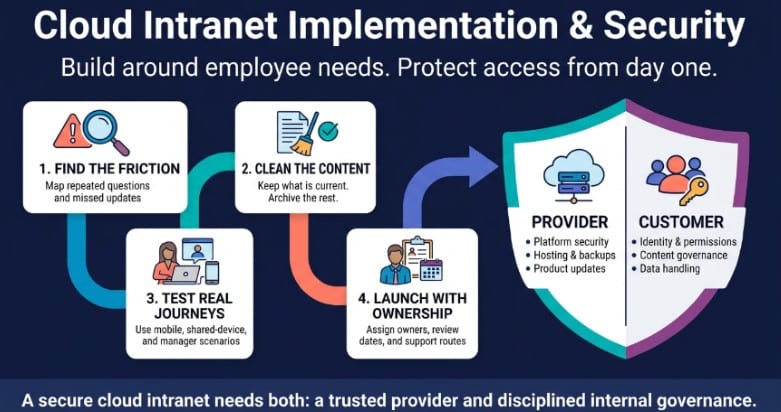
A cloud intranet can reduce the technical burden of running an employee platform, but rollout quality still depends on the decisions made before launch. The infographic below shows the two sides of a successful cloud intranet project: building an experience around real employee needs, then protecting that experience through clear ownership and shared security responsibilities.
1. Begin With the Points of Friction
Start with the moments that cause repeated employee questions, missed communications, or avoidable work for support teams. This may mean employees cannot find updated policies. It can be managers distribute important information manually or new hires have no obvious route to onboarding resources. Maybe frontline teams receive updates too late to use them. Build the intranet around the work these employees need to complete.
2. Clean Content Before You Migrate It
Content migration is a chance to decide what deserves to remain. Review old pages and documents. Remove duplicates. Archive outdated resources. Rewrite vague content. Assign owners. Apply clear naming conventions. Set review dates for policies, process guides, and high-risk information. Moving poor content to a new cloud platform does not make it useful.
3. Test Real Employee Journeys
Do not rely on a head-office-only test group. Include employees who work from a phone, use shared devices, manage teams, publish content, work in different locations, or recently joined the organization. Give them a task that resembles real work. Ask them to find a procedure, access an HR resource, locate an internal expert, read a targeted update, or submit a support request. Where they hesitate will show you how the design needs work.
4. Treat Security as a Shared Responsibility
A cloud vendor may secure the platform environment, but the customer still determines who can access what and how employees handle internal information.
| Security Risk | Ask the Provider | Manage Internally |
| Identity | Does the platform support single sign-on (SSO), multi-factor authentication (MFA), SCIM provisioning, and identity-provider integration? | Manage the employee lifecycle, access groups, MFA rules, and regular access reviews |
| Data protection | How does the provider protect data at rest and in transit? Where does it host customer data? | Classify sensitive information, set internal publishing rules, and define data-retention requirements |
| Permissions | Can administrators control access by role, location, employee group, page, or document? | Apply least-privilege access and review permissions regularly |
| Monitoring | Are audit logs available for security monitoring, investigations, and compliance reporting? | Define a monitoring process, escalation path, and incident-response procedure |
| Resilience | How does the provider manage backups, service recovery, and business-continuity measures? | Maintain internal continuity plans and communication procedures for employees and stakeholders |
| Vendor assurance | Which security, privacy, compliance, and data-processing documents can the provider share? | Complete legal, procurement, security, and compliance reviews before approval |
HubEngage lists SSO, MFA, role-based controls, encrypted data storage, and GDPR compliance among its security capabilities. Confirm the applicable scope, contractual commitments, documentation, and hosting arrangements before selecting a provider.
How to choose the right Cloud Intranet Provider?
A product demo can make most platforms look straightforward. The real test comes after launch, when employees need to use the intranet in their day-to-day work.
Cloud Intranet Provider Selection Checklist
| Evaluation Question | Why It Matters | What to Test |
| Can employees find information quickly? | Search and navigation determine whether employees trust the intranet enough to use it again. | Search relevance, filters, permissions, page titles, and mobile results |
| Can every workforce group access it? | A desktop-only experience can leave frontline, remote, or shared-device employees behind. | Mobile usability, shared-device access, sign-in process, notifications, and language support |
| Can teams target communications? | Relevant messages reduce unnecessary noise and help employees focus on updates that affect their work. | Audience controls by role, location, department, language, and employee group |
| Can employees complete routine actions? | Employees return when the intranet helps them complete practical work without extra back-and-forth. | Forms, workflows, HR and IT links, self-service tools, and workplace-system integrations |
| Can content owners maintain pages? | Outdated pages quickly reduce confidence in the information employees find. | Templates, publishing permissions, approval flows, ownership fields, review dates, and archive controls |
| Can teams see friction points? | Usage data can reveal where employees struggle, what content is missing, and which communications are not landing. | Search terms, failed searches, content use, employee feedback, campaign reporting, and usage trends |
| Can employees respond appropriately? | Feedback helps teams identify confusion, surface questions, and improve future communication. | Polls, surveys, recognition, comments, moderation settings, and anonymous-feedback options |
| Can it meet our security needs? | Intranets may contain internal documents, employee information, policies, and links to sensitive workplace systems. | SSO, MFA, encryption, access controls, audit evidence, data-processing terms, and vendor documentation |
| Can it evolve with us? | Workforce needs, technology stacks, locations, and communication requirements will change over time. | APIs, integrations, modular features, platform scalability, administration tools, and customer support |
Choose the provider that can demonstrate those journeys clearly, not the one that delivers the longest feature tour.
Future Trends in Cloud Intranet Technology
Cloud intranet technology will keep moving toward more relevant employee experiences and less manual effort for communication teams.
1. AI-Assisted Discovery
Employees increasingly expect to search in plain language. AI can help summarize long updates, find relevant resources, direct people toward an appropriate workflow, and suggest related content. Human ownership remains essential. Policies, safety information, legal guidance, and compliance documents require approved source content and regular review. AI can support discovery, but it should not replace accountable publishing.
2. More Practical Personalization
Personalization will move beyond generic news feeds. It can reflect an employee’s location, job role, language, department, shift pattern, or place in the employee lifecycle. The purpose is to reduce irrelevant communication and make high-priority information easier to see.
3. Better Frontline Access
Employee apps, workplace displays, QR codes, mobile alerts, and text-based communication will remain important for teams who do not work from a permanent desk. The cloud intranet will continue to act as the home for detailed information, while other channels bring the right employees to it.
4. Tighter Governance
AI-assisted content creation can speed up publishing, but it also increases the need for review. Organizations will need stronger standards around source accuracy, ownership, version control, accessibility, retention, and approval.
5. Connected Employee Platforms
Intranets, employee apps, recognition tools, surveys, internal communication channels, and workflow systems increasingly overlap. Some organizations will keep specialist tools connected through integrations. Others will choose modular platforms that bring several employee functions into one environment.
<Quote from HubEngage leadership>
How HubEngage supports Cloud Intranets?
HubEngage offers cloud-based intranet software that organizations can configure around their employee communication and engagement needs. The platform combines personalized intranet content with AI search, social interaction, employee recognition, surveys, messaging, and workplace resources.
Teams can extend intranet communication through an employee mobile app, email, SMS, digital displays, Microsoft Teams, Slack, and WhatsApp. That flexibility can help organizations match communication to its intended audience and urgency.
HubEngage also lists integration options for systems such as ADP, UKG, Workday, Microsoft 365, and other platforms through APIs. Confirm the availability and scope of each integration during the buying process. Explore our Employee Intranet Platform to see whether it fits your employee-access needs, communication strategy, and existing workplace technology.
Build a Cloud Intranet around employee needs
A cloud intranet changes the technical model, but its success depends on what employees experience. Employees need current information, a clear route to everyday workplace tasks, and access that fits their workflows. Content owners need a manageable way to keep guidance accurate. Communication teams need visibility into whether employees received and understood important updates.
Start with the points where work currently slows down. Build around the employee journeys that matter most. Give key content a named owner. Review search behavior and feedback after launch, then improve the experience in small, useful increments. Book a demo to see how HubEngage brings employee communication, AI search, workplace resources, and mobile access into one cloud intranet.
FAQs For Cloud Intranet
1. What is a cloud intranet?
A cloud intranet is a provider-hosted employee platform accessed via the internet. The vendor manages core infrastructure, while the organization controls content, access, permissions, data governance, and integrations.
2. Is a cloud-based intranet secure?
Yes, under a shared-responsibility model. The provider secures the application environment, while the customer manages authentication (SSO/MFA), permissions, sensitive content, and access reviews.
3. What’s the difference between a SaaS intranet vs. an on-prem intranet?
A SaaS intranet is hosted and maintained by the vendor with automated updates. An on-premises intranet runs on internal servers, giving the organization direct control but requiring local management of hosting, updates, and maintenance.
4. Why is a cloud intranet a good option for small businesses?
It provides a centralized communication and document hub without requiring dedicated IT server infrastructure, saving time and resources for smaller teams.
5. How much does a cloud intranet cost?
Costs vary based on user count, feature modules, integrations, and setup needs. Your total investment should include recurring subscription fees, implementation, migration, and ongoing administration.
6. Can you move from an on-prem intranet to the cloud?
Yes. Migration requires auditing existing content, archiving outdated files, setting up identity/permissions, designing navigation, and testing employee workflows before launch.
7. Cloud intranet vs. on-premises intranet: which should you choose?
Choose cloud for multi-location access, mobile availability, and lower maintenance overhead. Choose on-premise if strict data sovereignty, legacy network constraints, or custom local code require direct server control.
8. How do companies build a cloud-based intranet?
By identifying core requirements, mapping user roles, selecting a provider, designing navigation and security governance, testing real workflows, and refining content using analytics post-launch.
9. What industries benefit most from cloud-based intranets?
Industries with hybrid, deskless, or multi-site workforces, such as healthcare, retail, manufacturing, hospitality, logistics, education, and professional services.
10. How can businesses ensure compliance with data protection regulations in the cloud?
Conduct vendor risk assessments, enforce SSO/MFA, apply least-privilege access, classify content, enforce retention policies, and verify vendor compliance and data-processing documentation.
Related Links
Employee Intranet | Intranet Software | Employee Portal Software | Intranet Search Engine