Managing employee time tracking can feel like herding cats, especially when you are dealing with multiple shifts, remote workers, and complex scheduling needs. An employee time clock app transforms this chaos into organized, accurate records that save you hours of administrative work while ensuring payroll accuracy.
If you are tired of paper timesheets, buddy punching, or manual calculations eating up your time, this guide walks you through everything you need to know about employee time clock apps. You will understand how they work, what features matter most, and how to choose the right solution for your specific business needs.
What Is an Employee Time Clock App?
An employee time clock app is a digital solution that allows workers to clock in and out using their smartphones, tablets, or computers. These apps replace traditional punch cards and paper timesheets with automated tracking that records exact work hours, breaks, and overtime.
The app typically connects to a central database where managers can view real-time attendance, generate reports, and integrate with payroll systems. Most employee time clock apps include GPS tracking, photo verification, and project-based time tracking to prevent time theft and ensure accurate records.
Unlike traditional time clocks that require physical presence at a specific location, these apps offer flexibility for remote workers, field teams, and multi-location businesses. The software automatically calculates hours worked, applies overtime rules, and flags potential issues like missed punches or extended breaks.
Key Features of Time Clock Software
Modern employee time clock apps go far beyond simple clock-in and clock-out functionality. Understanding these features helps you identify what your business actually needs versus what sounds impressive but adds unnecessary complexity.
Core Tracking Features
- GPS Location Tracking: Verifies employees are at the correct job site when clocking in
- Photo Verification: Takes a picture when employees punch in to prevent buddy punching
- Geofencing: Creates virtual boundaries that automatically clock employees in when they arrive
- Offline Capability: Stores punch data when internet connection is unavailable
- Break and Lunch Tracking: Monitors paid and unpaid break periods automatically
Advanced Functionality
- Project Time Tracking: Assigns hours to specific clients, projects, or job codes
- Overtime Calculations: Applies federal, state, and custom overtime rules automatically
- Shift Scheduling: Integrates time tracking with employee schedules
- Real-Time Notifications: Alerts managers to late arrivals, missed punches, or overtime
- Mobile Accessibility: Works on iOS, Android, and web browsers
Comparison of Time Clock App Types
| App Type | Best For | Key Advantage | Main Limitation |
|---|---|---|---|
| Basic Time Tracking | Small teams under 20 | Simple setup and low cost | Limited reporting features |
| GPS-Enabled Apps | Field service teams | Location verification | Requires strong mobile signal |
| Biometric Integration | High-security environments | Prevents all forms of time theft | Higher hardware costs |
| All-in-One Platforms | Growing businesses | Comprehensive workforce management | Steeper learning curve |
The right features depend on your specific challenges. A construction company needs GPS tracking and offline capability, while a retail store might prioritize shift scheduling and break tracking.
Time Clock App vs Traditional Methods
The shift from paper timesheets and punch cards to digital solutions represents more than just technological upgrade—it fundamentally changes how businesses manage their workforce.
Accuracy and Reliability
Traditional punch cards and paper timesheets create multiple opportunities for errors. Employees forget to punch in, write illegible times, or make honest mistakes in calculations. Manual entry by managers introduces additional errors during data transfer.
Employee time clock apps eliminate these issues through automated tracking. The system records exact times, calculates hours automatically, and flags discrepancies immediately. GPS verification and photo capture prevent the buddy punching that costs businesses an average of 2-8% of their payroll.
Administrative Efficiency
Paper-based systems require managers to collect, organize, and manually calculate timesheets for every pay period. This process typically takes 2-4 hours per week for businesses with 20+ employees.
Digital time tracking reduces this administrative burden to minutes. The app automatically compiles reports, calculates overtime, and exports data directly to payroll systems. Managers spend their time on strategic tasks instead of data entry.
Real-Time Visibility
Traditional methods provide information only after the fact. Managers discover attendance issues, overtime problems, or scheduling conflicts during payroll processing—too late to address them effectively.
Employee time clock apps offer real-time visibility into who is working, where they are located, and how many hours they have logged. This immediate insight allows proactive management of labor costs and scheduling adjustments.
How to Choose the Right Time Tracking Solution
Selecting an employee time clock app requires matching your specific business needs with the right feature set. The most expensive solution is not necessarily the best choice, and the cheapest option might lack essential functionality.
Assess Your Business Requirements
Start by identifying your primary pain points. Are you dealing with remote workers who need location verification? Do you have complex overtime rules that require automated calculations? Are you losing money to time theft through buddy punching?
Document your current time tracking challenges and estimate the cost of these problems. This baseline helps you evaluate whether a time clock app will provide positive return on investment.
Consider Your Workforce Structure
Different employee types require different tracking approaches. Office workers need simple clock-in functionality, while field service teams require GPS tracking and offline capability. Multi-location businesses benefit from centralized reporting across all sites.
Evaluate whether your employees work fixed schedules or variable hours, handle multiple projects simultaneously, or work across different pay rates. These factors influence which features provide the most value.
Integration Requirements
Your employee time clock app must work seamlessly with existing systems. Most businesses require integration with:
- Payroll Software: QuickBooks, ADP, Paychex, or other payroll providers
- HR Systems: Employee databases and benefits administration
- Project Management: Client billing and project tracking tools
- Accounting Software: Cost allocation and budget tracking
Verify that your preferred app offers native integrations or API access for your current software stack. Poor integration leads to manual data entry that defeats the purpose of automation.
Budget Considerations
Employee time clock apps typically use per-employee monthly pricing ranging from $2-8 per user. Factor in implementation costs, training time, and any required hardware purchases.
Calculate the total cost of ownership over 12-24 months and compare this to your current administrative costs. Include the value of improved accuracy, reduced time theft, and better labor cost visibility in your analysis.
Integration with Payroll and HR Systems
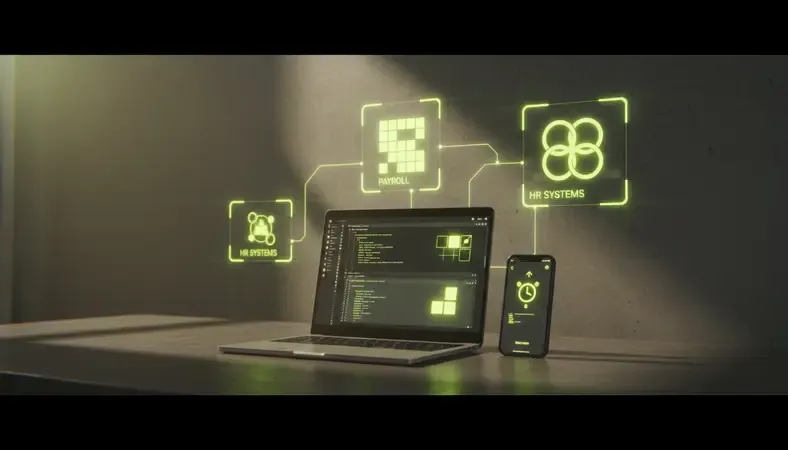
Seamless integration between your employee time clock app and existing business systems determines whether the solution saves time or creates additional work. Poor integration forces manual data entry that eliminates efficiency gains.
Payroll System Connectivity
Modern employee time clock apps connect directly with major payroll providers through APIs or file exports. This integration automatically transfers hours worked, overtime calculations, and project allocations to your payroll system.
The best integrations include:
- Automatic Data Sync: Hours transfer without manual intervention
- Error Handling: Flags discrepancies for review before payroll processing
- Custom Pay Rules: Applies your specific overtime, holiday, and bonus calculations
- Audit Trails: Maintains records of all time and pay adjustments
Verify that your payroll provider appears on the app’s integration list and understand any limitations or additional costs for data transfer.
HR System Integration
Employee time clock apps should connect with your HR information system to maintain consistent employee data. This integration ensures accurate job codes, pay rates, and scheduling information across all platforms.
Key integration points include:
- Employee Onboarding: New hires automatically gain time tracking access
- Role Changes: Updated job codes and pay rates sync immediately
- Terminations: Access revocation and final timesheet processing
- Compliance Reporting: Labor law compliance and audit documentation
Data Security and Compliance
Time tracking data includes sensitive employee information that requires protection. Ensure your chosen app meets industry security standards and compliance requirements for your business type.
Look for features like encrypted data transmission, secure cloud storage, user access controls, and regular security audits. Healthcare and financial services businesses may require additional compliance certifications.
Best Employee Time Clock Apps for 2024
The employee time clock app market offers solutions ranging from simple punch-in tools to comprehensive workforce management platforms. Understanding the strengths and limitations of leading options helps you make an informed decision.
Enterprise-Level Solutions
Large businesses with complex needs benefit from comprehensive platforms that combine time tracking with scheduling, HR management, and advanced reporting.
TSheets by QuickBooks excels at integration with existing QuickBooks workflows while providing robust mobile tracking capabilities. The platform handles complex overtime rules and offers extensive customization options for different business types.
ADP Workforce Now provides enterprise-grade functionality with strong compliance features and detailed analytics. The system works well for businesses with multiple locations and complex pay structures.
Mid-Market Options
Growing businesses need solutions that scale with their operations while remaining cost-effective and easy to use.
Deputy combines time tracking with shift scheduling and team communication tools. The platform works particularly well for retail and hospitality businesses with variable schedules.
BambooHR integrates time tracking with comprehensive HR management, making it ideal for businesses that need both functions in a single platform.
Small Business Solutions
Smaller teams need simple, affordable solutions that provide essential functionality without overwhelming complexity.
Clockify offers free basic time tracking with optional paid features for advanced reporting and integrations. The platform works well for remote teams and project-based businesses.
TimeClock Plus provides straightforward punch-in functionality with basic reporting and payroll integration at competitive pricing.
Specialized Industry Apps
Certain industries benefit from time tracking apps designed for their specific needs and compliance requirements.
Construction companies often choose ExakTime for its rugged hardware options and job site tracking capabilities. The platform handles prevailing wage requirements and certified payroll reporting.
Healthcare organizations frequently select Kronos for its compliance features and integration with healthcare-specific scheduling requirements.
Implementation and ROI Considerations
Successfully implementing an employee time clock app requires careful planning, proper training, and realistic expectations about the transition process. Poor implementation can turn a valuable tool into a source of frustration for both managers and employees.
Planning Your Rollout
Start with a pilot program using a small group of employees before company-wide deployment. This approach allows you to identify potential issues, refine processes, and build internal champions who can help train other team members.
Document your current time tracking processes and identify specific metrics you want to improve. Common goals include reducing payroll processing time, eliminating time theft, improving schedule compliance, and increasing labor cost accuracy.
Training and Change Management
Employee adoption determines implementation success. Provide comprehensive training that covers not just how to use the app, but why the change benefits both the company and individual workers.
Address common concerns about privacy, job security, and technology challenges upfront. Emphasize benefits like more accurate paychecks, easier schedule access, and reduced paperwork rather than focusing solely on management advantages.
Consider implementing Change Management Principles to ensure smooth adoption across your organization. Effective change management reduces resistance and accelerates the realization of benefits.
Measuring Return on Investment
Track specific metrics to quantify the value of your employee time clock app investment:
- Administrative Time Savings: Measure reduction in payroll processing hours
- Payroll Accuracy: Compare error rates before and after implementation
- Time Theft Reduction: Calculate savings from eliminated buddy punching
- Overtime Management: Track reduction in unplanned overtime costs
- Compliance Improvements: Document better adherence to break and meal requirements
Most businesses see positive ROI within 3-6 months through reduced administrative costs and improved accuracy. Larger organizations with significant time theft issues often recover implementation costs within the first month.
Ongoing Optimization
Employee time clock apps provide data that enables continuous improvement in workforce management. Use reporting features to identify patterns in attendance, overtime usage, and productivity that inform better scheduling and policy decisions.
Regular system audits ensure continued accuracy and help identify opportunities for additional features or integrations. Consider implementing Benefits of Employee Wellness Programs alongside time tracking to create a comprehensive approach to workforce management.
Conclusion
An employee time clock app transforms time tracking from a tedious administrative burden into an automated system that saves money and improves accuracy. The right solution eliminates buddy punching, reduces payroll processing time, and provides real-time visibility into labor costs.
Transform your workforce management at HubEngage — unify employee communications, engagement, and time tracking in one comprehensive platform designed for manufacturing, healthcare, and hospitality teams. Ready to get started? Visit HubEngage to learn more.
Employee Time Clock Apps FAQs
What happens if employees forget to clock in or out?
Most employee time clock apps include automatic notifications and manager alerts for missed punches. Employees typically receive reminders via email or push notifications when they forget to clock out. Managers can set up real-time alerts for late arrivals or missed punches.
The apps usually provide easy correction tools that allow managers to add missing punches with proper documentation and approval workflows. Some advanced systems use geofencing to automatically clock employees in when they arrive at work locations.
Can employee time clock apps work without internet connection?
Many modern apps include offline functionality that stores punch data locally when internet connection is unavailable. The data automatically syncs to the central system once connectivity is restored.
This feature is particularly important for field workers, construction sites, or locations with unreliable internet. However, real-time features like GPS verification and manager notifications require active internet connection to function properly.
How do time clock apps prevent employees from clocking in for each other?
Employee time clock apps use multiple verification methods to prevent buddy punching. Photo verification takes a picture each time someone clocks in, allowing managers to verify identity. GPS tracking confirms employees are at the correct location when punching in.
Some apps include biometric verification using fingerprints or facial recognition for maximum security. Geofencing creates virtual boundaries that prevent clock-ins from unauthorized locations.
Are employee time clock apps legal and compliant with labor laws?
Reputable employee time clock apps are designed to comply with federal and state labor laws, including Fair Labor Standards Act requirements for accurate timekeeping. The apps typically include features for break tracking, overtime calculations, and record retention that support compliance.
However, businesses remain responsible for ensuring their time tracking policies and practices comply with applicable laws. Some industries or states have specific requirements for employee consent, data privacy, or record keeping that may affect app selection.
What should I do if employees resist using a time clock app?
Employee resistance often stems from concerns about privacy, job security, or technology challenges. Address these concerns through transparent communication about why the change is necessary and how it benefits everyone.
Provide comprehensive training and ongoing support to help employees feel comfortable with the technology. Consider incentives for early adoption and recognize employees who help others learn the system. Focus on benefits like more accurate paychecks and easier access to schedule information rather than emphasizing monitoring aspects.