Intranet software plays a crucial role in improving internal communication, collaboration, and productivity across teams. It ensures employees can easily find information, stay updated with company news, and collaborate effectively, especially in organizations with distributed, hybrid, or frontline workforces.
Key Takeaways
- Intranet software acts as a central hub for managing communication, data, and workflows.
- Comparing intranet providers helps businesses choose platforms aligned with their workforce needs.
- Having an easy to go checklist for buying intranet software decreases the risk and improves long-term intranet adoption.
- Asking the right questions from intranet software providers will help you pick the right solutions to your business problems..
- Look for real customer experiences so that you know how the right intranet software gives the best business value.
What is Intranet Software?
Intranet software is a digital workplace platform that helps organizations centralize communication, collaboration, and information sharing, allowing employees to access company resources, updates, tools, and knowledge within a secure internal network.
In this blog, we will show you the best intranet software platforms available today, compare their features, strengths, and limitations. Also, you will be able to understand which solutions suit different business needs which will help you choose the right intranet platform for your organization.
Top Intranet Platforms & Enterprise Intranet Softwares
Having the right intranet solution helps organizations improve internal communication, increase productivity, and keep employees informed regardless of location. Below we have added our list of 10 best intranet software platforms that help organizations build connected, productive, and engaged workplaces.
1) HubEngage
HubEngage is an all‑in‑one employee communications and engagement platform designed as a modern intranet for organizations of all sizes. It centralizes internal communication, strengthens employee engagement, and helps companies build a connected digital workplace from a single platform. HubEngage supports multi‑channel messaging, recognition programs, employee surveys, social collaboration, and workforce analytics. Available on web and mobile, it keeps desk and frontline employees informed anywhere while replacing fragmented tools with one integrated communication and engagement system for modern organizations worldwide today.
Best For: All-in-one solution for SMBs to enterprises and frontline teams
Pricing: Starting at $3/user/month
Top Features
Multi-Channel Employee Communications
Send targeted updates across email, SMS, push, Teams, Slack, WhatsApp.
Employee Recognition and Rewards
Celebrate employee achievements using badges, points, and reward recognition programs.
Employee Surveys and Feedback Tools
Run pulse surveys, collect feedback, measure engagement, gain actionable insights.
Social Intranet and Employee Communities
Employees collaborate through social feeds, groups, communities, sharing knowledge internally.
Advanced Analytics and Insights
Track communication performance, engagement metrics, participation trends with analytics dashboards.
Automation and Workflow Management
Automate campaigns, onboarding messages, engagement programs using workflows and automation.
Pros
- Provides a unified platform for employee communication, recognition, surveys, and engagement programs
- Supports multi-channel communication to reach employees across devices and messaging platforms
- Includes mobile apps for both iOS and Android, making it effective for deskless and remote employees
- Offers robust analytics and reporting tools to measure communication effectiveness and employee engagement
- Highly configurable platform with branding and customization options
Cons
- Organizations with very simple communication needs may not require the full set of engagement features
- Advanced automation and customization may require some initial setup and configuration
- Larger enterprises may need integration planning to connect with existing HR or collaboration systems
2) Workvivo
Workvivo is an employee experience and internal communication platform designed to improve connection, engagement, and culture across organizations. The platform combines communication tools with social features to help employees stay informed, recognized, and aligned with company goals. With web and mobile access, Workvivo enables organizations to reach employees wherever they work while supporting collaboration, updates, and company-wide engagement through a modern digital workplace environment.
Top Features
Social Activity Feed
Provides a social-media style feed where employees can share updates, comment, react, and stay connected with company news.
Employee Recognition
Enables peer-to-peer and company-wide recognition through shout-outs, celebrations, and appreciation posts.
Internal Communications
Allows organizations to publish announcements, updates, and multimedia content to reach employees across locations.
Employee Insights and Analytics
Offers analytics to measure engagement, communication performance, and employee participation.
Integrations
Integrates with workplace tools such as Slack, Microsoft Teams, and other enterprise platforms.
Pros
- Strong focus on employee engagement and company culture
- Social-style interface encourages interaction and participation
- Mobile-friendly platform supporting distributed and frontline teams
- Integrates with popular workplace communication tools
Cons
- Less focused on structured intranet content management
- Some advanced features may require additional integrations
- Organizations needing heavy document management may require additional tools
3) Unily
Unily is an enterprise intranet platform designed to create a connected digital workplace for large and global organizations. The platform combines internal communications, knowledge management, collaboration tools, and employee experience features in one unified system. Unily helps companies deliver personalized employee experiences, streamline communication, and provide secure access to information and resources across the organization. With strong integrations and enterprise-level governance, it supports organizations that require scalable, secure, and highly customizable intranet solutions.
Top Features
Personalized Employee Experiences
Delivers tailored content, apps, and resources based on employee role, location, and preferences.
Enterprise Content Management
Provides structured content publishing, knowledge management, and document access across the organization.
Internal Communications Hub
Supports targeted announcements, campaigns, and company updates through a centralized communication platform.
Enterprise Integrations
Integrates with platforms such as Microsoft 365, enterprise apps, and business systems.
Analytics and Insights
Provides reporting and analytics to measure engagement, content performance, and communication impact.
Pros
- Highly scalable platform built for large enterprises and global organizations
- Strong personalization capabilities for delivering targeted employee experiences
- Advanced governance and security controls for enterprise environments
- Extensive integrations with enterprise applications and tools
Cons
- Implementation may require planning and technical resources
- Enterprise-focused platform may be complex for small organizations
- Pricing typically suited for large enterprises rather than SMBs
4) Simpplr
Simpplr is a modern AI-powered intranet platform designed to simplify internal communication and improve the employee experience. The platform brings together company communications, knowledge management, and collaboration tools into a single digital workplace. Simpplr focuses on creating personalized employee experiences by delivering relevant content, resources, and updates to employees based on their roles and interests. With its intuitive interface and AI-powered capabilities, the platform helps organizations improve information discovery, streamline communication, and foster stronger workplace engagement.
Top Features
AI-Powered Intranet
Uses AI to personalize content, automate content governance, and improve knowledge discovery.
Personalized Employee Experiences
Delivers targeted news, resources, and updates based on employee roles and preferences.
Content Management and Knowledge Sharing
Allows organizations to create, manage, and organize knowledge and internal content.
Employee Communication Tools
Supports company announcements, campaigns, and updates across the organization.
Analytics and Insights
Provides dashboards and analytics to measure employee engagement and content performance.
Pros
- Intuitive and user-friendly intranet platform
- AI-driven features improve content discovery and personalization
- Strong tools for internal communication and knowledge sharing
- Quick deployment and adoption compared to traditional intranets
Cons
- Advanced customization may require higher pricing tiers
- Some enterprise integrations may require configuration
- Organizations needing extensive workflow tools may require additional integrations
5) Bloomfire
Bloomfire is a knowledge management and collaboration platform designed to help organizations centralize information and make it easily accessible to employees. The platform enables teams to capture, organize, and share knowledge in a searchable digital workspace. By combining content management, collaboration tools, and powerful search capabilities, Bloomfire helps organizations improve information discovery, enable knowledge sharing, and support better decision-making across teams.
Top Features
Centralized Knowledge Repository
Allows organizations to store and organize documents, videos, and knowledge resources in one searchable platform.
Powerful Search Capabilities
Provides advanced search features that help employees quickly find relevant information and expertise.
Content Creation and Sharing
Enables teams to create posts, upload content, and share insights across departments.
Collaboration and Q&A Tools
Supports discussion threads, questions, and knowledge exchange among employees.
Analytics and Insights
Offers analytics to track knowledge usage, engagement, and content performance.
Pros
- Strong knowledge management capabilities for organizing internal information
- Powerful search features that help employees quickly locate resources
- Encourages collaboration and knowledge sharing across teams
- Supports multiple content formats including documents and videos
Cons
- Primarily focused on knowledge management rather than full intranet functionality
- May require additional tools for advanced internal communications
- Some organizations may need integrations for broader workplace collaboration
6) Axero
Axero is an intranet and employee experience platform designed to improve internal communication, collaboration, and knowledge sharing across organizations. The platform helps companies create a centralized digital workplace where employees can access information, collaborate with teams, and stay aligned with company initiatives. Axero combines social collaboration features, document management, and communication tools to help organizations build a connected and productive work environment.
Top Features
Social Intranet and Collaboration
Provides activity feeds, discussions, and team spaces to support collaboration across departments.
Document and Knowledge Management
Allows organizations to store, organize, and share documents and knowledge resources.
Employee Communication Tools
Supports announcements, news publishing, and targeted communication for employees.
Workspaces and Team Collaboration
Enables teams to collaborate through dedicated workspaces for projects and departments.
Integrations and Customization
Offers integrations with workplace tools and customization options for organizational needs.
Pros
- Combines intranet, collaboration, and knowledge management in one platform
- Flexible and customizable digital workplace solution
- Strong tools for team collaboration and internal communication
- Supports integrations with various workplace applications
Cons
- Some advanced capabilities may require configuration or additional setup
- Smaller organizations may not need the full collaboration feature set
- Implementation may require planning for larger organizations
7) SharePoint
Microsoft SharePoint is a collaboration and intranet platform within Microsoft 365 that helps organizations share content, manage knowledge, and work together across teams. It allows companies to create intranet sites where employees can access company news, documents, and resources from a centralized digital workspace. SharePoint supports collaboration through document sharing, team sites, and integrations with Microsoft 365 applications, enabling employees to work together securely from any device.
Top Features
Team Sites and Intranet Portals
Create team sites and intranet portals for sharing news, resources, and company information.
Document Management and Sharing
Store, organize, and securely share files with version control and permissions.
Microsoft 365 Integration
Integrates with Microsoft Teams, OneDrive, and other Microsoft 365 tools.
Collaboration and Co-authoring
Allows teams to collaborate on documents in real time across devices.
Content Management and Governance
Provides tools for managing content, permissions, and organizational information.
Pros
- Deep integration with Microsoft 365 productivity tools
- Strong document management and file collaboration capabilities
- Scalable platform suitable for organizations of various sizes
- Secure content sharing with enterprise-level governance
Cons
- Setup and customization may require technical expertise
- User interface can be complex for new users
- Some organizations may need additional tools for advanced intranet experiences
8) Noodle
Noodle by Vialect is a workplace collaboration and social intranet platform designed to help organizations improve internal communication, knowledge sharing, and team collaboration. The platform enables employees to connect, share ideas, and collaborate through a unified digital workspace. Noodle focuses on building a social and interactive work environment where employees can access company updates, collaborate in communities, and contribute knowledge across the organization.
Top Features
Social Collaboration Platform
Provides social feeds, discussions, and interactions that encourage employee engagement and communication.
Knowledge Sharing and Content Management
Allows employees to create, share, and organize knowledge across the organization.
Communities and Collaboration Spaces
Enables teams to collaborate in groups and communities focused on projects or interests.
Employee Communication Tools
Supports announcements, updates, and company-wide communication.
Search and Information Discovery
Helps employees quickly find relevant knowledge and resources across the platform.
Pros
- Encourages open communication and collaboration across teams
- Supports knowledge sharing through communities and social interactions
- Helps build a connected and collaborative workplace culture
- Centralizes information and communication in one platform
Cons
- May require adoption efforts to encourage active participation
- Feature set may be smaller compared to large enterprise intranet platforms
- Organizations may need integrations for broader digital workplace functionality
9) Blink
Blink is a mobile-first employee experience and communication platform designed to connect frontline and deskless workers with their organizations. The platform combines communication, collaboration, and productivity tools into a single app that employees can access from their mobile devices. Blink helps organizations deliver company updates, enable secure messaging, and provide employees with access to tools, resources, and services they need for their daily work.
Top Features
Mobile-First Employee App
Provides a single mobile app where employees can access communications, tools, and company resources.
Secure Messaging and Chat
Enables real-time messaging and collaboration across teams and departments.
Company News and Announcements
Allows organizations to share company updates, news, and important information with employees.
Digital Tools and Resources Hub
Provides access to workplace tools, forms, and resources from one platform.
Employee Engagement Features
Supports reactions, comments, and interaction with company content and updates.
Pros
- Designed specifically for frontline and deskless workers
- Mobile-first platform with easy employee access
- Combines communication, messaging, and workplace tools in one app
- Helps organizations reach employees who do not use traditional desktops
Cons
- Limited traditional intranet content management capabilities
- Organizations may need integrations for advanced knowledge management
- Focus on mobile communication may not suit all office-based workflows
10) Interact
Interact is an intelligent intranet platform designed to improve internal communication, knowledge management, and employee engagement across organizations. The platform helps businesses create a centralized digital workplace where employees can easily access information, collaborate with colleagues, and stay aligned with company goals. Interact focuses on delivering personalized content, powerful search capabilities, and strong governance features to ensure employees can quickly find the information they need.
Top Features
Personalized Content Delivery
Delivers targeted news, updates, and resources based on employee roles, departments, and locations.
Enterprise Search and Knowledge Management
Provides intelligent search and organized knowledge repositories for easy information discovery.
Content Publishing and Communication Tools
Allows organizations to publish announcements, articles, and company updates.
Integrations with Workplace Tools
Integrates with platforms such as Microsoft 365 and other business applications.
Analytics and Reporting
Offers analytics to measure engagement, content performance, and communication effectiveness.
Pros
- Strong intranet platform for internal communication and knowledge management
- Personalized content improves employee experience and information access
- Powerful search capabilities for finding organizational knowledge
- Integrates with widely used workplace productivity tools
Cons
- Advanced configuration may require administrative setup
- Enterprise-focused features may be complex for smaller teams
- Organizations may need planning for content governance and structure
For quick reference, we have created these in the form of below table which you can use anytime. These span SMBs to global enterprises and represent the top solutions in the market.
| Platform | Best For | Key Features | Pricing* |
|---|---|---|---|
| HubEngage | All-in-one; SMBs to Enterprises; frontline teams | Multi-channel comms (push, SMS, email, Teams, Slack, WhatsApp); Recognition & gamification; Surveys & AI chatbot; Analytics & automation | Starting at $3/user/month |
| Microsoft SharePoint | Large enterprises, regulated industries | Document management, enterprise-grade governance, workflows | Included in M365 enterprise plans |
| LumApps | Enterprises using Google ecosystem | Social intranet + Google Workspace integration | Custom pricing |
| Staffbase | Regulated industries, global enterprises | Employee comms hub, branded mobile app, compliance controls | Quote-based enterprise pricing |
| Firstup | Enterprises with complex comms needs | Multi-channel messaging orchestration | Custom enterprise pricing |
| Simpplr | SMBs and midsize businesses | AI-powered intranet, intuitive UI, fast rollout | Per-user/month pricing |
| Happeo | Midmarket, hybrid organizations | Google Workspace-native, social features | Subscription-based |
| Beekeeper | Frontline and deskless industries | Mobile-first platform, workforce reach | Per-user/month |
| Blink | SMBs, retail & hospitality | Lightweight comms app, mobile adoption | Subscription-based |
| Unily | Multinationals, compliance-heavy orgs | Enterprise-scale, customizable, secure | Enterprise license |
| Workvivo | Enterprises focused on culture & engagement | Social feeds, recognition, integrations | Subscription-based |
| Interact | Organizations needing deep CMS + comms | Content publishing, governance, search | Quote-based |
| Axero | SMBs & midsize companies | Collaboration hub, knowledge base, forums | Tiered pricing |
| Jive | Enterprises needing social collaboration | Forums, communities, analytics | Custom pricing |
| ThoughtFarmer | Companies wanting social + intranet hybrid | Social features + structured intranet | Subscription |
| MyHub | SMBs on budget | Simple intranet builder, templates | Low-cost monthly plans |
| Bloomfire | Knowledge management & content sharing | Q&A, search, knowledge repository | Subscription |
Intranet vs. Extranet vs. Internet
We have seen people get confused between intranet, extranet and internet. Let us see how they are different from each other.
| Type | Access Level | Who Can Use It | Purpose |
| Intranet | Private | Employees only | Internal communication, documents, workflows, and collaboration |
| Extranet | Restricted | Employees + approved partners or vendors | Secure collaboration with external stakeholders |
| Internet | Public | Anyone | Public information, websites, and open online content |
If you want to understand more about them in detail then you must check our detailed blog on Intranet vs Extranet vs Internet.
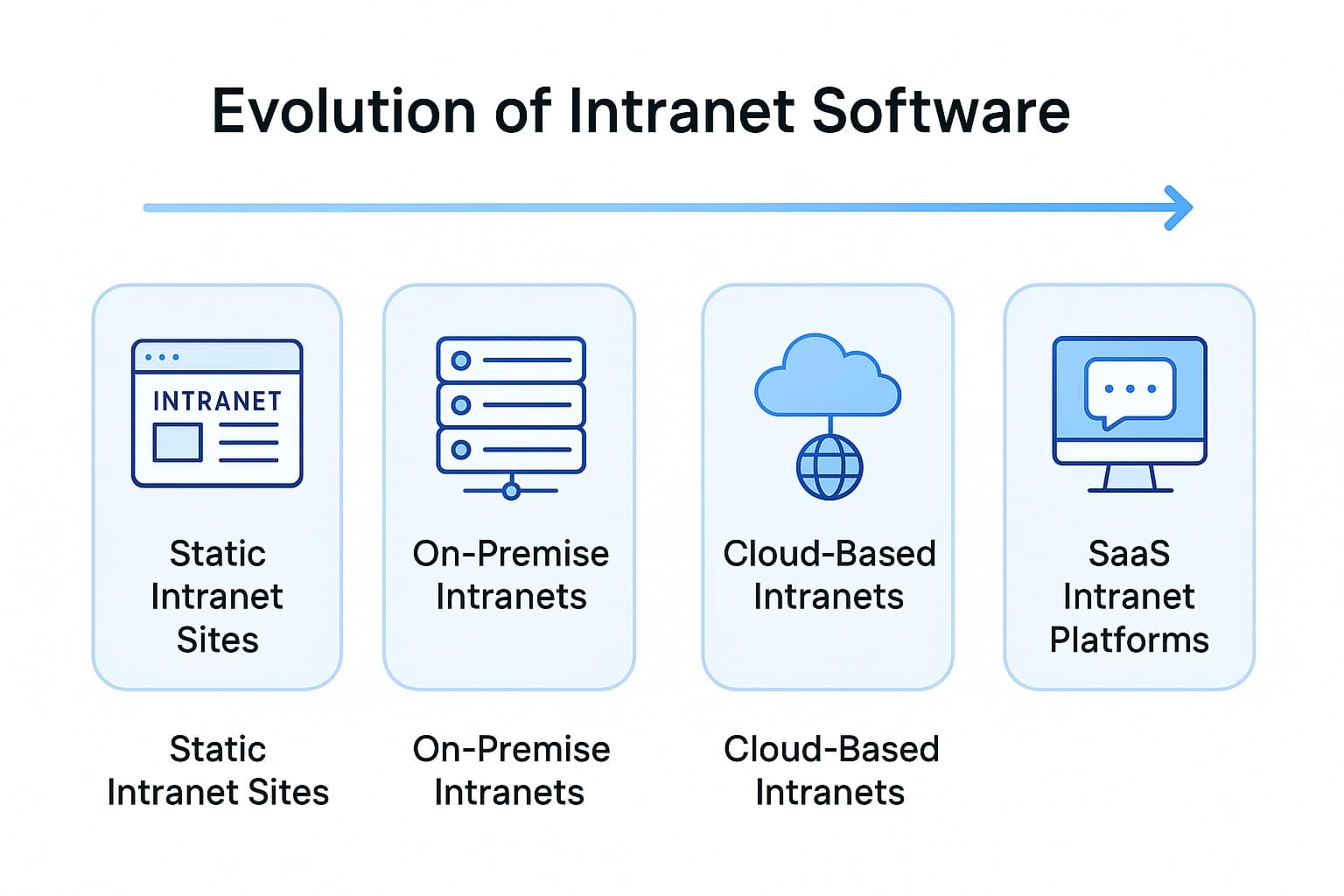
Evolution of Modern Intranet Solutions
We have had a front-row seat to how intranet solutions have transformed over time:
- Static intranets were on‑premise and designed mainly to store files.
- Document-heavy intranets like SharePoint added structure along with compliance but were difficult to scale.
- Modern intranet platforms became cloud-based, more visual, easier to use, and connected to everyday tools.
Today, modern intranets bring together communication, workflows, mobile access, and intelligence in one place.
📈 According to McKinsey, connected employees drive 20–25% more productivity, showing how important digital workplace intranets have become.
Types of Intranet Solutions
Here’s how we categorize the main types of intranet solutions:
| Type | Description | Pros | Cons | Best For | Key Features |
|---|---|---|---|---|---|
| Legacy Static | Basic CMS sites | Easy setup; low cost | One-way; minimal analytics | Small teams | File storage, static pages |
| Document-Centric | SharePoint/ECMs | Governance & version control | Complex; IT-heavy | Regulated industries | Libraries, workflows, permissions |
| Modern Dynamic | Cloud, AI, mobile-first | Personalized, social, integrated | Subscription cost | SMBs–Enterprises | AI search, social, mobile apps |
👉 Explore more about these in details by on this blog on intranet portals.
Benefits of Modern Intranet Platforms
From what we’ve seen, the value of modern intranet platforms goes far beyond sharing news.
Higher Productivity
Gartner reports employees spend 2.5 hours/day searching for information. Modern intranets reduce this dramatically through AI search alongwith an organized content.
Better Communication
Targeted messages, alerts, and feeds ensure employees receive the right updates at the right time. Also internal communication increases employee trust.
Culture and Engagement
Gallup found engaged teams are 21% more profitable. Social features such as likes, comments, recognition help us create a culture where contributions are seen.
Support for Frontline Teams
Also, Deloitte reports shows that 52% of frontline workers would leave due to poor workplace tech. However, having Mobile-first intranets shall close this gap.
Governance at Scale
With the help of role-based permissions, structured content, and analytics organizations can scale responsibly.
Core Features of Modern Intranet Applications
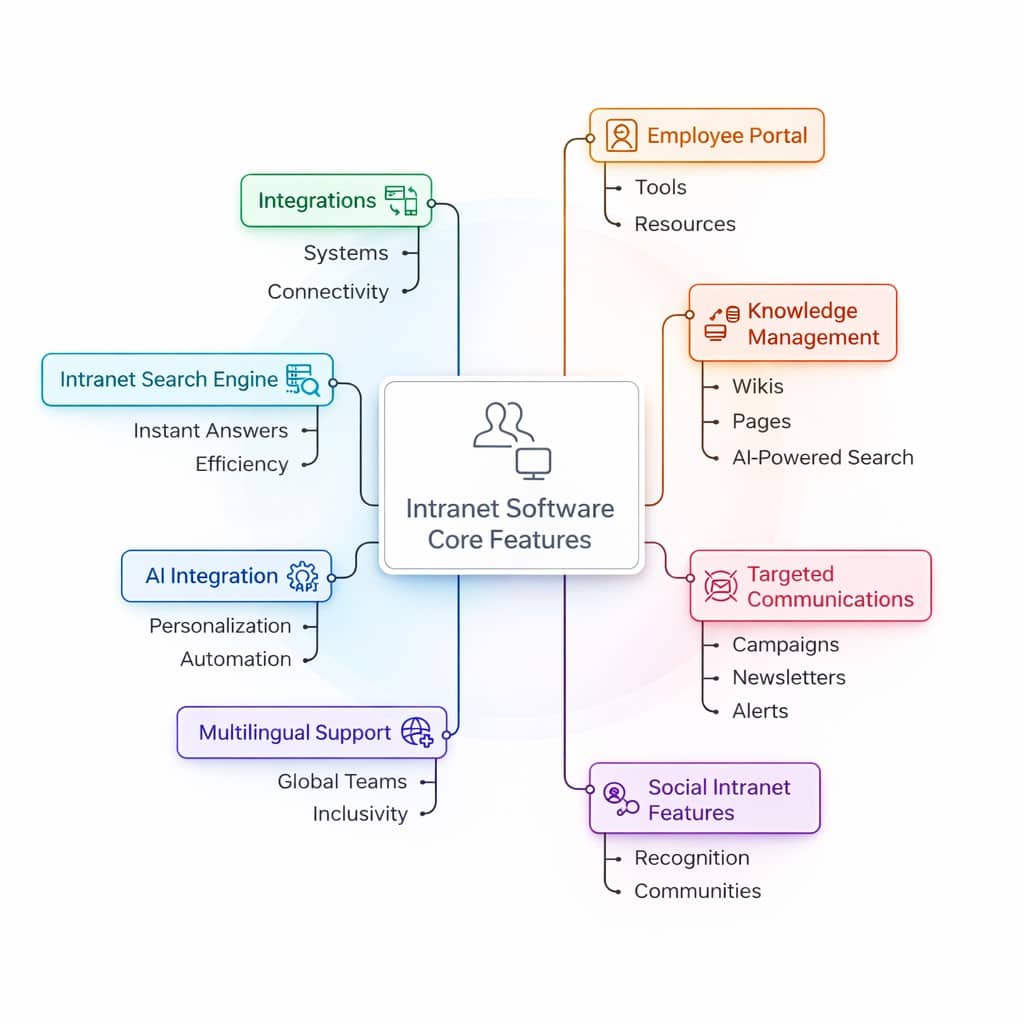
If you want to evaluate an intranet solution then, these are the most critical features to focus on such as employee portal accessibility, ability to create knowledge bases, targeting communications to specific employees, interactive features, multilingual support, AI search and chatbot, integrations into existing systems, and more importantly security and governance. These features improve communication, adoption, productivity, and overall employee experience across modern workplaces.
So far, we learned that the best intranets focus on usability, scalability, and engagement because technology only works when people actually use it.
How an Employee Intranet Software is used in different industries?
An intranet software is used to centralize internal communication, documents, and updates in one place. It helps employees access important information quickly, collaborate with teams, and stay aligned with company goals. Teams use it to share announcements, manage knowledge, support daily tasks, and reduce dependency on multiple tools.
A modern intranet also improves engagement, supports remote work, and creates a consistent employee experience across the organization. Let us explore how different industries are able to leverage intranet software:
1. Healthcare:
Real-time updates help staff access protocols, alerts, and schedules quickly, enabling faster decisions and safer, better coordinated patient care delivery.
2. Manufacturing:
Structured communication ensures workers receive clear instructions, safety guidelines, and updates, reducing confusion, errors, and workplace accidents significantly everywhere daily.
3. Retail & logistics:
Improved communication keeps employees informed, supported, and engaged, helping them feel valued and reducing stress, burnout, and staff turnover rates.
4. Corporate environments:
Better alignment across departments helps teams share goals, collaborate efficiently, avoid duplicated work, and make faster, more informed decisions together.
How to Choose the Right Intranet Solution?
To choose the right intranet solution, start by clearly understanding your business needs and employee workflows. Identify what problems you want to solve, such as communication gaps or information access. Then evaluate intranet platforms based on ease of use, the features you want to fulfil your business needs and long-term support before you make a final decision.
Intranet Software Buyer Checklist
While selecting the right intranet platform for your business needs you need to consider many factors as well as touchpoints so that you are able to pick the right one that gives you the best value.
| Factor | What It Means | Example |
|---|---|---|
| Business goals alignment | The intranet should support company goals and improve communication, productivity, and teamwork. | Leadership shares company goals through the intranet so teams stay aligned. |
| Ease of use | The intranet should be simple and intuitive so employees can use it without training. | Employees log in and easily find updates or documents. |
| Mobile and remote access | The platform should work smoothly on mobile and remote devices for easy access anywhere. | Frontline staff check announcements and schedules from their phones. |
| Core features | It should include key tools like communication, document sharing, search, and collaboration. | Employees share documents, post updates, and search company policies. |
| Integrations | The intranet should connect with existing workplace tools and software. | Employees access multiple tools without switching between apps. |
| Security and permissions | Strong security and role-based access protect company data and control information access. | Only authorized employees can view or edit sensitive information. |
| Scalability | The platform should grow with your company as teams and content increase. | New hires and departments can be added easily as the company grows. |
| Analytics and reporting | Analytics help track usage, engagement, and performance of intranet content. | Admins see which announcements employees read the most. |
| Vendor support and onboarding | Good vendor support helps organizations set up and manage the intranet effectively. | The vendor assists with setup and trains teams during launch. |
| Pricing and ROI | Businesses should evaluate pricing and long-term value before choosing intranet software. | Companies use ROI calculators to measure intranet value. |
What questions to ask from intranet software providers?
If you are someone who is looking forward to using intranet solutions in their business then there are a few questions that you always need to ask from an intranet vendor. Here are some of the common questions you can ask them:
Is the intranet easy for employees to use daily?
Easy usability ensures faster adoption, less training, and consistent usage across all employee groups.
Can the intranet integrate with our existing business tools?
Integrations reduce switching between tools and keep employee workflows simple, connected, and efficient.
How secure is our company data on the intranet?
Strong security protects sensitive information and ensures compliance with data privacy standards.
Does the intranet support mobile and remote employees?
Mobile access ensures all employees stay informed, connected, and productive from anywhere.
What level of support and onboarding is provided?
Good support helps teams launch faster, solve issues quickly, and maximize intranet value.
With these common questions in mind, you will be able to easily decide what type of intranet solution you need and from which vendor. Also, you can check our guide that will help you choose the right intranet provider.
Why is Hubengage a better platform as compared to others?
When we designed HubEngage, we focused on real problems we saw across industries such as too many tools to work on, difficulty in getting used to the tools, poor communication, and no single place where one can easily do all aspects of communication with ease.
Taking all these observations we created our approach of providing intranet software solutions by bringing together everything in one platform. We offer a multi-channel communication platform in which a user can access the desired information from any digital channel.
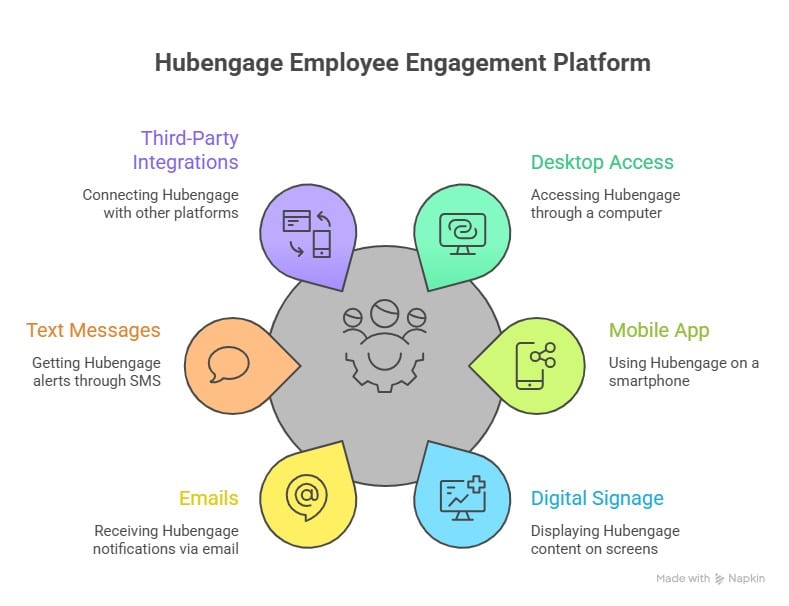
This holistic approach is why many organizations consider HubEngage among the best intranets available.
👉 Browse examples for inspiration: Best Intranet Websites
How HubEngage enables the successful use of Intranet Software?
We help organizations use intranet software successfully by focusing on employee needs, clear communication, and easy adoption. With real-world experience across industries our intranet solutions help companies to improve engagement, streamline communication, and create a connected digital workplace that delivers measurable results.
Customers using out intranet platform had great experiences in solving their business challenges as noted in this review by Joseph C, one of our real estate enterprise customers.
Before using HubEngage intranet software, our internal communication was scattered and often unclear. Important updates were missed, language barriers caused confusion, and employees relied on multiple tools to stay informed.
After implementing HubEngage, everything changed. We finally had one central platform to share announcements, newsletters, and updates seamlessly. The automatic translation feature helped our global teams understand messages instantly.
The platform is easy to set up and simple for employees to use daily. As a result, communication became clearer, engagement improved, and our teams felt more connected and aligned than before.
Importance of Intranet Platforms in Today’s Digital Workplace
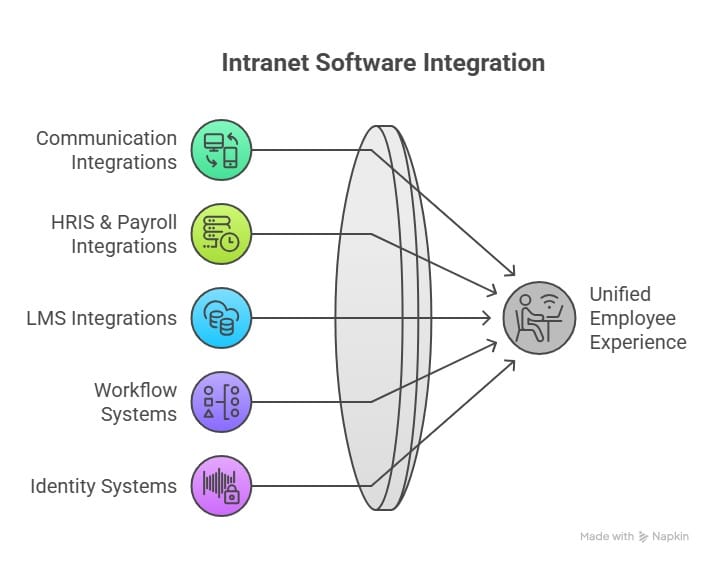
Intranet software is the foundation of the modern digital workplace as it brings communication, information, and work tools into one central system. It can easily connect with various digital platforms such as MIcrosoft Teams, Slack, JIRA, Google Workspace, HRIS tools like Zoho, and other industry‑specific softwares.
Earlier, they were mainly used as digital storage spaces for documents. Today, modern intranet software plays a big role in how employees work, communicate, and stay connected. It is where employees get real-time updates, find out important documents quickly, communicate with their team, and stay updated with the company rules from any device.
From working with organizations across industries, it is clear that the right intranet software helps in filling up the communication gaps and decreasing the need of using too many disconnected tools at one time. Instead of changing between emails, chat apps, and document systems, employees can find everything they need in one place. This improves focus, productivity, and overall employee experience at scale.
Modern intranet platforms also support remote and hybrid work models by giving secured access anytime as well as anywhere. They can easily connect with business tools like HR systems, project management software, and communication platforms to create smooth workflows. Social features, personalization, and feedback tools further improve engagement.
By decreasing separate data storages and improving alignment, intranet software helps organizations stay connected, productive, and responsive in today’s fast-changing digital environment.

Integration of Intranet Software with Other Business Tools
Modern intranet platforms can easily integrate with different types of digital channels so that you can create a simple and common digital workplace for your team. We have seen how these integrations eliminate confusion, decrease the time spent on switching between apps, and create a seamless employee experience. Where legacy intranets relied on manual uploads or scattered data sources, modern intranet software pulls everything together:
Future of Intranet Software
Intranets are evolving into digital workplace assistants:
- Predictive search & instant answers
- Generative content authoring
- Signal-driven targeting across push, Teams, Slack, WhatsApp
- Unified analytics tied to business outcomes
- AI-powered workplaces giving personalization and automation for every employee role.
Conclusion
Over the years, we’ve seen intranet software evolve from simple information repositories into powerful, dynamic digital workplace hubs. Today, intranet platforms bring communication, knowledge, workflows, automation, and culture together in one unified experience. They reduce noise, close communication gaps, and help employees stay focused on what matters.
Whether you’re supporting global teams, frontline workers, hybrid staff, or fast‑growing operations, the right intranet solution becomes the foundation for productivity and engagement. It aligns people, connects tools, and strengthens culture.
As organizations continue to modernize, we believe the intranet will remain one of the most important systems in the digital workplace. And when built with the employee experience in mind, it becomes more than a tool it becomes a central part of how people work, communicate, and thrive.
If you want to see how we approach intranet software and what a unified, modern intranet looks like in action, explore the HubEngage employee intranet platform.
👉 See the HubEngage employee intranet platform in action today.
FAQs on Intranet Software
What is intranet software?
Intranet software is a secure internal platform used by organizations to share information, communicate with employees, and manage company resources. It allows employees to access documents, updates, tools, and collaboration spaces from one centralized digital workplace.
What are intranet platforms used for?
Intranet platforms are used to improve internal communication, store company documents, share announcements, collaborate on projects, and manage employee resources. They help teams stay informed, connected, and productive across departments and locations.
What are examples of intranet solutions?
Examples of intranet solutions include HubEngage, Microsoft SharePoint, Simpplr, Workvivo, Unily, Axero, Interact, and Blink. These platforms help organizations manage internal communication, collaboration, and knowledge sharing.
How does intranet software improve internal communication?
Intranet software improves internal communication by providing a central place for company announcements, updates, messaging, and collaboration. Employees can quickly access important information, reducing email overload and ensuring consistent communication across the organization.
Can intranet software integrate with HR and project tools?
Yes, modern intranet software can integrate with HR systems, project management tools, and collaboration platforms like Microsoft Teams, Slack, and Google Workspace. These integrations help employees access tools and information without switching between multiple platforms.
What features should modern intranet software include?
Modern intranet software should include internal communication tools, document management, search functionality, collaboration spaces, employee directories, analytics, mobile access, and integrations with workplace tools to support a connected digital workplace.
How do intranet platforms differ from employee portals?
Intranet platforms focus on communication, collaboration, and knowledge sharing across the organization. Employee portals mainly provide access to HR services such as payroll, benefits, leave management, and personal employee information.
Is intranet software the same as a digital workplace intranet?
Intranet software is a core component of a digital workplace intranet. While an intranet focuses on communication and information sharing, a digital workplace includes additional tools like collaboration platforms, workflow automation, and integrated business applications.
What are the common challenges in maintaining intranet software?
Common challenges include outdated content, low employee adoption, poor search functionality, and lack of governance. Organizations must regularly update content, encourage participation, and maintain clear content ownership to keep the intranet effective.
How do companies measure the ROI of intranet software?
Companies measure intranet ROI by tracking employee engagement, communication reach, time saved in finding information, collaboration improvements, and productivity gains. Analytics dashboards and employee feedback help evaluate the platform’s impact.
How secure is modern intranet software?
Modern intranet software is highly secure and typically includes role-based access controls, data encryption, authentication systems, and compliance features. These security measures ensure only authorized employees can access company information.
How can intranet software be customized for different departments?
Intranet software can be customized by creating department-specific pages, targeted content, role-based access, and dedicated collaboration spaces. This allows teams such as HR, IT, and Marketing to access relevant tools and resources tailored to their needs.
Related internal links for deeper exploration:
Employee Intranet | Employee Portal Software | Company Intranet | Cloud Intranet | Intranet Apps | Internet vs Intranet | Intranet Search Engine | CMS Intranet | Benchmark intranet | Intranet examples