Most organizations lose productivity not because people lack skills, but because information never reaches the right person at the right time. A nurse misses a policy update. A factory floor worker does not know about a shift change. A hotel housekeeper never receives the new cleaning protocol. These are not communication failures — they are tool failures.
If you are evaluating employee communication apps for a distributed, deskless, or shift-based workforce, this guide gives you a clear picture of what is available, what to look for, and how to make the right call for your organization.

Key Takeaways
- Employee communication apps help organizations deliver real-time updates, announcements, and operational messages to frontline, deskless, and distributed employees.
- Modern communication platforms improve productivity by ensuring the right information reaches the right employees through mobile apps, SMS, push notifications, and in-app messaging.
- Key features to look for include targeted messaging, two-way communication, HR system integrations, engagement analytics, and mobile-first accessibility.
- Industries like manufacturing, healthcare, and hospitality benefit from communication apps that support shift workers, multilingual teams, and employees without corporate devices.
- Integrated employee communication platforms improve engagement, reduce missed updates, speed up response times, and strengthen workplace collaboration across locations.
- Platforms combine employee communications, surveys, recognition, and workforce operations into one unified employee experience platform.
Top Employee Communication Apps and Platforms
The market for employee communication apps has expanded significantly, with research from Gallagher’s State of the Sector report indicating that only 13% of organizations feel highly effective at internal communications. The right platform changes that number fast. Here are the platforms for employee communication.
1. HubEngage
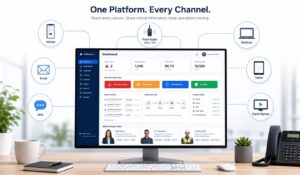
HubEngage is a unified employee experience platform built specifically for industries with large deskless and shift-based workforces — manufacturing, healthcare, and hospitality chief among them. Unlike general-purpose employee communication apps that bolt on engagement features, HubEngage integrates communications, surveys, recognition, and task management into a single environment.
Key features:
* Multi-channel delivery including push notifications, SMS, email, and in-app messaging
* Targeted communications by department, location, role, or shift
* Pulse surveys and feedback tools built into the same platform
* Multilingual support — critical for diverse manufacturing and hospitality teams
* Analytics dashboard showing open rates, read rates, and engagement by segment
* Mobile-first design that works on personal devices without requiring corporate hardware
Best use cases: Organizations with 250+ employees spread across multiple locations or shifts, particularly in manufacturing, healthcare, and hospitality where deskless workers make up the majority of the workforce.
Pros: Deep targeting capabilities, strong analytics, purpose-built for frontline industries, no corporate device required.
Cons: Best value at mid-to-enterprise scale; smaller teams may find the feature set broader than they need initially.
2. Staffbase
Staffbase is a well-established employee communications platform focused on large enterprises. It offers a branded employee app, an intranet, and an email newsletter tool. The platform emphasizes top-down communications with a polished, branded experience.
Key features:
* Custom-branded employee app
* Intranet and content management system
* Analytics on content performance
* Integration with Microsoft 365 and SharePoint
Best use cases: Large enterprises that need a branded internal communications hub and already operate within the Microsoft ecosystem.
Pros: Strong branding capabilities, enterprise-grade security, good Microsoft integration.
Cons: Less suited for two-way communication and frontline engagement; pricing reflects enterprise positioning.
3. Beekeeper
Beekeeper focuses specifically on frontline and deskless workers. The platform emphasizes messaging, shift communication, and operational workflows for industries like hospitality, manufacturing, and retail.
Key features:
* Team messaging and group chats
* Shift handover notes and operational streams
* Surveys and polls
* Integrations with scheduling and HR systems
Best use cases: Operations teams in hospitality and manufacturing that need fast, informal communication channels for shift workers.
Pros: Intuitive for frontline workers, strong operational focus, good for real-time team coordination.
Cons: Communication features are strong, but broader employee experience capabilities are more limited compared to full-suite platforms.
4. Microsoft Teams
Teams is the dominant communication tool for office-based workforces and has expanded into frontline worker functionality through Teams Essentials and Shifts. For organizations already invested in Microsoft 365, it offers significant value.
Key features:
* Chat, video, and voice in one platform
* Shifts module for schedule communication
* Integration with the full Microsoft 365 suite
* Broad third-party app ecosystem
Best use cases: Knowledge worker organizations already on Microsoft 365; mixed workforces where desk-based and field-based employees need to collaborate.
Pros: Deep Microsoft integration, familiar interface, strong collaboration tools.
Cons: Frontline features require additional licensing; can feel overwhelming for shift workers who only need targeted operational communications.
5. Workvivo
Workvivo, now part of Zoom, positions itself as a social intranet and employee experience platform. It emphasizes culture, recognition, and community alongside communications.
Key features:
* Social feed and activity stream
* Recognition and shoutouts
* Podcasts and video content distribution
* Integration with Zoom for video
Best use cases: Organizations prioritizing culture-building and employee recognition alongside communications, particularly in hybrid environments.
Pros: Strong culture and recognition features, engaging social interface, good for hybrid teams.
Cons: Less suited for operational, shift-based communication; better for engagement than real-time operational messaging.
Key Features to Look For in Communication Tools
Not all employee communication apps are built for the same workforce. Here is what actually matters when you evaluate options.
Reach Without a Corporate Device
For manufacturing floors, hospital wards, and hotel housekeeping teams, most workers do not have a company-issued phone or laptop. The app must work on personal devices and require minimal setup. Push notifications and SMS fallback ensure messages actually land.
Targeting by Role, Location, or Shift
Sending the same message to 2,000 employees creates noise. Effective employee communication apps let you segment by department, shift, site, or role — so a policy update for the night shift in Facility B reaches exactly those people and nobody else.
Two-Way Communication
Broadcast-only tools leave employees feeling talked at, not engaged. Look for survey tools, reaction options, comment threads, and feedback channels that let employees respond. This is where employee communication apps become employee experience platforms.
Analytics That Show Real Engagement
Open rates alone do not tell you much. Strong platforms show you who read a message, which segments engaged, and where communication drops off — so you can act on the data, not just collect it.
Integration With HR Systems
Employee communication apps that do not connect to your HRIS, scheduling system, or payroll platform create duplicate work. Integration matters — a point reinforced by the broader Benefits of a Company Intranet, which depends on connected data to stay relevant.
Employee Communication Apps vs. Traditional Methods
Comparing Communication Approaches
| Method | Speed | Reach | Two-Way | Analytics | Cost |
|---|---|---|---|---|---|
| Employee communication apps | Immediate | All employees, targeted | Yes | Full reporting | Monthly SaaS fee |
| Fast | Desk workers primarily | Limited | Basic open rates | Included in email tools | |
| Bulletin boards / posters | Slow | On-site only | No | None | Low |
| Team meetings | Scheduled | Attendance-dependent | Yes | None | High (time cost) |
| SMS / text blasts | Immediate | Broad | No | Limited | Per-message cost |
The table makes the case clearly: employee communication apps are the only method that combines speed, reach, targeting, two-way capability, and measurable outcomes. Traditional methods each solve one problem while creating others.
Email works for desk-based employees but misses the factory floor. Bulletin boards reach on-site workers but go unread by remote or off-shift staff. Meetings create engagement but cannot scale across 15 locations. Employee communication apps handle all of these scenarios in a single platform.
Implementation Best Practices for Internal Communications
Deploying employee communication apps successfully requires more than purchasing software. These practices separate effective rollouts from abandoned platforms.
Start with a clear use case. Do not try to solve every communication problem at once. Pick one high-value use case — shift change notifications, safety alerts, or policy updates — and build adoption around it before expanding.
Involve frontline managers early. Managers are the credibility bridge between leadership and frontline employees. If managers do not use the platform, their teams will not either. Train managers first and make them advocates.
Communicate the “why” to employees. Workers who understand why the organization is adopting a new tool are more likely to engage with it. A brief explanation — “this replaces the paper bulletin board and means you get shift updates on your phone” — removes resistance.
Measure from day one. Establish baseline metrics before launch: current message reach rates, survey participation, time to acknowledge safety alerts. Then measure the same metrics post-launch to demonstrate ROI.
Connect to Change Management Principles. Sustained adoption requires treating the rollout as a change initiative, not just a software deployment. Resistance is normal; planning for it is what separates successful implementations from stalled ones.
Integration With HR and Employee Experience Platforms
Employee communication apps deliver the most value when they connect to the broader HR technology stack. Standalone communication tools create data silos. Integrated platforms create a unified view of the employee experience.
Key integrations to prioritize:
- HRIS integration: Automatically sync employee rosters, departments, and roles so targeting stays accurate without manual updates.
- Scheduling systems: Connect shift schedules so communication can be triggered by schedule changes, shift starts, or coverage gaps.
- Learning management systems (LMS): Deliver training content and compliance acknowledgments through the same channel employees use for daily communications.
- Recognition and rewards platforms: Tie peer recognition to the communication layer so acknowledgment reaches employees in real time.
The Benefits of Unified Communication Platforms become most visible when these integrations are in place. A nurse who receives a shift change notification, a training reminder, and a peer recognition message through the same app has a meaningfully different experience than one who checks three separate systems — or misses the update entirely.
ROI and Productivity Metrics for Communication Apps
Organizations often ask how to measure the return on employee communication apps. The answer depends on which problems you are solving, but these metrics provide a reliable framework.
- Message reach rate: What percentage of targeted employees actually received and opened the communication? Benchmark against your pre-app baseline.
- Time to acknowledge: For safety alerts, compliance updates, or policy changes, how quickly do employees confirm receipt? Faster acknowledgment reduces liability exposure.
- Survey participation rate: Engaged employees respond to surveys. Low participation signals either poor communication reach or low trust — both solvable with the right platform.
- Reduction in communication-related incidents: In manufacturing and healthcare, missed communications can cause safety incidents. Track near-misses and incidents tied to communication failures before and after deployment.
- Manager time savings: Estimate how much time managers spend on communication tasks (posting notices, calling employees, answering repeated questions) and calculate the hours recovered when employee communication apps automate these workflows.
Industry data from McKinsey suggests that improved internal communication can increase productivity by 20–25% in organizations where workers are disconnected from information flows. For a 500-person manufacturing operation, that is a significant return on a SaaS subscription.
Security and Compliance Considerations
Employee communication apps handle sensitive information — HR policy updates, health and safety alerts, employee data. Security cannot be an afterthought.
What to evaluate:
- Data encryption: Messages and stored content should be encrypted in transit and at rest. Confirm the encryption standard (AES-256 is the current benchmark).
- Role-based access control: Administrators should be able to control who can send messages to which groups, preventing unauthorized broadcasts.
- GDPR and HIPAA compliance: Healthcare organizations in particular need platforms that comply with Health Insurance Portability and Accountability Act requirements. Confirm that employee data is stored in compliant environments and that audit logs are available.
- Data residency: For multi-national organizations, confirm where data is stored and whether it meets local regulatory requirements.
- SSO integration: Single sign-on reduces password fatigue and improves security by centralizing authentication through your existing identity provider.
Key Insight: The biggest security risk with employee communication apps is not the platform itself — it is shadow IT. When employees resort to personal WhatsApp groups because the official tool is too hard to use, sensitive information leaves your controlled environment entirely. Usability and security are not in tension; they are both requirements.
Understanding internal communications as a formal organizational function — not just a convenience — is what drives organizations to invest in secure, compliant platforms rather than consumer messaging apps.
Conclusion
The right employee communication apps do not just move information — they connect people who would otherwise operate in silos. For manufacturing, healthcare, and hospitality teams, that connection is the difference between a workforce that functions and one that thrives.
Unify your employee communications, engagement, and workforce operations with HubEngage — connect every employee, from the factory floor to the front desk, in a single platform built for the way your workforce actually works. Ready to get started? See a demo to learn more.
Employee Communication Apps FAQs
What is the difference between an employee communication app and an intranet?
An intranet is primarily a content repository — a place to store policies, forms, and company news. Employee communication apps are delivery mechanisms. The best platforms combine both: they push communications proactively and give employees a place to find information on demand. Many modern platforms blur this line, but the distinction matters when evaluating whether you need push capability or pull capability — or both.
Do employee communication apps work for employees without smartphones?
Most modern employee communication apps are mobile-first but not mobile-only. SMS fallback, email delivery, and desktop web access ensure that employees without smartphones can still receive communications. Platforms like HubEngage are designed for workforces where device access varies significantly across the employee population.
How long does implementation typically take?
For a mid-sized organization (250–1,000 employees), most employee communication apps can be deployed in four to eight weeks. The technical setup is usually faster than the change management process — getting managers trained and employees onboarded is where time is spent. Complex integrations with HRIS or scheduling systems may extend the timeline.
Can employee communication apps replace email?
For frontline and deskless workers, employee communication apps are more effective than email — most frontline employees do not have corporate email addresses. For desk-based workers, apps complement email rather than replace it. The goal is not to eliminate email but to ensure every employee has a reliable channel, regardless of whether they sit at a desk.
How do you measure whether the app is actually being used?
Platform analytics show you open rates, read rates, survey completion, and active user counts. Set a 30-day and 90-day review cadence after launch. Look for segments with low engagement — often a specific department or location — and investigate whether it is a training issue, a manager adoption issue, or a content relevance issue.
Related Links:
employee communication platform | internal communications software