Only 12% of employees say their company does a great job of onboarding. For HR and operations leaders, that is a signal that the standard model still misses too many people, especially employees who do not spend their day at a desk.
The gap usually starts with channel choice. Many onboarding programs still rely on email, portal logins, and desktop tasks as if every new hire has a company inbox on day one. That works for office-based staff. It breaks fast in healthcare, manufacturing, retail, hospitality, logistics, and field service, where new hires often depend on personal mobile devices, SMS, QR codes, kiosks, and direct manager communication to get what they need.
Automating employee onboarding means building a process the whole workforce can access. That includes forms and policy acknowledgments, but it also includes shift details, training prompts, day-one instructions, and reminders delivered through mobile-first channels that fit how people work. The practical takeaway is simple. Better automation improves consistency, reduces delays between HR, IT, operations, and frontline managers, and gives new hires a clearer path into the job.
Organizations that treat onboarding as part of a broader employee retention strategy usually get more value from the effort, because early confusion and missed communication often show up later as turnover, absenteeism, and slower ramp-up.
Why Automating Onboarding Is No Longer Optional
Most organizations don't have an onboarding effort problem. They have an onboarding design problem.
Manual onboarding usually piles up around the same points. HR chases forms. IT waits for approvals. Managers assume someone else sent the schedule. Frontline supervisors text last-minute instructions because the official workflow never reached the new hire. The employee experiences all of that as uncertainty.
The Gallup finding matters because it captures the scale of the issue. Only 12% of employees believe their companies have done a “great job” bringing them onboard, according to Gallup. That tells you poor onboarding isn't an isolated manager issue. It's a system issue.
Automation helps when it removes avoidable friction and creates consistency. It fails when leaders treat it like a faster version of the same fragmented process.
Key Takeaways
- Start with the workflow, not the software. Good automation begins with a task-by-task audit of what happens from accepted offer to full ramp-up.
- Automate the repetitive parts first. Account setup, document collection, routing, reminders, and approvals are strong early candidates.
- Design for the full workforce. Deskless teams often need mobile-first, SMS, and manager-triggered communication paths instead of email-only sequences.
- Use integrated systems carefully. HRIS-triggered workflows, SSO, and role-based access work best when employee data and permissions are mapped correctly.
- Keep human moments manual. Relationship-building, culture, manager check-ins, and team connection still need direct ownership.
Automated onboarding should reduce confusion, not make the process feel colder. If employees can't tell what's expected on day one, the workflow isn't finished.
There's also a business case beyond convenience. Research cited in industry analyses shows organizations that implement automated onboarding can see improvements in productivity, new hire advocacy, and early retention when workflows replace manual handoffs and administrative bottlenecks. The practical takeaway is simple. If onboarding still depends on inbox monitoring and spreadsheet tracking, it probably won't scale across locations, roles, or hiring surges.
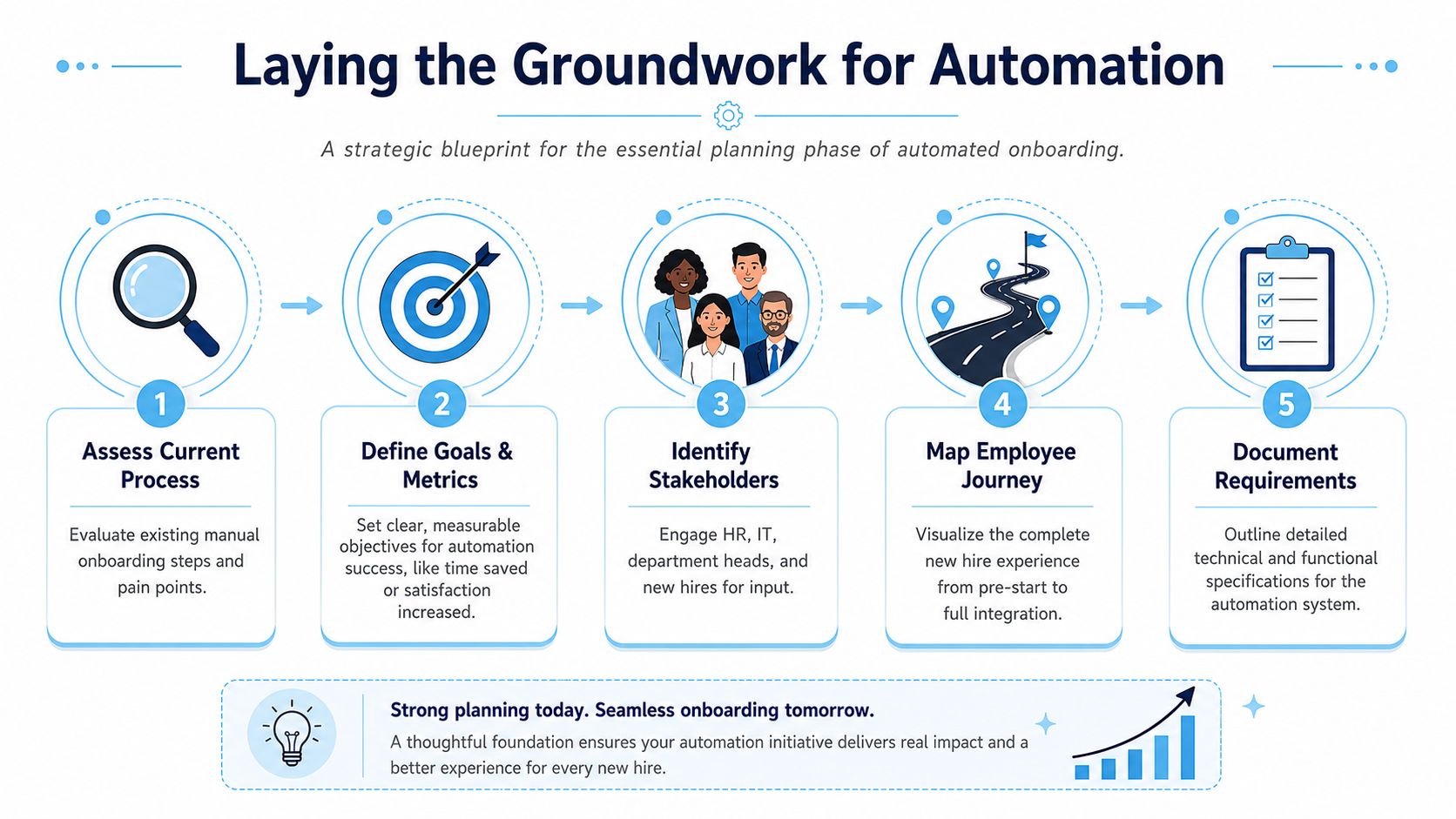
Laying the Groundwork for Automation
The fastest way to waste money on onboarding software is to automate steps nobody has fully mapped.
A phased rollout works better. The strongest methodology starts by auditing every task from offer acceptance to full ramp-up. That kind of review often exposes missing access steps in 40% of manual processes, which then creates avoidable delays later in the journey. Before you buy anything, document the actors, systems, dependencies, and handoffs.
Audit the real process, not the policy version
Most onboarding maps look clean because they reflect the intended process. What you need is the operational version.
Ask each team to list what happens when a new hire joins:
- Trigger event. What starts the process. Signed offer, HRIS status change, payroll record, or manager request.
- Owner. HR, recruiter, hiring manager, IT, payroll, facilities, compliance, or site leader.
- System used. HRIS, ATS, ticketing tool, email, spreadsheet, e-signature platform, SMS tool.
- Time required. Not estimated. Measured.
- Failure pattern. What usually breaks, stalls, or gets missed.
In practice, this exercise surfaces hidden work. Someone manually creates badges. Someone else retypes personal data into a payroll system. A store manager sends onboarding instructions by personal text because the employee never received the official email. Those are automation candidates.
Define success before you configure anything
Don't set vague goals like “streamline onboarding.” Tie the project to outcomes your leaders already care about.
A practical planning sheet usually includes:
- Operational goals. Faster completion of forms, cleaner provisioning, fewer manual follow-ups.
- Experience goals. Clearer day-one readiness, better communication cadence, lower confusion.
- Business goals. Faster ramp-up, stronger retention, cleaner compliance execution.
A useful companion to this planning stage is this guide for HR teams implementing AI, especially if your automation roadmap includes AI-assisted support or workflow decisions.
Practical rule: If you can't point to a broken handoff, delay, or missed experience in the current process, don't automate that step yet.
Document requirements with frontline reality in mind
At this stage, many projects drift back into office-centric assumptions. The requirement list should ask blunt questions.
| Requirement area | What to define |
|---|---|
| Communication channels | Email, mobile push, SMS, digital signage, manager-delivered prompts |
| Identity readiness | When credentials are created and which roles need pre-day-one access |
| Content delivery | What can be self-serve and what must be manager-led |
| Location logic | What changes by site, shift, country, language, or department |
| Compliance steps | Which documents, verifications, and acknowledgments need proof of completion |
For many teams, onboarding also starts with standardized documents and acknowledgments. A library of employee onboarding forms and templates helps reduce ad hoc form creation and keeps the workflow more consistent.
A strong plan is specific enough that technology choices become easier. A weak plan pushes every problem downstream into implementation.
Choosing Your Onboarding Automation Tech Stack
The right tech stack doesn't just automate tasks. It coordinates systems that usually operate in isolation.
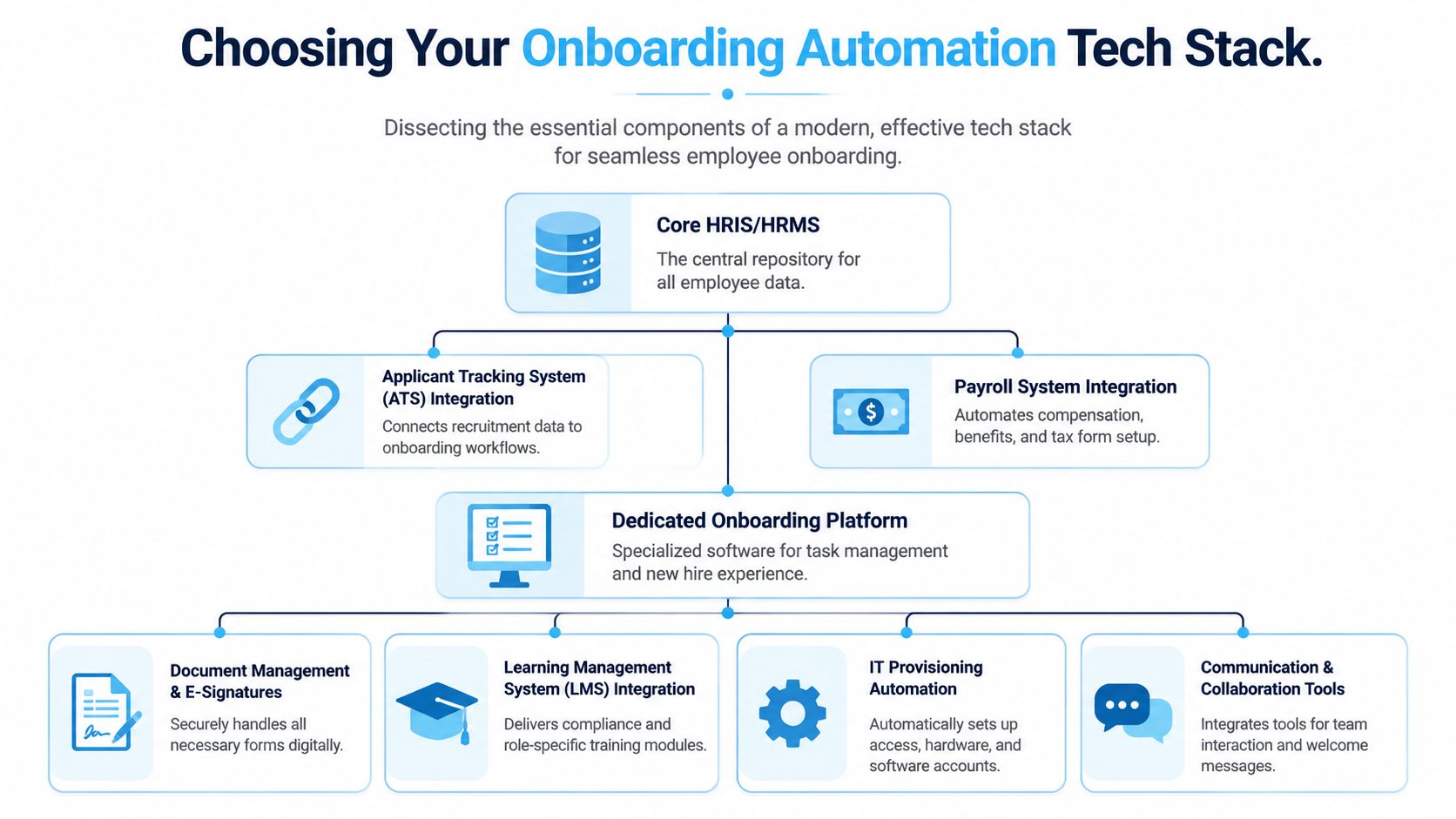
That matters because onboarding is rarely one workflow. It's a chain of linked actions across the ATS, HRIS, payroll, identity systems, learning tools, communications channels, and local managers. If those systems don't pass data cleanly, automation becomes a pile of exceptions.
What belongs in the core stack
At minimum, most organizations need these layers working together:
- ATS or recruiting system. Carries candidate data into the hiring event.
- HRIS or HRMS. Acts as the source of truth for worker status, role, location, and start date.
- Identity and access layer. Controls account creation, authentication, and permissions.
- Document and form workflow. Handles signatures, acknowledgments, and required records.
- Learning delivery. Pushes role-specific and compliance training.
- Communication layer. Sends messages through the channels employees use.
For desk-based hires, email and collaboration tools may be enough. For deskless hires, they usually aren't. In those environments, the communication layer often matters as much as the HRIS because a perfect workflow is useless if the new hire never sees it.
Why SSO and RBAC matter early
A lot of onboarding friction shows up as IT delay. New hires can't log in, don't know which tools they should have, or receive access in the wrong order.
A critical specification is integrating Single Sign-On and role-based access control, which can eliminate 80% of manual IT provisioning time when access is granted automatically based on the employee's mapped role. Unified platforms with native HRIS integrations also reduce onboarding cycle time by 40% when compared with fragmented approaches. Those numbers explain why identity design should sit near the start of the project, not at the end.
A practical example helps. If a newly hired sales coordinator is mapped to the correct department, location, and manager in the HRIS, the workflow can trigger the right SaaS access, shared drives, collaboration channels, learning modules, and policy acknowledgments automatically. If those fields are incomplete, the workflow stalls or grants the wrong permissions.
Unified platform versus point-solution sprawl
There isn't one universal answer here. Some enterprises need a broad orchestration layer because they already run complex systems across regions or business units. Others are better served by a unified workforce experience platform that combines communications, tasks, content, and learning in one place.
What usually doesn't work is stacking disconnected tools just because each one solves a narrow problem. HR uses one app for forms. IT uses another for tickets. Managers use email. Frontline teams rely on text chains. Employees then experience the gaps between systems.
A fragmented stack creates hidden labor. Every missing integration turns into manual cleanup by HR, IT, or local managers.
One overlooked dependency is meeting coordination. New hire orientation, manager introductions, equipment pickup, and job-shadow sessions often require cross-calendar visibility. If your rollout involves multiple scheduling tools, this roundup of apps for syncing multiple calendars is useful for reducing scheduling friction across systems.
For teams evaluating integration depth, HubEngage documents its enterprise integrations across HRIS and workplace systems, which is the kind of connectivity you need when onboarding spans communications, tasks, and learning rather than forms alone.
Designing Automated Onboarding Workflows That Work
Good onboarding workflows aren't generic sequences. They are conditional, role-aware, and channel-aware.
That's where many automation projects underperform. They create one standard path for every hire, then wonder why office staff engage while field staff miss critical steps. The workflow logic needs to account for role, location, device access, reporting line, and how the employee will receive information.
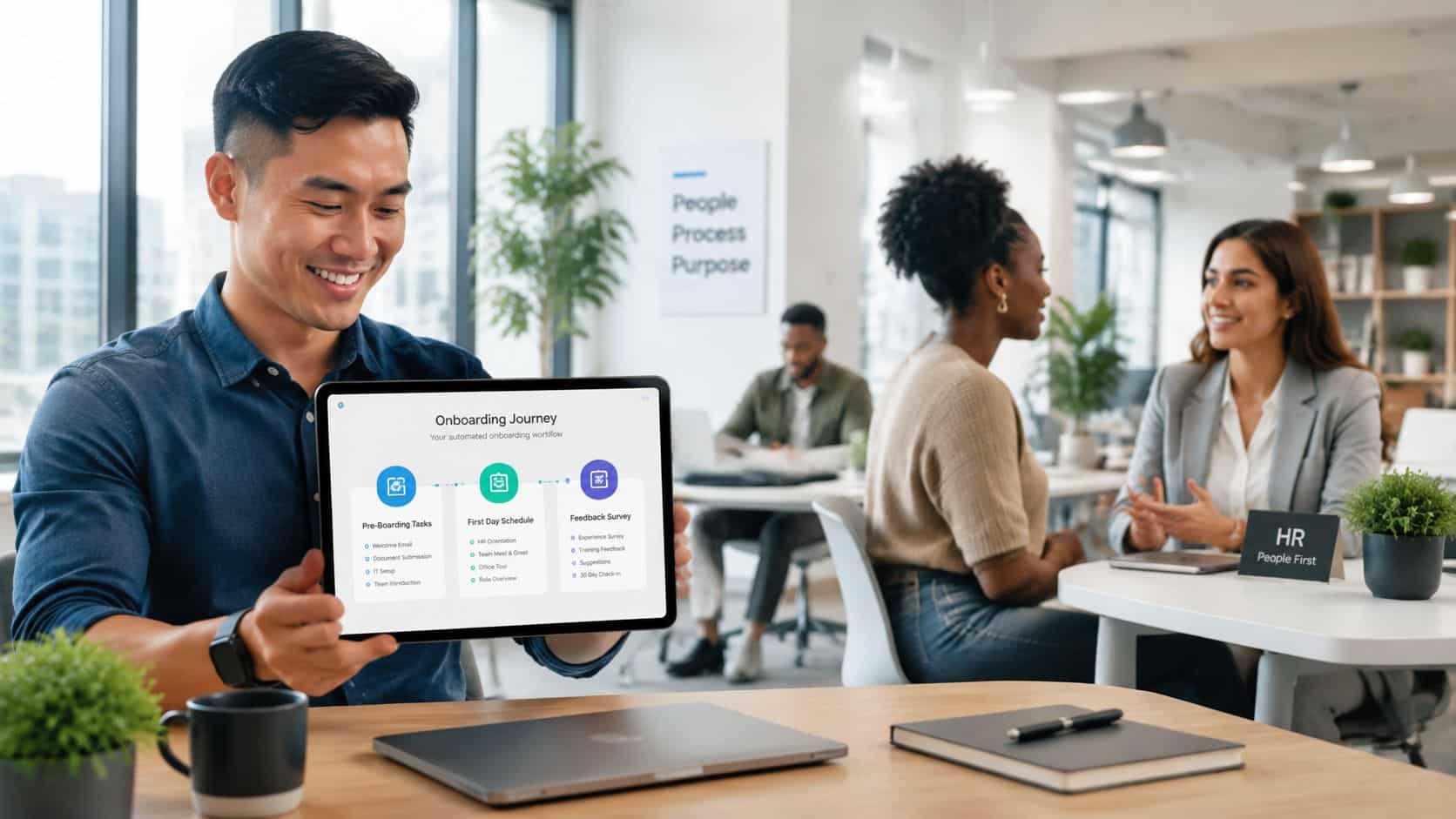
Pre-boarding flows for two different hires
Take the same start date and compare two employees.
A software developer in a hybrid office role can receive a pre-boarding workflow through email and mobile push. The HRIS triggers account creation, laptop shipment, access to the code repository, a welcome note from the manager, and links to policy documents and orientation content. The communication channel assumes regular inbox access.
A warehouse associate needs a different setup. The workflow may send an SMS with shift details, facility arrival instructions, required documents, dress guidance, and a short welcome message from the site leader. If the employee doesn't use corporate email yet, the process can't depend on it. The manager may also receive a checklist covering badge pickup, locker assignment, safety briefing, and first-shift buddy assignment.
Those are both automated onboarding workflows. They just aren't identical.
Build around decision points
Conditional logic usually matters more than volume. A strong workflow asks questions like these:
- Role-based branch. Does this hire need desk tools, shared devices, or no device at all?
- Location branch. Does the site require parking, security clearance, or local safety training?
- Employment type branch. Full-time, part-time, seasonal, contractor, union, temporary.
- Experience branch. Is this a first-time employee, rehire, or internal transfer?
- Channel branch. Email, SMS, app notification, digital signage prompt, or manager-delivered instruction.
Standard operating procedures continue to matter. Before automating edge cases, it helps to build robust onboarding SOPs that define who owns each step and when exceptions should trigger a manual review.
The strongest workflows don't automate more. They automate the right branch at the right moment.
A simple workflow pattern by phase
| Phase | Desk-based example | Frontline example |
|---|---|---|
| Pre-boarding | Send email for forms, create accounts, assign training | Send SMS for arrival info, trigger manager checklist, assign mobile-accessible forms |
| First day | Deliver orientation agenda, login instructions, team intro | Confirm attendance, send shift schedule, provide site-specific safety checklist |
| First week | Assign policy learning, manager check-in, role resources | Assign mobile microlearning, buddy follow-up, attendance reminders |
| First month | Trigger pulse survey, skills plan, benefits reminders | Trigger supervisor check-in, role refresher content, schedule confirmation |
For organizations hiring at scale across varied worker populations, mobile access becomes part of onboarding design, not just communication convenience. That's why many teams evaluate employee onboarding apps that help people learn quickly instead of relying on desktop-first systems alone.
Orchestrating a Smooth Rollout and Adoption
Even a well-built onboarding flow can fail during rollout if managers don't trust it or employees don't understand where to go.
Rollout should start with one high-friction use case, not the full ecosystem. Account provisioning is often a strong first candidate because it's repetitive, time-sensitive, and visible to HR, IT, and hiring managers. Once that stabilizes, add forms, communications, learning, and manager tasks in layers.
What managers and stakeholders need
Most adoption issues are role-clarity issues. People don't resist automation as much as they resist uncertainty.
Give each stakeholder a short operating guide:
- Managers need to know what the system handles automatically and which relationship moments still belong to them.
- HR teams need visibility into workflow status, failed tasks, and exceptions.
- IT teams need clear ownership for access rules, app mapping, and escalation paths.
- Site leaders need mobile-friendly prompts if they manage frontline hires.
- New hires need one obvious place to find what matters next.
Build compliance into the workflow
Security and compliance can't sit outside the process. They have to be embedded in it.
Use approval rules, task dependencies, required acknowledgments, timestamped completions, and access controls inside the workflow itself. If a form is mandatory, the system should track completion. If a role requires training before work begins, access to the next stage should depend on that completion. If identity creation depends on mapped HRIS fields, the workflow should stop on missing data instead of guessing.
A smooth rollout is less about launch-day excitement and more about dependable execution after the first few hiring cycles.
Unifying Onboarding for a Distributed Workforce with HubEngage
Frontline communication breaks faster than office-based teams expect. Preboarding often assumes every new hire has a company email address, regular desktop access, and time to read long messages before day one. That assumption fails for drivers, clinicians, store associates, technicians, plant workers, and field crews.
The result is operational, not cosmetic. Missed instructions lead to incomplete forms, no-shows, delayed training, and managers spending the first shift fixing preventable gaps. In distributed environments, onboarding works only when communication reaches people in the channels they already use.
HubEngage fits that requirement well. Its mobile apps for distributed workforces extend onboarding communication beyond corporate email across mobile, web, SMS, digital signage, and workplace channels. HR can send policy acknowledgments and benefit prompts to office staff by email, push first-shift instructions to a warehouse hire by mobile notification or SMS, and route task reminders to a site supervisor in the same system.
That channel flexibility matters, but the bigger advantage is coordination. Communications, tasks, learning, and feedback live in one environment, which reduces the patchwork many organizations build across HRIS workflows, inboxes, spreadsheets, and supervisor texts. For distributed teams, that gives HR and operations a shared view of who has completed what, who is stuck, and which location needs intervention.
I have seen this matter most in mixed workforces. Corporate hires can usually recover from a missed email. Deskless hires often cannot, especially if the missed message contained start-time details, document requests, or safety steps needed before the first shift. A unified, mobile-first setup closes that gap without forcing every employee into the same desk-based onboarding experience.
Measuring Success and Avoiding Common Pitfalls
Automation needs proof. Leadership won't care that a workflow looks cleaner in a dashboard if it doesn't improve readiness, retention, or productivity.
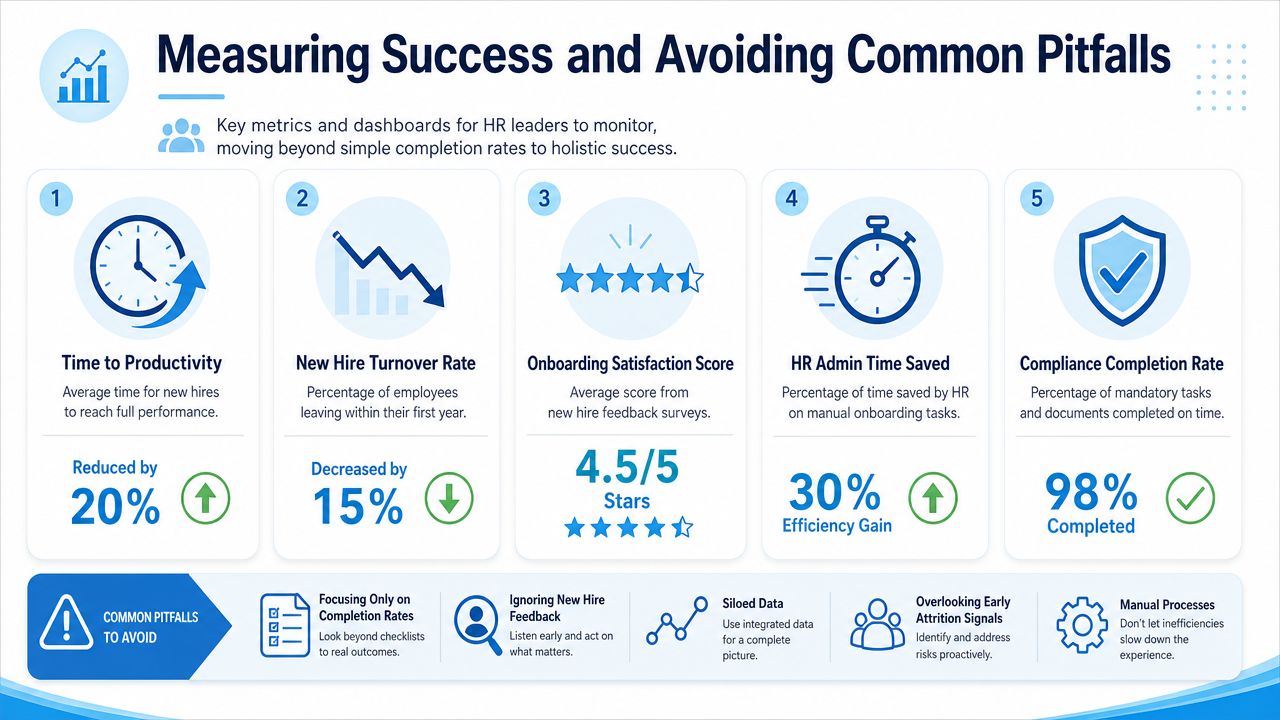
The strongest measurement approach combines operational metrics with experience signals. Completion rates matter, but they're not enough. A fully completed process can still produce a confused employee.
Metrics that actually show business impact
Research on automated onboarding shows organizations can achieve up to a 65% increase in new hire productivity and a 77% decrease in turnover rates within the first three months when workflows replace manual bottlenecks and disconnected handoffs. Those are the kinds of outcomes that help justify investment because they connect onboarding to workforce performance, not just HR efficiency.
I also recommend tracking a mix of these measures:
- Day-one readiness. Did the employee have access, schedule clarity, and the right first-day instructions?
- Time to productive contribution. When did the employee begin operating with reduced supervision?
- New hire sentiment. What do pulse surveys and manager check-ins reveal about clarity and confidence?
- Manager adoption. Are managers completing the tasks automation leaves with them?
- Early retention. Are first-month and first-quarter exits dropping after rollout?
Common mistakes that undermine results
The most common failure pattern is automating a broken process. If the manual workflow is unclear, automation only speeds up confusion.
Another mistake is over-automating the human side. Administrative tasks can be automated heavily, but culture, connection, manager trust, and team integration still need real ownership. If leaders strip too much human contact out of the experience, employees feel processed instead of welcomed.
A third issue is one-size-fits-all design. Some deskless workforces need onboarding logic based on location, shift, device access, or language. If the workflow assumes every employee behaves like a knowledge worker, adoption drops.
Measure where employees get stuck, not just where the system says tasks were completed.
A practical review cadence
| Review point | What to inspect |
|---|---|
| Weekly after launch | Failed tasks, missing data, access issues, message delivery gaps |
| After first hiring cycle | Manager feedback, employee confusion points, exception volume |
| After several cycles | Trend in readiness, sentiment, and early exits |
| Quarterly | Workflow updates by role, site, and business unit |
The point isn't to prove the system worked once. It's to keep improving the process as hiring patterns, tools, and workforce mix change.
Automate Employee Onboarding FAQs
What is the best first step if you want to automate employee onboarding?
Start with a process audit. Map every step from signed offer through first-week readiness, then note where work stalls, where data gets re-entered, and where ownership is unclear. Include corporate employees, field teams, contractors, and shift-based roles in that review. Onboarding usually breaks at the edges, especially when the workflow was built for email users but a large share of the workforce relies on phones, shared devices, or manager-led communication.
Which onboarding tasks should be automated first?
Automate the work that is repetitive, time-sensitive, and easy to standardize. Document collection, policy acknowledgments, account requests, access provisioning, reminders, and approval routing are usually the safest place to begin.
Keep manager conversations, team connection, and role-specific coaching in human hands. Automation should protect time for those moments, not replace them.
How do you automate onboarding without losing the human touch?
Use automation for timing, coordination, and follow-through. Keep welcome calls, site introductions, role expectations, and early check-ins assigned to managers and team leads.
Personalization matters here. A new store associate, a traveling technician, and a finance analyst should not receive the same sequence in the same channel. The overview of personalization challenges from Yousign supports that point. Good workflow design changes by role, location, language, device access, and prior experience. That is how teams avoid making onboarding feel cold or generic.
How long does it take to implement onboarding automation?
Implementation time depends on scope, systems, and how clean the current process is. A focused first phase can move quickly when HR, IT, operations, and hiring managers agree on ownership and data fields early.
In practice, phased rollouts work better than trying to automate everything at once. Start with one high-friction workflow, prove it works, then add the next layer.
Can onboarding automation work for frontline and deskless employees?
Yes, and here many onboarding programs either improve sharply or fail outright. Frontline and deskless employees often do not sit in an inbox all day, and some do not have a company email at all before day one.
The communication model has to match how they work. Mobile notifications, SMS, app-based task lists, manager prompts, QR-code access points, and site-level instructions are often more reliable than email-only workflows. If the onboarding stack cannot reach employees on the channels they use, task completion drops and day-one readiness suffers.
What metrics should HR track after launch?
Track time to readiness, first-week task completion, productivity ramp, new hire sentiment, manager follow-through, and early retention. Break the results out by workforce segment, not just by company average.
That matters for distributed organizations. A workflow may perform well for office hires and still fail for plant workers, drivers, or retail staff if message delivery, language support, or mobile access is weak.
HubEngage, Inc. helps organizations coordinate onboarding communications, tasks, learning, and engagement across office, frontline, and distributed teams in one workforce experience platform. If the current process depends too heavily on email, separate tools, or manual follow-up, a unified mobile-first approach can close gaps that standard HRIS workflows often miss.