
Cloud technology has changed the way intranets are present Today, most of the new business softwares are launched in the cloud and intranet software is one of them. Cloud adoption can increase the launch speed by giving higher efficiency and removing the need of local servers, which decrease IT maintenance, and gives quick access on different devices.
According to Forrester, companies that switch to cloud-based infrastructure report up to 30% cost savings in comparison to keeping legacy on-prem systems.

In this guide we will break down everything to help you compare cloud intranet, cloud based intranet, and the growing landscape of cloud intranet solutions. Also, you will know the benefits as well as the best cloud intranet platforms and how cloud based intranet software supports businesses of all sizes.
For organizations choosing between a cloud-based intranet and an on-prem intranet, the risks are high. Cloud intranets give you speed, are more flexible, and have lower overhead. While on-prem solutions focus more on control. In this blog we will describe both models, compare leading vendors, and help you choose the right fit.
What Is a Cloud Intranet?
A cloud intranet also called a cloud-based intranet, SaaS intranet, or “intranet as a service” is a safe online platform which is managed by a provider and launched with the help of an internet. Instead of setting up the servers and maintaining software at a place, companies can get their intranet by a web browser or mobile app.
Like legacy intranets that are made at a physical place, these cloud intranets can be launched quickly, get updates faster, and can be easily used from any place. They work as the base of a modern intranet platform that makes internal communications, teamwork, and employee engagement better.
Before we go deeper, check out how an Employee Intranet can make the communication better in any cloud‑first workplace.
Benefits of a Cloud Intranet
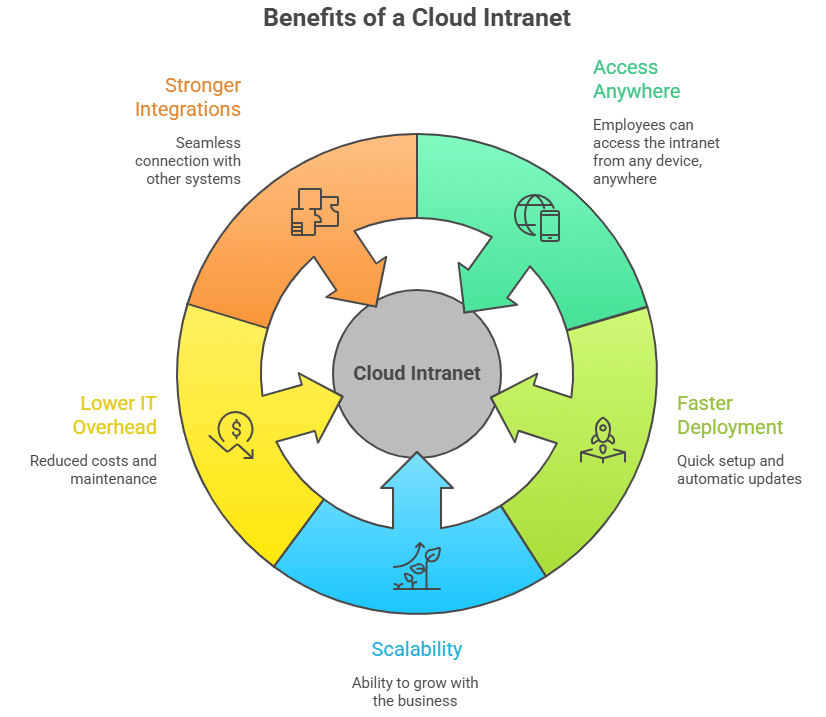
Cloud Intranets give a lot of benefits to the companies that use it well. Below are some of its advantages:
- Access Anywhere – Employees can log in from desktops, laptops, or mobile apps, which is good for hybrid and frontline teams.
- Faster Deployment & Updates – No more long IT projects; updates are given automatically in SaaS models.
- Scalability – Add users, storage, or features as your business grows.
- Lower IT Overhead – No need of physical servers, less need of support tickets, and low maintenance costs.
- Stronger Integrations – Easily connects with Microsoft 365, Google Workspace, Slack, Teams, HRIS, and CRM systems.
Key Features of Modern Cloud Intranets
Many companies connect their cloud intranet with an Employee Portal Software layer for self‑service workflows. Modern cloud intranets have become way more advanced than simple file storage or company news pages.
Today these platforms are like the digital headquarters for internal communication, employee engagement, knowledge sharing, and productivity. Here are some of its important features:
1. Unified Communication Hub
A central place to publish news, updates, videos, announcements, emergency alerts, and messages over multiple channels like mobile apps, email, SMS, digital signage, and collaboration tools.
2. AI-Powered Search & Personalization
A strong search experience is very important, which is why many companies invest in an Intranet Search Engine to help employees quickly find out policies, documents, and tools. Cloud intranets use AI features to get the right information quickly. Employees can search for documents, people, policies, or tools and get personalized results based on their role, location, department, and behavior.
3. Mobile-First Experience
Modern cloud intranets are responsive and come with full-featured mobile apps that helps with push notifications, offline access, chat, recognition, surveys, and role-based dashboards.
4. Integrated Collaboration Tools
Team spaces, discussion boards, chat, document workspace, and connectivity with Microsoft 365, Google Workspace, Slack, Teams, etc helps employees work together in real time.
5. Employee Engagement Modules
Recognition, badges, awards, social feeds, commenting, reactions helps with better engagement to create a connected and active workplace.
6. Workflow Automation & Self-Service
Cloud intranet makes the process like onboarding, IT requests, HR forms, approvals, training reminders, and task assignments smooth by low-code or no-code automation.
7. Robust Governance & Role-Based Permissions
Admins can easily handle who sees what. Permissions make sure that employees only access the content, documents, and tools which are needed for their role.
8. Analytics & Insights
Modern platforms have dashboards that track engagement, content performance, search patterns, employee behavior, and knowledge gaps thereby making the communication better in the team.
9. Easy Scalability & Continuous Improvements
The cloud model helps the organizations with regular updates, new features, and security patches automatically with no IT downtime.
10. Integration-Friendly Architecture
With APIs, SSO, HRIS sync, and connectors, a cloud intranet brings together payroll, benefits, scheduling, LMS, and other business systems into one employee-facing experience.
Cloud vs On-Prem Intranet: Pros & Cons
Below is a quick comparison that will help you understand how intranet cloud and on-prem intranet are different:
| Factor | Cloud Intranet (SaaS) | On-Prem Intranet |
| Setup Cost | Low upfront; subscription-based | High upfront hardware & licenses |
| Maintenance & Updates | Automatic, handled by vendor | Manual IT management & patches |
| Security & Compliance | Strong vendor certifications (ISO, GDPR, SOC2) | Full internal control but resource-heavy |
| Customization | Configurable, but within vendor limits | Highly customizable (requires dev resources) |
| Accessibility | Anywhere, any device, mobile-ready | Limited to corporate network or VPN |
| Best For | SMBs, franchises, hybrid/remote | Enterprises with strict compliance or local-only needs |
👉 Check out this article to explore more on how to pick intranet providers.
Cloud Intranet for Small Business
For small and mid-sized businesses (SMBs), a cloud-based intranet is the clear winner. With limited IT staff and budgets, SMBs benefit from:
- Quick deployment without server installs
- Pay-as-you-grow subscription pricing
- Mobile apps for distributed teams across retail, hospitality, healthcare, franchise
- Easily connects with HR, payroll, and scheduling tools
But here’s the challenge that many of the big-name vendors such as Workvivo, LumApps, Simpplr, Staffbase, and others are not able to actively serve businesses with fewer than 1,000 employees. Their contracts generally needs minimum commitments of $20,000–$30,000 per year or more. Smaller organizations that do sign on usually receive less support and attention because they represent lower customer value to these vendors. The result is that SMBs pay premium prices but get a sub-par experience compared to enterprise clients.
HubEngage uses a different way to give its solution. We work with businesses of all sizes such as SMBs and give the same level of support and service that our enterprise customers get. Even if you are a 200-person retail brand, a 500-person healthcare network, or a growing franchise, our platform gives a modern intranet experience that gets better as your business grows.
Use Cases of Cloud Intranets in Large Enterprises
Big companies choose cloud intranets not just as communication tools, but as important digital environments that bring global teams, make the work smooth, and makes the work culture better. Some important enterprise use cases are as follows:
1. Unifying Global and Distributed Workforces
Companies with thousands of employees present at different places need a single, and continuous source of real information. Cloud intranets helps with following:
- Location based content targeting
- Localized news and language support
- Continuous messaging over time zones
- Role‑based access for global, regional, and departmental content
2. Improving Internal Communications at Scale
Cloud intranets makes all communication channels such as email, mobile notifications, SMS, digital signage, and chat at one place. This makes sure employees never miss important updates. Enterprises use them to:
- Broadcast executive messages and town halls
- Push crisis alerts instantly
- Manage internal PR and brand alignment
3. Improving Operational Efficiency & Process Automation
Large companies generally do not have simple processes like HR, IT, Operations, and Compliance. A cloud intranet helps to automate and make the tasks simple such as:
- Onboarding workflows for documents, training, forms)
- IT ticketing, equipment requests, and approvals
- HR policy acknowledgments and compliance attestations
- SOP distribution and version control across locations
4. Enhancing Knowledge Management & Compliance
Enterprises have large amounts of data. With Cloud intranets they can do the following:
- Searchable policy and procedure libraries
- Auto‑archiving and versioning for compliance
- Secure, role‑based document access
- AI‑powered knowledge suggestions for employees
5. Driving Engagement & Culture Across Large Organizations
Culture becomes harder to maintain as an organization grows. Cloud intranets support:
- Organization‑wide recognition and rewards
- Employee‑generated content and social feeds
- People directories and org chart visibility
- Milestones, anniversaries, and cultural celebrations
6. Integrating All Enterprise Systems Into a Single Front Door
Large enterprises use many systems like HRIS, LMS, CRM, scheduling, payroll, ITSM, benefits, and more. A cloud intranet becomes the unified employee experience layer with:
- SSO and identity management
- Deep integrations with Microsoft 365 and Google Workspace
- API connections to internal tools
- Personalized dashboards bringing all systems together
7. Enabling Faster Change Management
Mergers, restructures, leadership changes, policy updates cloud intranets help enterprises keep employees aligned by:
- Centralizing change communications
- Delivering targeted messages to affected groups
- Tracking engagement to ensure understanding
8. Supporting Hybrid, Remote, and Frontline Teams Simultaneously
Enterprises often have multiple worker types. Cloud intranets allow tailored experiences for:
- Office staff (desktop-centric)
- Remote workers (mobile and browser access)
- Frontline teams (kiosks, mobile apps, SMS alerts)
9. Providing Enterprise-Grade Security & Governance
Large organizations require strict controls. Cloud intranets offer:
- Audit trails and compliance logs
- Encryption, MFA, and SSO
- SOC2, ISO, GDPR compliance
- Granular admin controls and content governance
10. Delivering Analytics to Inform Leadership Decisions
At scale, communication and engagement insights become crucial. Cloud intranet analytics help leaders understand:
- What employees read and engage with?
- Where knowledge gaps exist?
- Which departments or locations need attention?
- Sentiment trends across the workforce
Best Cloud Intranet Softwares
If you are looking for the best cloud intranet softwares out there in the market then you must check out HubEngage, Staffbase, LumApps and many more.
👉 Explore a complete of these platforms in our best intranet software guide.
Implementation & Security Considerations
A cloud intranet ensures proper security as top vendors offer:
- SSO (Single Sign-On) and MFA (Multi-Factor Authentication)
- Data encryption in transit & at rest
- GDPR, HIPAA, ISO 27001 compliance
- Enterprise SLAs with uptime guarantees
Strong governance and role-based permissions ensure only the right people access sensitive data.
👉 Check out our comprehensive guide on cloud intranet security.
How to Choose the Right Cloud Intranet Provider?
Use the below checklist that will help you select the right provider. You should check on important characteristics like Business fit, Integration, Customization, Cost, and Support.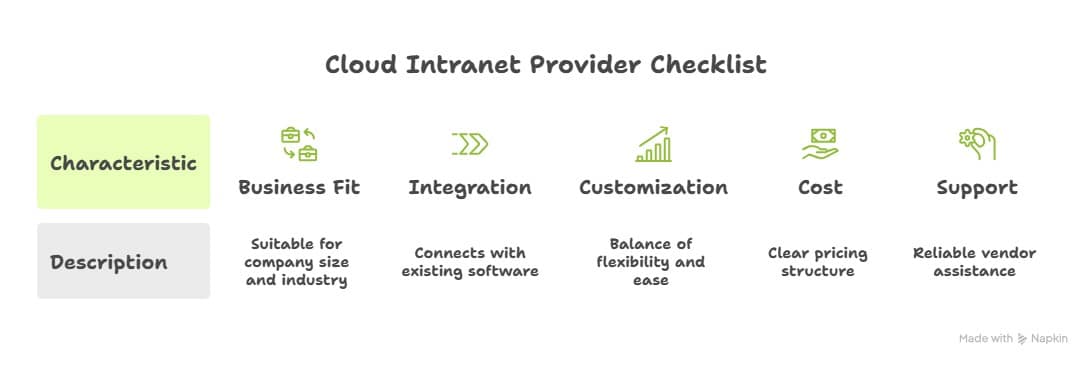
Future Trends in Cloud Intranet Technology
Cloud intranet platforms are rapidly evolving as organizations want more intelligent, integrated, and personalized digital workplaces. Several major trends are shaping the future of cloud intranet technology:
1. AI‑Driven Personalization & Content Delivery
Modern intranets are changing from regular content hubs to intelligent, context‑aware systems that are powered with AI to help you:
- Recommend content, policies, training, and tools based on employee behavior
- Identify knowledge gaps and auto‑suggest resources
- Auto‑tag and categorize new content for better search
- Personalize homepages for each user’s role, location, preferences, and activity
2. Conversational Interfaces & Employee Assistants
AI chatbots and copilots will become a part of intranets as the primary navigation layer. Employees will simply ask:
- “Where can I find the PTO policy?”
- “Show me yesterday’s shift notes.”
- “Submit an IT ticket for laptop repair.”
These assistants will be able to retrieve information, take actions, summarize updates, and guide employees through workflows.
3. Seamless Integration With the Full Employee Tech Stack
The future intranet will function as a single entry point for all workplace systems including HR, IT, scheduling, payroll, benefits, LMS, compliance, and communications. APIs and prebuilt connectors will make the intranet the “front door” to the employee experience.
4. Predictive Analytics & Workforce Intelligence
Cloud intranets will shift from reporting to prediction so that one can expect the following:
- Forecast employee engagement drop‑off
- Identify teams at risk for turnover
- Detect communication blind spots
- Highlight which content drives performance outcomes
This transforms the intranet into a strategic decision‑making tool for executives and HR leaders.
5. Mobile‑First, Multi‑Channel Experiences
As frontline and hybrid workforces are increasing, intranets will prioritize more mobile experiences with push alerts, micro‑surveys, digital signage, SMS, and WhatsApp connectors. Multi‑channel delivery becomes standard to reach employees wherever they are.
6. No‑Code/Low‑Code Automation for Business Teams
Communicators, HR, and operations leaders will be able to design workflows without IT support, including:
- Onboarding paths
- Compliance attestations
- Task reminders
- Training sequences
No‑code automation will control intranet management and speeds execution.
7. Enhanced Security, Zero‑Trust & Compliance
With threats increasing, future cloud intranets will adopt:
- Zero‑trust authentication
- Continuous access evaluation
- Automated compliance logs
- Intelligent anomaly detection
This will ensure secured experiences across remote, hybrid, and global teams.
8. Employee Experience Platforms (EXPs) Converging With Intranets
The industry is moving toward unified employee experience platforms that combine communication, collaboration, engagement, learning, and workflow automation. The cloud intranet will become the central layer that connects them all.
9. Deeper Support for Frontline Workers
As frontline workforce technology rises in importance, future intranets will include:
- Shift‑aware notifications
- Role‑based tasking
- Safety check‑ins
- AI‑powered knowledge retrieval for hands‑free environments
10. Generative AI Content Production
Intranets will help communicators generate:
- News posts
- Policy summaries
- Training modules
- Video scripts
- Translations and accessibility content
Generative AI will decrease the workload of an admin while improving the quality of the content.
These findings will put cloud intranets as not just information platforms, but smart, user friendly, and more connected work experience platforms that shape a better future of work.
Cloud Intranet By HubEngage
HubEngage cloud intranet helps companies to solve real problems in the workplace such as disconnected teams, low engagement, and using many communication tools. It brings everything into one place having AI-powered search, multichannel messaging, recognition programs, surveys, digital signage, and supports different languages. Businesses can make the communication better, boost employee morale, and make better decisions using real-time analytics and data.
👉 Want to see real results? Check out customer reviews from Software Advice Platform using our cloud intranet.
Before using HubEngage cloud intranet, our communication was scattered across emails, chats, and notice boards. It was hard to keep everyone informed, especially our frontline staff. After we implemented HubEngage, everything became centralized and easy to access from mobile devices. The AI search helps employees quickly find policies and documents. We have also seen better engagement through recognition and surveys. Overall, it has made our workplace more connected and organized.
Conclusion
A cloud intranet is no longer an option but is the base of modern workplace communication. With an option to use anywhere, less time to launch, and custom pricing, businesses of all sizes can make the best use of it.
👉 Ready to explore? See our Intranet software guide and book a demo to see it live.
FAQs
Is a cloud-based intranet secure?
Yes, leading cloud intranet providers like HubEngage have enterprise-level security with safety codes, SSO, MFA, and global compliance certifications making it safe to use.
SaaS intranet vs on-prem intranet. How are they different?
SaaS intranets are taken care by the provider and gets updated by them with time. On the other hand, an on-premises intranet needs internal servers, maintenance, and manual upgrades.
Why is a cloud intranet better for small businesses?
Cloud Intranet helps in removing server costs, decreases load on IT systems, and gives a ready-to-use option with mobile access which is very helpful for SMBs and remote teams. HubEngage stands out because it actively helps SMBs with full support, unlike other popular vendors who focus more on enterprise or big companies.
How much does a cloud intranet cost?
Most SaaS intranets start from $4–10 per user per month. However, the costs are different based on the features as well as options to connect with other platforms.
Can you move from on-prem intranet to cloud?
Yes, with the help of migration services we can move all the important documents, user data, and permissions into a modern cloud intranet without any change in the workflows.
Cloud intranet vs. on-premise intranet, which one to choose?
A cloud intranet is good for many companies because it is easy to launch, less need of IT support, stronger connections, and is easy to use for hybrid or remote teams. On‑premise intranets are good only for companies with strict data safety rules, fixed work environments, and too much legacy tech setup. For most businesses, cloud is a easy to upgrade, safe, and low cost ption.
How do companies build a cloud‑based intranet?
To make a cloud intranet, companies generally follow this common method:
- Identify goals and use cases for communication, hiring, knowledge transfer, etc.
- Select a cloud intranet platform like HubEngage or similar SaaS platforms.
- Connect with other systems like HRIS, payroll, scheduling, Microsoft 365, and Google Workspace.
- Create content architecture such as pages, hubs, permissions, workflows.
- Launch with a communication plan and train employees.
- Improve with time using analytics, search patterns, and engagement data.
What industries benefit most from cloud‑based intranets?
Cloud intranets is helpful for any company with teams that work remote as well as have ground level jobs such as:
- Healthcare(nurses, clinic staff, shift workers)
- Retail & hospitality(store teams, part-time workers)
- Manufacturing & logistics(factory workers, transport team)
- Franchises(team present in different places)
- Professional services(remote teamwork and consultants)
- Education & nonprofits(sharing study materials and teaching)
How can businesses ensure compliance with data protection regulations in the cloud?
To keep complaint with the rules, all companies should do the following things:
- Choose a cloud intranet vendor with SOC 2, ISO 27001, GDPR, HIPAA, or regional certifications
- Activate SSO, MFA, encryption, and role‑based access controls
- Use audit logs to see the users access and activity
- Set up policies to save or delete data
Check if your provider meets industry standards and give you signed DPAs