Loom is a well-known async video messaging and screen recording platform that focuses on helping teams explain work faster, reduce meetings, and share visual updates across distributed organizations.
It is commonly evaluated by HR leaders, internal communications teams, employee engagement managers, and business teams looking for a simple way to record walkthroughs, training clips, feedback, product demos, and internal updates.
Organizations considering Loom are typically seeking a tool that makes video communication easier, supports asynchronous collaboration, and helps employees consume information without scheduling another meeting.
However, buyers often struggle to determine whether a video-first tool is enough for broader employee communication needs. Many decision-makers also look for clarity around pricing, enterprise scalability, adoption, analytics, and if the platform can replace or only supplement intranet and engagement software.
In this guide, we will give you a comprehensive breakdown of Loom, covering its core features, strengths, limitations, pricing structure, and verified user reviews. We also compare it with popular internal communication software to help you pick the right tool for your team.
Loom Key Features
Based on the details present in the website of Loom below are the common features buyers should look for:
1. Screen and camera recording
Loom lets users record their screen, camera, and microphone for quick demos, training clips, updates, walkthroughs, and feedback videos.
2. Fast sharing and viewer collaboration
Users can share videos through simple links, while viewers can add comments or reactions to keep async conversations moving quickly.
3. Meeting recording and recaps
Loom supports meeting recordings, transcriptions, and AI-powered notes on selected plans, helping teams capture discussions and follow-up items.
4. Editing and branding controls on paid plans
Paid plans include longer recording options, basic editing, video downloads, branding removal, and advanced AI editing features on higher tiers.
5. AI video enhancements
AI features can create titles, summaries, chapters, text outputs, calls to action, and meeting recaps to make videos easier to use.
6. Enterprise administration and security
Enterprise features include SSO, SCIM, privacy controls, data retention, admin insights, Salesforce integration, Atlassian Guard, and uptime commitments.
Loom Feature Matrix
After using the software, we have made a list of loom features that are good and the ones that can be made better.
| Feature | Pros | Cons |
| Screen recording | Easy to use, fast to share, strong for demos and walkthroughs | Not a complete internal communications platform |
| Video sharing | Helps reduce repetitive meetings and long emails | Video links can become fragmented knowledge if not governed inside a broader intranet |
| Comments and reactions | Useful for feedback and lightweight collaboration | Limited compared with full employee communities, campaigns, and engagement workflows |
| AI summaries and titles | Improves scanability and follow-up | Advanced AI features sit in higher-paid plans |
| Meeting notes and recaps | Useful for remote and hybrid teams | Does not replace structured employee communication, surveys, recognition, or analytics |
| Enterprise controls | Better for governed enterprise video use | Enterprise pricing requires sales contact, reducing cost transparency |
Loom Pricing
As per the pricing page, Loom offers four pricing models for different team needs. The Starter plan is free and includes 25 recordings, a 5-minute screen recording limit, unlimited meeting recording length, transcriptions, comments, and emoji reactions.
The Business plan costs $18 per user/month and adds unlimited videos, unlimited recording time, basic editing, branding removal, uploads, downloads, and viewer email capture.
Business with AI costs $24 per user/month and includes AI titles, summaries, chapters, video-to-text automation, advanced editing, video variables, meeting notes, and recaps.
The Enterprise plan requires contacting sales. It adds SSO, SCIM, advanced privacy, data retention, Salesforce integration, admin insights, and much more.
Loom Reviews
Loom reviews are mostly positive for ease of use and sync video sharing, but users also mention reliability, customization, free-plan limits, and support concerns.
Positive Reviews
- Simple interface makes video sharing faster.
- Reusable walkthroughs help reduce repeat team meetings.
- Instant upload makes one-click link sharing easier.
Challenges faced
- Recording issues can confuse users during screen capture.
- Limited customization makes branding and downloads harder.
- Slow loading can disrupt video sharing workflows.
- Basic editing may frustrate advanced content creators.
- Video-first scope limits broader employee engagement needs.
Overall Sentiment
Reviews are positive for simple video communication. However, buyers needing advanced customization, clear enterprise pricing, stronger engagement tools, or multi-channel employee reach may find Loom limited.
Loom Review Summary Table
Here is a summary table of customer feedback from Loom review sites like G2 showing what users like and where improvement is needed.
| Source | Review signal | Positive themes | Negative themes |
| G2 | 4.7/5 | Ease of use, easy recording, screen recording, easy sharing, productivity gains | Recording issues, limited features, slow loading, free-plan restrictions, slow performance |
| Capterra | 4.7/5 | Helpful for repeated walkthroughs, online teaching, demos, client updates, internal explanations | Bugs, basic editing, avatar quality issues, support and renewal concerns |
| TrustRadius | 9.5/10 | Instant upload, one-click link sharing, embedded GIF features | Publicly available summaries focus less on broad employee engagement use cases |
Loom Alternatives
Below are some of the leading internal communication platforms that you can check and compare with Loom.
| Software | Key Strength | Best Fit |
| HubEngage | All-in-one employee communication | Enterprises & distributed teams |
| Workvivo | Social-style engagement | Culture-focused teams |
| Staffbase | Strong enterprise communications | Large organizations |
| Blink | Mobile-first frontline communication | Deskless workforce |
| Unily | Highly customizable intranet | Large enterprises |
| ContactMonkey | Email analytics and campaigns | Email-focused teams |
| LumApps | Strong personalization | Enterprise teams |
| Poppulo | Advanced analytics | Communication teams |
| Appspace | Hybrid workplace tools | Office & hybrid environments |
| Allo | AI automation and simplicity | SMBs and startups |
To learn more about these platforms and softwares, you must check out this intranet communication tools guide.
How does HubEngage stand as a good option?
Many internal communication platforms do not clearly prove their cost-to-value benefits, which usually creates confusion among decision-makers. This is exactly where HubEngage stands apart.
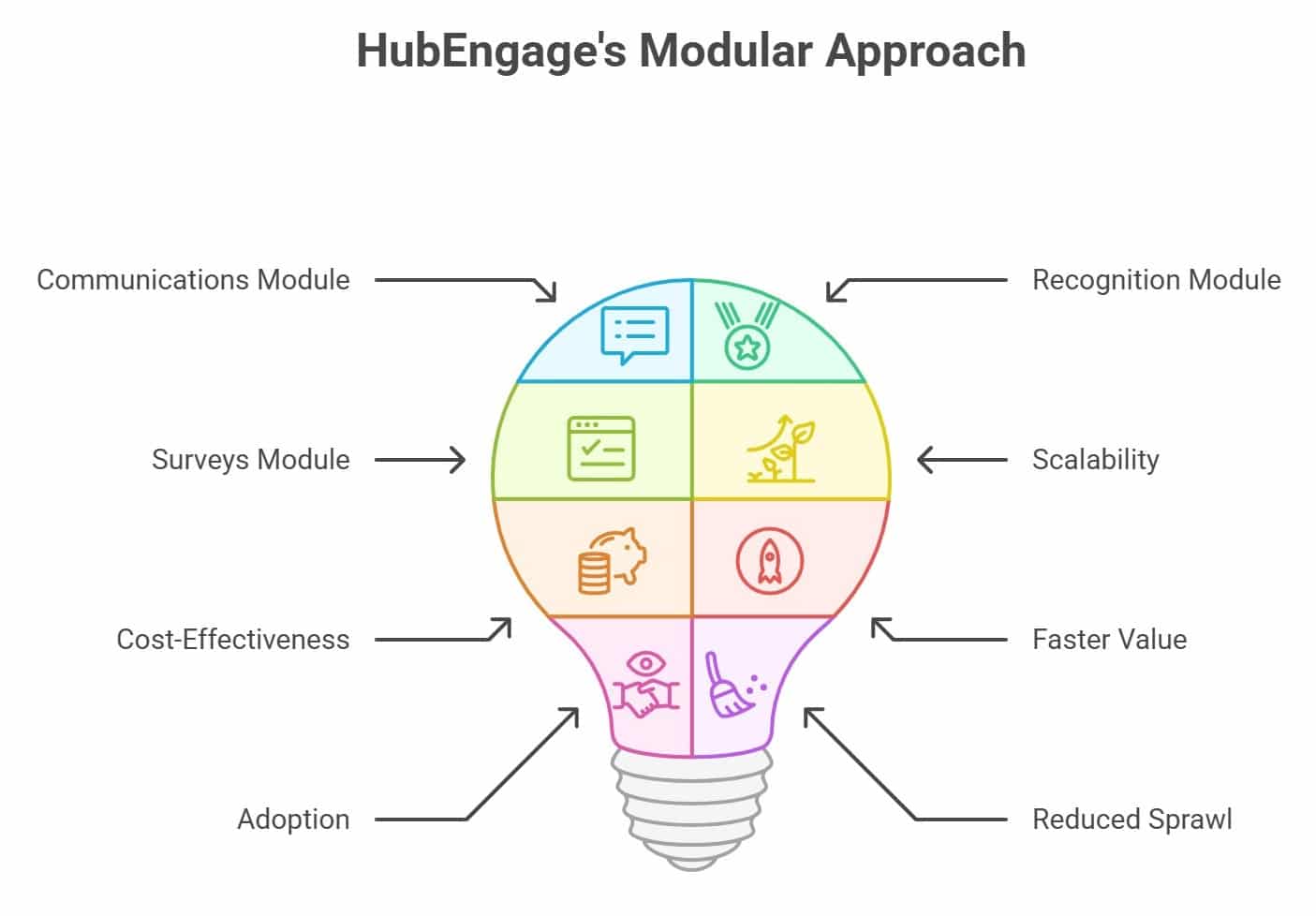
Instead of asking organizations to commit to a full intranet rollout upfront, HubEngage lets companies begin with one module such as communications, recognition, or surveys.
As the organization’s needs grow, they can expand into a complete employee experience platform. This modular approach delivers:
- Lower upfront investment
- Faster time to value
- Stronger adoption across teams
- Reduced tool sprawl
Loom vs HubEngage Comparison
Below is a simple comparison table based on different factors that will help you understand the two platforms easily.
| Area | Loom | HubEngage |
| Main use | Video recording and sharing | Employee communication and engagement |
| Pricing | Starts at $18/user/month | Starts at $3/user/month |
| Flexibility | Best for video updates | Modular and scalable platform |
| Reach | Works mainly through video links | Supports multiple communication channels |
| Best fit | Teams needing async videos | Teams needing a full employee hub |
Conclusion
Loom is a useful tool for fast video recording, async updates, and simple meeting reduction. It works well for teams that need quick explanations, screen recordings, AI summaries, and easy sharing.
However, it is not a complete digital hub that offers employee communication, intranet, and employee experience for teams.
HubEngage is a stronger option for organizations that want to reach every employee, reduce tool costs, and manage communication from one place.
It supports messaging, intranet, surveys, recognition, communities, analytics, and automation. Teams can start with one module and expand as their needs grow, making it more flexible and cost-effective for long-term employee engagement.
Loom FAQs
What are the most common Loom reviews?
Most users say Loom is easy to use, fast for recording, and simple to share videos. However, some reviews mention recording issues, limited customization, and occasional support concerns.
How much does Loom cost?
Loom offers a free Starter plan. Paid plans include Business at $18 per user per month, Business + AI at $24 per user per month, and custom Enterprise pricing.
What is the best Loom alternative for internal communications?
HubEngage is a strong alternative for internal communications. It offers messaging, mobile access, surveys, recognition, intranet features, analytics, and automation in one platform for better employee engagement.
Is Loom a good employee engagement platform?
Loom helps with communication through videos, but it is not a full employee engagement platform. It does not include surveys, recognition tools, or full intranet features.
Why is HubEngage better than Loom for HR teams?
HubEngage is better for HR teams because it supports communication, feedback, recognition, analytics, intranet content, mobile reach, and automation together, helping improve overall employee engagement and adoption.
What should buyers compare before choosing?
Buyers should compare pricing, features, employee reach, integrations, analytics, and scalability. It is important to choose a platform that supports long-term communication and engagement needs.