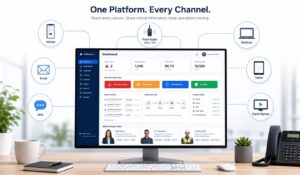
Local government agencies face a communications challenge that most private-sector organizations never encounter tasks like reaching hundreds of employees across departments, shifts, and facilities. Many of whom do not sit at a desk, use a company email, or check internal systems regularly. When a public works crew, a parks and recreation team, and a city clerk’s office all need the same critical update, the margin for miscommunication is significant.
Local government communications software solves this by centralizing how agencies send, receive, and track internal communications across every workforce segment. In this article we will break down what these platforms do, how they compare to enterprise tools, what features matter most, and how to evaluate your options.
Key Takeaways
- Local government communications software helps agencies send real-time updates, emergency alerts, and policy changes to deskless, field, and office employees through one unified platform.
- Modern platforms improve internal communication by combining mobile messaging, employee engagement surveys, read receipts, and workforce notifications in a single system.
- Features like multi-channel delivery, role-based targeting, multilingual support, and audit trails are essential for municipal and county government teams.
- Unlike general enterprise tools, local government communication platforms are built for public-sector compliance, frontline workforce communication, and emergency response coordination.
- Integrating communications with HR systems, scheduling tools, and employee engagement features improves adoption, reduces missed updates, and strengthens workforce transparency.
- Platforms help local government agencies unify employee communications, engagement, and operations while supporting compliance, security, and mobile-first access for distributed teams.
What is Local Government Communications Software?
Local government communications software refers to digital platforms designed to manage internal and external communications for municipal, county, and regional government agencies. These tools handle everything from emergency alerts and policy updates to staff scheduling notifications and employee engagement surveys, all through a single, as well as unified interface.
The defining characteristic of local government communications software is its ability to reach a distributed, often deskless workforce. A city with 800 employees might have 200 in administrative roles with regular computer access, and 600 in field roles such as sanitation, utilities, public safety support, transit. They use primarily use mobile devices to get latest information and updates. Effective local government communications software must serve both groups equally well.
This category of software overlaps with broader employee experience platforms. Tools like HubEngage unify employee communications, engagement tracking, and workforce operations into one platform. This is why agencies in public-sector-adjacent industries increasingly evaluate them alongside purpose-built government tools.
A staff engagement survey conducted through the same platform that delivers shift notifications creates a feedback loop that isolated tools cannot replicate. When employees receive communications and respond through the same interface, agencies gain real-time data on message reach, comprehension, and workforce sentiment.
Local Government Communications Software Key features:
Not every local government communications software product offers the same capabilities. The features that matter most depend on your agency’s size, workforce composition, and existing technology stack. Here are the core capabilities to evaluate:
Multi-channel message delivery
Your platform should push communications through mobile push notifications, SMS, email, and in-app messaging simultaneously. Field employees who do not check email regularly must receive the same updates as office staff. Local government communications software that relies on a single channel will consistently leave part of your workforce uninformed.
Employee engagement surveys and feedback tools
A workplace engagement survey embedded directly in the communications platform eliminates the need for a separate survey tool. Agencies can run a staff engagement survey after a policy change, an associate engagement survey following a departmental restructure, or an employee engagement questionnaire tied to annual performance cycles. All of these are within the same system employees already use daily. This integration improves response rates significantly compared to emailed survey links.
Role-based and location-based targeting
A parks department supervisor should not receive the same communications as a water treatment technician. Local government communications software should allow administrators to segment audiences by department, location, job role, and shift. With this right message reaches the right person without flooding everyone’s feed with irrelevant content.
Audit trails and read receipts
Government agencies operate under public records laws and accountability requirements that private businesses do not face. Your local government communications software must log who received a message, when they opened it, and whether they acknowledged it. This documentation matters during audits, grievance proceedings, and emergency response reviews.
Emergency alert capabilities
Time-sensitive communications like severe weather, facility closures, active safety incidents require a dedicated alert tier that bypasses standard notification queues. Local government communications software should support priority alerts with mandatory acknowledgment, ensuring critical messages are not buried under routine updates.
Multilingual support
Many municipal workforces include employees whose primary language is not English. Local government communications software that supports Spanish, French, Haitian Creole, or other languages relevant to your workforce removes a significant barrier to equitable communication.
How Local Government uses Communications Software?
The practical applications of local government communications software span every department and workforce type. Here are the most common use cases agencies implement first.
Emergency and incident communications. When a water main breaks or a severe weather event grounds city vehicles, agencies need to reach all affected employees within minutes. Local government communications software with priority alert functionality ensures field crews, supervisors, and administrative staff receive simultaneous notification with acknowledgment tracking so incident commanders know who has been reached.
Policy and compliance updates. HR departments use local government communications software to distribute updated policies, required training reminders, and compliance deadlines. Built-in read receipts replace the old method of circulating paper sign-off sheets, which were slow, easy to lose, and difficult to audit.
Employee recognition and engagement. Public sector turnover is a documented challenge and the U.S. Bureau of Labor Statistics consistently shows government agencies competing with private employers for skilled workers. Local government communications software that includes peer recognition features, colleague engagement survey tools, and two-way feedback channels helps agencies build the kind of workplace culture that retains employees beyond the first contract cycle.
Shift and schedule management. For agencies operating 24/7 like public safety support, utilities, transit, etc the local government communications software that integrates with scheduling systems reduces the administrative burden of communicating shift changes, overtime requests, and coverage needs.
Town hall and leadership communications. City managers and department heads use broadcast features in local government communications software to share strategic updates, budget decisions, and community news directly with staff without routing everything through email chains that get forwarded, filtered, or ignored.
Local Government Communications Software vs. Enterprise Solutions
Many agencies evaluate general enterprise communication tools such as Microsoft Teams, Slack, or broad intranet platforms alongside purpose-built local government communications software. The differences are meaningful.
Comparison of local government communications software vs. enterprise tools
| Capability | Local Government Software | General Enterprise Tools |
|---|---|---|
| Deskless worker support | Native mobile-first design for field workers | Primarily designed for office/desk users |
| Public records compliance | Built-in audit trails and retention policies | Requires custom configuration |
| Emergency alert tiers | Dedicated priority alert system | Basic notification settings only |
| Employee engagement surveys | Integrated workplace engagement survey tools | Requires third-party integration |
| Role-based targeting | Department, location, and shift segmentation | Limited without custom setup |
| Multilingual delivery | Often included for diverse workforces | Variable by platform |
| Government security standards | FedRAMP or CJIS alignment available | Varies significantly by vendor |
The core issue is configuration burden. A general enterprise tool can technically do many of these things but it requires significant IT resources to configure, maintain, and audit. Local government communications software builds these requirements in from the start, which matters for agencies with lean technology teams.
Key Insight: Agencies that choose general enterprise tools for cost reasons often spend more in IT configuration and compliance remediation over a three-year period than they would have spent on purpose-built local government communications software.
Top Local Government Communications Softwares
The market for local government communications software includes both purpose-built government platforms and employee experience platforms that serve public-sector agencies effectively. Here are the categories to evaluate:
Purpose-built government platforms (such as CivicPlus, GovDelivery by Granicus, and Bang the Table) are designed specifically for government workflows, public-facing communications, and regulatory compliance. They excel at citizen engagement and inter-agency coordination but sometimes lack the depth of internal employee engagement features that workforce-focused agencies need.
Employee experience platforms (such as HubEngage) take a different approach — building unified communications, employee engagement questionnaire tools, recognition systems, and workforce operations into one platform. Agencies that prioritize internal workforce engagement alongside external communications often find these platforms deliver stronger outcomes on the employee-facing side.
Intranet-based solutions (such as SharePoint with government configuration or Simpplr) provide document management and internal news functions but typically require additional tools to handle mobile-first delivery, emergency alerts, and associate engagement survey workflows.
The benefits of unified communication platforms such as consolidating messaging, engagement, and operations into one interface apply directly to government agencies managing multiple departments. Agencies that run separate tools for internal messaging, surveys, and scheduling often find that data silos undermine their ability to act on workforce feedback in real time.
Local Government Communications Software Implementation Considerations
Deploying local government communications software involves more than selecting a vendor. Agencies should evaluate these implementation factors before signing a contract:
Integration with existing HR and payroll systems. Your local government communications software should connect with the HR information system your agency already uses whether that is Tyler Technologies, NEOGOV, or a state-provided system. Without this integration, employee data must be maintained in two places, which creates errors and administrative overhead.
Single sign-on (SSO) compatibility. Government employees should not need a separate login for their communications platform. SSO integration with your agency’s identity provider. Microsoft Active Directory, Okta, or a state-managed system reduces friction and improves adoption rates.
Change management during rollout. The principles of change management apply directly here: employees who understand why a new platform is being introduced, what it replaces, and what they gain from it adopt it faster than those who receive a system update without context. Agencies that invest in a structured rollout like pilot groups, department champions, training sessions consistently report higher adoption rates within the first 90 days.
Phased deployment by department. Rolling out local government communications software to all departments simultaneously creates support bottlenecks. A phased approach starting with a department that has a high proportion of mobile workers and a motivated supervisor generates early wins and internal advocates before the agency-wide launch.
Data migration from legacy systems. If your agency has years of communications history in an old intranet or email system, understand what migrates and what does not. Local government communications software vendors should provide a clear data migration plan, not just a general assurance that the process is straightforward.
Local Government Communications Software Compliance and Security Needs
Security and compliance are non-negotiable for local government communications software. Government agencies handle sensitive employee data, internal policy discussions, and in some cases information that intersects with law enforcement or emergency management systems.
FedRAMP authorization. The Federal Risk and Authorization Management Program establishes security standards for cloud services used by government agencies. Local government communications software that holds FedRAMP authorization has been independently assessed against these controls, which simplifies your agency’s own security review process.
Data residency requirements. Some state and local governments have requirements about where employee data can be stored. Confirm that your local government communications software vendor can meet specific data residency requirements before committing to a contract.
CJIS compliance. Agencies with any connection to criminal justice information systems even indirect connections through shared networks may need local government communications software that meets Criminal Justice Information Services (CJIS) security policy requirements.
Role-based access controls. Not every administrator should have access to all employee communications data. Local government communications software should support granular access controls so that department supervisors see their team’s data, HR sees agency-wide data, and IT administrators manage system configuration without any of these roles having access to data outside their scope.
Retention and deletion policies. Public records laws require government agencies to retain communications for defined periods and to delete them on schedule when retention periods expire. Your local government communications software must support configurable retention policies that align with your state’s records management requirements.
Conclusion
Local government communications software closes the gap between administrative offices and the field workers who keep public services running with the compliance, security, and engagement tools that government agencies specifically require. Connect your entire government workforce through HubEngage, offering unified communications, built-in employee engagement surveys, and mobile-first delivery for every department, with no complex IT configuration required.
Local Government Communications Software FAQs
What is the difference between government communications software and a general intranet?
A general intranet primarily serves document storage, internal news, and directory functions. Local government communications software adds real-time multi-channel messaging, mobile-first delivery for field workers, emergency alert capabilities, and integrated employee engagement survey tools. The distinction matters most for agencies with large deskless workforces who cannot rely on intranet access during their working day.
How does local government communications software handle employee engagement surveys?
Most platforms include built-in survey tools that allow HR teams to deploy a staff engagement survey, a workplace engagement survey, or an employee engagement questionnaire directly through the communications interface. Employees complete surveys in the same app they use for daily communications, which improves response rates compared to separate survey platforms. Results are typically visible in a real-time analytics dashboard segmented by department, location, or role.
Is local government communications software secure enough for sensitive employee data?
Reputable platforms in this category support encryption at rest and in transit, role-based access controls, audit logging, and in many cases FedRAMP or SOC 2 Type II certification. Agencies handling particularly sensitive data that are connected to law enforcement systems should specifically ask vendors about CJIS compliance before selecting a platform.
How long does implementation typically take?
Implementation timelines for local government communications software range from four weeks for smaller agencies doing a straightforward rollout to six months for large county or regional agencies with complex integrations, multiple departments, and legacy data migration requirements. A phased deployment approach consistently reduces implementation time and support burden compared to agency-wide launches.
Can local government communications software integrate with scheduling and HR systems?
Yes. Most platforms in this category offer API-based integrations with common government HR systems, including Tyler Technologies, NEOGOV, and Workday. Some also integrate with scheduling tools, which allows shift change notifications and coverage requests to flow through the same communications platform employees use for all other updates. The benefits of a company intranet built on a unified platform become clearest when scheduling, communications, and engagement data are all accessible in one place.