AI employee training starts paying off when it fixes work on the floor, not when it adds another course to the LMS.
The current gap shows up in daily operations. Messages get missed. Onboarding varies by location. New hires take longer to reach productivity. Teams start using disconnected AI tools because no approved path exists, and frontline employees are usually the last group to get clear guidance.
That is why the critical decision is not whether to offer AI training. It is whether training will sit inside the systems employees already use to communicate, find answers, complete tasks, and give feedback. Organizations that treat AI training as a stand-alone learning program usually create more tool sprawl. Organizations that tie it to the flow of work get better adoption and fewer process breaks.
For HR and operations leaders, the priority is practical. AI training should help a field technician get the right procedure on mobile during a shift. It should help a store associate finish onboarding without chasing three apps and a paper checklist. It should reduce manager time spent repeating answers, correcting inconsistent handoffs, and hunting for the latest policy.
This guide takes that operational view. It connects AI skills to core workforce problems such as communication gaps, fragmented systems, and uneven frontline access, then ties the program back to ROI. For teams evaluating the broader role of AI across HR, HubEngage’s perspective on using AI in human resources to improve workforce communication and service delivery provides useful context.
The goal is straightforward. Build AI capability in a way that improves execution, cuts friction for frontline teams, and gives leadership a clear return on the investment.
The AI Skills Gap Is an Operations Gap

Most companies say AI skills matter. Far fewer have built a practical way for employees to learn, apply, and repeat those skills during daily work.
That gap shows up in operations first. Teams fill the void with unofficial tools, screenshots in chat threads, outdated SOPs, and manager workarounds. What looks like a training problem in a budget meeting becomes a consistency problem on the floor, in the field, and across distributed locations.
AI employee training works best when it is treated as an operating model. The goal is not just to teach people how AI works. The goal is to reduce avoidable friction, shorten time to competence, and help employees complete work correctly without bouncing across five systems.
Disconnected systems break adoption
In office settings, employees can usually chase down information across the LMS, email, Teams, SharePoint, and internal wikis. Frontline teams do not have that margin. If training sits in one app, process documents in another, schedules in a third, and manager updates in personal text chains, adoption becomes uneven before the rollout is even complete.
That creates a predictable set of failures:
- Knowledge stays trapped in PDFs, old intranet pages, and supervisor inboxes
- Managers spend time translating systems instead of coaching performance
- Frontline employees lose trust when answers differ by location or shift
- Training stays abstract because it is separated from the task itself
This is why platform decisions matter as much as course content. A connected employee experience gives workers one place to learn, search for answers, receive updates, and complete tasks. For HR leaders evaluating that broader model, HubEngage outlines a practical approach to using AI in human resources for workforce communication and service delivery.
Practical rule: If employees have to leave their work environment to find training, most will not use it when the actual task shows up.
Frontline gaps make the problem worse
The risk is higher for deskless and distributed teams. They already deal with fragmented communication, limited device access, and inconsistent manager follow-through. Adding AI training on top of that stack, without fixing delivery and knowledge access, usually creates one more login and one more underused program.
In client environments, ROI gets lost. Leadership funds AI training to improve output, speed, or service quality. Frontline employees experience another disconnected initiative that competes with the systems they already use to clock in, complete checklists, and find policy updates.
AI employee training needs to close three operational gaps at the same time:
| Gap | What employees experience | What leaders should fix |
|---|---|---|
| Communication gap | Missed updates, unclear expectations | Multi-channel delivery across mobile, SMS, email, and signage |
| Knowledge gap | Slow answers, outdated SOPs | Searchable, AI-assisted knowledge access |
| Workflow gap | Learning disconnected from tasks | Training embedded into onboarding, task flows, and manager routines |
That is the playbook. Connect training to communication, knowledge, and workflow in one operating system, then measure whether it reduces repeat questions, speeds ramp time, improves task accuracy, and cuts the drag created by tool sprawl. If it does not change execution, it is not closing the AI skills gap. It is just adding another course.
Key Takeaways
- AI employee training is now an operational priority, not just an L&D program, because weak AI adoption usually traces back to communication gaps, fragmented systems, and poor workflow support.
- Frontline execution matters most. If training isn’t mobile-first and easy to access during work, distributed teams won’t use it consistently.
- The best programs teach in context, using onboarding, knowledge search, microlearning, and manager reinforcement instead of one-time workshops.
- Completion rates aren’t enough. Leaders should track adoption, output quality, usage within the first month, and behavior change on the job.
- One connected platform works better than tool sprawl, especially when organizations need to reach hourly, deskless, remote, and office employees in one system.
What AI Employee Training Really Means for Your Workforce
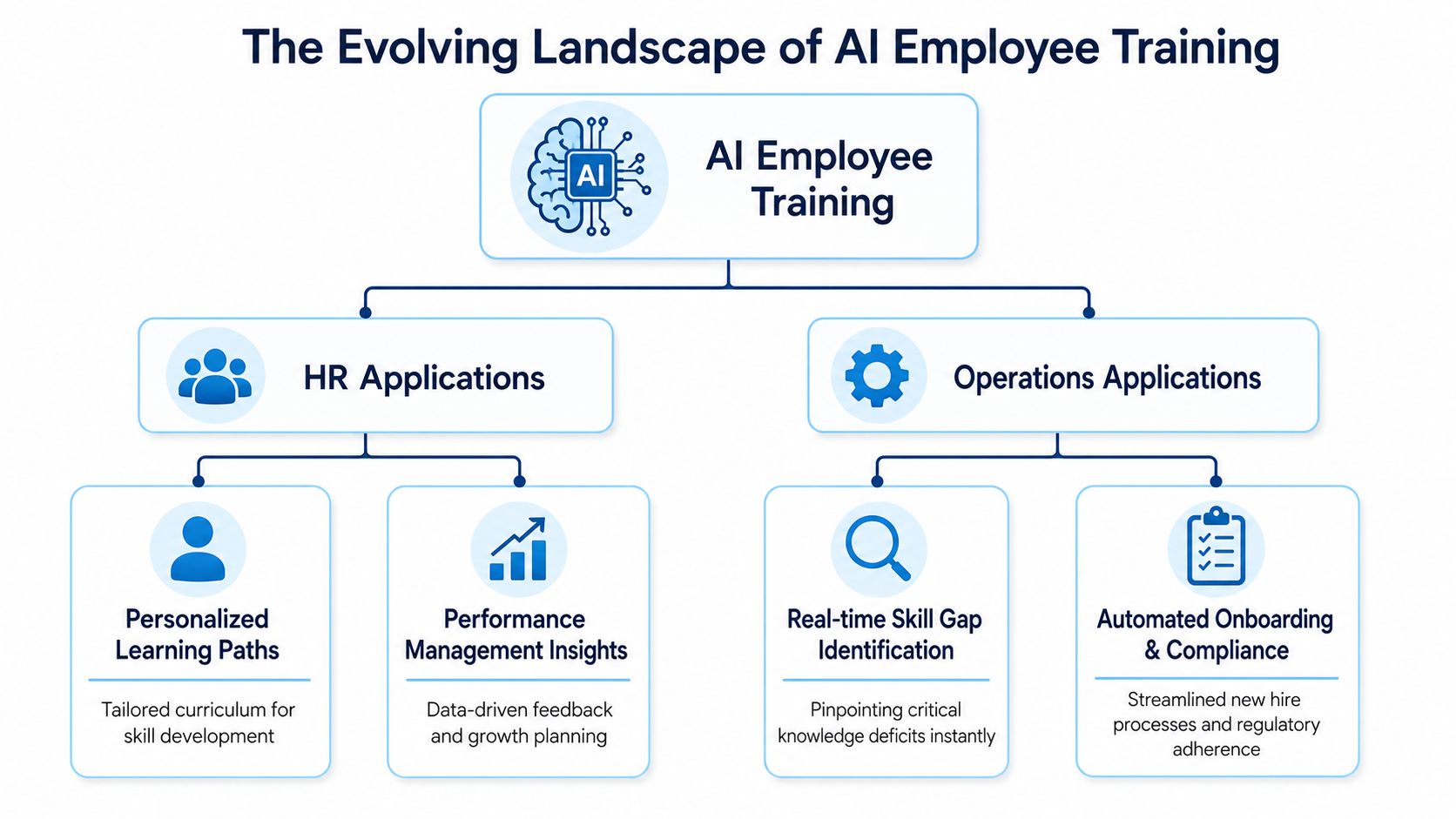
AI employee training isn’t a single course on prompt writing. It’s a set of practical supports that help employees do their jobs better, faster, and more consistently.
The most effective programs show up in ordinary moments. A new hire needs help on day three. A field technician needs the latest troubleshooting steps. A supervisor wants to coach a struggling team member. A retail associate needs a quick compliance refresher before a shift starts.
Onboarding that adapts to the role
A warehouse associate, a home health worker, and a regional sales rep don’t need the same starting path. AI-assisted onboarding makes that obvious and actionable.
AI-assisted onboarding programs have been shown to cut new hire ramp time by 25% and improve 90-day retention by up to 20%, while personalized, self-paced learning boosts overall employee performance by 15 to 25%, according to CareerTrainer.ai’s corporate training statistics. In practical terms, that means the system can prioritize what matters first by role, location, language, and task.
A realistic setup looks like this:
- A retail associate gets mobile lessons on POS basics, returns, shift expectations, and customer interactions
- A field service worker gets safety content, route protocols, and equipment-specific checklists
- A remote support rep gets product knowledge, escalation flows, and response templates
That’s very different from a generic LMS sequence that treats every employee the same.
Knowledge access when the question is urgent
Most training failures aren’t caused by bad content. They happen because employees can’t find the right answer when they need it.
A frontline worker doesn’t want to search six folders for a policy. They want one clear answer on mobile. That’s where enterprise AI search and guided knowledge discovery become part of training itself. Instead of asking employees to memorize everything, organizations can give them immediate access to policies, SOPs, product info, and how-to guidance through AI bots for enterprise search and knowledge discovery.
Good AI training reduces dependence on memory and increases confidence in action.
For example, a nurse manager can ask where to find the updated incident reporting process. A store supervisor can pull the approved refund exception steps during a customer issue. A field tech can confirm whether a part replacement requires escalation. Those moments are training in practice, not training in theory.
Personalized upskilling, not one-size-fits-all content
Employees learn unevenly. So do teams.
An operations coordinator may need help drafting summaries and organizing information. A people manager may need coaching prompts, recognition ideas, and better ways to run check-ins. A manufacturing lead may need quick decision support tied to safety, quality, and escalation.
That’s why strong AI employee training uses:
- Role-based recommendations instead of one course for everyone
- Microlearning instead of long modules employees postpone
- Behavioral nudges tied to actual tasks and recurring work
Compliance that fits distributed work
Compliance training breaks down when companies treat it as an annual event. It works better when AI helps surface the right training at the right moment, based on job role, location, certification status, or recent task history.
For frontline teams, that can mean short reminders before a shift, a quick refresher after a process change, or manager alerts when a required skill hasn’t been reinforced. For distributed office teams, it can mean policy clarification embedded directly into workflow tools.
The result is more useful than traditional learning completion. Employees get support when a real decision is in front of them.
Your Four-Phase AI Training Implementation Roadmap
Most AI training programs fail before the first course launches. The problem usually isn’t content. It’s weak operating design.
A useful rollout starts with governance, then connects data, then builds learning around real work, then reinforces behavior long enough for habits to stick.

Phase 1 Assess policy and governance
Before training employees to use AI, decide what “good use” looks like inside your organization.
That means clarifying:
- Approved tools employees can use for work
- Restricted data that must never be shared with public AI systems
- Review expectations for AI-generated output
- Role boundaries on who can automate, publish, approve, or recommend
If you skip this, employees fill the gap themselves. Some move too cautiously and avoid useful tools. Others move too fast and introduce compliance risk.
A strong start includes HR, IT, operations, legal, and frontline managers. The policy should be short enough for managers to explain, clear enough for hourly workers to follow, and specific enough to guide daily decisions.
Phase 2 Connect data and systems
AI training gets more useful when it pulls context from the systems employees already use. That often includes HRIS, payroll, scheduling, LMS, communication tools, and frontline operations systems.
For larger organizations, this is orchestration work. For smaller organizations, it may mean replacing separate tools with one cleaner environment. Either way, the goal is the same. Employees shouldn’t need to remember where learning lives versus where work lives.
A practical planning checklist helps:
| System area | Why it matters for training |
|---|---|
| HRIS | Personalizes learning by role, location, manager, and tenure |
| LMS or content repository | Supplies formal learning content and completions |
| Scheduling and task systems | Triggers training in the flow of work |
| Communications platform | Delivers reminders, updates, and reinforcement |
| Survey and feedback tools | Captures confidence, friction, and adoption barriers |
Teams building a stronger employee enablement model often start with a structured guide to creating a training program for employees, then adapt it for AI-specific use cases.
Phase 3 Build content for the real job
Generic AI literacy modules have value, but they’re not enough. The useful layer is role-specific.
A customer service team should practice summarizing tickets, drafting responses, and checking for tone and accuracy. A store manager should practice creating schedules, coaching employees, and finding policy answers. A field service crew should practice troubleshooting and documenting work clearly.
This is also where microlearning matters. Short modules, embedded checklists, and scenario-based prompts travel much better across distributed teams than long courses.
Phase 4 Reinforce behavior for long enough to matter
One-day training events create awareness. They don’t create habits.
Effective training programs must include repeated practice sessions and structured reflection, as research indicates new workplace habits require 4–8 weeks of consistent practice to become automatic, according to Sue Behavioural Design’s analysis of AI training reinforcement.
That changes how rollout should work. Use lighthouse roles first. Pick respected employees in a few functions, give them practical scenarios, then let them model use for peers. Reinforce with manager check-ins, short prompts, peer sharing, and follow-up practice.
Manager move: Ask employees to show one real task they improved with AI this week. That reveals adoption quality far better than asking whether they “finished the training.”
Measuring What Matters Beyond Course Completion
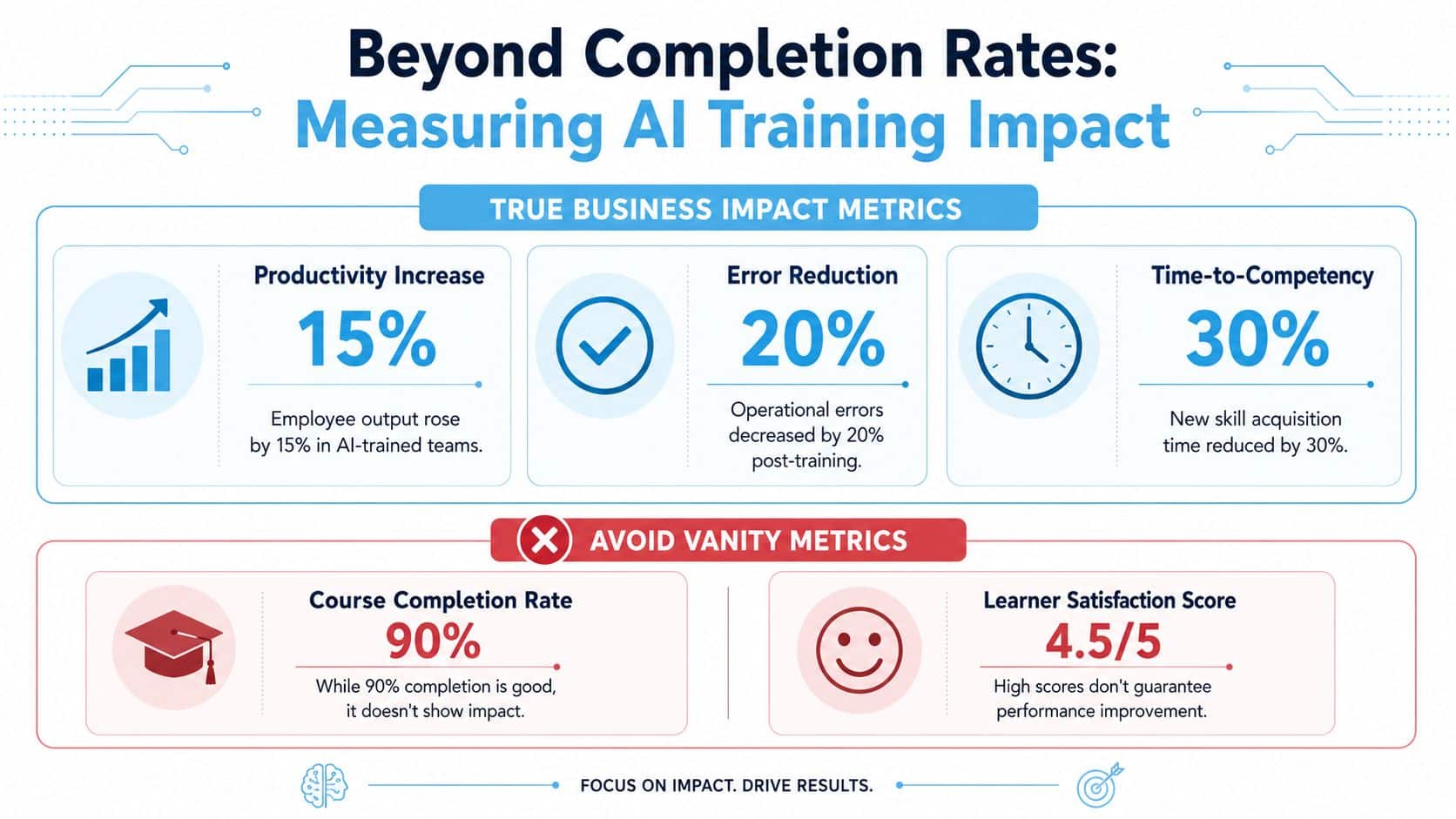
Many AI training dashboards look healthy and still tell leaders almost nothing. Course starts are high. Completions look fine. Satisfaction scores are positive. None of that proves employees changed how they work.
The right question is simpler. Are people using AI effectively in real tasks, and is that changing outcomes?
Start with adoption inside the first month
Well-designed AI employee training programs deliver a median ROI of 300–800%, but this is causally dependent on a 30-day adoption leading indicator. If employees do not actively use AI tools within 30 days post-training, the productivity impact fails to materialize, as explained in Pertama Partners’ guide to AI training ROI measurement.
That means leaders should stop treating completion as success. Completion only tells you someone reached the end of the material. It doesn’t tell you whether they trusted the tool, used it correctly, or changed a workflow.
A better scorecard includes:
- Usage within 30 days after training
- Pre and post practical task performance
- Peer-reviewed output quality
- Manager-observed behavior change
That four-part measurement approach also aligns with Candova’s benchmarking guidance for AI proficiency, which argues that real proficiency should be assessed on actual work artifacts, not self-ratings or quizzes.
Measure workflow impact, not just learning activity
HR and ops leaders should tie AI employee training to work outcomes that employees and managers can see.
Examples include:
| Better metric | What it shows |
|---|---|
| Task completion speed | Whether employees are moving faster on recurring work |
| Output quality | Whether AI-supported work is clearer, safer, or more accurate |
| Manager intervention rate | Whether supervisors spend less time answering routine questions |
| Knowledge search patterns | Whether employees can find answers without escalation |
A connected analytics environment matters here. If learning, communication, survey feedback, and operational data are split across platforms, it’s hard to connect training to outcomes. Teams trying to track this cleanly usually need a workforce analytics platform that combines adoption, engagement, and operational indicators.
Completion rates can support the story. They should never be the story.
Include employee confidence, but don’t stop there
Confidence matters because fear slows adoption. But self-reported confidence can drift far from real capability. Someone may feel fluent after a workshop and still accept poor outputs, miss policy constraints, or skip verification.
That’s why practical assessments matter more. Ask employees to solve a role-specific task. Review what tool they chose, how they framed the request, and how they checked the output before using it.
That’s the difference between exposure and proficiency.
How HubEngage Unifies Your AI Training Strategy
AI training usually breaks down for a simple reason. Employees have to switch between too many tools to learn, ask questions, find policies, complete tasks, and give feedback. That friction shows up as lower adoption, slower manager follow-through, and more inconsistency across locations.
A unified platform solves an operations problem, not just a learning problem.
Why one employee experience layer reduces tool sprawl
For SMBs and lean HR teams, separate systems for communications, surveys, learning, scheduling, recognition, and task management create avoidable overhead. Every extra platform adds setup work, support tickets, login issues, and reporting gaps. AI training suffers because reinforcement happens outside the course itself. Managers need a way to send prompts, answer recurring questions, collect feedback, and point employees to approved guidance without asking them to hunt across five systems.
One employee-facing system gives people a single place to go. That matters most for frontline teams, where time is short and desktop access is uneven.
Large organizations need orchestration, not another disconnected app
Enterprise teams rarely want to replace their HRIS, payroll, LMS, or workforce systems all at once. The better approach is to add an employee experience layer that connects those systems and presents training, communication, and support in one place.
The operational value is straightforward:
- Targeted communications keep AI policy updates, role-based prompts, and manager reinforcement visible
- Feedback and engagement tools surface confusion, resistance, and adoption barriers early
- Task and workflow features connect training to daily execution instead of treating learning as a side activity
- Centralized learning access gives employees one front door for job aids, microlearning, and role-specific guidance
That structure helps HR and operations teams tie AI skill building to real workforce problems, including communication gaps, inconsistent execution, and frontline tool sprawl.
One hub makes AI training easier to apply on the job
Employees do not need another content library. They need one place to find the right answer, complete a short learning module, respond to a manager prompt, and use that guidance during the workday. An employee learning hub supports that model by bringing learning into the broader employee experience.
The payoff is practical. HR can see where adoption stalls. Managers can reinforce the right behaviors in context. Operations leaders can connect AI training to fewer escalations, faster task completion, and more consistent execution across office, remote, and frontline teams.
AI Employee Training FAQs
How do we make AI employee training inclusive for frontline and non-technical workers
Start with access, not content. A critical challenge is making AI training inclusive, as 40% of workers in underserved communities lack access to AI literacy programs, and many existing curricula are not accessible via mobile, SMS, or digital signage, according to the ARI and Notre Dame workforce report.
That has direct design implications:
- Use mobile-first delivery so employees can learn without a desktop
- Offer multiple channels such as SMS, digital signage, and in-app prompts
- Teach through role-specific tasks instead of abstract AI concepts
- Use peer-led learning so trusted employees model practical use
- Keep modules short enough to fit shifts, handoffs, and field work
A frontline cashier doesn’t need a broad lecture on large language models. They need to know how AI can help answer policy questions, support product lookup, or guide next best actions without slowing customer service. A maintenance worker needs troubleshooting support and safety reminders that are easy to pull up on mobile. Practicality is what makes inclusion real.
What compliance and ethical risks should HR and operations leaders watch closely
Three issues matter most.
First, data handling. Employees need clear rules on what information can and cannot be entered into AI tools. That includes customer data, employee data, health information, financial details, and internal confidential material.
Second, output verification. AI can draft, summarize, and recommend, but employees still need to verify accuracy, policy alignment, and judgment-sensitive decisions. Training should teach employees to review outputs before using them.
Third, bias and inconsistency. If managers use AI for coaching notes, hiring support, recognition prompts, or performance language, organizations need standards and human review. The point isn’t to avoid AI. It’s to use it within defined guardrails.
A sound program combines policy, role-based scenarios, access controls, and manager reinforcement. That’s more effective than a single compliance memo sent after rollout.
Should we build our own AI training program or buy a platform
Most organizations need a blend of both.
Build the parts that reflect your business. That includes your policies, approved use cases, job-specific workflows, internal terminology, SOPs, and manager expectations. Those pieces are too operationally specific to outsource completely.
Buy the parts that are expensive to reinvent. That usually includes delivery infrastructure, mobile access, communications orchestration, content distribution, analytics, survey workflows, search, and integration layers.
A simple way to frame this is:
| Decision area | Build internally | Buy through a platform |
|---|---|---|
| Company policies and use cases | Best handled internally | Not enough on its own |
| Learning delivery and access | Hard to scale well | Usually faster and cleaner |
| Frontline communication reach | Often fragmented | Better through unified channels |
| Measurement and orchestration | Complex across systems | Stronger when centralized |
If your workforce is distributed, deskless, multilingual, or manager-dependent, platform support becomes more valuable. The harder it is to reach employees consistently, the more dangerous a build-only strategy becomes.
What’s the biggest mistake leaders make with AI employee training
They launch training as an event instead of a work system.
Employees don’t need one inspirational session on AI. They need useful guidance, approved tools, easy access to knowledge, repeated practice, and manager reinforcement over time. When those pieces are missing, adoption stalls and unofficial workarounds appear.
How should managers participate in AI employee training
Managers should do three things consistently. Show approved use cases, ask employees to demonstrate one real application, and coach for verification rather than blind trust. Their role isn’t to become technical experts. Their role is to normalize good habits in daily work.
HubEngage, Inc. helps organizations turn AI employee training into an operational system, not a disconnected course library. For SMBs, that means replacing scattered tools with one platform for communications, engagement, operations, and continuous learning. For larger organizations, it means orchestrating AI-powered employee experiences across existing HRIS, payroll, LMS, and workforce systems. To see how HubEngage can support frontline, deskless, remote, and distributed teams in one connected experience, get a demo from HubEngage, Inc..