Skip to content

How To Create Training Program For Employees?

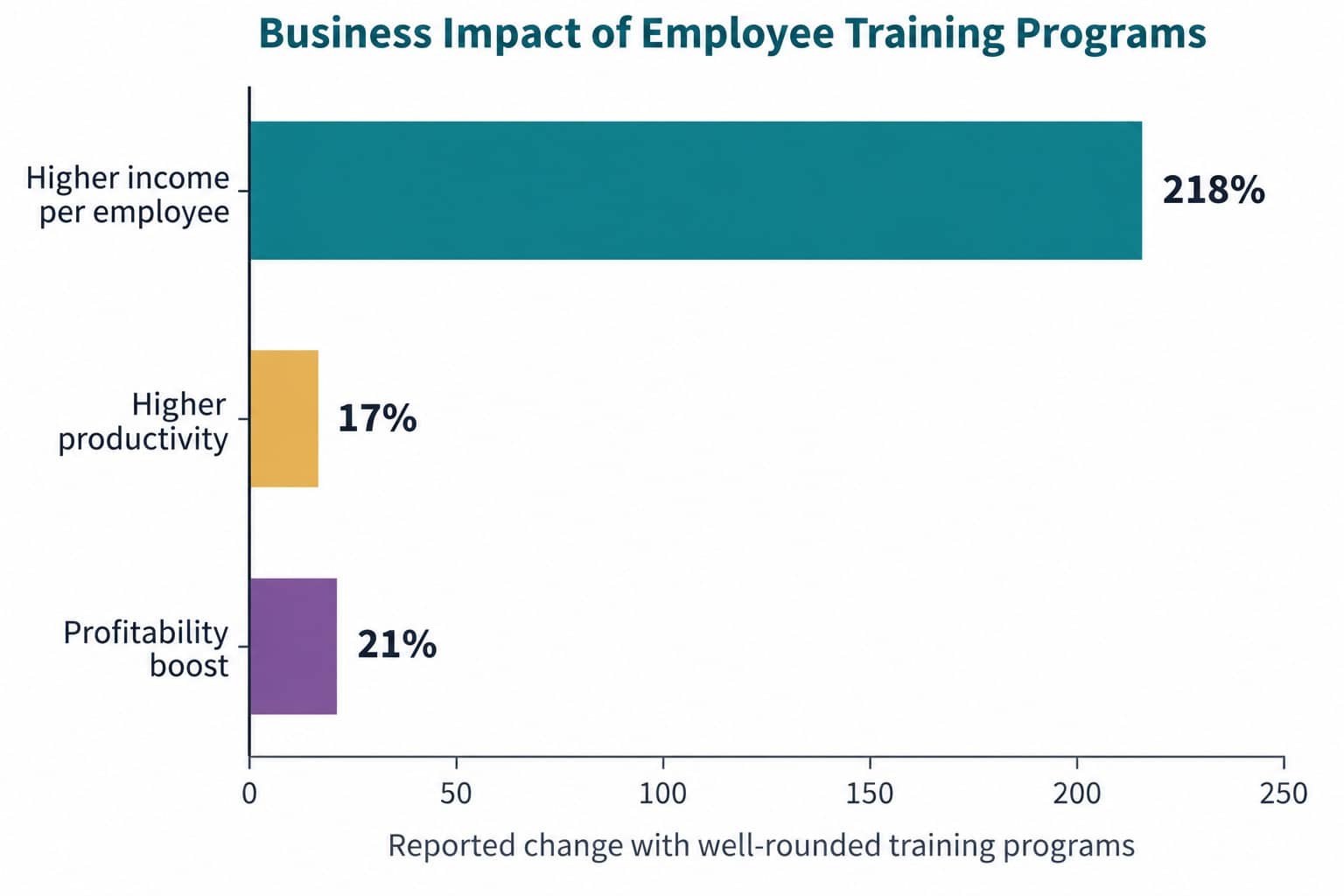
Training stops looking like a soft initiative when you attach it to output. Companies with well-rounded employee training programs have been reported to generate 218% higher income per employee, employees who receive the training they need are associated with 17% higher productivity, and targeted training has been linked to a 21% boost in profitability, according to Devlin Peck’s roundup of employee training statistics.

That’s the fundamental frame for anyone trying to create a training program for employees. You’re not building a course catalog. You’re building a system that helps people perform better, adapt faster, and stay aligned as the business changes.

The hard part isn’t usually writing a few modules or buying an LMS. The hard part is building a program that works for the workforce you have. For many organizations, that means mixed schedules, distributed teams, frontline employees without desks, managers who are stretched thin, and employees who won’t log into yet another standalone tool unless there’s a clear reason.

Generic advice often assumes everyone sits at a laptop, has time for long courses, and can absorb learning the same way. That’s not how most work happens. Warehouse teams learn in shifts. Nurses and field technicians learn between tasks. Retail associates need quick, role-specific guidance. Corporate employees may want self-paced paths, while frontline teams often need manager reinforcement and practical job aids.

A useful training program accounts for all of that from the start. It ties learning to business priorities, chooses formats that fit the task, builds promotion into rollout, and measures what changed after training. That’s what separates training that gets completed from training that gets used.

Key Takeaways

  • A successful employee training program focuses on improving job performance, productivity, and business outcomes.
  • Start with a training needs analysis to identify skill gaps, role-specific challenges, and measurable business goals.
  • Choose training formats that match how employees work, including mobile learning, microlearning, coaching, and hands-on practice.
  • Frontline and deskless employees need easy access to training through mobile devices, QR codes, multilingual content, and manager support.
  • Effective training programs combine strong communication, manager reinforcement, and ongoing promotion to drive adoption.
  • Measure training success using behavior change, performance improvements, and business impact.

Employee Training For Modern Workplaces

Employee training now sits much closer to operations than HR teams did a few years ago. Companies are dealing with faster process changes, tighter compliance requirements, higher turnover in frontline roles, and wider skills gaps across distributed teams. The mandate has changed from offering learning opportunities to making sure people can do the job correctly, consistently, and safely in the environments where work occurs.

That shift matters most for organizations with non-desk employees.

A training program built for office staff often fails in the field. Store associates do not have time for 45-minute modules during peak hours. Nurses and technicians cannot stop for long course sessions in the middle of a shift. Warehouse teams may share devices, work across language groups, and rely on supervisor reinforcement more than formal course completion. If training access depends on a desktop login and uninterrupted time, adoption drops before the content has a chance to help.

What the mandate looks like in practice?

When leaders ask how to create a training program for employees, the request usually points to one of three business problems:

  • Close a performance gap: A team is making repeat errors, struggling with systems, or missing execution standards.
  • Support a business change: New products, policies, workflows, or compliance requirements need consistent rollout.
  • Build workforce capacity: Employees need a clearer path into larger roles, with less trial-and-error learning on the job.

Each problem calls for different design choices. Compliance training needs consistency and proof of completion. Operational training needs speed, repetition, and reinforcement. Frontline training needs easy access first, then enough structure to support retention and manager follow-through.

Training breaks down when the design assumes ideal conditions. Many organizations are working with fragmented schedules, limited device access, uneven manager coaching, and employees who need learning in the flow of work, not outside it.

Where generic training advice breaks down?

Generic guidance still treats training like a standard LMS rollout. That works for some corporate populations. It works poorly for mobile teams, shift-based workforces, and employees who rarely sit at a computer. A stronger approach gives employees more than one way to reach the same learning outcome. T

eams may need mobile delivery, short video, QR-code access, text reminders, multilingual content, quick job aids, and supervisor-led practice built into shift huddles. The trade-off is clear. More delivery options take more planning, but they raise participation and make training usable for the people who keep daily operations running.

If training is supposed to change behavior, reach and usability matter as much as the content itself.

The Business Case for Employee Training Programs

Companies with strong learning cultures are more likely to improve innovation, productivity, and readiness for change, according to Deloitte’s research on how a learning culture supports business performance. That matters because training budgets rarely win approval on good intentions alone. They win when leaders can see a direct line from learning to execution.

For distributed and frontline teams, that line is easier to prove than many companies think. If onboarding takes too long across sites, if procedures vary by location, or if customer experience depends too heavily on who trained whom, training becomes an operating control. It reduces variability, shortens time to proficiency, and gives managers a repeatable way to reinforce the right behaviors.

A flowchart showing five steps for a training needs analysis to build an employee program.

What executives usually need to hear?

Executive teams usually respond to four business arguments.

Business concern Training answer
Productivity pressure Training closes the gap between expected and actual performance
Margin pressure Better capability reduces mistakes, delays, safety incidents, and rework
Retention risk Clear development paths give employees a reason to stay and grow
Change fatigue Structured learning helps teams adopt new tools and processes with less disruption

The strongest case is specific. “We need training” is vague. “We need every store supervisor to coach the new returns process the same way within 30 days” gives finance, operations, and HR something concrete to evaluate.

Why informal learning gets expensive?

A lot of organizations already train people. They just do it informally. A supervisor explains a task during a busy shift. A PDF sits in a shared drive. A field employee learns by shadowing whoever is available that week. That approach creates hidden cost.

  • Execution drifts: Locations and managers teach different versions of the same task.
  • Experienced employees become bottlenecks: Key knowledge stays with a few people.
  • Risk rises: Safety, compliance, and service standards become harder to enforce consistently.
  • Frontline workers get less support: If learning depends on email or desktop access, the least-connected employees miss the message.

This is usually where the business case sharpens. Informal learning looks cheaper on paper, but it increases rework, slows ramp-up, and makes performance harder to manage across a dispersed workforce.

The business case gets stronger when employees can actually access the training

This is the gap generic training guides miss. A polished course library does not help much if nurses, retail associates, drivers, technicians, or plant workers cannot reach it during the workday.

Access is a design decision. Mobile delivery, QR codes in breakrooms, short modules that fit between tasks, multilingual content, and manager-led reinforcement all raise completion and retention for non-desk teams. The trade-off is real. Multi-channel delivery takes more planning than a standard LMS rollout, but it reaches the people whose day-to-day actions affect service, safety, and output.

A useful way to validate that need is to collect direct employee input before asking for budget. Short pulse checks and employee survey strategy and implementation guidance can show where training access breaks down by role, site, or shift. After launch, the right effective training survey questions help confirm whether the program was clear, usable, and relevant enough to change behavior..

Step 1 Laying the Foundation with a Needs Analysis

A solid program starts before content. The first move is a formal skills-gap analysis that maps current capabilities against role-critical competencies. That gap should determine both the curriculum and the KPI set used to evaluate impact, based on Leapsome’s guidance on building an employee training plan.

A diagram outlining the first step of creating an employee training program, focusing on a needs analysis process.

If you skip this step, you usually end up with content that sounds useful but doesn’t solve anything specific. Teams complete courses. Managers nod politely. Nothing changes on the floor.

Start with the work, not the content

Needs analysis is easier when you move in this order:

  1. Define the business trigger: What changed or what isn’t working?
  2. Identify role-critical behaviors: What do employees need to do differently?
  3. Assess current capability: Where are people already strong, and where are they falling short?
  4. Rank the gaps: Which gaps matter most to business performance right now?
  5. Set measurable outcomes: Decide how you’ll know whether the training worked.

For example, if a field service team is struggling with a new mobile workflow, the problem may not be “people need more system training.” It may be that technicians need faster task-specific guidance, better in-app reminders, and manager reinforcement during the first weeks of rollout. That distinction matters because it changes what you build.

Gather evidence from more than one source

One of the quickest ways to improve your needs analysis is to combine hard signals with employee input. Look at process errors, quality issues, missed steps, manager observations, support tickets, and time-to-proficiency patterns. Then ask employees what’s getting in the way.

If you need a practical starting point for interviews or pulse checks, these effective training survey questions help uncover confidence gaps, delivery preferences, and barriers to completion.

Use surveys carefully. Employees can tell you where training feels confusing, inaccessible, or irrelevant. They usually can’t diagnose the whole business problem on their own. That’s why manager input and operational data matter just as much.

A structured survey process also helps. Teams that want a repeatable way to collect and act on workforce feedback can borrow ideas from this employee surveys strategy and implementation guide.

Define KPIs before you build anything

The KPI should match the job behavior, not just the learning event.

  • For knowledge transfer: Quiz accuracy, confidence checks, and recall after a short delay can help.
  • For procedural work: Observation checklists, task completion quality, or fewer process errors are more useful.
  • For frontline adoption: Completion alone isn’t enough. Track access rates, manager reinforcement, and whether employees can apply the task correctly in live conditions.

A good needs analysis narrows the scope. It tells you who needs training, on what, in which format, and what success looks like. That’s where strong programs start.

Step 2 Designing Content and Choosing Delivery Methods

Most training programs become bloated during design. Teams try to cover everything, please everyone, and build one format that serves every role. The result is usually a long course that underperforms.

Design gets easier when you match the delivery method to task complexity. Self-paced modules work well for knowledge transfer, while hands-on coaching is more appropriate for procedural tasks. And because 68% of employees prefer to learn and train at work, integrating learning into daily workflows matters, as noted in LevelUp LMS guidance on training delivery trends.

A professional woman working on a laptop designing an employee training program with interactive content planning tools.

Match the format to the job

Here’s a practical way to think about format choice.

Training need Best-fit format
Policy awareness Short self-paced modules, microlearning, quick checks
Software navigation Screen recordings, task demos, practice in sandbox environments
Customer conversations Role-play, manager coaching, scenario-based practice
Safety or procedural execution Hands-on demonstration, supervised practice, refresher prompts
Distributed frontline reinforcement Mobile modules, QR access, huddles, job aids, multilingual summaries

A lot of teams overproduce when a simple format would work. If an employee needs to learn how to submit a request, approve a shift swap, or follow a reset procedure, a concise tutorial video often works better than a long course. If you’re building those assets internally, this guide to creating tutorial videos is a useful reference for scripting and keeping walkthroughs easy to follow.

Design for distributed and frontline workers first

Many training programs often fail here.

Frontline employees often have limited time, shared devices, mixed literacy levels, and uneven access to email or desktop systems. If training depends on a long login flow, a desktop browser, or a quiet uninterrupted block of time, completion will drop and retention will suffer.

Use design rules that reflect real operating conditions:

  • Keep modules short: Employees should be able to complete a unit during a shift gap, not at the end of a long day.
  • Use mobile-friendly layouts: Buttons, text size, and navigation should work on phones without pinching and zooming.
  • Build for low-friction access: QR codes, text prompts, single sign-on, and direct links reduce drop-off.
  • Support multiple languages: Critical instructions should be available in the languages employees use.
  • Pair content with manager reinforcement: A two-minute huddle after a module often does more for retention than adding another slide.

For many organizations, microlearning is the right backbone because it fits how work happens. This overview of microlearning tools for employee training is useful if you’re evaluating shorter-format delivery for mobile or deskless teams.

Don’t confuse content volume with effectiveness

A good program usually has fewer assets than people expect. What matters is relevance, sequencing, and reinforcement.

That may mean a short self-paced module before launch, a live demo during team meetings, a one-page job aid on day one, and a refresher quiz two weeks later. That blend usually outperforms a single “complete” course that employees finish once and forget.

Step 3 Implementing and Promoting Your Program

A rollout lives or dies by manager behavior. Employees take cues from supervisors about what matters, what can wait, and what’s just another corporate request. If managers treat training like optional admin work, employees will too.

The better launches I’ve seen all share the same pattern. They don’t start with a company-wide blast. They start with a pilot group, a manager briefing, and a clear explanation of what should change after training.

What a strong rollout looks like?

A practical launch sequence often looks like this:

  • Pilot first: Test with one team, one location, or one role group. You’ll catch confusing instructions, access issues, and bad assumptions quickly.
  • Brief managers before employees: Give supervisors the purpose, the timeline, and the talking points. They need to answer “why this matters” in plain language.
  • Use more than one channel: Email alone rarely reaches everyone. Combine mobile notifications, intranet posts, team huddles, signage, chat tools, and direct manager reminders.
  • Explain the employee benefit: People engage faster when they understand how training helps them do the job, avoid mistakes, or grow into a better role.
  • Follow up after launch: Reminder cadence matters. Most programs lose momentum because communication stops too early.

Frontline promotion needs operational realism

Deskless workforces don’t consume internal communications the same way office employees do. Some teams check phones between tasks. Others rely on supervisors for updates. Some need training messages tied directly to schedules, shifts, or site routines.

That’s why implementation needs distribution planning, not just learning planning. Teams managing non-desk populations often need a communication model more like campaign operations than course assignment. This remote employee training resource is a useful reference point when planning reinforcement across dispersed teams.

Make adoption visible

One thing that works well in practice is visible accountability without turning training into punishment. Give managers simple progress views. Recognize early completion. Highlight locations or teams that are engaging well. If the program matters, leadership should talk about it in regular operating rhythms, not only in launch week.

What doesn’t work is burying the rollout inside a long HR email, assigning the same content to every role, and hoping the LMS dashboard will sort it out later. Implementation is part communication strategy, part manager enablement, and part operational follow-through.

Step 4 Measuring Success and Driving Continuous Improvement

The wrong way to evaluate training is to stop at completion rates and smile sheets. Those tell you whether people showed up and whether they liked the experience. They don’t tell you whether performance changed.

A more useful model tracks four layers: reaction, learning, behavior, and business impact. You don’t need a complicated framework name for this to work. You need clean questions and a willingness to compare pre-training and post-training performance.

Measure what changed

Use a mix of learning and operational signals.

Evaluation layer What to look for
Reaction Was the training clear, relevant, and accessible?
Learning Did employees understand the material well enough to demonstrate recall or decision-making?
Behavior Are managers seeing the new behavior on the job?
Business impact Did the operational problem improve after rollout?

For knowledge-heavy content, quizzes and short recall checks can work. For practical tasks, observation matters more. Industry guidance recommends using quizzes, polls, refresher sessions, and before-and-after evaluation to confirm whether metrics such as error rates or productivity improved, based on practical employee training guidance in this video resource.

Use feedback loops, not one-time reports

The best measurement systems create action, not paperwork.

  • Review manager observations: Supervisors usually spot friction before dashboards do.
  • Look for drop-off points: If employees start but don’t finish, the issue may be access, timing, or relevance.
  • Check retention later: Immediate recall can look fine while actual retention fades quickly.
  • Revise content fast: If one module causes confusion, shorten it, rewrite it, or move part of it into live coaching.

One common mistake is treating low completion as a motivation problem. Sometimes it is. Often it’s a design problem. The module is too long. The login is clunky. The language is off. The training was assigned during the busiest shift window.

Keep the program alive

Training shouldn’t freeze after launch. Processes change. Policies shift. Managers rotate. New hires enter the system. That means the program needs maintenance.

A mature training program has a simple review cycle. Content owners update materials when work changes. L&D reviews completion and application patterns. Operations leaders flag recurring performance issues that need reinforcement. That loop is how training becomes a business system instead of a library.

Unify and Amplify Your Training with HubEngage

Many training programs struggle for a reason that has nothing to do with learning design. The tools are fragmented. Communication happens in one place, recognition in another, surveys somewhere else, and training content in a separate system employees rarely visit unless they’re forced to.

That fragmentation is especially costly for distributed and frontline workforces. Every extra login, app switch, or disconnected workflow lowers the chance that employees will see the message, access the content, and complete the follow-through.

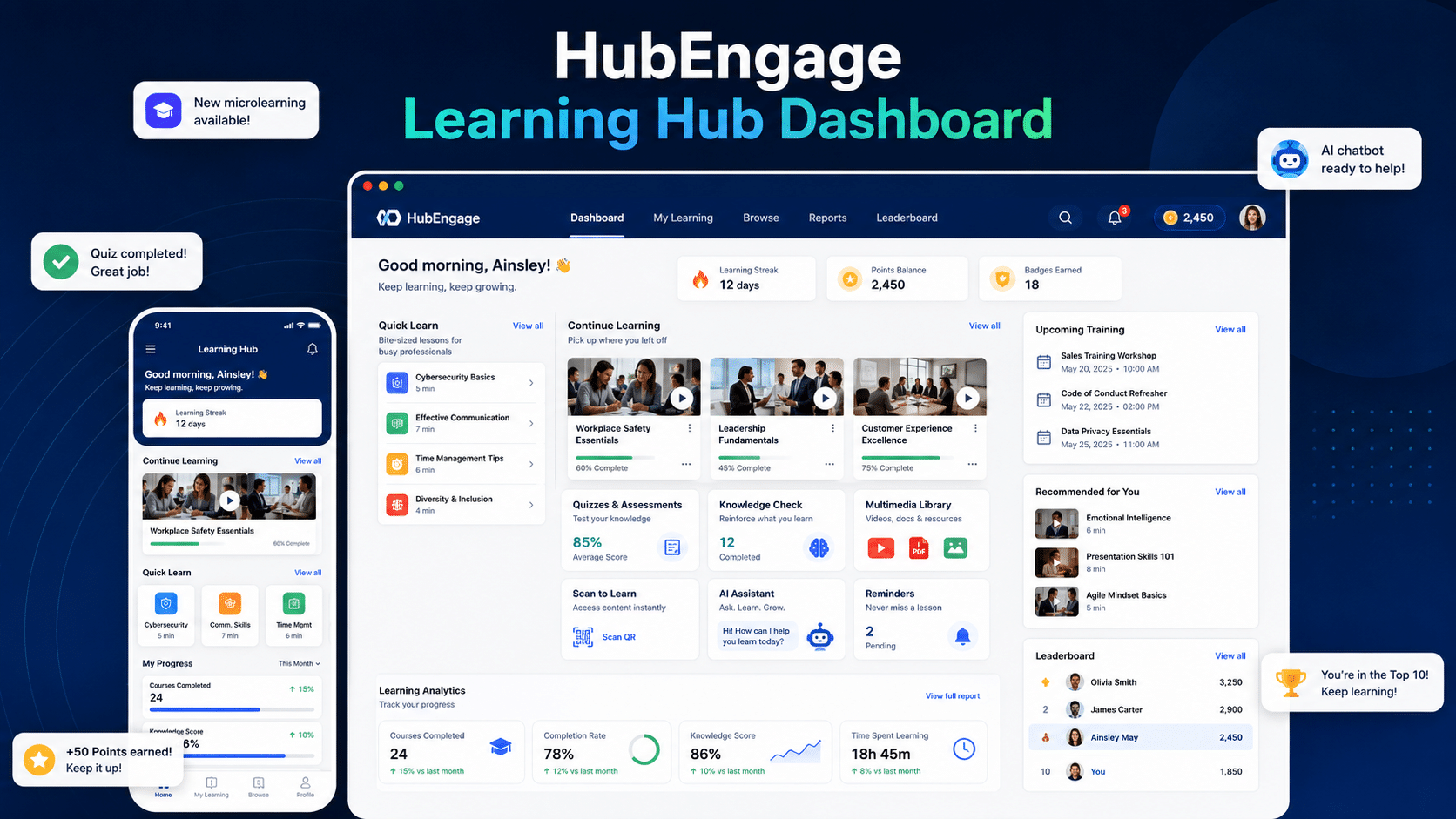
Screenshot from https://www.hubengage.com

Why a unified platform changes adoption?

A unified workforce platform can tighten the whole training cycle:

  • Communication and promotion: Leaders can announce new programs through mobile, web, email, SMS, chat, and other employee channels instead of relying on one message path.
  • Engagement and motivation: Recognition, gamification, and social features help reinforce participation and keep learning visible.
  • Operations and workflow fit: Scheduling, tasks, and day-to-day workflows make it easier to place training into the actual flow of work.
  • Learning and feedback: Training resources, certifications, quizzes, pulse surveys, and AI-supported support tools can sit closer to the environment employees already use.

That’s where HubEngage, Inc. fits for organizations that want communications, engagement, operations, and continuous learning in one workforce experience platform. For training teams, the practical advantage is reduced friction. Employees don’t have to hunt across systems to find announcements, content, reminders, surveys, and recognition tied to the same initiative.

A better fit for frontline execution

This matters most when you’re trying to create a training program for employees who aren’t desk-based. If a platform supports mobile access, multi-channel communication, surveys, social reinforcement, task alignment, and learning in one place, you can build a rollout that reflects how employees work. The strongest employee training programs aren’t just well written. They’re well distributed, well reinforced, and easy to use.

Conclusion

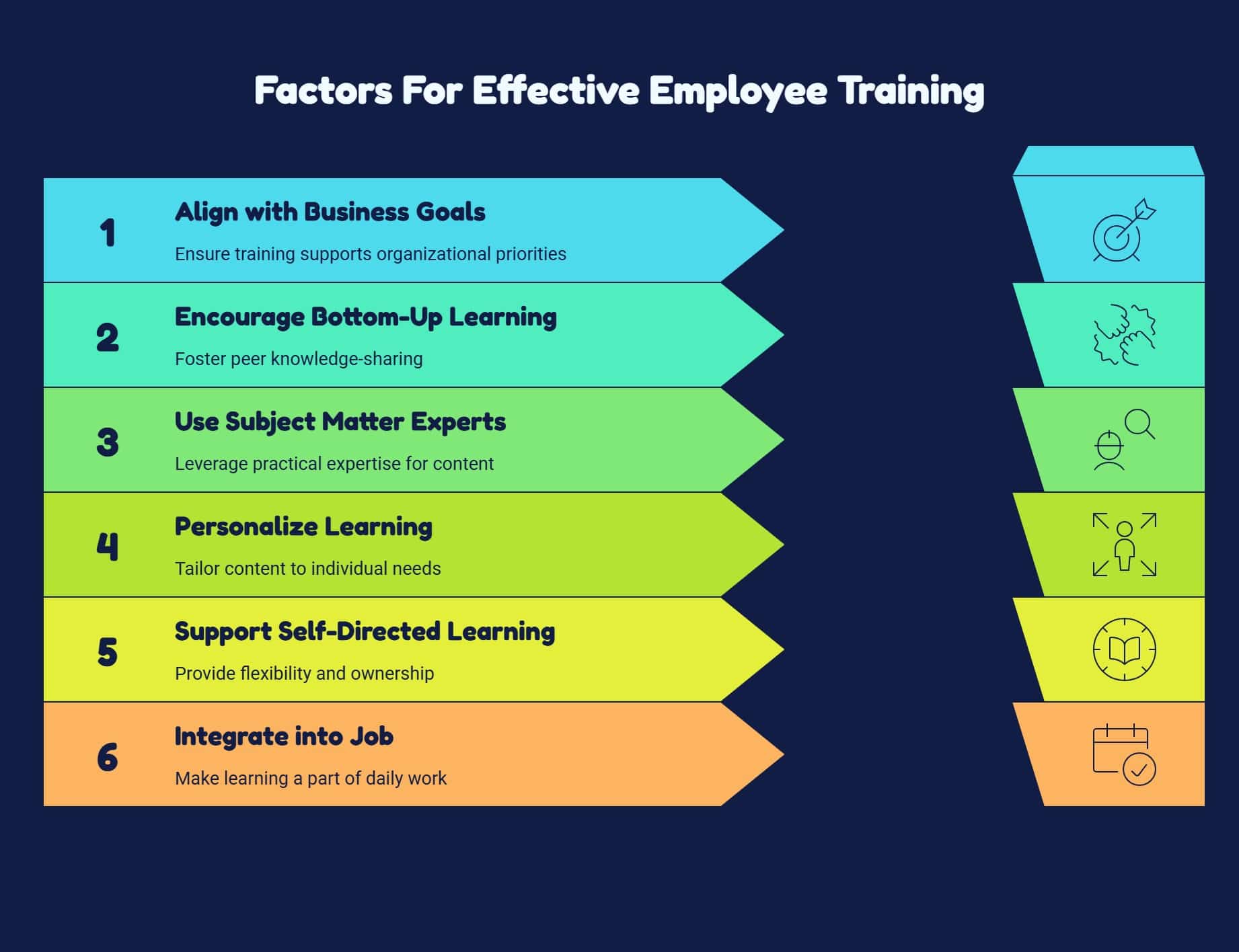
Creating an effective employee training program requires more than delivering content. It involves aligning learning with business goals, choosing formats that fit how employees work, reinforcing adoption through managers, and continuously measuring results.

When training is accessible, relevant, and integrated into daily workflows, it becomes a powerful driver of performance, engagement, and growth across the organization. To see how a unified platform can support these efforts, explore the HubEngage Employee Experience Platform by scheduling a personalized demo today.

Related Links

training program for employees | employee training resources

Get Insights

Subscribe to our weekly newsletter to get more tips on effective employee engagement and communications!

Join Our Community

Join Turn On Engagement (TOE) to interact with other employee engagement and people experience professionals. Share and get new ideas!

An expert content writer specializing in creating comprehensive, insight-driven content for technology and SaaS products. With more than three years of hands-on experience working closely with HR, internal communications, and leadership teams, he helps organizations turn employee engagement challenges into measurable outcomes. His writing is grounded in real customer experiences and focuses on practical strategies that boost productivity, improve communication, and strengthen workplace culture. Known for his ability to simplify complex technology concepts, he translates them into clear, actionable insights that resonate with HR professionals, talent acquisition leaders, and business owners alike. His work consistently reflects a strong commitment to trust, credibility, and people-first innovation, supporting organizations as they navigate employee experience, digital workplace transformation, and modern workforce engagement strategies.

Other posts you might enjoy

Back To Top