Most internal communication emails get a 65–70% open rate on average, according to Ragan’s State of Internal Communications Report. That means roughly 1 in 3 employees never sees the message at all, and that’s before accounting for the ones who open it and don’t act on it.
Our guide covers what makes internal communication emails work, such as the email formats and reusable templates that your team can use today. We also provide some examples that you can refer to along with some common best practices for internal email communications.
For a broader look at the full range of channels available to internal comms teams, see our guide to internal communication tools.
Key takeaways:
- Internal communication emails work best when they’re short and specific, and sent only to the people who need them.
- Email still outperforms chat for formal updates, policy changes, and anything employees need to reference later.
- Email templates save time and keep your tone consistent across teams, especially when messages come from different departments.
- Segmentation and personalization are the fastest ways to improve open rates without changing anything else.
- Email analytics aren’t limited to open rates. Read receipts and click-throughs tell you whether your message landed.
What is an Internal Communication Email?
An internal communication email is any message sent within your organization to inform or engage employees. That covers email updates such as a CEO sharing quarterly priorities or the HR team announcing a policy change. Your organization can also send out an internal communication email to recognize a team win.
Internal comms emails are deliberate, written for a specific audience, with a specific outcome in mind.
Does email still matter when you have Slack and Teams?
Yes, emails still matter because they are sent for things that need to last; Slack and Teams are built for day-to-day conversations.
When you need to find an updated remote work policy, you are more likely to be searching through your inbox and not scrolling through a Slack channel. The same applies when HR sends a compliance acknowledgment; they need a record that employees received and read it. Chat doesn’t give you that.
According to Gallup’s 2024 Global Employee Engagement report, 68% of employees are disengaged at work. Poor or inconsistent communication is one of the most common contributors to this issue. Emails, when used well, is still one of the most direct ways to engage employees because everyone in your organization already has access to it.
The practical split most internal comms teams land on:
| Use email for | Use chat for |
| Policy updates and announcements | Quick team check-ins |
| Recognition and milestones | Day-to-day project coordination |
| Compliance and required reading | Fast questions and replies |
| Newsletters and company updates | Informal culture moments |
| Crisis communications | Sharing links or short updates |
Table 1: When to use internal email vs. chat tools like Slack or Microsoft Teams
What makes an Internal Communication Email effective?
A good internal email gets the right message to the right person in a way they can act on quickly. Some ways that your organization can write an email that gets the message across are below:
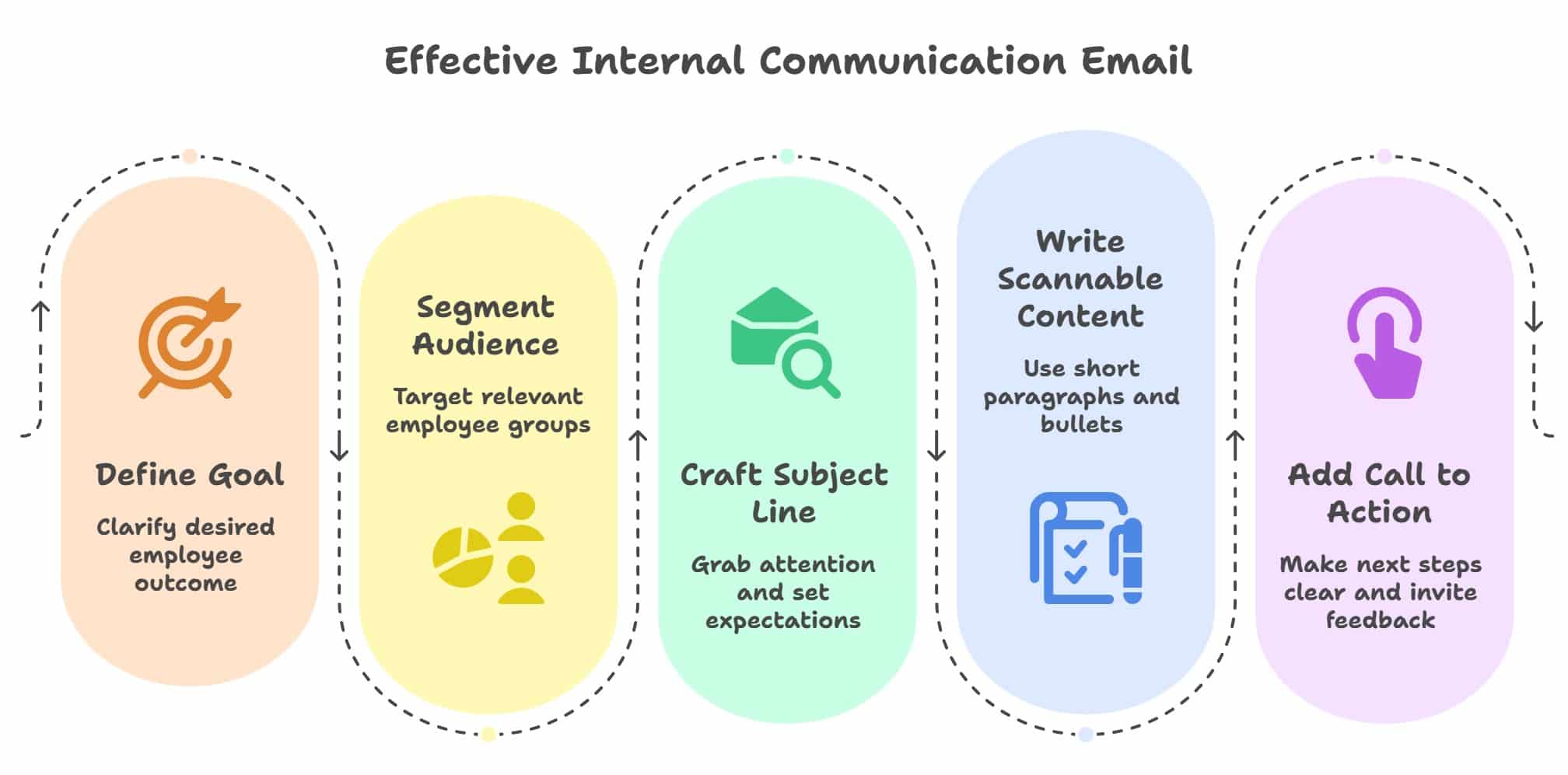
A subject line that tells people what to expect
Specific emails that help readers understand what to expect when they open the email encourages them to open it. A simple weak vs. strong email subject line example is provided below:
- Weak subject line: “Update from leadership”
- Strong subject line: “Remote work policy change effective September 1”
The subject line should answer: who is this for, and why does it matter today?
An email short enough to read in under a minute
Most employees scan emails before deciding whether to read the rest of the email body text. If your message looks long, it gets deferred and often forgotten. You can aim to introduce the key point in the first two sentences, then use the rest of the email to support it.
A body text formatted for fast scanning
Your email formatting helps to grab employees’ attention before they read a single word. Short paragraphs and bullet points make your email easy to skim through, while bolding the key action or takeaway helps it stand out for people who are moving quickly.
An audience list relevant to the email content
Irrelevant emails teach your employees to ignore new incoming emails. If a policy change affects customer-facing teams only, then your engineering team doesn’t need it. Taking a few extra minutes to segment your audience list before sending an email is one of the best practices habits that you can build for higher engagement.
A clear next step at the end of the email
Every email should answer one question for the reader: what do you want them to do next? Whether that’s reading an attached document, completing a survey, or resetting a password, spelling it out removes any ambiguity and makes it much more likely they’ll follow through.
10 Common Types of Internal Communication Emails
The format, tone, and level of urgency you use in your internal communication emails should match what you’re trying to communicate. Here’s a breakdown of the most common types your team will likely use.
| Type | Purpose | Common use cases |
| Leadership updates | Keep employees informed on direction and priorities | Quarterly goals and messages from the CEO messages on strategic changes |
| Policy announcements | Communicate rule or process changes clearly | Remote work and leave policy updates, code of conduct notices |
| Recognition emails | Acknowledge contributions and celebrate wins | Team milestones, individual and/or peer recognition |
| Crisis and safety alerts | Deliver urgent information fast | Notice of security incidents, unexpected weather closures, or emergency protocols |
| Onboarding emails | Help new hires settle in and know what to do | First-day instructions and system access guides |
| Event invitations | Drive participation in company activities | Town halls and company training sessions, or departmental events |
| Newsletters | Share regular updates across the organization | Weekly roundups and department highlights |
| Employee spotlights | Build culture through peer recognition and storytelling | Spotlight newsletters, new hire introductions, and career milestones |
| Wellness and culture | Show employees the organization cares about them | Mental health resources and wellness challenges |
| Diversity and inclusion | Celebrate and build a more inclusive workplace | Cultural observances and DEI initiatives or milestones |
Table 2: Common types of internal communication emails and when to use them
Examples of Internal Communication Email to send your employees
The examples below cover the most common scenarios your team will run into. Each one includes a subject line and body copy you can adapt directly to fit your email’s purpose.
Leadership or CEO update
Why this works: The subject line is specific, with the body copy detailing clear priorities and a direct next step (submit questions by Monday).
Subject: Q3 priorities, a quick note from [Name]
Body:
Hi team,
Here’s where we’re focused for Q3:
- Improve customer satisfaction scores by 10%
- Ship the product update by August 15
- Simplify our internal documentation process
I’ll be hosting a company-wide Q&A on Tuesday at 2pm. Send me your questions by Monday and I’ll make sure we cover them.
[Name]
Policy announcement
Why this works: The email starts with a descriptive subject line with the effective date upfront, a scannable list of changes, and a clear next step for questions.
Subject: Updated remote work policy effective September 1
Body:
Hi all,
Starting September 1, we’re updating our remote work policy for customer-facing teams.
What’s changing:
- Remote days: up to 2 per week
- Timesheets due by 5pm every Friday
- Monthly check-in with your manager is still required
You can read the full policy [here]. If you have questions, join our office hours on Thursday at 3pm.
[Name]
Recognition email
Why this works: The subject line tells the reader what to expect. The email body is short and specific about the outcome. It also ends warmly without overstating.
Subject: Shoutout: Marketing team’s Q2 results
Body:
Hi everyone,
Quick shoutout to the marketing team, who exceeded lead generation targets by 25% last quarter. Special thanks to [Names] for leading the campaign from start to finish.
This kind of result has a real impact on the business, and it doesn’t happen without a lot of behind-the-scenes work. Thank you.
[Name]
Crisis or safety alert
Why this works: The email sounds urgent but not alarmist. Three immediate actions are provided, each specific enough to act on without follow-up questions.
Subject: Action required: security incident, please read now
Body:
Hi team,
We’ve identified a security incident. Please take the following steps immediately:
- Do not open any suspicious attachments or links you weren’t expecting
- Reset your password now: [link]
- Report anything unusual to IT Security at [email or link]
We’ll send an update within the hour. Thank you for acting quickly.
IT Security Team
For more examples you must explore these free employee newsletter templates.
5 Internal Communication Email Templates to apply for your organization
These five templates cover the scenarios most internal comms teams deal with regularly. Each one is written to be adapted, so feel free to swap in your own details and adjust the tone to match how your organization communicates.
Template 1: General update or newsletter
Subject: [Company] update, [Month] highlights
Hi [Team],
Here’s what’s new this [week/month]:
- [Highlight #1]
- [Highlight #2]
- [Upcoming event or deadline]
If you have any questions, you’re welcome to reply to this email or join the Q&A on September 15, 2025.
[Name]
Template 2: Policy announcement
Subject: Update: [Policy name] effective September 15, 2025
Hi all,
We’re updating [policy or process] to [brief reason].
What’s changing:
- [Change 1]
- [Change 2]
You can read the full document here: [link]. If anything isn’t clear, join our office hours on September 15, 2025 and we’ll walk you through it.
[Name]
Template 3: Recognition
Subject: Celebrating [Team or Person]
Hi everyone,
We’d like to take a moment to recognize [Team/Person] for [what they did]. Their work on [specific project or outcome] made a real difference, and it doesn’t go unnoticed.
Thank you for the example you’ve set for the rest of the team.
[Leader’s name]
Template 4: Event invitation
Subject: You’re invited: [Event name] on [Date]
Hi [Team],
We’d love to see you at [event]. Here’s what you need to know:
- Date: September 15, 2025
- Time: [time]
- Location: [location or link]
Please RSVP by [deadline] so we can plan accordingly.
[Name]
Template 5: Wellness or culture
Subject: This week’s wellness focus: [theme]
Hi all,
This week we’re thinking about [theme, e.g. managing screen fatigue or setting boundaries]. We’ve pulled together a few resources that might be helpful: [link]
Take care of yourselves.
HR Team
For more ready-to-use formats, browse our employee newsletter templates. If you’re looking for inspiration on structure and tone, the company newsletter examples are worth a look too
How to personalize and segment your audience for Internal Communication Emails?
Personalization is one of the simplest ways to improve engagement without you needing to rewrite everything. With personalization, each employee feels like the message was written for them specifically, and not just blasted to everyone.
What personalization in internal communication emails look like?
According to Campaign Monitor, personalized subject lines can lift email open rates by up to 26%. The simplest personalization changes are things like addressing someone by name or referencing their team to make it feel like the email was written for them instead of talking at them. Some ways to personalize an internal communication email include:
- Use their name in the subject line or opening. “Hi Sarah” performs better than “Hi all” when the content is role-specific.
- Reference their team or location. For instance, “For our Sydney team” is more relevant than “For all employees.”
- Tailor recognition emails to call out team-specific wins, not just company-wide ones.
How to segment your email audience without making it complicated?
Segmentation doesn’t have to be complicated to be effective. Most teams start with four or five basic filters and find that covers the majority of their use cases. These basic segmentation methods are a good place to start:
| Segment by | Example use case |
| Department | IT policy updates only go to relevant teams |
| Location | Facility-specific alerts or events |
| Role or seniority | Manager-only briefings vs. all-staff updates |
| Employment type | Part-time or shift workers may need different formats |
| New vs. tenured employees | Onboarding content vs. company news |
Table 3: Common ways to segment internal emails by employee group
Segmentation quickly becomes a spreadsheet problem when you’re managing it manually in Outlook. Platforms like HubEngage are built specifically for internal employee communications, and they connect to your Human Resource Information System (HRIS) to keep employee lists accurate automatically.
This means that you can segment by role, location, or department without maintaining anything manually. See how the internal communications email platform handles this.
How to measure whether your Internal Communication Emails are working?
Sending emails and knowing they worked are two different things. These are the metrics worth tracking and what each one actually tells you.
According to Ragan’s State of Internal Communications Report, typical benchmarks for internal emails are:
- Open rate: 65–70%
- Click-through rate: 10–15%
- Read time: 30–40 seconds on average
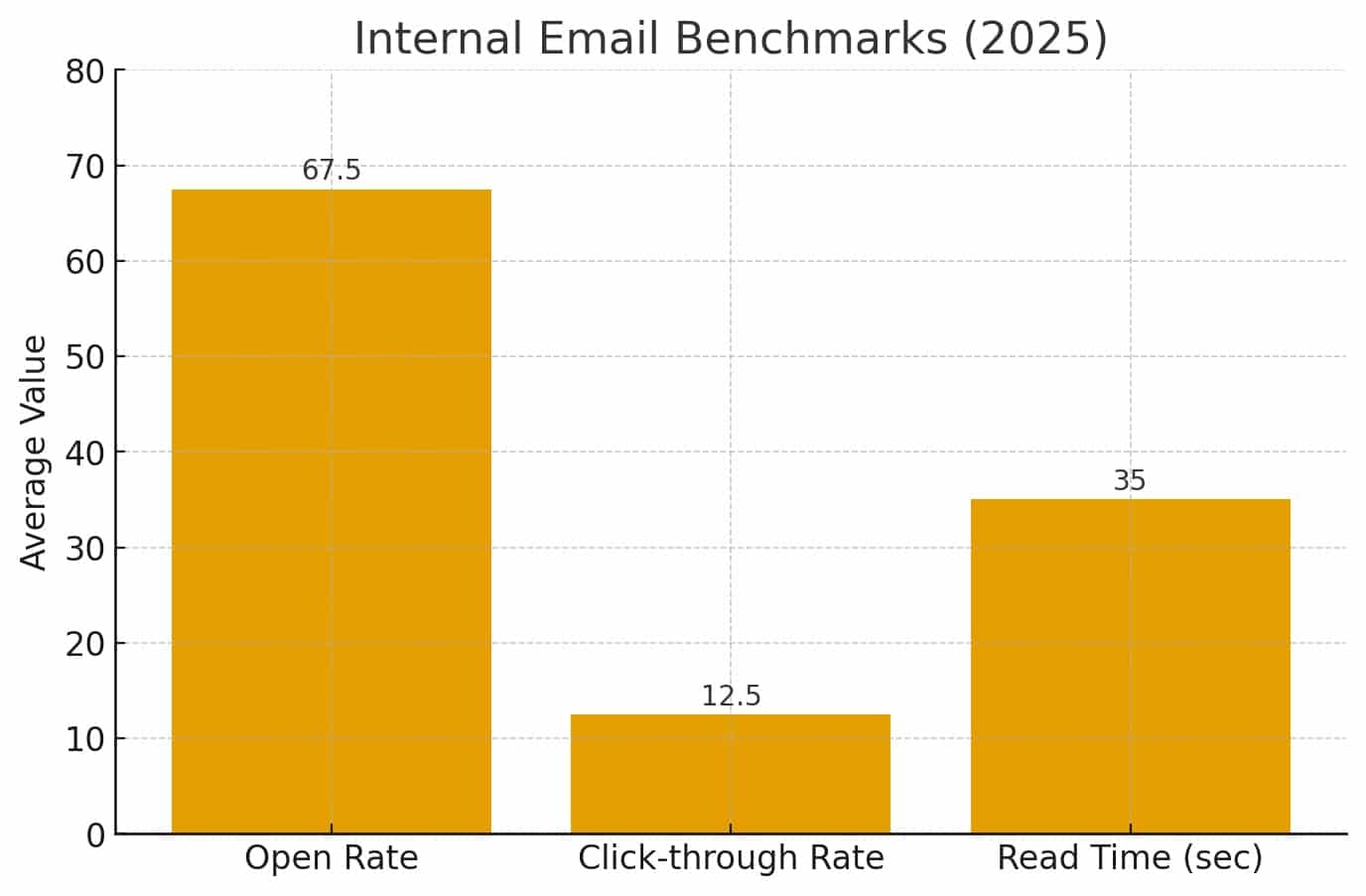
If your numbers are below these, it usually points to one of three things. Either the subject line isn’t compelling enough, the content isn’t relevant to the audience, or you’re sending too frequently and people have started tuning out.
Which email metrics to track beyond open rates?
Email open rates only tell you how many people opened the email. These metrics tell you what happened after that.
| Metric | What it tells you |
| Read time | Whether employees are spending enough time on the email to absorb the content |
| Click-through rate | Whether the content was compelling enough to prompt the reader to take action |
| Survey responses | Whether employees found the communication relevant enough to engage with |
| Read receipts | Whether compliance-critical emails were acknowledged by the people who needed to see them |
| Unsubscribes or opt-outs | Whether your sending frequency or content relevance needs a rethink |
| Zero-click emails | Whether an update was read and understood without requiring any follow-up action |
Table 4: Internal email metrics and what each one tells you about engagement
Refine your email campaigns continuously with HubEngage.
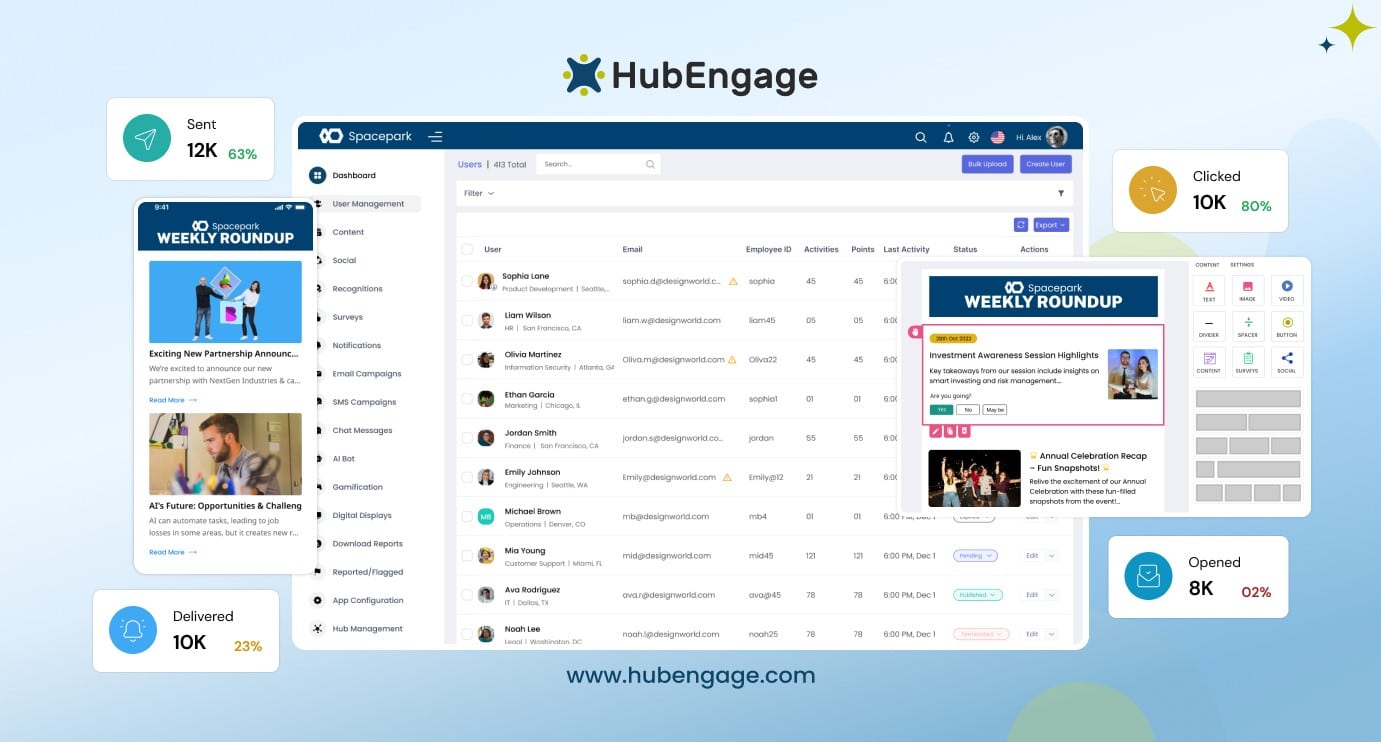
Platforms like HubEngage, you can go deeper with analytics. Our tool is an internal email platform as part of its employee experience suite, which helps organizations manage employee communication at scale.
Similar to how CRM platforms manage customer data, HubEngage easily connects with HRIS and payroll systems to maintain centralized, up-to-date employee records which enables teams to segment audiences and deliver targeted, personalized email campaigns across departments, roles, and locations.
With automation, multi-channel delivery, and analytics, organizations can improve communication effectiveness and ensure messages reach the right employees at the right time.
As part of a unified platform, HubEngage also supports additional channels like intranet and employee mobile apps, along with modules such as employee recognition, social feeds, surveys, instant messaging, and an AI-powered HR chatbot which allows organizations to manage communication and engagement in one place.
Key features:
- HRIS and payroll integrations for centralized employee data
- Advanced employee segmentation and targeting
- Internal email campaigns with automation and scheduling
- Multi-channel delivery across email, mobile, and intranet
- Analytics and reporting for engagement and performance
Best for: Organizations looking to streamline internal email communication using centralized employee data
Why it stands out: Functions like an internal CRM for employee communications while extending into a full employee experience platform.
Personalization & Segmentation Strategies
Personalization makes employees feel valued and drives higher engagement. Here are simple strategies to personalize and segment internal emails:
- Use employee names in subject lines or greetings. This feels more personal.
- Segment by department or geography. Content stays relevant.
- Send multilingual emails for global teams. This increases inclusivity.
- Tailor recognition emails to highlight team-specific wins. Employees see their contributions acknowledged.
- Use tools that integrates with HRIS and payroll platforms, making segmentation seamless.
Campaign Monitor found that personalized subject lines can increase open rates by up to 26%. If you draft emails with AI, an AI Humanizer can help the tone feel more personal before you send.
Common mistakes that make employees ignore Internal Emails
The most common mistakes that cause an email to be ignored are subject lines that are too vague and sending an email company-wide regardless of the email’s intent. Other common reasons that emails get ignored include:
- Too much information in one email: When your email covers five different topics at once, employees tend to skim past all of them. Keeping each email to one clear purpose makes
- Writing the way you’d write a report: Formal, dense writing creates distance. If you read your draft back and it sounds nothing like how you’d explain it to a colleague, you should simplify it before you send.
- Sending at the wrong time: An important update sent at 5pm on a Friday will be buried by Monday morning. You can consider when your audience is most likely to read to make a difference on whether or not your message lands.
- No follow-up on critical messages: A single email may not always be enough for policy changes or compliance requirements. A planned reminder or second touchpoint can improve acknowledgment rates.
- Inconsistent sending cadence: When employees have no idea when to expect communication from you, they’re less likely to stay engaged with it. A predictable rhythm builds the habit of reading.
- Burying the key message: If the most important information is three paragraphs in, most employees won’t reach it. Leading with what matters most gives your message the best chance of being read.
What all to check before you send an Internal Email?
A quick pre-send check catches the small things that quietly hurt engagement, like a broken link, a vague subject line, or a call to action that got buried. It’s worth going through this before every send, especially for anything going to a large or mixed audience.
| Check | What to look for |
| Subject line | Is it specific enough that the reader knows exactly what this is about? |
| Audience | Are you sending this to the right group only? |
| Call to action | Is there one clear thing you want people to do after reading? |
| Tone | Does it sound like a person, or does it read like a policy document? |
| Mobile view | Does it look readable on a phone screen? |
| Sender name | Will employees recognise who this is coming from? |
| Send time | Are you sending this at a time when your audience is likely to see it? |
| Links | Are all links working and going to the right place? |
Table 5: Pre-send checklist for internal communication emails
Ready to improve how your organization communicates?
The difference between an email that gets read and one that doesn’t usually comes down to a few small, fixable things. Getting your segmentation right, leading with what matters most, and giving people a clear next step will take you further than any design change or sending tool.
If you’re finding that manual processes are slowing you down or making it hard to reach everyone consistently, you can explore what a purpose-built internal communications email platform can do. From automated segmentation to read receipts and engagement tracking, HubEngage is built to give internal comms teams the visibility and reach they need.
Ready to see it in action? Request a demo and we will walk you through it.
FAQs On Internal Communication Emails
What is an internal communication email?
It’s any message your organization sends internally to inform or engage employees, whether that’s a leadership update, a policy change, a team recognition, or an event invite.
How is an internal email different from a company newsletter?
An internal email is a standalone message with one specific purpose. A newsletter is recurring and usually covers multiple topics. They serve different goals, even though both live in the inbox.
What should every internal communication email include?
At minimum, you’ll want a clear subject line, the right audience, a scannable body, and one specific next step for the reader.
How do I improve low email open rates?
Your subject line and audience targeting are the two most common culprits. When both are right, open rates tend to follow. Sending cadence is worth reviewing too if nothing else changes.
Can I send internal communication emails through Outlook?
You can, but segmentation, design, and tracking become difficult fast. For newsletters or anything you need to measure, a purpose-built platform gives you much more control. Here’s a guide on how to create an Outlook email list to get you started.
How do I know if employees actually read my emails?
Open rates only confirm delivery. To know if your message landed, you’ll want to track read time, click-throughs, and read receipts where your platform supports them.
Related Links
internal communications email platform | employee newsletter templates | company newsletter