Skip to content

Omnichannel Communication Strategy for Frontline Workforces

If you manage frontline communication today, you probably know the pattern already. A schedule change goes out by email, but your warehouse team doesn’t live in email. A second version lands in chat, a third appears on a shared screen, and a fourth gets buried in an app notification that half the crew dismissed during shift handoff.

That’s not an omnichannel communication strategy. It’s distribution without orchestration.

A strong omnichannel communication strategy creates a single, continuous conversation across touchpoints, so people don’t have to start over every time they move from one channel to another. For frontline, deskless, hourly, remote, and distributed workers, that difference decides whether critical information gets acted on or vanishes into tool sprawl.

Key takeaways

  • Omnichannel means continuity, not just more channels.
  • Multichannel stacks fragment context, which creates duplicate messages and missed updates.
  • Frontline communication needs channel mapping by reality, not by assumption.
  • Governance matters, or the same alert will hit employees too many times.
  • Outcome-based KPIs tell you whether the system is working.

Why Most Omnichannel Strategies Fail Frontline Workers

A warehouse associate gets a schedule change in email, but she does not check email on the floor. The SMS version never reaches her because she opted out. A Teams message gets buried in the noise, the digital sign flashes by during a rush, and the app notification is dismissed before she clocks in.

That failure is not about one bad channel. It is about a system that does not carry context across the workday.

A warehouse worker looking stressed while checking a schedule change notification on her smartphone in a facility.

The core issue is context loss

Many teams still treat omnichannel like a broadcast checklist. They add email, SMS, chat, apps, signage, and manager talking points, then assume coverage will solve the problem. It does not, because workers do not experience communication as channel count. They experience it as whether the update arrived in time, in the right place, and with the right context.

That is why the operational definition matters. Industry guidance describes omnichannel as communication that moves between email, SMS, chat, mobile apps, print, and other channels without losing context or forcing the user to start over. Multichannel is different because channels are managed separately rather than linked through shared data and orchestration, as described in the practical framing from HubEngage’s frontline messaging guidance.

Practical rule: if an employee has to re-read, re-ask, or re-confirm the same message in another tool, the system is already broken.

For deskless teams, the cost shows up fast. Duplicate alerts create fatigue. Missed alerts create operational delays. Managers end up acting as human routers, repeating updates that should have been coordinated by the system in the first place.

Why more touchpoints can still mean less reach

The assumption that being present on every channel means being well communicated falls apart in mixed workforces. Workers move between devices, shift patterns, and physical environments, so the channel that works at 9 a.m. may be useless at 3 p.m. The question is not how many places you can post. It is whether the conversation survives movement.

Firacard’s Firacard insights on digital trends points in the same direction. Communication only works when the message can adapt to the context around it, not when each channel is left to operate on its own.

That is the shift HubEngage’s model is built around, one connected system of action rather than a set of isolated announcements. For frontline operations, that means continuity has to win over volume every time.

Omnichannel vs Multichannel Communication Explained

A schedule changes at 2 p.m., and the breakroom board still shows the old shift while the app has the new one, the email is sitting unopened, and the supervisor has already started repeating the update on the floor. That is multichannel communication in practice. Each channel carries a message, but the channels do not know what the others have already said.

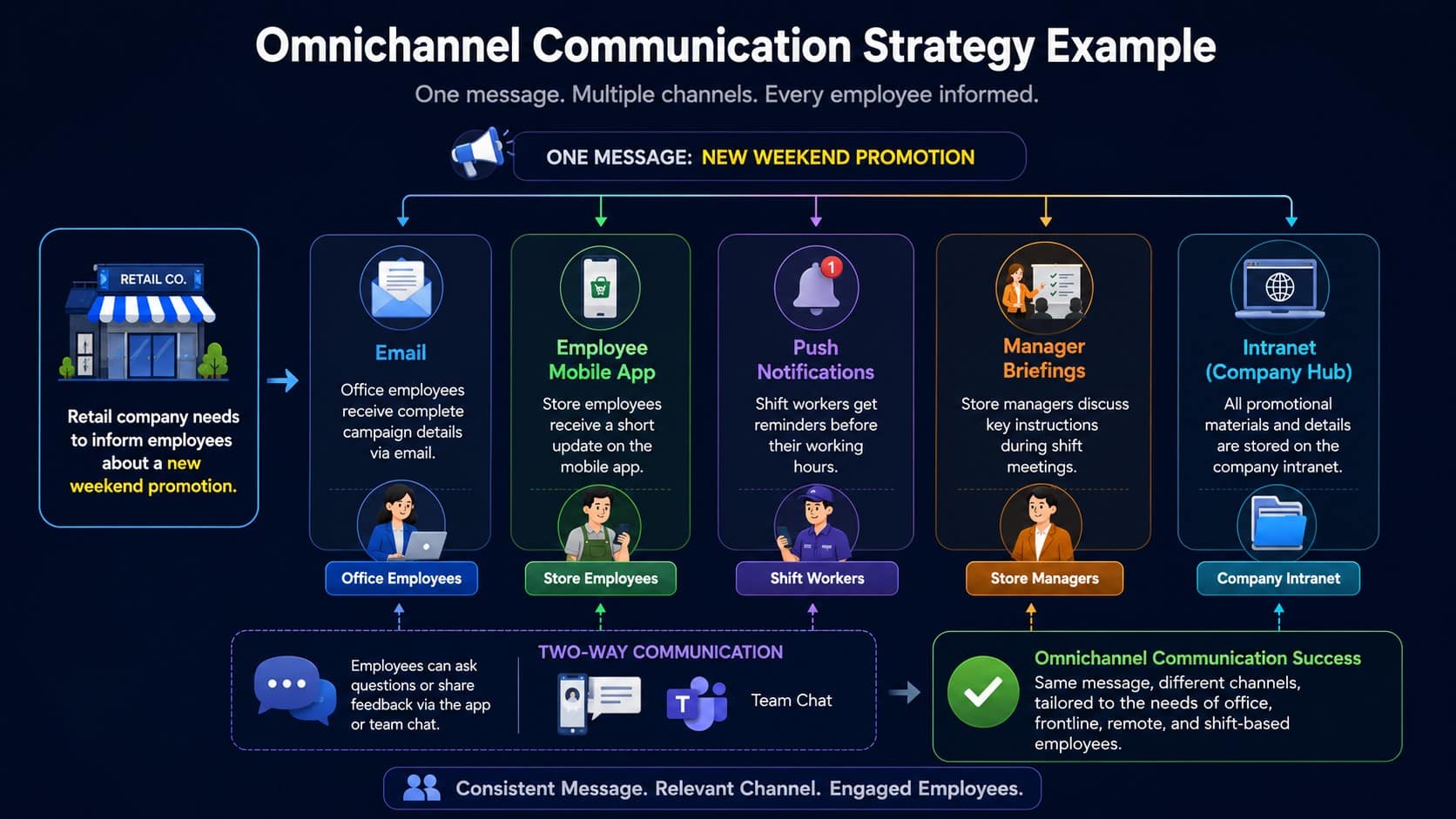
Omnichannel communication works differently. One change flows through connected channels, and the employee’s context stays attached as it moves.

Mechanics, not branding

The useful distinction is operational. Omnichannel considers the channels together so the employee gets one coordinated experience, while multichannel leaves each channel to do its own job. Read the fuller breakdown in Wharton’s explanation of omnichannel marketing and then translate the logic to workforce communication, similar to how HubEngage explains multi-channel platforms at HubEngage’s multi-channel communication platform guide. The same logic shows up in onboarding, scheduling, learning, and recognition workflows.

The practical test is straightforward. If a message has to be rewritten for email, repeated in chat, posted on signage, and restated by managers, that is multichannel. If a shared data layer and coordinated orchestration let one update adapt by channel while preserving context, that is omnichannel.

Scenario Multichannel Approach Omnichannel Approach
Shift change Manager updates one system, then manually tells employees in another Schedule change propagates across relevant channels with context intact
Policy acknowledgement Email goes out, app message follows later, manager reminds people verbally One acknowledgement workflow carries across touchpoints until completion
Safety alert Team receives separate alerts from different tools One critical message routes to the right channels based on urgency and availability
Training reminder LMS reminder, email reminder, and chat reminder arrive independently One sequence adapts to progress and channel preference
Recognition Posts live in a separate app with no connection to day-to-day work Recognition follows the employee journey and shows up where the team already works

A widely cited benchmark says according to industry roundups on omnichannel behavior 73% of shoppers use multiple channels during their shopping journey. The internal communications takeaway is simple. People already move between channels, so workforce communication has to carry the same message, context, and action path across whatever tool they use.

If the journey crosses channels, the context has to cross too.

That line separates a stack of tools from a communication system.

Segmenting Your Workforce and Mapping Channels

The wrong way to build channel strategy is to ask, “What channels do we have?” The right way is to ask, “Who needs what, when, and on which device?”

A frontline-heavy organization usually has at least three communication realities running at once. Deskless teams may have intermittent connectivity and shared devices. Hybrid employees bounce between laptop, phone, and meeting tools. Head office teams live in email, calendars, and internal chat. Those aren’t just audience differences, they change how messages should be routed.

Build segments around working conditions

Start with five variables. Shift timing tells you when people can realistically receive and act on a message. Device access tells you whether the worker has a personal phone, a shared kiosk, or a company app. Connectivity tells you whether the message needs to work offline or in low-bandwidth environments. Language preference affects comprehension. Role-based needs determine whether the message is operational, policy-related, or informational.

A useful resource on the broader evolution of digital communication is Firacard insights on digital trends. What matters for workforce teams is that communication is moving toward more connected, device-aware delivery, which makes segmentation more important, not less.

Map message types to available channels

Once the segments are clear, build a channel matrix. Safety alerts should go through the most immediate channels available to the people at risk. Policy updates may work better in a mobile app plus signage for floor teams, while detailed briefings can stay in email and intranet for managers and desk-based staff. Don’t assume every message deserves every channel.

Operational test: if a message needs to be read during a shift change, it should not depend on a channel people only check after hours.

This is also where frontline realities get overlooked. SMS opt-in rules matter. Intranet access gaps matter. Shared device environments matter. So does timing around shift changes, because a message sent fifteen minutes before a shift ends may never get the same attention as one delivered at handoff.

A practical audit looks like this:

  • List active segments: frontline, hybrid, head office, contractors, managers, and any language-based groups.
  • Inventory reachable channels: SMS, app, email, signage, Teams, Slack, intranet, and manager cascade.
  • Map message priorities: safety, scheduling, policy, recognition, onboarding, training, and feedback.
  • Identify dead zones: segments that don’t reliably receive urgent updates in the channels you use today.
  • Review timing windows: when each group is available to receive and act on communication.

The point isn’t to make every channel work harder. It’s to make each segment easier to reach with the right message at the right moment.

Orchestrating Messages Without Creating Channel Fatigue

The most common omnichannel mistake is simple. Teams expand reach faster than they build control.

That’s how the same alert lands in email, SMS, app, Teams, and signage at once. The sender feels covered. The employee feels overwhelmed. After a while, even critical messages start to look like background noise.

Set rules before you scale delivery

Channel fatigue is usually a governance failure, not a channel failure. The fix starts with priority tiers. Critical messages should be reserved for urgent operational or safety needs. Important messages can wait for the next available working window. Informational messages should be scheduled where they won’t interrupt active work.

Then add frequency caps. Not every channel should carry the same volume, and not every employee should receive the same reminder cadence. If a crew has already seen a shift update in the app, there may be no reason to repeat it in SMS unless acknowledgment is overdue or the message is time-sensitive.

Adobe is one of the few mainstream sources that explicitly mentions managing message frequency to avoid overcommunication, which shows how often this issue is still treated as an afterthought. The gap matters more in mixed deskless and desk-based environments, where one alert can multiply across tools if nobody owns suppression logic.

Use sequencing and suppression rules

Good orchestration is about sequence, not just reach. A message can start in the least disruptive channel that fits the use case, then escalate only if it’s not acknowledged. That keeps attention where it belongs and reserves high-urgency channels for actual escalation.

A practical governance model usually includes:

  • Priority tiers: critical, important, informational.
  • Frequency caps: a limit on how often one audience sees a message in the same channel.
  • Suppression windows: quiet periods during active shifts, nights, or rest periods.
  • Escalation logic: move to a higher-urgency channel only when acknowledgment is overdue.
  • Ownership rules: a named team decides when messages are repeated, delayed, or blocked.

If you need a baseline for internal governance thinking, Adobe’s omnichannel marketing guidance is useful precisely because it surfaces the overcommunication problem that most stack diagrams ignore.

Quiet channels are often better than louder ones, especially when the workforce is already handling tools, tasks, and deadlines all day.

The best systems don’t just send. They decide when not to send.

Using AI and Automation to Power Continuous Conversations

AI changes omnichannel communication when it reduces manual routing, not when it adds another shiny layer to the stack. The practical win is a unified data layer that knows employee behavior, preferences, role, and message history well enough to automate delivery without losing continuity.

That’s the difference between sending messages and running a conversation.

Where automation actually helps

Onboarding is the cleanest example. A new hire in operations doesn’t need the same sequence as a manager in the office, and they shouldn’t get the same follow-up schedule. Automation can adjust the sequence based on role and progress, then trigger the next message only when the previous step is complete.

Multilingual communication gets better too. Instead of hand-building separate versions of the same update, a system can route content through the employee’s preferred channel and language while keeping the source message consistent. Surveys can do more than collect feedback. They can route follow-up actions based on sentiment, so a low score triggers manager outreach or an HR review instead of disappearing into a spreadsheet.

AI-powered search is equally practical. Employees should be able to find schedule rules, policy answers, or onboarding steps without waiting on HR to respond to every question. That lowers friction for deskless workers and cuts repetitive work for managers.

Unified data reduces tool sprawl

A true omnichannel system doesn’t just automate delivery. It lets communications, learning, and operations share one data layer so context stays intact across touchpoints. Emarsys describes that model as a unified customer data layer plus automated engagement and regular performance analysis, and the same mechanics apply to workforce communication when you translate customer logic into employee operations Emarsys’s omnichannel engagement model.

HubEngage’s AI internal communications capabilities fit this same operational idea. For organizations trying to reduce tool sprawl, the value is not just faster content creation. It’s a connected system where communications, engagement, operations, and learning can share context instead of scattering it across separate apps.

When AI and automation are working properly, HR spends less time re-sending the same update. Managers spend less time chasing acknowledgments. Employees spend less time hunting for answers.

Measuring Omnichannel Impact with Outcome-Based KPIs

Open rates and clicks can tell you that something got seen. They can’t tell you whether the workforce moved.

For omnichannel communication, the better question is whether the message changed behavior, improved completion, or reduced delay. That means the dashboard has to track outcomes across channels, not just activity inside one tool.

What to measure instead

A useful measurement model starts with journey completion. If onboarding or training depends on several steps, you need to know where people drop off, not just how many opened a message. Time to acknowledgment matters for critical updates, because a fast response can separate a clean shift change from a missed one.

Retain the channel combination view too. A message sequence might work better for warehouse teams in SMS plus app, while desk-based managers respond better to email plus Teams. You only see that once you measure performance across all touchpoints.

The most diagnostic metrics include:

  • 90-day retention by channel combination
  • Journey completion rate
  • Time to conversion or time to acknowledgment
  • Churn by lifecycle stage
  • Multi-touch revenue or engagement attribution

Braze’s guidance on omnichannel customer engagement measurement is useful because it argues for cross-channel outcome metrics rather than vanity metrics. That logic carries over directly to internal communications.

Build dashboards around decision points

If a safety message is being acknowledged slowly, the dashboard should show whether the delay is tied to channel, shift, language, or message type. If onboarding completion stalls after the second step, the system should show which channel sequence loses people. If a policy update gets seen but not acted on, the problem may be comprehension rather than reach.

AI-assisted analytics can help here by surfacing patterns manual reporting misses. Leaders can spot which combinations of channel, timing, and message type consistently perform better, then adjust orchestration without guessing.

Measure the journey, not the noise around it.

For a deeper internal-communications measurement lens, HubEngage’s guide to communication effectiveness aligns with this outcome-first approach. The goal is to know whether the system improved work, not just whether it generated activity.

How HubEngage Unifies Omnichannel Workforce Communication

HubEngage is built around one connected system of action for frontline, deskless, hourly, remote, and distributed employees. That matters because omnichannel communication only works when communications, engagement, operations, and continuous learning share the same data layer and workflow logic.

For SMBs, the practical value is consolidation. Instead of managing disconnected tools for announcements, messaging, recognition, surveys, scheduling, and learning, teams can run those functions in one platform. For larger organizations, the value is orchestration across existing HRIS, payroll, LMS, and workforce systems, so communication can stay coordinated without replacing everything already in place.

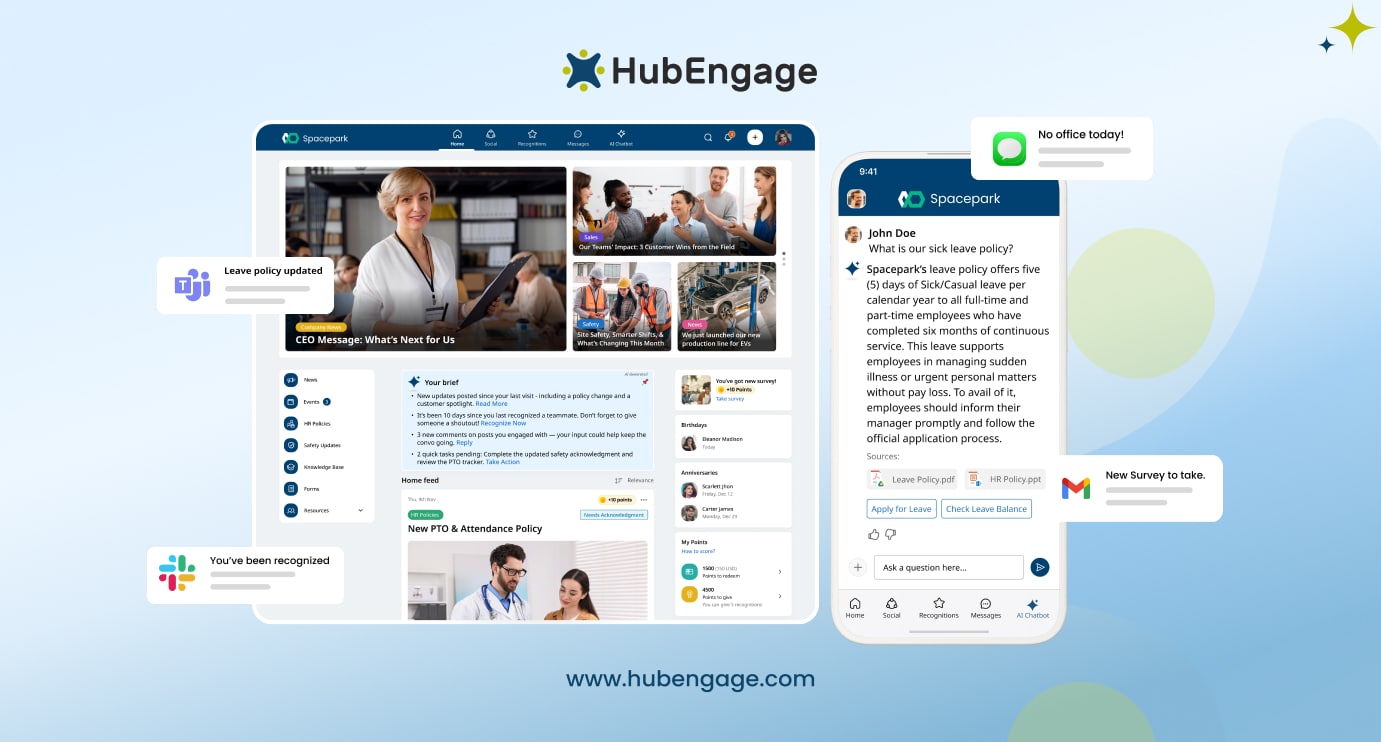
The platform supports multi-channel delivery across mobile, web, email, SMS, digital signage, Microsoft Teams, and Slack. One-click orchestration can auto-format content per channel, which reduces the manual work of duplicating updates. AI-assisted content creation and search help employees find answers faster, while pulse surveys and AI-driven analytics support feedback loops that leaders can use.

If you’re evaluating software for this use case, start with HubEngage’s employee communications hub and assess whether it can handle both reach and continuity, not just broadcasting.


HubEngage, Inc. helps organizations unify communications, engagement, operations, and learning so frontline and distributed employees get the right message in the right channel without losing context. If you’re trying to replace disconnected tools or orchestrate across HRIS, payroll, LMS, and workforce systems, visit HubEngage, Inc. and see how a connected omnichannel model works in practice.

Get Insights

Subscribe to our weekly newsletter to get more tips on effective employee engagement and communications!

Join Our Community

Join Turn On Engagement (TOE) to interact with other employee engagement and people experience professionals. Share and get new ideas!

An expert content writer specializing in creating comprehensive, insight-driven content for technology and SaaS products. With more than three years of hands-on experience working closely with HR, internal communications, and leadership teams, he helps organizations turn employee engagement challenges into measurable outcomes. His writing is grounded in real customer experiences and focuses on practical strategies that boost productivity, improve communication, and strengthen workplace culture. Known for his ability to simplify complex technology concepts, he translates them into clear, actionable insights that resonate with HR professionals, talent acquisition leaders, and business owners alike. His work consistently reflects a strong commitment to trust, credibility, and people-first innovation, supporting organizations as they navigate employee experience, digital workplace transformation, and modern workforce engagement strategies.

Other posts you might enjoy

Back To Top