Managing a distributed workforce is not only about supporting remote employees. It also includes frontline workers, deskless teams, shift-based staff, field employees, and people working across different locations.
Each group experiences work differently. A remote employee may struggle with too many tools. A frontline worker may miss an important update before a shift. A manager may spend hours answering repeated questions or fixing schedule issues.
Employee journey mapping helps organizations understand these real experiences. It shows where employees face delays, confusion, poor communication, or limited support.
More importantly, it helps leaders connect these problems to practical operational improvements. Our blog will also help employees understand how their journey is mapped and how employee experience platforms can make their work easier.
Key Takeaways
- Employee journey mapping shows how employees experience work from hiring through offboarding.
- Distributed teams need journey maps covering communication, shifts, support, training, and daily workflows.
- Employee personas reveal different needs across frontline, deskless, remote, and shift-based teams.
- Surveys, interviews, support data, and workplace metrics help identify real employee pain points.
- Assigning owners and automating repeated tasks turns journey insights into operational improvements.
- Regular measurement helps improve employee experience, productivity, engagement, and workforce retention.

What are the different stages of Employee Journey Mapping?
Employee journey mapping usually follows five main stages of the employee lifecycle as shown below:
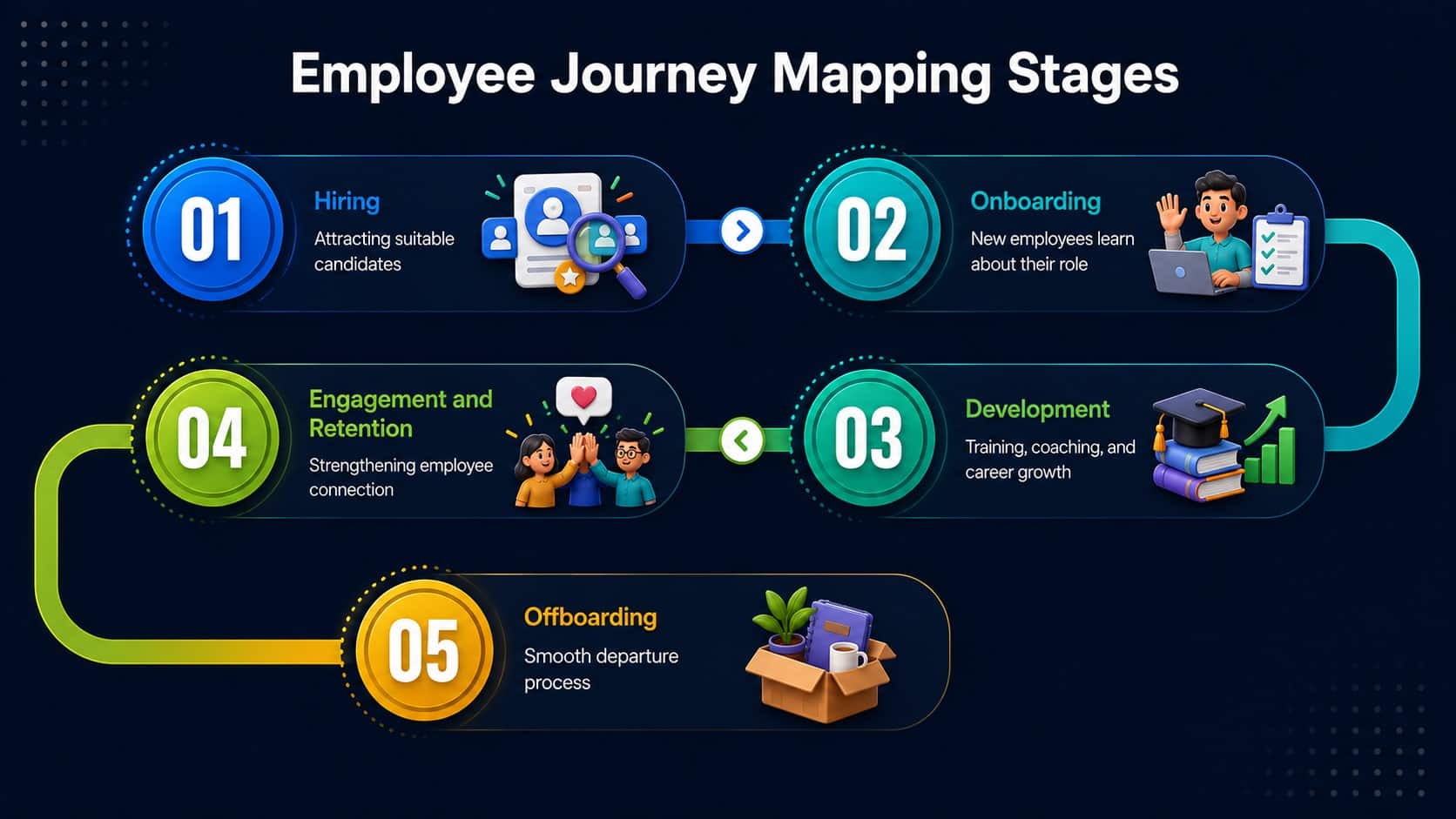
Each stage includes different expectations, touchpoints, and opportunities to improve the employee experience. If you’re building that foundation, this employee listening strategy resource is a useful companion.
Why Employee Journey Mapping is important for every business?
Employee journey mapping helps businesses understand what employees experience across hiring, onboarding, daily work, development, and offboarding. (STATS/RESEARCH). It reveals important pain points and helps teams improve the moments that affect engagement, productivity, and retention.
1. Improves Employee Support
Journey mapping shows when employees need help and which support channels they use. This helps HR and managers provide faster answers, improve service quality, and make support easier to access.
2. Streamlines HR Workflows
By showing where processes slow down, journey maps help teams remove unnecessary steps, automate repeated tasks, and improve workflows such as onboarding, leave requests, benefits management, and offboarding.
3. Increases Employee Engagement
Journey maps identify where employees feel supported, recognised, or disconnected. Leaders can use these insights to improve communication, development, feedback, and recognition, helping employees stay motivated and engaged.
4. Creates More Personalised Experiences
Different employees have different roles, needs, locations, and access challenges. Journey mapping helps organisations provide relevant information and support for frontline, deskless, remote, shift-based, and office employees.
5. Improves Productivity and Reduces Costs
Journey maps reveal repeated questions, delays, and manual work. Businesses can use automation, AI chatbots, and self-service knowledge tools to reduce HR workload, lower support costs, and help employees find answers faster.
6. Supports Better Business Decisions
Employee journey mapping brings together surveys, interviews, support requests, turnover data, and digital activity. These insights help leaders prioritise improvements, assign resources, and make decisions based on real employee needs.
How to do Employee Journey Mapping?
Employee journey mapping helps businesses understand what employees experience at each stage of work. Follow these six steps to create a clear and useful map.
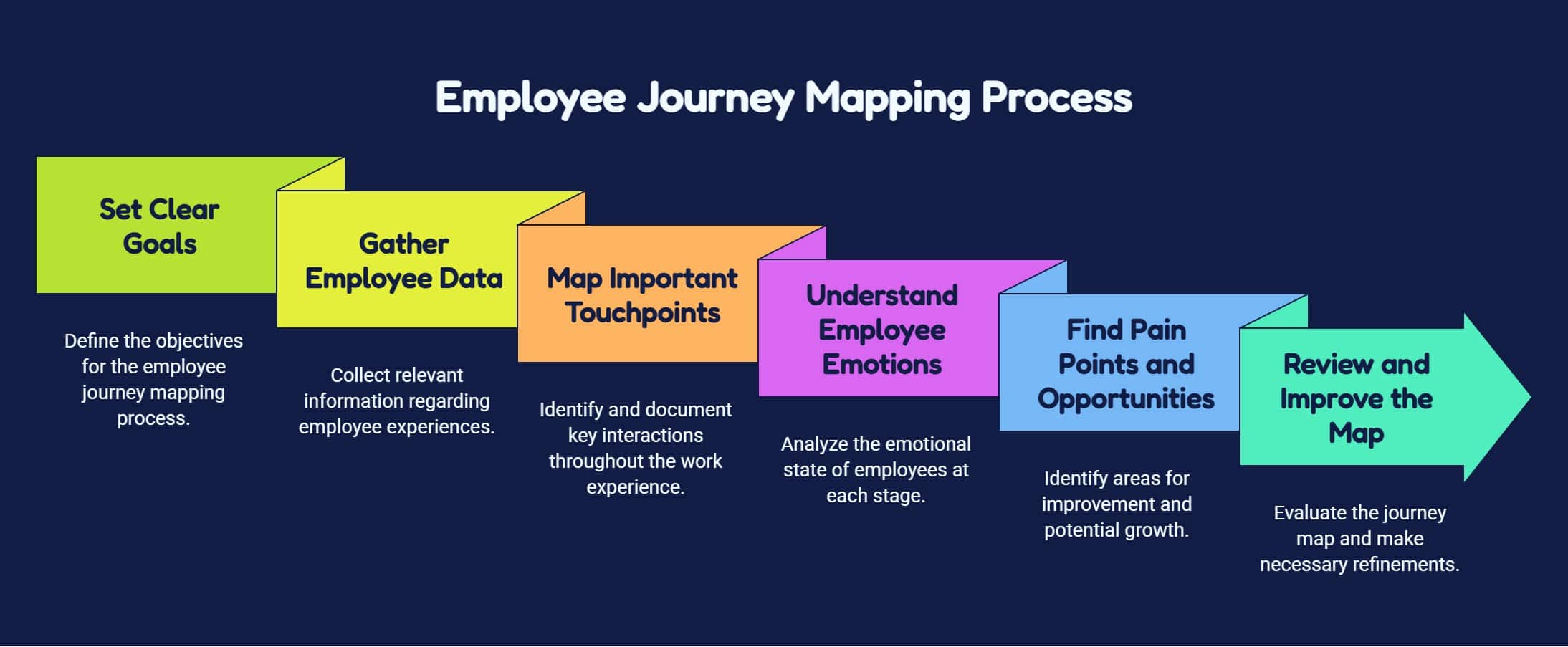
Before you start creating the employee journey mapping process, you must check this employee listening strategy guidance.
Best Practices of Employee Journey Mapping
Employee journey mapping can feel complex at first because it involves many stages, data sources, employee groups, and tools.
| Best Practices | Action Step |
|---|---|
| Create personas | Map needs for different employee groups. |
| Use multiple data sources | Combine surveys, interviews, and workplace data. |
| Measure and update | Track results and refresh the map regularly. |
| Improve knowledge access | Make support, policies, and training easy to find. |
| Use AI and automation | Analyse feedback and automate repeated tasks. |
| Assign clear owners | Give each pain point an owner and deadline. |
These six best practices can help you stay focused and build a map that leads to practical improvements. Lets us explore them in more detailed:
1. Create Different Employee Personas
Do not assume every employee follows the same journey. Build personas for frontline workers, shift-based employees, remote teams, managers, and office staff. Include their roles, needs, access challenges, expectations, and common pain points.
2. Use More Than One Data Source
Combine employee surveys, interviews, support tickets, turnover data, onboarding results, manager feedback, and digital activity. Using different sources gives you a more accurate view and helps confirm whether a problem is isolated or repeated.
3. Measure and Update the Journey Map
Track results such as onboarding completion, employee turnover, survey scores, support requests, tool adoption, and training progress.
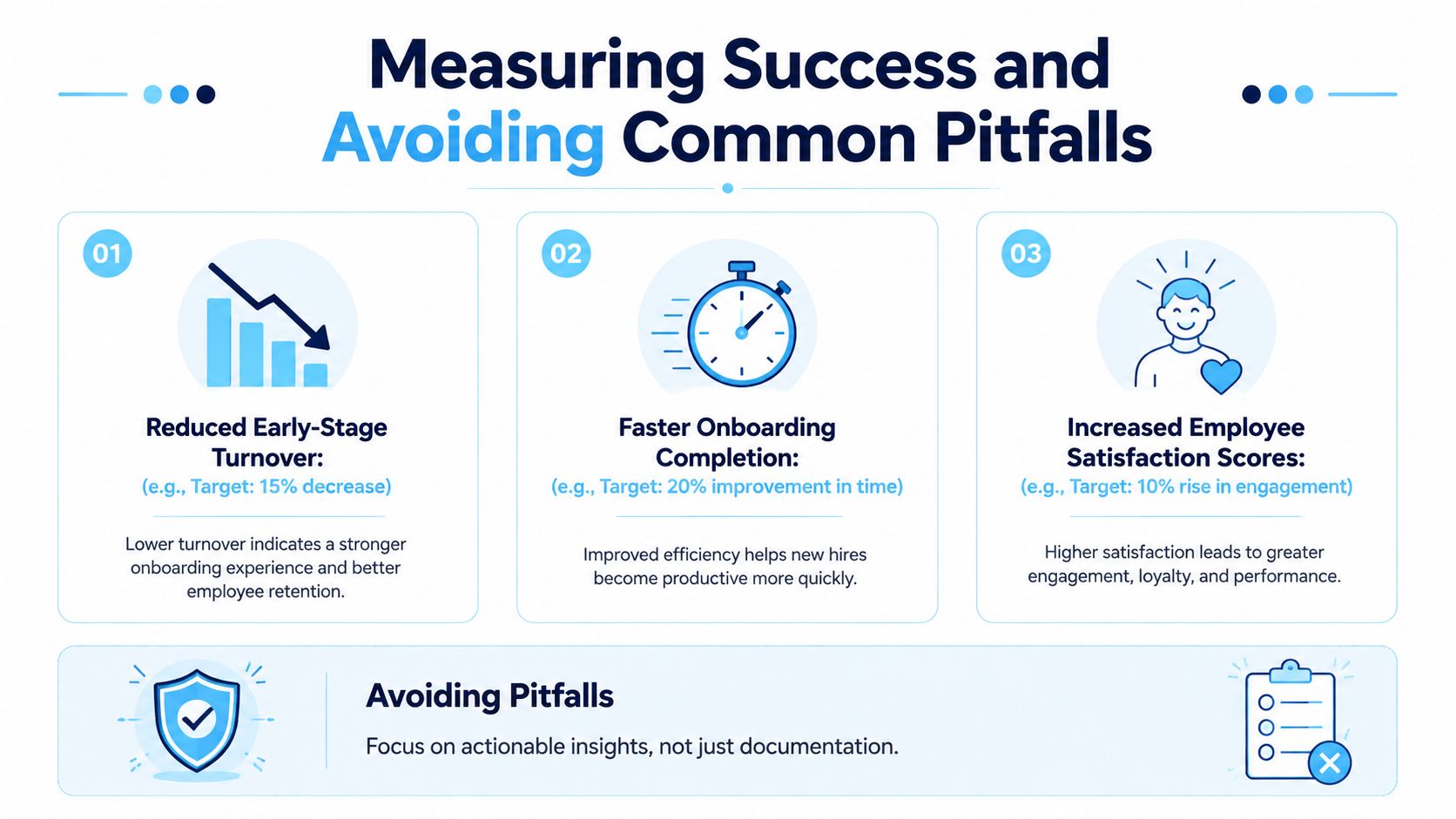
Review the map after major workflow, policy, or technology changes so it continues to reflect the real employee experience. The strategy to implementation approach for employee surveys is useful because it reinforces the same principle, feedback only matters when it turns into action.
4. Make Support and Knowledge Easy to Access
Employees should be able to find policies, answers, training, and process guidance quickly. Use an internal knowledge base, mobile access, and clear support channels so frontline, remote, and shift-based employees can get help when needed.
5. Use AI and Automation Carefully
AI can group feedback, identify repeated concerns, monitor sentiment, and help employees find answers faster. Automation can trigger onboarding tasks, reminders, policy updates, check-ins, and microlearning, reducing manual work and repeated journey friction.
6. Connect Pain Points to Owners
Every major issue should have a clear owner, action, and deadline. The owner may be HR, IT, operations, or a manager. This turns the journey map from a visual document into a practical improvement plan.
How HubEngage helps with Employee Journey Mapping?
Our employee experience platform helps organizations improve employee journey mapping by bringing communication, engagement, recognition, learning, scheduling, tasks, and support into one connected platform.
Teams can track key touchpoints, collect feedback through surveys, identify friction, and support employees across onboarding, daily work, development, and offboarding.
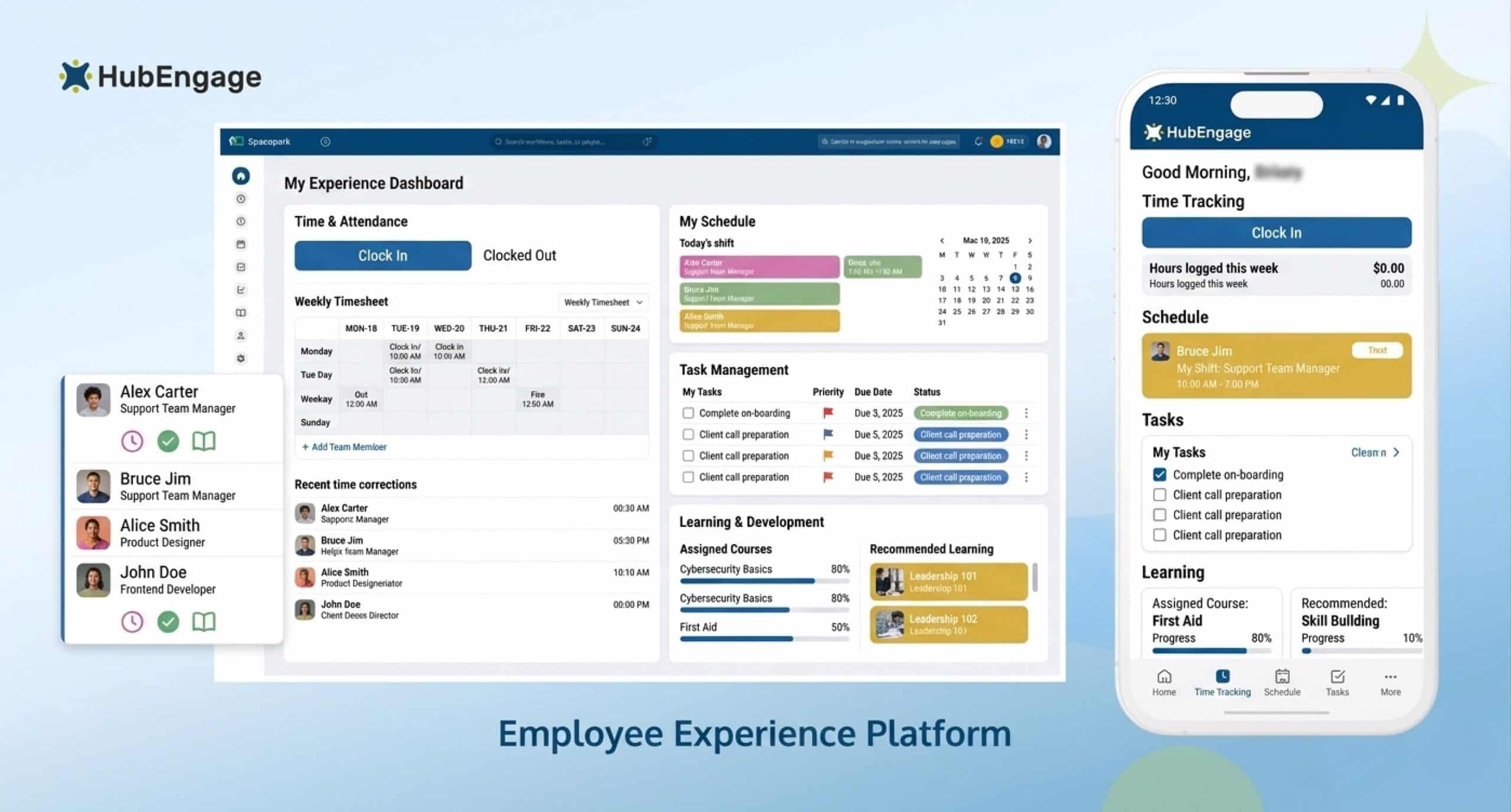
Multi-channel access through mobile, web, email, SMS, and signage keeps every employee connected. AI-powered tools and chatbots provide quick answers.
While reporting helps leaders measure progress, reduce tool sprawl, and improve the overall employee experience at every stage. It connects frontline, shift-based, and remote teams through mobile access, timely updates, shared tasks, learning, support, and feedback anywhere, anytime.
Conclusion
Employee journey mapping works best when it reflects the real workday, not only formal HR milestones. By combining employee feedback, operational data, personas, and ownership, organizations can create smoother experiences across onboarding, daily work, development, and offboarding.
The goal is to turn insight into practical action that supports engagement, productivity, and retention. Explore the HubEngage Employee Experience Platform and take a demo to see how one connected system can support every employee journey.
FAQs on Employee Journey Mapping
What is employee journey mapping?
Employee journey mapping is a visual process that shows how employees experience work from recruitment to exit. It highlights key touchpoints, emotions, pain points, and opportunities to improve communication, support, engagement, and retention.
Why is employee journey mapping important?
Employee journey mapping helps leaders understand what employees experience at each stage of work. It reveals pain points, service gaps, and improvement opportunities that can strengthen engagement, inclusion, productivity, satisfaction, and long-term retention.
What is the difference between an employee journey map and an employee lifecycle model?
An employee lifecycle model lists major stages such as hiring, onboarding, development, and exit. A journey map explores what happens within those stages, including employee emotions, touchpoints, pain points, responsibilities, and improvement areas.
Can employee journey mapping focus on one process?
Yes, an organization can create a focused journey map for one process such as first-week onboarding, parental leave return, performance reviews, or shift changes. Smaller maps are easier to validate, improve, assign, and measure.
How can you make employee journey mapping more equitable?
Make journey mapping more equitable by creating separate personas for employees with different roles, abilities, locations, and access needs. Include diverse employee feedback so the map identifies unequal experiences, hidden barriers, and missing support.
Related Links
employee experience platforms | employee listening strategy guidance | strategy to implementation approach for employee surveys | employee listening strategy