Skip to content

Learning Management System Requirements: Selection Checklist For Small Businesses

llaptop with earning management system requirements

You’re sitting in an LMS demo, and the vendor is sliding past the hard questions. The screens look polished. The trainer clicks through completion reports, mobile views, and a few integration logos. Then the issue shows up, the one that kills rollouts later. Can this platform handle frontline onboarding, compliance deadlines, and a workforce that doesn’t live at a desk?

That’s where learning management system requirements stop being a procurement exercise and start being an operating decision. If you’re buying for hourly, deskless, remote, or distributed teams, the bar is higher than course hosting. You need a system that fits the way people work, learns from their activity, and plugs into the tools they already use.

Key Takeaways

  • Define LMS requirements before attending vendor demos.
  • Mobile access is essential for frontline and deskless employees.
  • SCORM, xAPI, SSO, MFA, and audit logs should be clearly supported.
  • The LMS should automate assignments, reminders, certifications, and reporting.
  • Migration requirements should cover content, records, integrations, and training.
Learning Management System Experience banner showing HubEngage’s mobile-friendly workplace learning platform for small businesses.

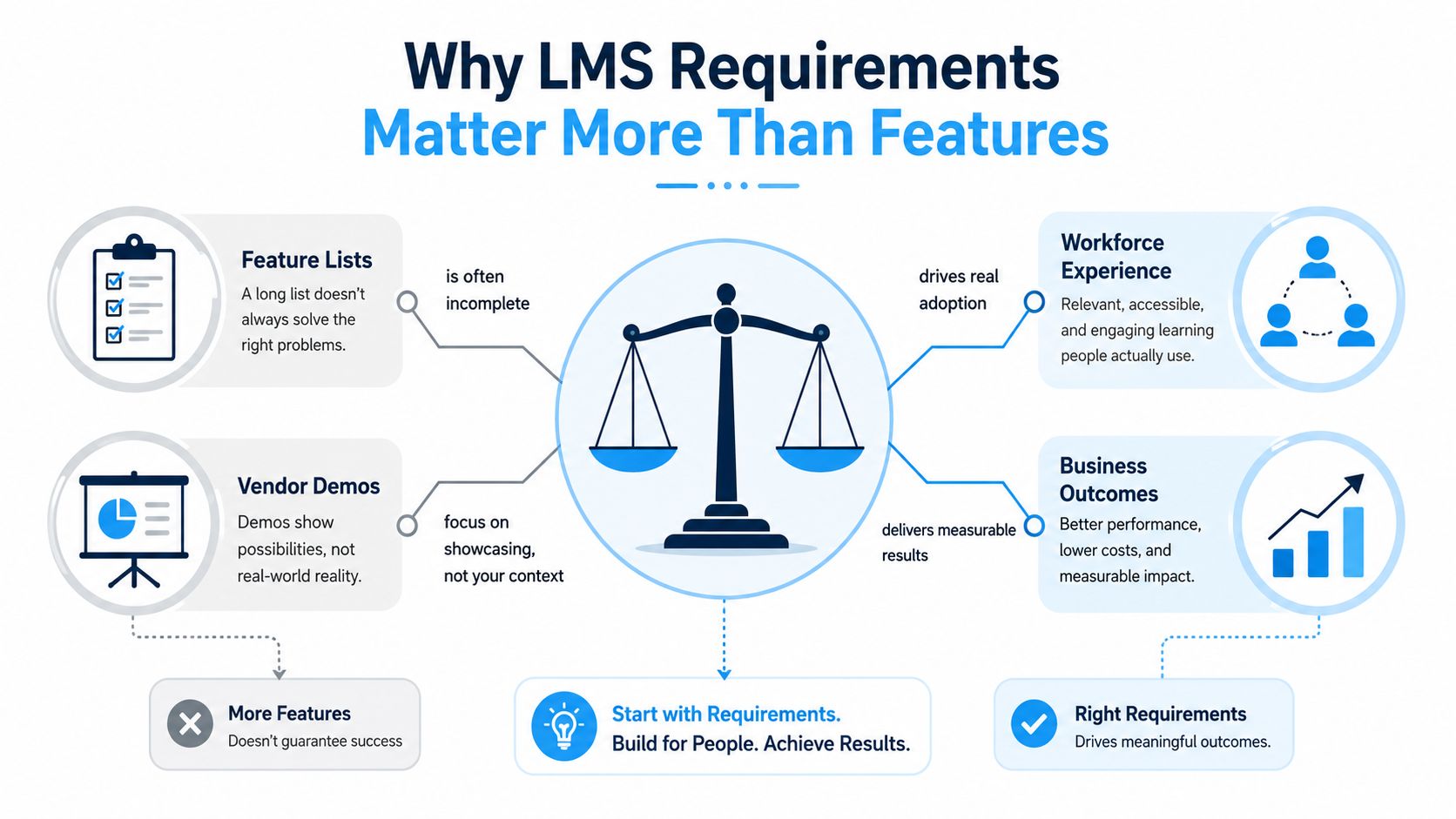
Why Learning Management System Requirements matter more than features?

Most buyers ask vendors what the platform can do. The better question is what it must do for your workforce, your systems, and your compliance posture. That shift matters because the LMS concept emerged in the late 1990s and has grown from basic course administration into enterprise-scale learning infrastructure for delivery, tracking, reporting, and automation, with modern requirements now spanning analytics, mobile access, social learning, integrations, and security controls.

For frontline organizations, feature lists are where bad decisions get dressed up as progress. A retail chain does not need “learning capabilities” in the abstract. It needs every new cashier, store associate, and supervisor to get the right training on day one, on a phone, with no friction, while managers can see who’s overdue. That’s a requirements problem, not a marketing problem. if a requirement can’t be tied to onboarding, compliance, knowledge access, or manager accountability, it’s probably decoration.

The market signal is also clear. One 2026 industry summary cites a global LMS market value of $34.1 billion, projected to reach $123.78 billion by 2033. Another 2025 statistics roundup estimates the global LMS user base at about 73.8 million and reports LMS user penetration at 15%, projected to reach 17.2% by 2030. That tells you the selection process has become a strategic procurement exercise, not a simple instructional purchase.

An infographic showing that choosing LMS requirements leads to better business outcomes than focusing on feature lists.

The evaluation lens should stay simple. Score every vendor against functional fit, nonfunctional controls, integration ecosystem, and total cost of ownership. If those four areas aren’t written into the requirements document, you’ll end up comparing demos, not outcomes.

Core Functional Capabilities Every LMS Must Deliver

The core job of an LMS is boring on purpose. It has to get content to the right person, prove they took it, and make administration less painful than the spreadsheet mess many organizations are replacing. If the platform can’t do that cleanly, nothing else matters.

Start with the basics that reduce admin load

User and course management should be first on your list. The LMS needs to create, organize, enroll, and track users and training programs without making your HR or operations team babysit every assignment. Automated notifications for deadlines and new enrollments are table stakes, not a bonus.

A frontline example makes this plain. A hospital can’t manually chase every nurse for recurring certification. A distribution center can’t rely on managers to remember who needs forklift training after a role change. The system should assign learning by role, trigger reminders, and keep the record tied to the employee.

Demand standards, assessments, and learning paths

Content support matters because training rarely comes from one vendor or one format. Your LMS should support SCORM, AICC, and xAPI/Tin Can so it can reliably launch and track content from different sources. You should also verify assessments, certification tracking, and completion records, because those are the mechanics that turn training into evidence.

Personalization is worth demanding if you run different audiences. Role-based learning paths, recommended modules, and microlearning are useful when a supervisor needs one sequence and a field rep needs another.

For a practical reference point on feature depth, review HubEngage’s employee experience learning management system features and compare those capabilities against your own frontline use cases. A good LMS makes the next required action obvious. A weak LMS makes people hunt for it.

Separate must-haves from nice-to-haves

The must-haves are clear, course catalog, enrollment rules, completion tracking, certifications, mobile access, and admin controls. Social learning, gamification, and AI-recommended paths can help, but they should never outrank the basics if your audience is hourly staff, franchise operators, or distributed managers.

If a vendor can’t show learner records by role, assignment rules, and certificate status in a few clicks, keep moving. That’s not a mature learning system, it’s a content wrapper.

Technical Standards, Security, and Nonfunctional Requirements

Many deals go wrong when buyers focus on workflows and overlook the controls that protect data, keep the system usable under load, and allow other tools to connect without custom code. Nonfunctional requirements are not IT trivia. They determine whether the LMS survives real operations.

Verify the interoperability stack before anything else

You need explicit support for SCORM, AICC, and xAPI/Tin Can because those standards determine whether the LMS can ingest and track content consistently across vendors and asset types (SCORM, AICC, and xAPI support). Ask the vendor to show live course import and completion tracking, not just a compatibility badge. If they hesitate, the integration story is weaker than they’re claiming.

Security controls should be written down in plain language. Major checklists call for data encryption at rest and in transit, role-based access controls, MFA, audit logging, and SSO with the identity provider your company already trusts. For HR and operations buyers, that means no vague promises about “secure cloud hosting.” Ask how access is granted, logged, reviewed, and revoked.

Ask the vendor to prove peak-load performance

Performance matters most when everyone logs in at once. That happens during company-wide compliance deadlines, new-hire waves, or seasonal onboarding spikes. The LMS should handle concurrency without slowing to a crawl or dropping sessions. If your manager population or frontline staff can’t complete training when they’re scheduled to, your rollout is already leaking credibility.

A comprehensive checklist covering security, compliance, performance, and integration requirements for a learning management system platform.

Ask these demo questions and insist on direct answers.

  • Encryption: Can you confirm encryption at rest and in transit?
  • Authentication: Does the system support SSO and MFA natively?
  • Access control: Can role-based permissions be set by location, department, or audience?
  • Logging: What events are written to the audit trail?
  • Load handling: What happens when a large cohort logs in at the same time?

For enterprise teams, review enterprise data security approach alongside the LMS security brief so your InfoSec team can compare controls without translation.

Integrations, Deployment Models, and Scalability

An LMS never lives alone. It sits inside a stack that already includes HRIS, payroll, SSO, content tools, and, in many organizations, a broader workforce experience platform. If the vendor can’t fit into that ecosystem cleanly, your team will end up copying data between systems and calling that “process.”

Match the deployment model to your control needs

Cloud SaaS is the default for most buyers because it reduces infrastructure burden and speeds rollout. Private cloud gives you more control over environment boundaries. On-premises gives the most direct control, but it usually demands more IT effort and slower change cycles. The right choice depends on your governance, not the vendor’s preferred sales script.

LMS Deployment Models Compared Ownership & Control Scalability Typical Integration Effort
Cloud SaaS Vendor-managed, lighter internal control burden Usually easier to expand Often lower at setup, faster to launch
Private Cloud Shared responsibility, more tenant control Good if architected well Moderate, depends on stack and policy
On-Premises Highest internal control Can be strong, but capacity is your problem Usually highest, especially for upgrades

Push on integration details, not logo slides

Ask whether the platform exposes a documented API, how often it syncs with HR records, and whether it can trigger learning from workflow events like a new hire, promotion, or role change. Those are the moments that matter to HR ops. If the answer is a hand wave about “standard integrations,” keep pressing.

A useful companion reference is integrating an LMS with a company intranet and employee training, because training works better when it’s embedded in the systems people already use. That’s especially true for frontline teams who don’t want another destination to remember.

Treat scalability as a hard requirement

Scalability means more than “it can grow.” It means the LMS can handle more users, more languages, more programs, and more pressure without a redesign. If your business plans to add sites, seasonal labor, or new regions, write those realities into the requirements up front.

User Experience, Accessibility, and Reporting Requirements

Adoption is a requirements issue. If a frontline worker can’t open training quickly on a phone, the content quality doesn’t matter. If a manager can’t see who’s behind on training, the reporting is cosmetic.

A construction worker uses a mobile phone to access a digital personal protective equipment training module.

Require a mobile-first experience that reduces friction

For hourly and deskless employees, the LMS has to be usable in two taps or less. That means responsive design, simple navigation, and content that reads well on a phone. If the platform buries courses behind menus or relies on desktop assumptions, adoption will lag no matter how strong the training content is.

Accessibility needs to be explicit too. Require WCAG 2.2 AA conformance in your specification and confirm screen-reader compatibility, keyboard navigation, and clear contrast. Accessibility isn’t a legal box to tick after launch. It’s a design standard that keeps training usable for more people.

Make reporting useful to managers, not just L&D

Reporting should answer operational questions. Who finished? Who’s overdue? Which department is lagging? Where are learners getting stuck? The dashboard should surface completion by department, time-to-competency, overdue compliance, and engagement trends in a way an HR leader or operations manager can use immediately.

That’s also where AI starts to matter in a useful way. Natural-language queries, automatic gap detection, and content recommendations can reduce manual analysis and help surface the right module at the right moment. Used well, automation cuts admin work and helps managers act sooner.

For microlearning examples and front-line delivery ideas, see microlearning for employees. Short modules, fast access, and role-based delivery are often a better fit for field teams than long courses that require a quiet office and a spare hour.

Cost Considerations and Common Pricing Traps

Sticker price is not the true price. The contract line item looks manageable, then implementation starts, integrations get scoped separately, and year two arrives with add-ons nobody mentioned in the demo. That’s why cost belongs in the requirements document, not just in procurement’s memory.

Build the full cost picture into the RFP

The cost components that should be explicit are per-user licensing, authoring seats, storage and bandwidth, implementation and integration services, premium support, and exit costs such as data export and content repatriation. If those items are not visible, you do not have a real comparison. You have a quote.

Here’s the trap pattern I see most often.

  • Flat-fee minimums: These punish seasonal workforces because you pay for capacity you don’t use.
  • Overage charges: These hit when inactive learners or burst enrollment drives usage above the contract.
  • Content hosting fees: These separate course storage from core licensing.
  • Module add-ons: These make reporting, automation, or mobile features more expensive than the demo implied.

Compare total cost, not the first-year invoice

A cheaper license can become the most expensive option if it requires custom services for every integration or forces you to buy support tiers just to get response times that work for operations. For mid-market teams, the negotiation power usually sits in multi-year commitments, implementation scope, and bundled support. Don’t trade away exit rights just to reduce year one.

If you’re building your own comparison sheet, use a simple TCO worksheet with columns for license, implementation, integration, support, storage, training, and exit. Then score vendors against the same operational use case, not against generic functionality. The cheapest platform on paper is often the one that costs you the most time later.

A comparison chart highlighting transparent LMS cost factors versus common hidden pricing traps for organizations.

Turning Requirements Into an RFP, Scoring Matrix, and HubEngage Fit

A good RFP turns preferences into evidence. It should start with scope, audience, and business goals, then move into functional requirements, technical requirements, integration requirements, support expectations, and commercial terms. That structure stops vendors from gaming the process with polished demos and vague promises.

Weight what matters to your workforce

A regulated SMB should weight compliance, mobile access, and secure authentication more heavily than advanced customization. An enterprise with multiple systems should put more weight on integration depth, scalability, and reporting. If your workforce is frontline-heavy, give extra weight to mobile usability, offline access, and manager visibility.

A scoring matrix works when each criterion is tied to a real scenario. For example, ask whether the LMS can assign learning after a role change, preserve records during migration, and show completion status by location. That’s more useful than giving equal points to every shiny feature the sales team mentioned.

Include migration risk in the requirements, not the rescue plan

This is the part most buyers leave out, and it causes the most pain. If you’re replacing a legacy LMS or consolidating multiple systems, your requirements should cover data migration, learner record preservation, content conversion, SSO cutover, admin training, and rollout planning. A platform that looks perfect in a demo can still fail if the switch disrupts compliance training or loses historical records.

One neutral requirement-first view says to gather requirements before feature comparison and shape them around the buyer profile, regulatory environment, and learner audience. Another recommends defining hosting, security, and integration capability first, then using a ranked checklist for vendor scoring. That order is right because it keeps the business problem ahead of the vendor narrative.

HubEngage fits this conversation as a connected workforce experience platform that can handle communications, engagement, scheduling, and continuous learning touchpoints across mobile, web, email, SMS, digital signage, Microsoft Teams, and Slack. For SMBs, that means replacing disconnected tools with one platform. For larger organizations, it means orchestrating learning alongside existing HRIS, payroll, LMS, and workforce systems through HubEngage’s employee learning hub.

Conclusion

Learning management system requirements help organizations move beyond attractive demos and choose a platform that supports real workforce needs. Focus on mobile access, automation, security, integrations, reporting, accessibility, migration, and total ownership cost.

Our employee experience platform helps organizations connect learning with communications, engagement, scheduling, and daily operations so training doesn’t live in a silo. Ready to take the next step? Book a demo to see how our employee experience platform offers continuous learning for your distributed workforce.

FAQs on Learning Management System Requirements

What are the essential functional requirements of an LMS?

Essential LMS functional requirements include user management, course delivery, automated enrolment, assessments, certification tracking, learning paths, notifications, mobile access, multilingual content, completion records, manager dashboards, and compliance reporting.

What security requirements should an LMS meet?

An LMS should support encryption at rest and in transit, SSO, MFA, role-based permissions, audit logs, secure backups, data deletion controls, incident response procedures, and applicable privacy or security standards.

Which content standards should an LMS support?

A modern LMS should support SCORM and xAPI for reliable content delivery and tracking. Organizations with older training libraries may also need AICC compatibility and tools for importing, exporting, and converting course content.

What accessibility requirements should an LMS include?

Require WCAG 2.2 AA conformance, keyboard navigation, screen-reader compatibility, captions, transcripts, text alternatives, clear contrast, accessible assessments, and a mobile experience that works for employees with different accessibility needs.

How should an organization plan an LMS migration?

LMS migration requirements should cover content review, learner record preservation, certificate history, data validation, integrations, SSO cutover, administrator training, user communication, testing, parallel operation, and post-launch support.

Should a business choose an LMS or an employee experience platform?

An LMS may be enough for course delivery and compliance tracking. A broader employee experience platform may be better when the organization also needs communication, engagement, knowledge access, scheduling, and continuous learning in one connected system.

Related Links

best learning management systems | learning management system experience | learning management system features | gamified learning platform | microlearning for employees

Get Insights

Subscribe to our weekly newsletter to get more tips on effective employee engagement and communications!

Join Our Community

Join Turn On Engagement (TOE) to interact with other employee engagement and people experience professionals. Share and get new ideas!

An expert content writer specializing in creating comprehensive, insight-driven content for technology and SaaS products. With more than three years of hands-on experience working closely with HR, internal communications, and leadership teams, he helps organizations turn employee engagement challenges into measurable outcomes. His writing is grounded in real customer experiences and focuses on practical strategies that boost productivity, improve communication, and strengthen workplace culture. Known for his ability to simplify complex technology concepts, he translates them into clear, actionable insights that resonate with HR professionals, talent acquisition leaders, and business owners alike. His work consistently reflects a strong commitment to trust, credibility, and people-first innovation, supporting organizations as they navigate employee experience, digital workplace transformation, and modern workforce engagement strategies.

Other posts you might enjoy

Back To Top