Great communication is a competitive advantage. When teams cannot reach the right person quickly, projects slow down, errors multiply, and costs creep in. With the rise of remote work and dispersed teams, communication tools have become even more critical for keeping employees connected and productive.
In this guide we will compare the best team communication apps for your organization. We include a structured “best for” overview, a detailed comparison grid, clear selection criteria, and scenario-based recommendations to help you pick the best team chat app.
By the end of this blog, you’ will understand how to choose the right platform for your business and how different types of team chat tools and chat for business solutions serve different needs.
👉 Get a better understanding about team communication by checking out our Internal Communication Tools guide.
Key Takeaways
-
Team chat apps improve collaboration, reduce email overload, and enable faster decision-making across teams.
-
Modern tools centralize communication through channels, messaging, integrations, and searchable knowledge history features.
-
Choosing the best team chat app depends on workforce type, tech stack, and compliance needs.
-
Comparison of top platforms highlights differences in integrations, usability, multi-channel communication, and scalability.
-
Key features include security, file sharing, integrations, user experience, and support for distributed teams.
-
Scenario-based recommendations help businesses select tools aligned with frontline, enterprise, or budget requirements.
Why Do You Need Team Chat Apps?
A good team chat app is more than just a messaging tool. It improves collaboration, reduces email overload, and helps teams make faster decisions.
- Enhancing collaboration: Chat apps let employees connect instantly, regardless of location. Real-time communication helps build stronger relationships and ensures everyone stays on the same page.
- Reducing email clutter: Endless email chains waste time. Chat apps streamline conversations into focused channels where decisions happen faster. In fact, studies from G2 show that companies using modern team chat software reduce internal email volume by up to 40%.
- Fostering community: Beyond work tasks, chat apps allow informal conversations that improve morale and foster a sense of belonging.
- Faster decision-making: With instant responses, teams avoid delays and keep projects moving on schedule.
How Do Team Chat Apps Work?
Team chat apps work by creating a centralized digital space where employees can communicate instantly through channels, direct messages, and group chats. Instead of relying on long email threads, teams collaborate in real time, share files, and coordinate projects from a single interface. Let us understand this by below step by step process.
Users sign in securely and join channels based on teams, projects, or topics. They can send messages, share files, and collaborate in real time from mobile or desktop devices. Most team chat software also integrates with workplace tools like project management apps and calendars, making it easier to manage work without switching platforms.
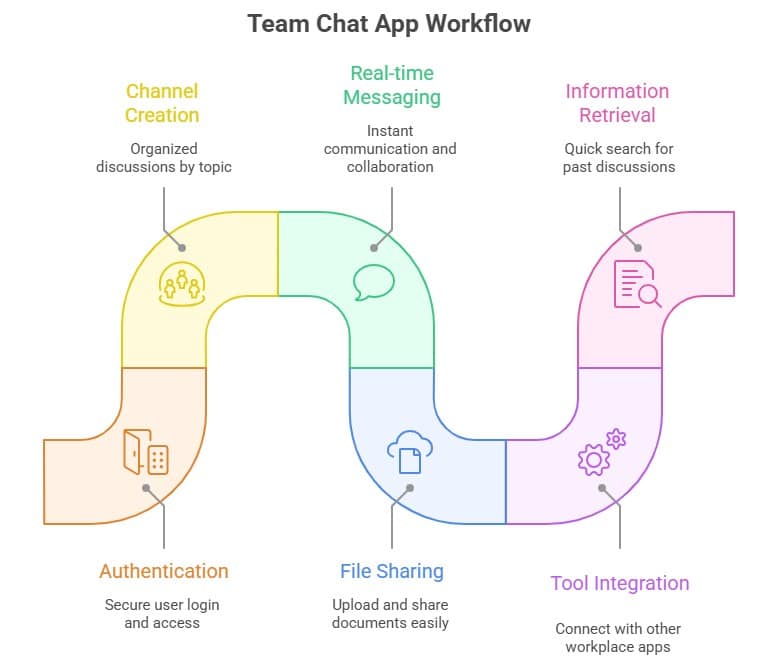
With built‑in search, message history, and admin controls, these apps help teams find information quickly, maintain secure communication, and stay connected across the organization. Team chat apps replace fragmented communication with a unified platform where employees can collaborate faster, reduce miscommunication, and stay aligned on goals.
Top Picks: Best Team Chat Apps by Use Case
Choosing the right team chat app can feel overwhelming given the number of options. To make it easier, here’s a summary of the leading platforms and the scenarios they fit best. This overview highlights which type of solution aligns with your organization’s needs.
| Tool | Best For | Starting Price* | Free Plan |
|---|---|---|---|
| HubEngage | Frontline & multi-channel comms | Custom business-friendly tiers | Yes |
| Microsoft Teams | Microsoft 365 organizations | Included in M365 bundles | Limited |
| Slack | Integrations & extensibility | ~$7–$12/user/month | Yes |
| Google Chat | Google Workspace simplicity | Included in Workspace | Yes (with Workspace tiers) |
| Zoom Team Chat | Teams already on Zoom | ~$6–$12/user/month | Limited |
| Discord | Always-on voice collaboration | Free core / low premium | Yes |
| Element / Mattermost | Self-hosted & security control | Varies by hosting | Yes (community) |
*Pricing ranges are approximate; always check vendor websites for current details.
The best team chat app depends on your context. Some tools integrate deeply into productivity suites, others focus on extensibility, while a few emphasize frontline usability or security control. The next sections explain how to evaluate them in more detail.
Comparison Grid of the Top Team Chat Software at a Glance
When choosing between different team chat tools, it helps to see features side by side. The grid below compares leading platforms on the essentials: chat, video, admin, compliance, and multi-channel capabilities. Use below table to narrow your shortlist before diving into deeper evaluation.
| Feature | What to Compare |
|---|---|
| Messaging | Direct messages, group chats, and channels |
| Video & Meetings | Built-in video calls or meeting integrations |
| Admin Controls | User permissions and role management |
| Compliance & Security | Encryption, audit logs, and data retention |
| Integrations | Connections with HR, project management, and productivity tools |
| Multi-channel Communication | Ability to send updates via chat, email, SMS, or signage |
| Messaging | Direct messages, group chats, and channel conversations |
Summary: This grid shows how tools differ not just in messaging features but also in compliance, extensibility, and multi-channel delivery. It highlights why companies must match features to workforce needs, not just choose based on brand recognition.
Key Features to Look for in a Team Chat App
Before narrowing down providers, identify which features matter most:
- User-friendly interface: Clean design that is easy to navigate.
- Group and private messaging: Flexibility for teams and individuals.
- File sharing and storage: Built-in ability to exchange and organize documents.
- Integration with other tools: Connections with project management and HR systems.
- Security and privacy: End-to-end encryption, access controls, and admin rights.
In addition, keep in mind how these features translate to chat for business scenarios: usability for non-technical employees, integrations with payroll or HRIS, and compliance settings for sensitive industries.
By considering these essentials, you can avoid wasted spend on apps that look good on paper but fail in practice.
How to Choose the Best Team Chat App for Your Business?
Before jumping into a specific tool, step back and think about what matters most for your company. Selecting team chat software is easier when you apply a decision framework:
- Stack alignment — If you are standardized on Microsoft 365 or Google Workspace, their chat tools may simplify administration
- Workforce type — Desk-based employees can handle channel complexity; frontline workers need lightweight, mobile-first apps.
- Governance & security — Confirm retention, device management, and access policies (NIST SP 800-53).
- Multi-channel needs — Critical updates should also reach emails, text messages, and digital signage to guarantee visibility.
- Engagement add-ons — Recognition and surveys drive culture, not just speed. Explore our employee recognition hub.
- Total cost of ownership — Licenses are only part of the equation. Include training, admin time, and risk of missed messages. In addition, weigh the opportunity costs of fragmented tools versus an integrated solution.
- AI & search — Evaluate how the tool surfaces information and supports compliance with AI features.

Key Factors for choosing the Best Team Chat App
| Factor | What to Evaluate | Why It Matters |
|---|---|---|
| Stack Alignment | Check if the chat tool integrates with Microsoft 365 or Google Workspace. | Native tools can simplify IT administration and user management. |
| Workforce Type | Determine if employees are desk-based or frontline/mobile workers. | Frontline teams need simple, mobile-first chat apps, while desk workers can manage complex channels. |
| Governance & Security | Review retention policies, device management, and access controls (e.g., NIST SP 800-53). | Ensures compliance, secure communication, and proper data protection. |
| Multi-Channel Communication | Confirm whether messages can reach email, SMS, or digital signage. | Guarantees employees receive critical updates across multiple channels. |
| Engagement Features | Look for built-in recognition, surveys, or feedback tools. | Boosts employee engagement and strengthens workplace culture. |
| Total Cost of Ownership | Consider licensing, training, admin effort, and risk of missed messages. | Helps evaluate the real long-term cost of the communication platform. |
| AI & Search Capabilities | Assess how the tool finds information and uses AI features. | Improves knowledge discovery, productivity, and compliance support. |
Scenario-Based Recommendations for Team Chat Apps
Every organization has different communication needs depending on its size, industry, and workforce type. Below are key scenarios and the types of team chat tools best suited for each. This helps you see how requirements differ by context and why no single tool fits everyone.
Scenario 1: Communication for frontline or deskless workers
Frontline employees often lack corporate email and rely on mobile devices. Platforms suited for this scenario should be mobile-first, offer simple authentication, and support multi-channel delivery (push, SMS, signage) so critical updates always reach the workforce. For more strategies, explore our frontline communication strategies.
Scenario 2: Communication with engagement and surveys
Some organizations look for more than just chat. Platforms in this category combine conversations with engagement features such as recognition, surveys, and rewards, so communication is tied to culture-building and measurable outcomes.
Scenario 3: Communication in highly regulated industries
In sectors like healthcare and finance, compliance requirements drive the choice of tools. Here, organizations need platforms with strong audit trails, export controls, retention settings, SSO, and sometimes self-hosting options to maintain control over data and security.
Scenario 4: Communication requiring a full platform approach
Certain companies need to go beyond chat and add capabilities such as analytics, recognition, surveys, signage, and broadcast announcements. In this scenario, an employee communications app is needed rather than a standalone chat tool.
Scenario 5: Communication for small businesses on a budget
For smaller teams, cost sensitivity is key. Free or low-cost chat apps can be a starting point, but they usually lack compliance and advanced features. As the business grows, scaling to a more robust communication platform becomes important. For advice on scaling, check out our internal communication strategy guide.
While frontline teams need mobile-first multi-channel delivery, culture-focused teams need engagement add-ons, regulated industries demand compliance features, some organizations need full platforms, and small businesses may prioritize affordability. A solution like HubEngage can address all these scenarios by combining multi-channel chat, engagement, and compliance in one platform.
HubEngage vs Slack vs Microsoft Teams vs Google Chat
Before deciding, it is important to see how the best chat apps are different from each other as shown in the below table:
| Platform | Core Strength | Best For | Key Limitation |
| HubEngage | Multi‑channel communication (chat, SMS, email, signage) plus engagement tools like surveys and recognition | Frontline, distributed, and multi‑location workforces | Custom enterprise pricing and broader platform scope than basic chat tools |
| Slack | Strong integrations and extensible ecosystem | Tech teams and organizations that rely on many SaaS integrations | Limited built‑in multi‑channel communication and engagement features |
| Microsoft Teams | Deep integration with Microsoft 365 apps such as Outlook, SharePoint, and OneDrive | Companies standardized on the Microsoft ecosystem | Can feel complex for frontline or non‑desk employees |
| Google Chat | Simple messaging integrated with Google Workspace | Small teams or companies using Google Workspace | Limited advanced communication features and fewer integrations compared to competitors |
What are the benefits of Work Chat Apps?
Work chat apps provide organizations with faster, more structured communication compared with traditional email. As businesses adopt remote and hybrid work models, these platforms have become essential for maintaining productivity and collaboration.
1. Faster Internal Communication
Team chat tools enable real-time conversations, allowing employees to ask questions, share updates, and resolve issues instantly. This reduces delays in decision-making and keeps projects moving forward.
2. Improved Team Collaboration
Most team communication apps allow employees to create channels for specific projects, departments, or initiatives. This organized communication structure makes it easier for teams to collaborate, share ideas, and track discussions without losing context.
3. Reduced Email Overload
One of the biggest advantages of work chat apps is their ability to replace long email threads. Instead of searching through inboxes, employees can find conversations in channels or direct messages, which improves efficiency and reduces communication fatigue.
4. Better Knowledge Sharing
Chat platforms act as searchable knowledge hubs where files, discussions, and decisions are stored. New employees can quickly review past conversations to understand context and learn from previous projects.
5. Stronger Employee Engagement
Many modern team chat platforms include features such as polls, reactions, recognition, and announcements. These tools help organizations build stronger workplace culture and encourage employee participation.
6. Support for Remote and Distributed Teams
With cloud access and mobile support, chat apps enable teams to collaborate regardless of location. Remote employees can stay connected to colleagues and leadership without relying solely on meetings.
Implementation Checklist
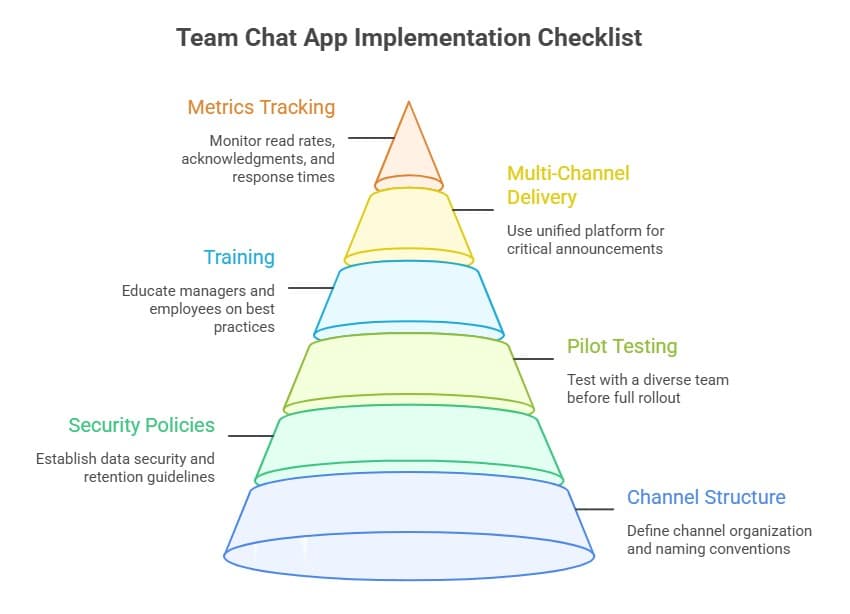
When rolling out a new tool, plan for adoption and governance. Additionally, use this list to ensure smoother implementation and higher adoption:
- Define channel structure and naming rules
- Set security and retention policies upfront
- Pilot with a diverse team before company-wide rollout
- Train managers and employees on best practices
- Use multi-channel delivery for critical announcements through unified employee communication platform
- Track metrics like read rates, acknowledgments, and response times
Conclusion
The best team chat app depends on your tech stack, workforce type, and governance needs. For frontline or distributed teams, choose team chat software that provides multi-channel communication, read confirmations, and engagement features. In contrast, if integrations or compliance are top priority, focus on platforms with deep ecosystem ties or audit capabilities. Ultimately, the right choice ensures every message lands and employees stay connected.
As older communication methods like email struggle to keep pace with modern workflows, chat apps play a critical role in boosting productivity, reducing clutter, and strengthening morale. By choosing wisely, you ensure that your teams are not just connected but aligned and empowered.
See HubEngage in action: Schedule a guided demo to explore chat, announcements, SMS, email, and digital signage in one platform.
FAQs
What is the best team chat app for business?
It depends on your stack and workforce. Teams works best for Microsoft users, Slack excels at integrations, Google Chat is simple for Workspace, and HubEngage is best for multi-channel communication and frontline reach.
Which team chat software works best for frontline or deskless teams?
Frontline teams need mobile-first, multi-channel communication. HubEngage offers SMS, email, push notifications, and digital signage alongside chat.
What is the difference between team chat tools and collaboration suites?
Chat tools are for quick messaging. Collaboration suites add meetings and document sharing. Communication platforms like HubEngage go further with engagement and analytics.
Can work chats be monitored by admins?
Yes, most of work chat apps allow retention, export, and audit controls. Transparency in governance is essential.
Is there a team chat app that also sends announcements by SMS or email?
Yes, HubEngage unifies chat, announcements, SMS, email, and signage in one platform.
What is the best free team chat app for small teams?
Slack and Google Chat offer free tiers. Open-source tools like Mattermost also have community editions. Plan for growth beyond free features.
Which team chat tools support acknowledgment tracking or read receipts?
HubEngage includes announcement confirmations. Others may require third-party apps or bots.
How do we migrate from WhatsApp to proper chat for business?
Establish policy, select a new tool, import contacts, train staff, and phase out shadow IT.
What is the most secure chat for business?
It depends on needs. Self-hosted tools provide control; enterprise tools like Teams offer advanced compliance.
What is the best chat for business in 2026?
The best chat for business balances usability, integrations, compliance, and multi-channel delivery. HubEngage is strong for frontline teams, while Teams and Slack serve enterprise office workers.
How much does team chat software typically cost?
Most plans range from free to about $12 per user/month. Enterprise or self-hosted solutions can be higher depending on features and compliance needs.
How do I measure the ROI of team chat software?
Track delivery times, read acknowledgments, engagement rates, and productivity improvements. Combine operational metrics with employee surveys for a complete picture.
Are work chats monitored?
Yes, work chats can be monitored in many organizations. Most team chat apps include admin tools that allow companies to manage message retention, audit logs, and security settings. This monitoring helps businesses maintain compliance, protect sensitive information, and ensure appropriate workplace communication.
How Much Do Work Chat Apps Cost?
Most team chat software is priced per user per month, often between $0 and $12+ depending on features. Enterprise platforms can be higher, and free tiers are common but limited. In addition, don’t overlook hidden costs of admin time and lost productivity.
Related Links:
Team Communication Software | Instant Messaging Software | Instant Messaging For Business | Office Chat | Alternatives To Google Chat | Instant Messaging Vs Email |