A mobile intranet lets employees access company information and communication on their phones, even when they’re not at a desk. It gives them a direct place to find updates and resources, while helping internal communications teams control how information reaches different groups. Below we explain what a mobile intranet is and how to introduce it into your organization to create a connected workforce.
Key Takeaways:
- A mobile intranet is built for phones and tablets, giving employees secure access to company information and team communication.
- Organizations with employees spread across multiple locations get the most value from a mobile intranet, so they don’t miss important messages.
- A rollout that starts small and earns real daily use matters more than a single platform feature.


What is a Mobile Intranet?
A mobile intranet is a native app built for people who need workplace updates away from their desks. It gives them secure access to company information from a phone or tablet. A mobile-friendly intranet site, on the other hand, is just a desktop portal adapted for a smaller screen. The app is designed around how employees use their devices during the workday, with timely alerts as needed.
Mobile Intranet vs. Traditional Intranet
The main difference between a mobile intranet and a traditional intranet is reach. A traditional intranet only works for employees who log in from a company computer, shutting out anyone who spends a shift on a warehouse floor or on the road. The table below shows where the two differ the most.
| Mobile intranet | Traditional intranet | |
| Access | Available from phones and tablets, including personal devices if approved | Usually accessed from a desktop or laptop on the company network |
| User experience | Designed for touchscreens and smaller screens | Designed around desktop browsing |
| Real-time updates | Can send push notifications when updates are time-sensitive | Relies on employees checking the intranet or email |
| Offline access | Keeps cached content available in areas with limited connectivity | Requires an active network connection |
| Deployment | Often cloud-hosted and faster to roll out | May require more IT setup and ongoing maintenance |
Table 1. Mobile intranet app vs. traditional intranet.
Teams comparing broader app-based options can refer to our guide on intranet apps to understand how these platforms work and what to consider before choosing one.
Why a Mobile Intranet matters in 2026?
A mobile intranet matters because most employees do not work from a fixed workstation. Boston Consulting Group estimates that deskless workers make up 70-80% of the global workforce, or roughly 2.7 billion people. Most of them lack access to the communication tools that could make their jobs easier.
This gap is not limited to frontline roles. Hybrid employees can also miss updates when information lives in an email thread or a desktop intranet they don’t check all day. PoliteMail’s 2026 Internal Email Benchmark Report examined over two billion internal emails sent to nearly 11 million employees. It found an average internal email open rate of 66%, which means companies cannot assume every employee saw a message just because it reached their inbox.
With a mobile intranet, communication goes directly to the device people already carry, reaching workers on the floor or at a desk.
Key Features to Look for in an Intranet Mobile App
An intranet mobile app should make company information easy to access when employees need it. This applies when communicating with a small office of 50 people or 5,000 frontline workers at once. Here are key features organizations should look for.

1. Push notifications and targeted alerts
Push notifications make a mobile intranet useful for time-sensitive communications because alerts appear directly on employees’ phones instead of waiting in an email or portal. Targeting keeps those alerts relevant, so a location-specific notice reaches only the employees it affects and not the rest of the company.
Our article on intranet communications explains how channels like mobile push notifications can help companies share timely updates beyond email.
2. Mobile-first UI with offline access
A mobile-first UI makes the intranet easier to use on a phone, since the layout is built for smaller screens instead of desktop-weight pages or mouse-driven menus. It should also load well on mobile data for teams without steady Wi-Fi and keep key documents available offline when service drops.
For organizations replacing a desktop-first portal, our employee mobile app gives workers a mobile version of the intranet that is easier to use away from a workstation.
3. AI-powered search
AI-powered search surfaces relevant results from across the intranet. Employees can ask questions in plain language instead of knowing which folder or page holds the information they need. In larger organizations, this can reduce repeat questions for internal support teams. Our employee intranet platform includes an AI search engine that helps employees find approved information faster.
4. Secure authentication (SSO and MFA)
Secure authentication protects sensitive company data without making mobile access difficult to manage. Single sign-on (SSO) lets employees use their existing company credentials, so they do not need a separate password for the intranet mobile app.
Multi-factor authentication (MFA) adds another security layer before login, which matters when employees use personal phones or connect outside the corporate network. Pairing it with role-based permissions lets IT limit sensitive content to relevant groups and review activity when needed.
5. Content personalization by role and location
Content personalization ensures each employee’s feed is relevant to their role or location, which strongly influences daily active usage.
CMS intranet tools let communication and HR teams manage content by site or job function, which reduces the number of irrelevant messages employees receive. Teams in different regions can also receive updates in their preferred language.
6. Analytics and employee insights
Read receipts and engagement data show whether employees are receiving company updates and flag messages that are being missed.
Adoption becomes easier when employees have a reason to return to the app. A points-based rewards system encourages participation without making the app feel like another required tool. A branded App Store or Google Play deployment helps too, since it carries the company’s name instead of a third-party’s.
Who benefits the most from a Mobile Intranet Platform?
A mobile intranet platform is most useful for organizations that need to reach employees beyond email and desktop systems. It works especially well when teams are spread across different regions or work settings.
1. Frontline and deskless workers
Frontline and deskless workers benefit from an employee mobile intranet because they often do not have a regular time or place to check company email. A mobile intranet app replaces breakroom posters with a channel they can check on their own schedule.
Pechanga Resort & Casino uses HubEngage to reach several thousand team members across all shifts through its branded PRC Engage platform. Kira Green, Director of Media and Public Relations, shared that employees can access HR information outside office hours and find important updates without being at a desk.
2. Remote and hybrid teams
Shared mobile access keeps remote and hybrid teams connected to company updates outside the office. Employees can see announcements and internal posts without logging in to a desktop portal.
It also supports the informal communication that remote work can reduce, such as peer recognition or leadership posts. This makes company news easier to follow, even when people aren’t working in the same place.
3. Large distributed organizations
A mobile intranet lets large distributed organizations share updates from one place while sending site-specific information to the people who need it, so no location gets left out or overloaded with irrelevant messages.
For Newport Hospitality Group, which manages around 50 hotels, the HubEngage platform helps keep employees connected across properties. Lizz Chambers, Vice President of Team Member Engagement, noted that surveys that once took much longer to format and distribute can now be sent in real time.
4. Field service teams
Field service teams need reliable access to current information while they are away from a central office. A mobile intranet makes safety updates and operational documents easier to reach from a phone, especially when timing affects compliance or service quality.
EnerCorp, an energy and industrial solutions company, worked with HubEngage to create more consistent communication with field employees across remote sites. Gareth Young, Director of Health, Safety, Environment and Quality, said that the team went live in six weeks, with support that made the rollout easier for teams working outside a traditional office.
How to roll out a Mobile Intranet App successfully?
A successful mobile intranet rollout depends on whether employees keep using the app after the first announcement. The goal is to make the app user-friendly and measurable so you can improve it over time.
1. Pilot with a frontline team first
Start with a group that depends on mobile access. Their feedback will reveal issues that may need fixing and give the rest of the organization more confidence in the rollout before a company-wide launch.
If the organization is still comparing platforms, our intranet software guide explains what to consider before choosing a system, including mobile reach and adoption planning.
2. Build an internal launch campaign
Treat the launch like a product release. Set a clear launch date and explain what the app helps employees do. Share the announcement where employees are most likely to see or hear it. That may mean breakroom posters and supervisor reminders for warehouse teams, while office staff may respond better to email.
3. Use a champions program
A champions program makes adoption easier by giving staff a familiar person to ask for help. Give a few trusted employees early access so they can answer basic questions during the launch.
4. Measure adoption after launch
Set benchmarks before launch to see whether employees keep using the app after. HubEngage supports guided onboarding and can help organizations go live in two to five weeks. Login rates and read receipts are the clearest signals to measure adoption over time.
Build a More Connected Workforce
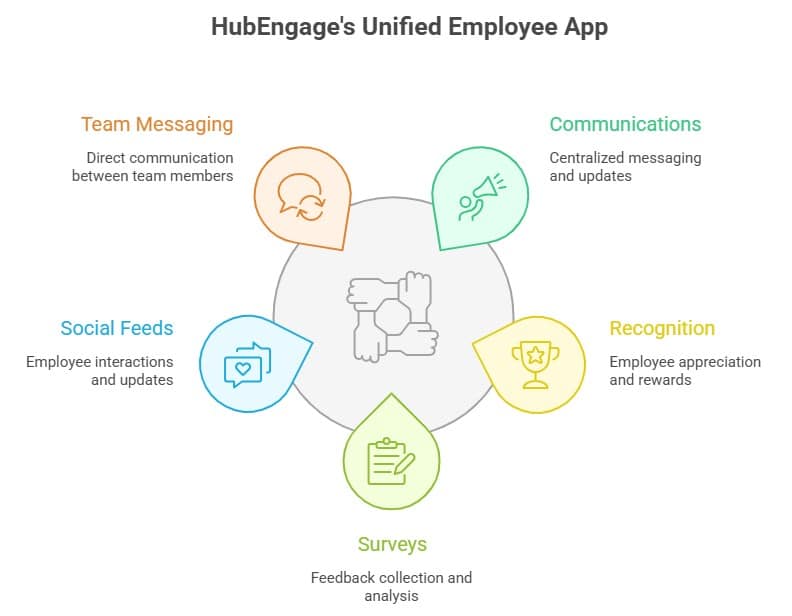
Most companies still run on tools built for people who sit at a desk, which leaves out a large share of the workforce. A mobile intranet fixes that by putting company updates directly on devices employees already carry, so they stay informed and engaged no matter where the job takes them. HubEngage brings this together in one branded platform with built-in engagement tools. To see how it could support your workforce, book a demo.
Conclusion
A mobile intranet is not just a nice-to-have but a basic need for organizations with distributed and deskless workforces. By centralizing communication, giving real-time updates, and mobile-first access, it makes sure every employee stays updated and engaged no matter where they are present. Platforms like HubEngage simplify this shift by combining multiple tools into one seamless experience, helping organizations improve adoption, streamline operations, and build a more connected, responsive workplace. Our Employee App works for companies of all sizes and goes live in 2 to 5 weeks with guided onboarding. Request a demo today to see you can extend your reach and drive even more engagement with a single intuitive app.
FAQs On Mobile Intranet
1. What’s the difference between a mobile intranet app and a mobile-friendly intranet site?
A mobile-friendly intranet site adapts a browser experience to a smaller screen. A mobile intranet app is built for mobile use, so it can offer push notifications and offline access in ways a resized desktop portal may not. The right choice depends on how employees work and what access control the organization needs.
2. Can deskless or frontline employees use a mobile intranet?
Yes. Deskless and frontline employees can use a mobile intranet from a phone or tablet. Some platforms, like HubEngage, support QR code onboarding so employees can download and log in easily.
3. What features should an intranet mobile app include?
An intranet mobile app needs secure authentication and push notifications as the baseline. Offline access and AI search make it easier to use daily, while analytics and recognition tools support adoption over time.
4. Is a mobile intranet secure for company communication?
A mobile intranet is secure when the platform supports strong authentication and clear access controls. That means logging in through single sign-on (SSO) and multi-factor authentication (MFA), with access limited by each employee’s role. The vendor should also provide current security documentation, and regulated industries need to check which certifications apply before launch.
Related Links:
Employee Intranet | Intranet Apps | Employee Mobile App | Intranet Communications | Intranet Software | CMS Intranet