A well-planned intranet for schools fixes that by becoming the school’s internal source of truth. Not the place where everything is dumped, but the place where the right people can reliably find the right information, at the right time, in the right format.
About 60% of educational institutions have adopted intranet software, with adoption reported to be over 70% in universities and colleges according to a widely cited estimate shared by AgilityPortal’s education intranet guide. That matters because a school intranet is no longer a nice-to-have for unusually large campuses. It has become a mainstream way to centralize communication, documents, and collaboration.
From a school board perspective, that changes the question. The issue is no longer, “Should we have some kind of internal digital hub?” It’s, “How do we design one that simplifies school life instead of adding another login, another content pile, and another system to maintain?”
Most schools already feel the strain. Staff receive updates in email, Teams, printed memos, shared drives, and department chats. Policies live in several folders. A form gets revised, but an old version still circulates. Parents ask who to contact. Teachers save their own copies of curriculum resources because they don’t trust the shared location. None of this is dramatic in isolation. Together, it creates drag across the entire institution.
In this blog, we will explain how school intranets improve communication, organization, and collaboration which will help educators choose the right intranet for schools.
Key Takeaways
• An intranet for schools provide centralized access to resources, announcements, documents, and updates.
• Using Modern intranets reduce communication gaps by unifying messages, files, and information.
• Document management, collaboration tools, workflows, communication, and permissions are key features of school intranet
• Modern Intranet for schools helps with better efficiency, quick information access, stronger collaboration, and consistent communication.
• Successful school intranet platforms integrate seamlessly with different type of digital platforms.
• The best intranet for schools simplify work, boost engagement, strengthen governance, and connectivity.

Intranet For Schools
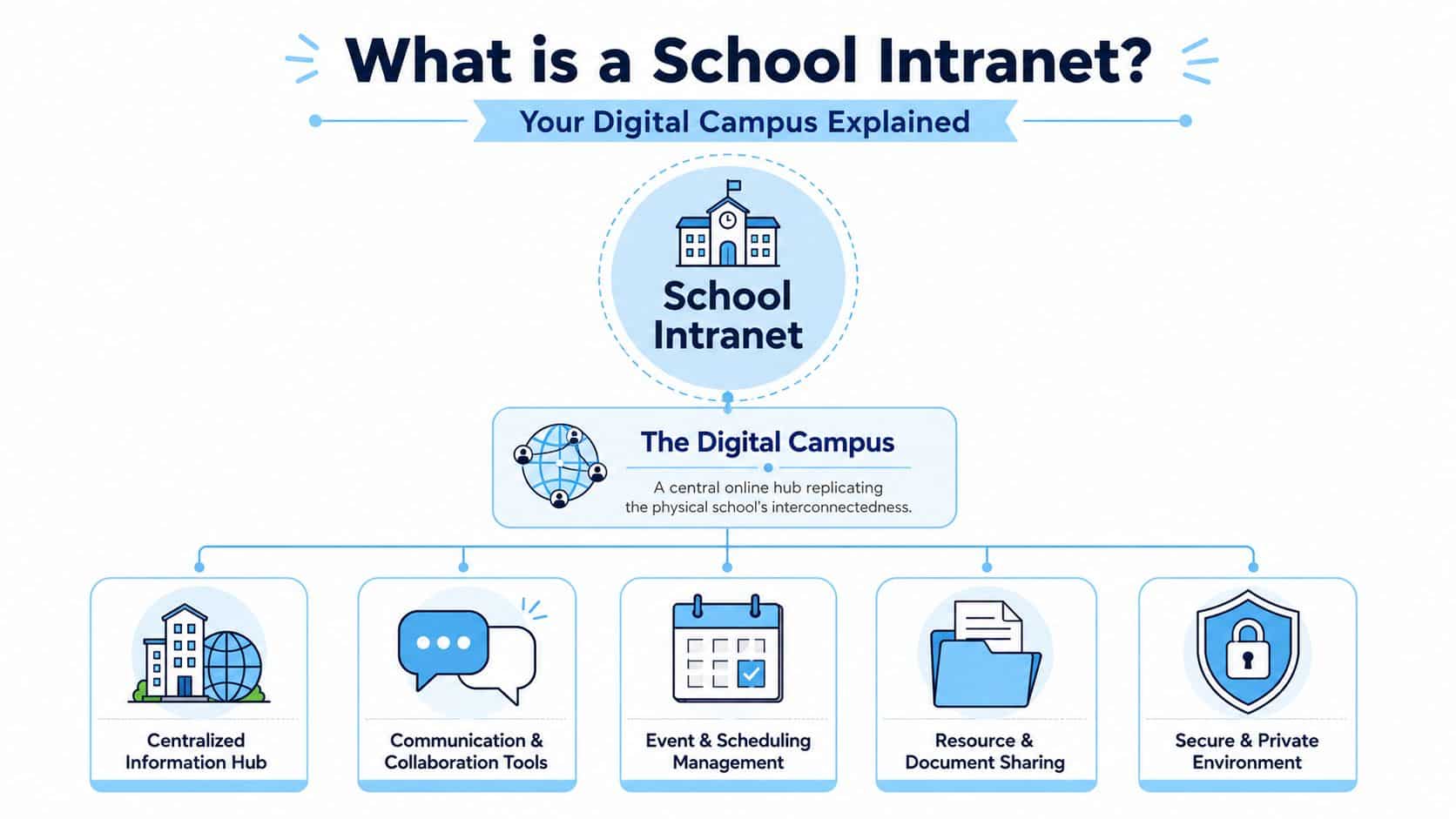
A school intranet is best understood as a digital campus. It is the internal online environment where staff, teachers, students, and in some cases parents can access shared information, school resources, and communication tools in one place.
That description is more helpful than calling it a portal. A portal sounds like a doorway. A digital campus sounds like a place where work happens.
From noticeboard to workspace
Older school intranets often acted like static staff pages. They held a few forms, a calendar, and maybe some policy documents. Modern platforms do far more.
As Unily’s education intranet overview notes, school intranets have evolved from simple staff portals into broader digital hubs used for document sharing, virtual classrooms, discussion forums, messaging, and personalized learning tools, helping connect students and teachers wherever they are in the world.
That shift matters because schools no longer operate only in a physical building. Even fully in-person schools now depend on digital coordination. Staff collaborate across departments. Students access resources outside classroom hours. Families expect timely communication. Multi-campus institutions need consistency across locations.
What belongs in the digital campus?
A strong intranet for schools usually brings together several kinds of activity:
| Digital campus area | What it does in practice |
|---|---|
| Communication | Shares announcements, department news, leadership updates, and urgent notices |
| Resources | Stores policies, forms, curriculum documents, staff handbooks, and templates |
| Coordination | Supports calendars, room bookings, event planning, and task follow-up |
| Community | Creates spaces for discussion, recognition, clubs, committees, and staff groups |
If the content supports the broader life of the institution rather than a specific course, it probably belongs in the intranet.
Why we need an intranet for schools?
Schools have become digitally crowded. They use learning platforms, student systems, cloud storage, messaging tools, websites, and parent communications apps. Each tool may do one job well, but the school still needs one place that ties daily operations together.
That’s where a central digital hub comes in. Think of it as the front office, staff room, filing system, bulletin board, and internal help desk combined into one secure environment. Without that hub, schools default to scattered communication. Important notices hide in email threads.
Updated procedures sit in one folder while staff keep using a downloaded copy from last semester. The problem is not just inconvenience. Fragmentation creates operational risk.
- Staff miss critical updates: A timetable change posted in one channel may never reach support staff who rely on another.
- Version confusion spreads quickly: A teacher downloads a policy once, then unknowingly shares an outdated copy.
- Parents and students get mixed messages: The website says one thing, a class app says another, and reception receives the follow-up calls.
- Administrators spend time chasing information: Instead of leading, they become traffic controllers for files, approvals, and repeated questions.
Schools already know that technology must support daily operations, not interrupt them. That’s why conversations about intranets should sit alongside broader planning for essential school IT support, not apart from it.
A useful way to frame the value is through the organizational gains described in these benefits of intranet examples. The underlying principle is simple. When communication, documents, and workflows are centralized, schools reduce friction across teaching, administration, and support functions.
Key Features of an Intranet For Schools
A useful intranet doesn’t win by having the longest feature list. It wins when each feature solves a daily school problem. For evaluation, I advise school leaders to group capabilities into four buckets: operations, communication, resource management, and community engagement.
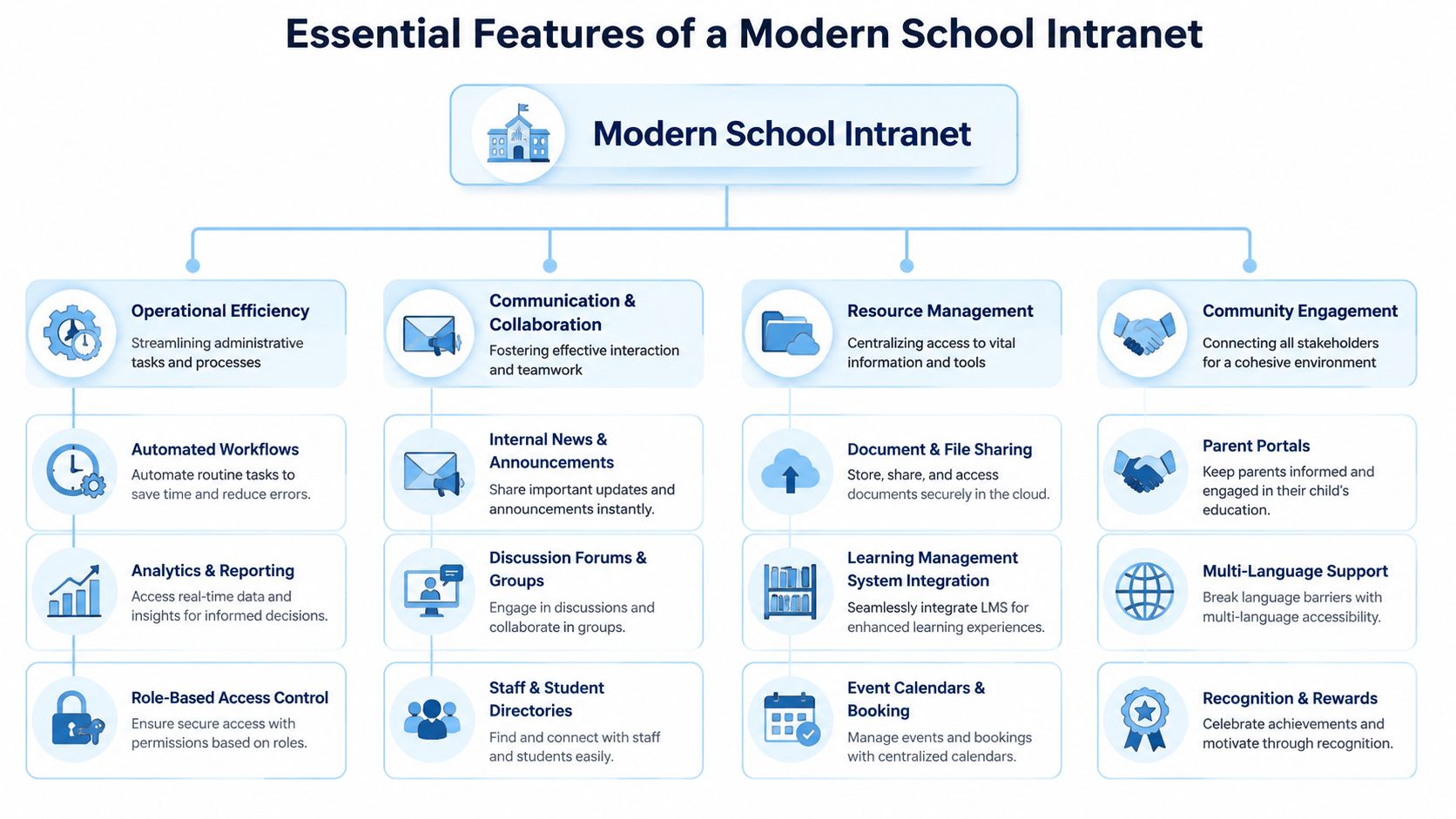
Operational efficiency
Operations features are the ones staff often appreciate most after launch because they reduce repetitive admin work.
- Automated workflows: These route approvals and recurring tasks without endless email forwarding. A leave request, facility issue, or policy acknowledgment can move through the right sequence automatically.
- Role-based access control: Different groups see different content. The science department doesn’t need finance files. Students shouldn’t see staff HR documents.
- Analytics and reporting: Leaders can review what people search for, what gets read, and what gets ignored. That helps schools improve content rather than guessing.
A practical example is staff onboarding. Instead of emailing contracts, induction resources, safeguarding policies, timetables, and campus maps separately, the intranet can present a structured checklist with the right documents for each role.
Communication and collaboration
Schools need communication tools that are targeted, not just loud.
A modern intranet should support internal news, audience-based announcements, staff and student directories, discussion spaces, and collaborative work areas. If your school already uses Microsoft Teams or Google Workspace, the intranet should coordinate those tools rather than compete with them.
For schools reviewing teamwork functions, it helps to compare them against common intranet collaboration tools so the platform strengthens existing habits instead of duplicating them.
Resource management
Many intranet projects succeed or fail depending on how well content is managed. Schools need one searchable, governed place for important content.
Key capabilities include:
- Document and file sharing: Policies, templates, curriculum documents, handbooks, and forms should be easy to find and clearly versioned.
- Calendar and booking tools: Staff need to know what’s happening and reserve shared spaces or resources without chasing multiple coordinators.
- Integration with learning systems: The intranet should connect to LMS and other platforms without pretending to replace them.
Consider tutoring coordination. A school might continue using specialist tutoring scheduling software for booking sessions, while the intranet becomes the place where staff publish tutoring policies, schedules, links, and parent guidance. That’s a smarter division of labor than forcing one platform to do everything.
Community engagement
An intranet for schools also shapes culture.
It can support multilingual access, recognition programs, parent-facing areas, group spaces for clubs or committees, and mobile access for staff who aren’t at desks all day. These features matter because school communication isn’t only about instruction. It’s also about belonging, visibility, and trust.
How an Intranet For School is beneficial?
A school runs on hundreds of small decisions each day. Which policy is current. Where a parent finds the event schedule. How a teacher gets the right form before a deadline. An intranet improves those routine moments, which is why it matters to the whole community, not just the IT team.
For a school board, the clearest way to view an intranet is as shared infrastructure. It works like a front office for the digital campus. People should not have to guess which app holds the answer. The better approach is to use the intranet as the starting point, then connect it to the systems the school already relies on, such as Google Workspace or Microsoft 365. That reduces tool sprawl instead of adding another disconnected platform.
For administrators and operations teams
Administrators are responsible for consistency at scale. If staff use different versions of a safeguarding policy, trip form, or HR document, the issue is no longer inconvenience. It becomes risk.
A well-planned intranet gives leaders one governed place to publish approved information, route updates, and confirm that staff are working from current materials. It also reduces repetitive office work. Fewer emails asking, “Can you send that form again?” means more time for planning, compliance, and student support.
This matters for operations because schools do not struggle from a lack of information. They struggle from information scattered across too many places.
For teachers and staff
Teachers feel the cost of digital clutter quickly. Five minutes spent hunting for a timetable change or a behavior referral form may not sound serious, but repeated across a staff of dozens, it drains hours from the week.
An intranet helps by creating one trusted starting point for daily work. Staff can open the platform and find the documents, updates, links, and department spaces they need without retracing old emails or checking multiple tools first. If the school uses Google Drive, SharePoint, Teams, or other existing systems, the intranet should point to and organize those resources clearly rather than competing with them.
Useful outcomes for staff include:
- Less time spent searching: Common forms, schedules, policies, and curriculum materials are easier to find.
- Clearer collaboration: Departments and committees can work in shared spaces with visible ownership and fewer duplicate files.
- More focused communication: Staff see updates that apply to their role, campus, or team instead of wading through every message sent school-wide.
For students and parents
Students and parents need something simple. They need to know where to look, what information applies to them, and whether they can trust what they find.
An intranet can provide that clarity through well-organized access to calendars, announcements, support services, forms, and school resources. It can also create cleaner boundaries between internal staff operations and family-facing information, which helps schools share the right content with the right audience.
The value of an intranet is trust. When families and students learn that the platform is current, they stop relying on screenshots, unofficial group chats, and outdated attachments saved months ago.
Teachers teach, administrators coordinate, students stay informed, and families know where to turn. A good intranet does not replace every other system. It connects them, simplifies access, and gives the school one digital home base people will readily use.
Intranet For Schools Use Cases
The easiest way to judge an intranet for schools is to watch it solve ordinary problems.
Onboarding a new teacher
A new history teacher joins in August. In many schools, onboarding happens through a patchwork of PDFs, forwarded emails, calendar invites, and informal advice from nearby colleagues.
In a better setup, the intranet becomes the teacher’s guided starting point. It includes induction tasks, safeguarding policies, staff handbook, timetable links, curriculum folders, required forms, and key contacts. The teacher logs in and sees what to do first, what to read, and who to ask.
That doesn’t just help the new hire. It also reduces repeated work for HR, department heads, and IT.
Running a school-wide event
Now take a school production, athletics day, or open house. These events require coordination across administration, teaching staff, facilities, volunteers, and families.
A school intranet can bring together:
- Event schedules: One calendar view for rehearsals, setup, room usage, and volunteer timing
- Shared files: Maps, duty rosters, risk forms, signage, and contact sheets
- Live updates: Last-minute changes posted once instead of texted through several chains
The result is calmer execution. People check one place instead of relying on memory and fragmented messages.
Organizing curriculum resources
Curriculum teams often struggle with duplicate files and unclear ownership. One teacher updates a lesson sequence, another uses an older version saved locally, and a third isn’t sure which copy is approved.
A searchable intranet library can establish a stable home for curriculum frameworks, lesson materials, assessment guidance, and department templates. Ownership is clearer. Search is easier. Version confusion drops.
Communicating during disruptions
Snow days, power issues, campus closures, transport problems, or urgent policy changes expose weak communication systems quickly.
When the intranet is connected to web and mobile channels, the school can push one clear message through its official internal system. Staff know where the authoritative update lives. Families and students see aligned communication rather than mixed signals from multiple unofficial channels.
Intranet For School Implementation Checklist
Most school intranet projects don’t fail because the software lacks features. They struggle because the school never decided what problem the intranet should solve, who owns the content, and how the platform fits with tools already in use.
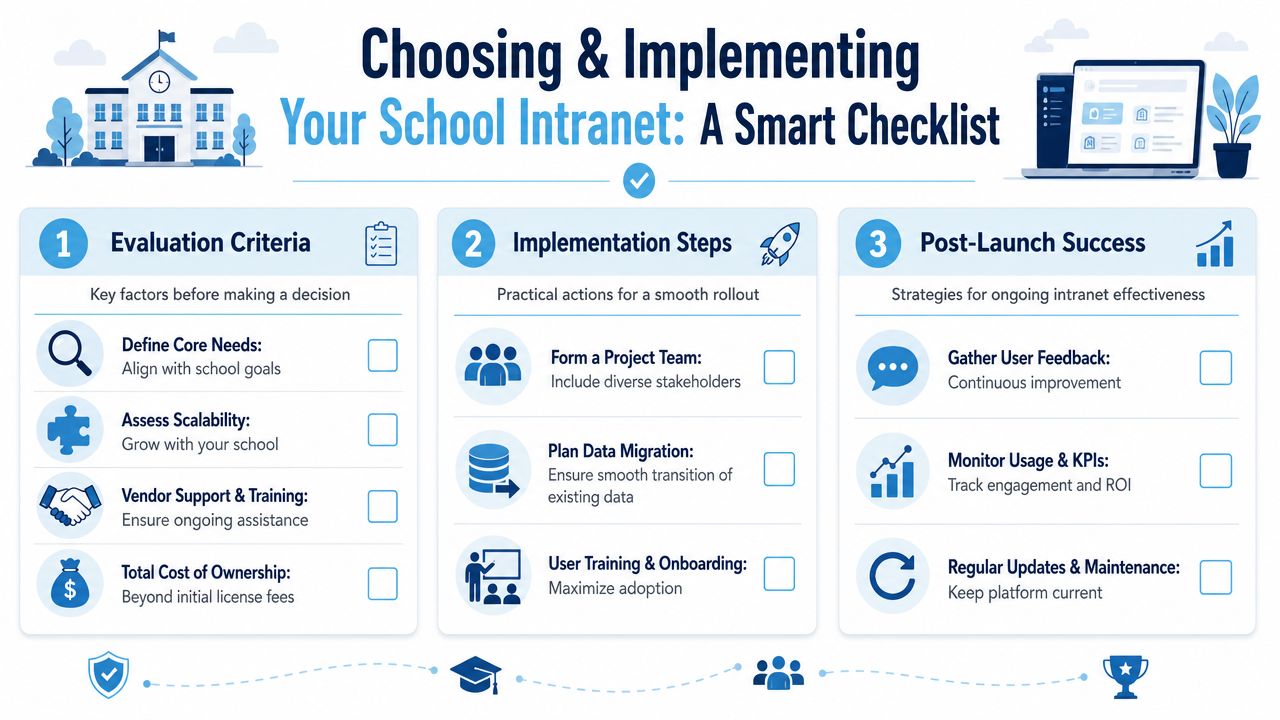
Start with governance, not graphics
Schools are often shown homepage mockups first. That’s backwards. Before design, answer these questions:
| Decision area | What the school should define |
|---|---|
| Audience | Who needs access: staff only, students, parents, or selected combinations? |
| Content ownership | Which team owns policies, handbooks, calendars, and department pages? |
| Publishing rules | Who can create content, who approves it, and how often is it reviewed? |
| System boundaries | What belongs in the intranet, and what stays in LMS, SIS, Teams, Drive, or email? |
Many schools encounter a common pitfall: They buy an intranet as a “single hub” but never decide whether the intranet will host content, link to content, or orchestrate content across other systems.
Make security role-based from day one
A school intranet must be built as a secure, role-based access layer with permissions so teachers, students, and staff only see the documents and tools intended for them, as outlined in AgilityPortal’s guidance on intranet design for schools.
For school boards, this is not an optional technical detail. It is the foundation of manageable governance. Role-based access affects everyday decisions such as:
- Policy distribution: Staff receive internal procedures, while students see student-facing guidance.
- Department spaces: Finance, HR, learning support, and leadership can work securely without creating hidden file sprawl.
- Targeted announcements: Schools can send the right update to the right audience instead of broadcasting every message to everyone.
Integrate with Microsoft 365 or Google Workspace thoughtfully
Most schools already depend on Microsoft 365 or Google Workspace. The intranet should reduce tool sprawl, not increase it. A practical rule of thumb:
- Use the intranet for school-wide communication, policy access, searchable resources, directories, institutional calendars, and cross-department workflows.
- Use the LMS for coursework, assignments, grading, and class-specific instructional activity.
- Use email and chat tools for conversation and quick coordination, not as permanent storage.
Adoption also needs a deliberate plan. Schools should pilot with a few departments, train content owners, and use clear engagement practices such as those outlined in these tips to drive intranet adoption and boost engagement. Rollout succeeds when users understand one simple benefit: “This will help me do my work with less searching and less repetition.”
Unify Your Campus with the HubEngage Intranet Platform
Schools rarely struggle because they lack tools. They struggle because staff are forced to jump between too many of them.
That is a critical test for any intranet platform. A school does not need another place to post announcements if staff still have to check email for updates, Teams or chat for follow-up, shared drives for documents, and separate apps for forms, tasks, and acknowledgments.
A good platform reduces that switching cost and gives the school one governed place to publish, find, and act on information. HubEngage, Inc. is one platform schools can review if the goal is to bring communication, engagement, tasks, resources, and multi-channel delivery into one digital hub. Its product supports web, mobile, email, SMS, digital signage, Microsoft Teams, and Slack, which makes it relevant for schools trying to reach different staff groups in the channels they already use.

The key question is not whether a platform has many features. The key question is whether those features help the school cut down on tool sprawl. If your school wants a shorter list of tools, clearer communication, and a more usable digital workplace for staff and stakeholders, HubEngage, Inc. is worth reviewing as part of your shortlist. Request a walkthrough centered on school workflows, governance, and how the platform would work alongside your existing Microsoft 365 or Google Workspace environment.
Conclusion
Using the right intranet for schools and colleges is about creating a connected digital environment that simplifies communication, improves access to information, and supports collaboration. When implemented thoughtfully, an intranet can reduce administrative burdens while helping staff, students, and families stay informed and engaged.
If you are evaluating solutions to strengthen your school’s digital workplace, explore the HubEngage Employee Experience Platform and see how it can support your goals by scheduling a personalized demo today.
Intranet For Schools FAQs
What is an intranet for schools?
An intranet for schools is a secure internal platform that centralizes communication, documents, announcements, calendars, and resources. It helps staff, students, and sometimes parents access important information from one trusted location.
Why do schools need an intranet?
Schools need an intranet to reduce communication gaps, organize resources, and improve collaboration. It provides a single source of truth for policies, forms, updates, and school-wide information, making daily operations more efficient.
What features an intranet for schools must have?
A school intranet should include document management, announcements, calendars, staff directories, role-based access, search functionality, collaboration tools, and integrations with platforms like Microsoft 365, Google Workspace, and learning management systems.
Can parents and students access a school intranet?
Yes, many school intranets offer controlled access for parents and students. Schools can share announcements, calendars, forms, resources, and important updates while keeping sensitive staff information secure through permissions.
How does an intranet improve communication in schools?
An intranet improves communication by providing one central place for announcements, updates, policies, and resources. This reduces reliance on scattered emails and messages, ensuring information reaches the right audience consistently.
What is the difference between an intranet and a LMS?
A school intranet manages communication, resources, policies, and organizational information. While a learning management system focuses on coursework, assignments, grading, and classroom activities. Both systems often work together to support education.