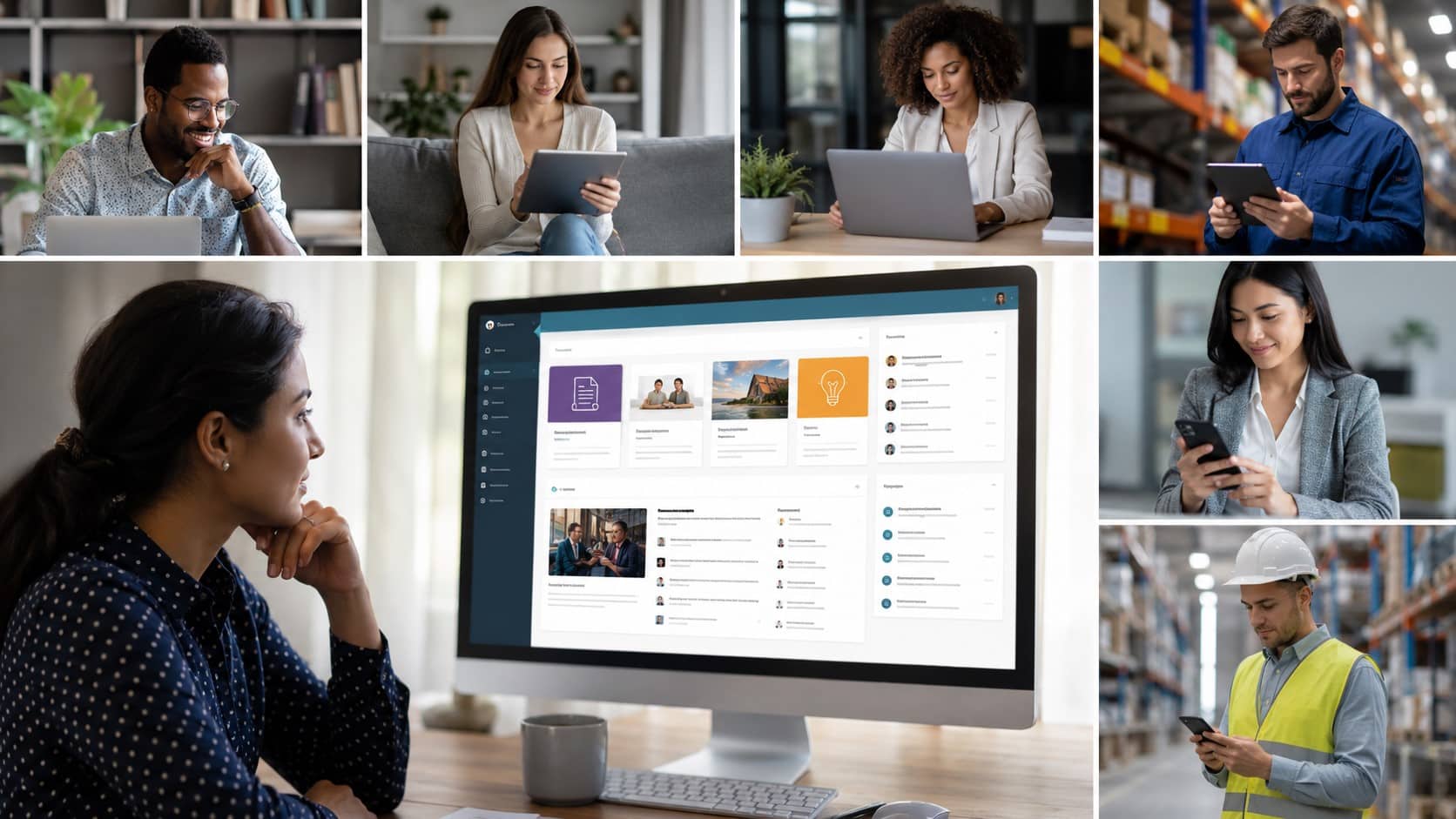
Internal communications teams evaluating intranet software today face a longer shortlist than they did five years ago. Intranet platforms have grown in scope, moving from file storage and company news into communication, engagement, knowledge management, and workforce analytics.
Building a successful intranet involves defining clear goals, selecting the right platform, organizing content effectively, and creating an engaging employee experience. A well-planned intranet improves communication, knowledge sharing, and productivity across the organization thereby generating long-term business value.
In this guide, we will walk through how to create an intranet step-by-step, including planning, choosing the right technology, organizing content, selecting features, estimating costs, and following best practices for building an effective company intranet.
Key Takeaways
- Today’s intranets do more than just store documents. Look for platforms that offer AI-powered search, multi-channel communication, recognition programs, and real-time analytics.
- The type of workforce you have is the key factor. If most employees work on the front lines or without desks, you need a mobile-first platform. For desk-based teams, focus on governance and Microsoft integrations.
- You can quickly narrow your options by figuring out your headcount and deployment needs early. Prices can be under $3 per user each month or over $20,000 per year, depending on your scale.
- A long list of features does not mean your employees will use the platform. Choose one with built-in gamification, multi-channel delivery, and support for a structured rollout.

What is Intranet Software?
Intranet software is a digital workplace platform that helps organizations centralize communication, collaboration, and information sharing, allowing employees to access company resources, updates, tools, and knowledge within a secure internal network.
According to Gartner’s report, on workplace engagement, employee engagement levels declined from 23% to 21% in 2024, highlighting the growing need for organizations to strengthen how they connect with and engage their workforce.
If you are wondering how an intranet contributes to employee engagement, it does so by offering a centralized platform that is accessible, connected to everyday work tools, and built to support employee expectations and needs.
A modern Employee Intranet gives employees one central place to access company news, resources, policies, business tools, and collaboration areas. Most organizations today run intranet software through cloud-based platforms accessible from any device, without VPN setup or on-site servers. These are commonly called an intranet portal, a digital front door where employees start their workday, search for policies, check company updates, and connect with colleagues.
Intranet vs. Extranet vs. Internet
We have seen people get confused between intranet, extranet and internet. Let us see how they are different from each other.
| Type | Access Level | Who Can Use It | Purpose |
| Intranet | Private | Employees only | Internal communication, documents, workflows, and collaboration |
| Extranet | Restricted | Employees + approved partners or vendors | Secure collaboration with external stakeholders |
| Internet | Public | Anyone | Public information, websites, and open online content |
For a full breakdown of how an intranet differs from an extranet and the public internet, see our intranet vs. extranet vs. internet guide.
| Intranet vs Extranet: An intranet is your company’s private, employees-only space. An extranet lets you open up just the right areas to trusted partners like contractors, suppliers, or clients, giving them access to only what they need. If you work closely with outside organizations, you might want both. Just remember, you’ll need to set up different permission levels for employees and external partners. |
How has Intranet Software changed in recent years?
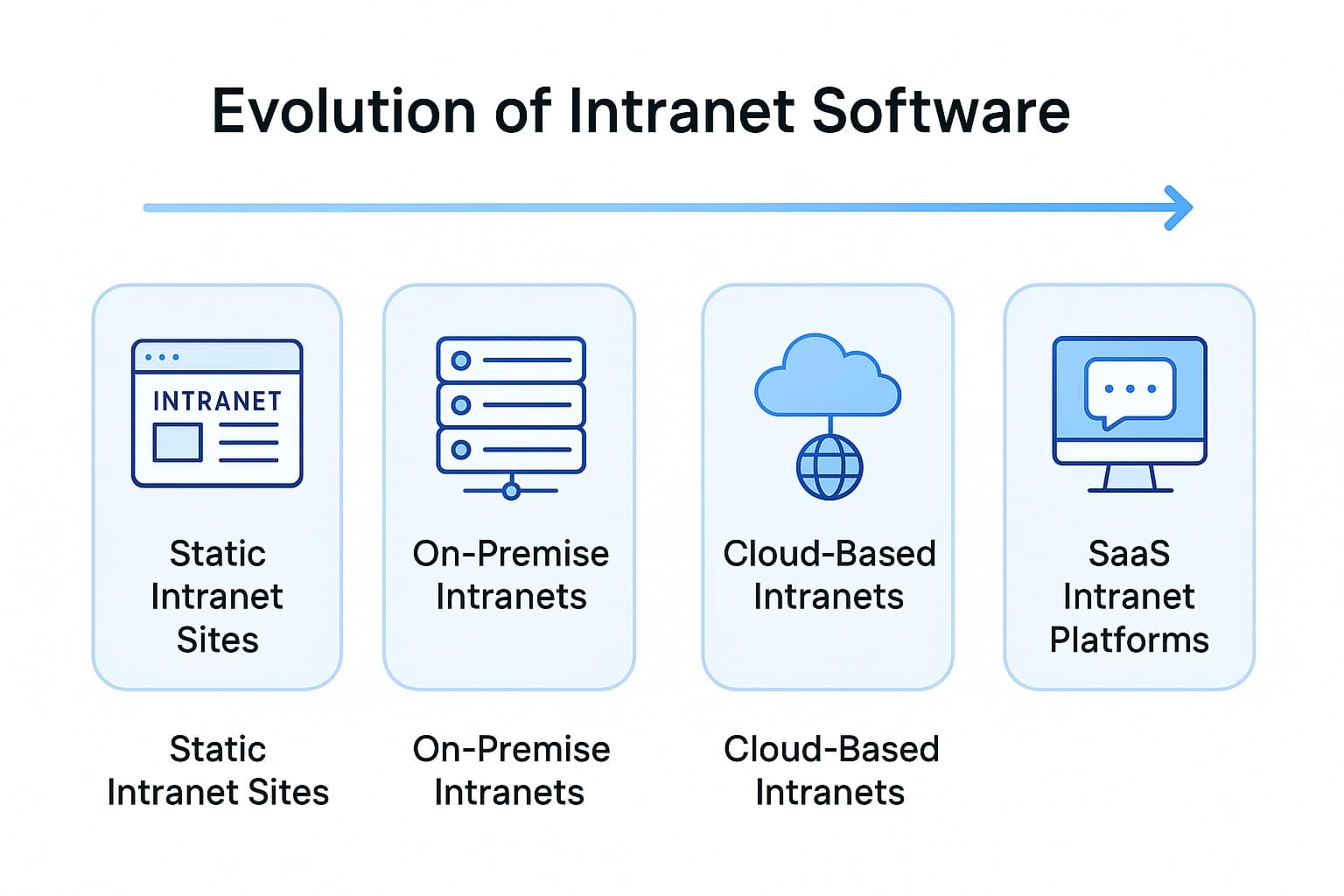
Modern intranet platforms are cloud-based, mobile-native, and built so that your content teams can update pages without IT involvement. This is a big step forward from the static document repositories most organizations ran a decade ago.
Today’s platforms support native mobile apps, AI-powered search, social engagement features, employee recognition, and analytics that measure communication reach rather than page visits.
According to McKinsey’s research on social technologies, organizations that connect employees through collaborative tools can raise knowledge worker productivity by 20 to 25 percent. The positive ROI is why organizations now treat the intranet as a business-critical system.
Why modern intranets replaced the fragmented tool stack?
The older model meant managing a different tool for nearly every communication need, each with its own license, admin overhead, and learning curve. Modern platforms consolidate those functions into one. For most organizations, this consolidation reduces total cost in licensing, administration, and employee time.
What Separates a Good Intranet Platform from a Generic One?
What makes a good intranet platform stand out is fairly consistent across organizations: it reaches your workforce where they are, gets information to them fast, and tells your communications team what is working. The details of how platforms deliver on each of those vary significantly. Here’s what you can evaluate in each area.
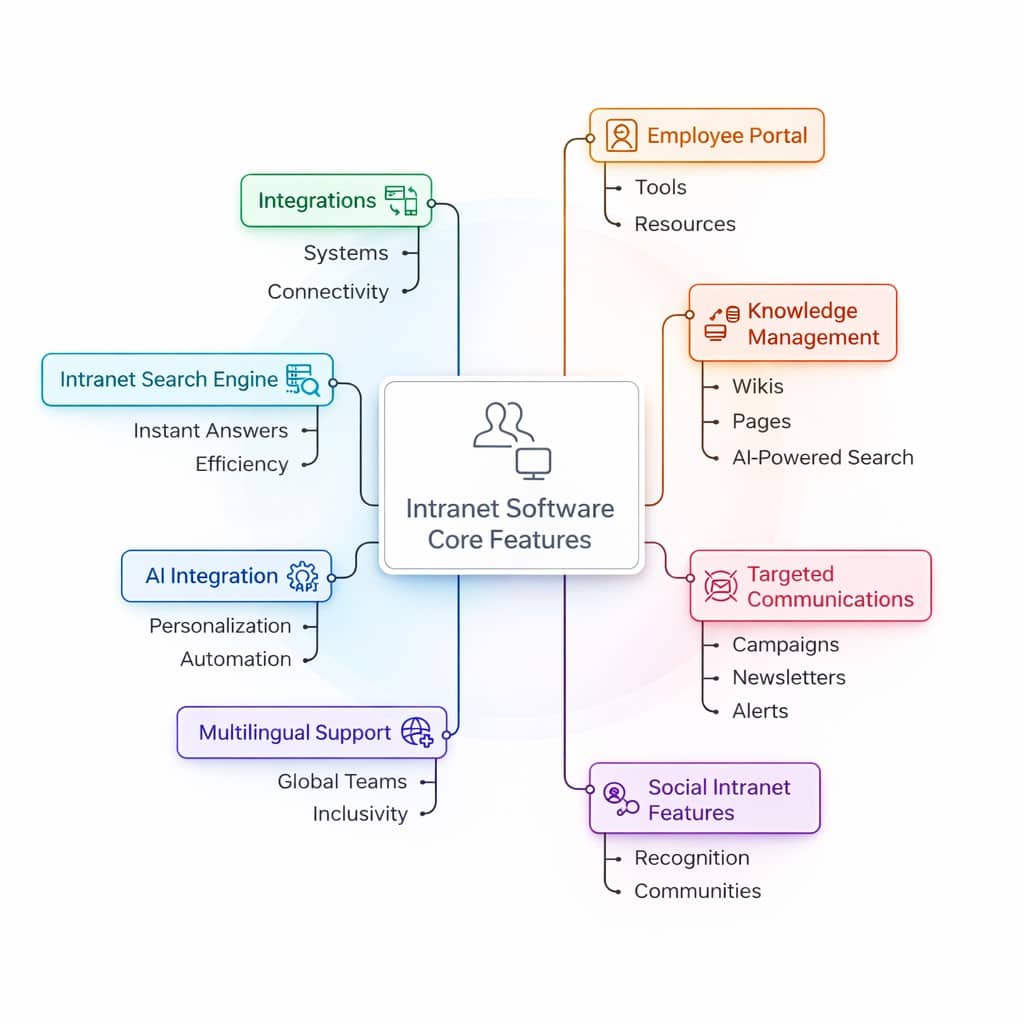
Mobile and Frontline Reach
Without native mobile access, most intranet platforms can’t reach the majority of your workforce.
According to Emergence Capital’s State of Technology for the Deskless Workforce report, 80% of the global workforce (approximately 2.7 billion people) are deskless, yet they receive less than 1% of enterprise software investment.
In these cases, company updates may travel via unofficial WhatsApp groups, bulletin boards, or word-of-mouth. All of these are channels that organizations cannot manage, measure, or secure. Deloitte research puts the gap in sharper focus: only 23% of frontline workers believe they have access to the technology they need to be productive.
A platform built for mobile reach should provide:
- Native iOS and Android apps, not a mobile-resized desktop site
- Targeted push notifications segmented by role, location, or shift
- Offline access for workers in areas with poor connectivity
- Branded deployment through the App Store and Google Play, so employees download a company app rather than a generic third-party tool
Our employee mobile app guide covers what to look for when evaluating mobile-first platforms specifically.
Multi-Channel Communication
Relying on a single channel to reach all employees means that a significant portion of the workforce misses critical updates.
According to PoliteMail’s 2025 Internal Email Benchmark Report which analyzed 4.8 billion internal emails sent to over 12 million employees globally, the average internal email open rate is 64%. That figure drops further for shift-based or hourly workforces without corporate email addresses.
An effective intranet communications platform reaches employees through whichever channel they actually use. The right channel, however, may depend on the audience.
| Channel | Best suited for |
| Push notifications | Shift workers and deskless employees without regular email access |
| SMS | Employees without corporate devices or email addresses |
| Microsoft Teams / Slack | Desk-based and hybrid workers already in those tools |
| Digital signage | On-site locations such as warehouses, break rooms, and retail floors |
| Formal communications and document-heavy updates for office staff |
Table 1: Recommended communication channels by employee type and work setting
A good multi-channel setup lets your manager write one update and reach every employee through their preferred channel, without switching between tools to do it.
AI-powered search
A well-built intranet search engine surfaces information in seconds, eliminating the time your employees need to spend hunting through drives, email threads, and shared folders.
According to McKinsey’s research on social technologies, employees spend an average of 1.8 hours every day, or roughly 9.3 hours per week, searching and gathering information. Across a 1,000-person organization, that is a measurable and recoverable loss of productive capacity.
A modern intranet search engine does this in two ways: natural language processing lets your employees search conversationally rather than by exact file names, and strong implementations surface a direct answer with an actionable next step. For example:
- Search “parental leave policy” → get a plain-language summary, plus a direct link to submit the request
- Search “new hire training” → see the policy and direct access to the relevant course in the LMS
- Search “health and safety update” → see the current version, not an outdated archived file
HubEngage extends this through federated search, connecting the intranet to Google Drive, OneDrive, SharePoint, and LMS platforms so employees search once across all connected systems.
Content personalization and governance
Well-developed content personalization determines whether your employees will find an intranet platform useful. Role-based and location-based filtering help employees to see updates, resources, and announcements relevant to their actual job function easily.
For example, a warehouse worker in a regional distribution center and a marketing manager at headquarters have almost no overlap in what they need on any given day.
However, intranet app content that goes unreviewed becomes a liability. Outdated policies may get cited and superseded procedures may lead to errors. As a result, your employees may end up losing trust in the platform.
This creates the content junkyard problem. A well-built CMS intranet sets expiry dates on content, flags pages for review before they become outdated. In more mature implementations, you can use AI to automatically detect aging content so governance is continuous and not as dependent on manual checks.
Analytics tied to outcomes
Pageview data tells your communications team that a page is loaded. However, it does not tell them whether the update was read, who it reached, or whether anyone acted on it.
Some specific, actionable metrics an intranet platform should measure include:
- What percentage of employees in a location has opened this update?
- Which departments show the lowest content engagement this month?
- Are read receipts confirming that required policy acknowledgments are being completed?
- Which searches returned zero results, signaling a content gap that needs filling?
According to HubEngage’s intranet benchmarking research, organizations that track the right metrics consistently see stronger adoption and more effective communication over time. This is because they identify what is not working before it becomes a persistent problem. Older intranet platforms may only diagnose a failure instead.
Intranet Performance Metrics to Track
| Metric Category | What It Measures | Why It Matters | Benchmark to Aim For |
|---|---|---|---|
| Engagement & Adoption | Daily and weekly active users, session duration, and repeat visits | Indicates whether employees are consistently using the intranet | 60–70% weekly active usage for a well-adopted intranet |
| Content Performance | Page views, time spent on content, and top- or low-performing pages | Helps determine content relevance and overall quality | 75%+ search success rate and strong engagement on critical pages |
| Search Effectiveness | Accuracy of AI-generated answers, zero-result searches, and federated search quality | Ensures employees can quickly find accurate information while highlighting content gaps | Less than 10% zero-result searches and increasing high-intent search activity |
| Collaboration & Communication | Comments, reactions, shares, and participation in communities | Measures how effectively the intranet supports interaction and knowledge sharing | Consistent participation across departments and employee groups |
| Employee Satisfaction | Survey results, sentiment scores, and qualitative feedback | Provides insight into the reasons behind engagement levels | 7+/10 ease-of-use rating |
These benchmarks make it easier to determine whether your intranet is performing above average, below expectations, or within a typical range.
Intranet Security Practices
A secured intranet software safeguards data, maintains compliance, and keeps employees connected without exposing the organization to threats. Enterprise intranets hold sensitive internal content, and access controls need to match that responsibility.
At a minimum, any platform under evaluation should support single sign-on (SSO) so employees authenticate with existing company credentials, multi-factor authentication (MFA) as a second layer, and role-based permissions so your staff only see content applicable to their function.
Here’s a useful intranet security checklist which will help you building a secured intranet platform. Also, it serves as a handy reference for IT and compliance teams:
| Security Area | Application |
|---|---|
| Software Updates | Regular updates and security patches |
| Device Security | Protection for remote and distributed devices |
| Access Control | Role-based permissions with least-access access |
| Authentication | Multi-factor authentication (MFA) and single sign-on (SSO) |
| Monitoring | Activity tracking and audit logs |
| Data Encryption | Encryption at rest and in transit |
| Compliance | ISO 27001, SOC 2, GDPR, HIPAA (where applicable) |
| Employee Awareness | Security training and awareness programs |
The compliance requirements are more specific for regulated industries. Use the following as a baseline when checking for any vendor documentation:
| Certification | What it covers |
| ISO 27001 | International standard for information security management |
| SOC 2 Type II | Data security and availability controls, independently audited |
| HIPAA | Required for healthcare organizations operating in the US |
| GDPR | Required for any operation with employees based in Europe |
Table 2: Security and compliance certifications to verify before selecting an intranet platform
Cloud-based intranet platforms have an advantage here: they receive automatic security patches and updates. Your IT teams do not need to manage on-premise maintenance cycles with these modern intranet platforms.
AI and automation capabilities
AI in a modern intranet targets the parts of internal communications that consume the most time. Take for example content creation tools in an AI-powered workplace, which handle the drafting work: writing announcements, translating updates across languages, and condensing long documents into scannable digests.
From there, automated governance takes over content maintenance, flagging outdated pages for review without waiting on a manual audit. Then, sentiment analysis adds another layer, drawing patterns from pulse survey responses to surface early disengagement signals before they show up in attrition data.
With AI and automation, a communications manager can draft a multilingual update, format it for mobile and digital signage, and schedule delivery in a single workflow; These are all carried out faster than one juggling separate tools for each step.
However, AI depth varies significantly between vendors, so it is worth pressing on specifics during any demo rather than accepting a feature list at face value.
Intranet Integrations
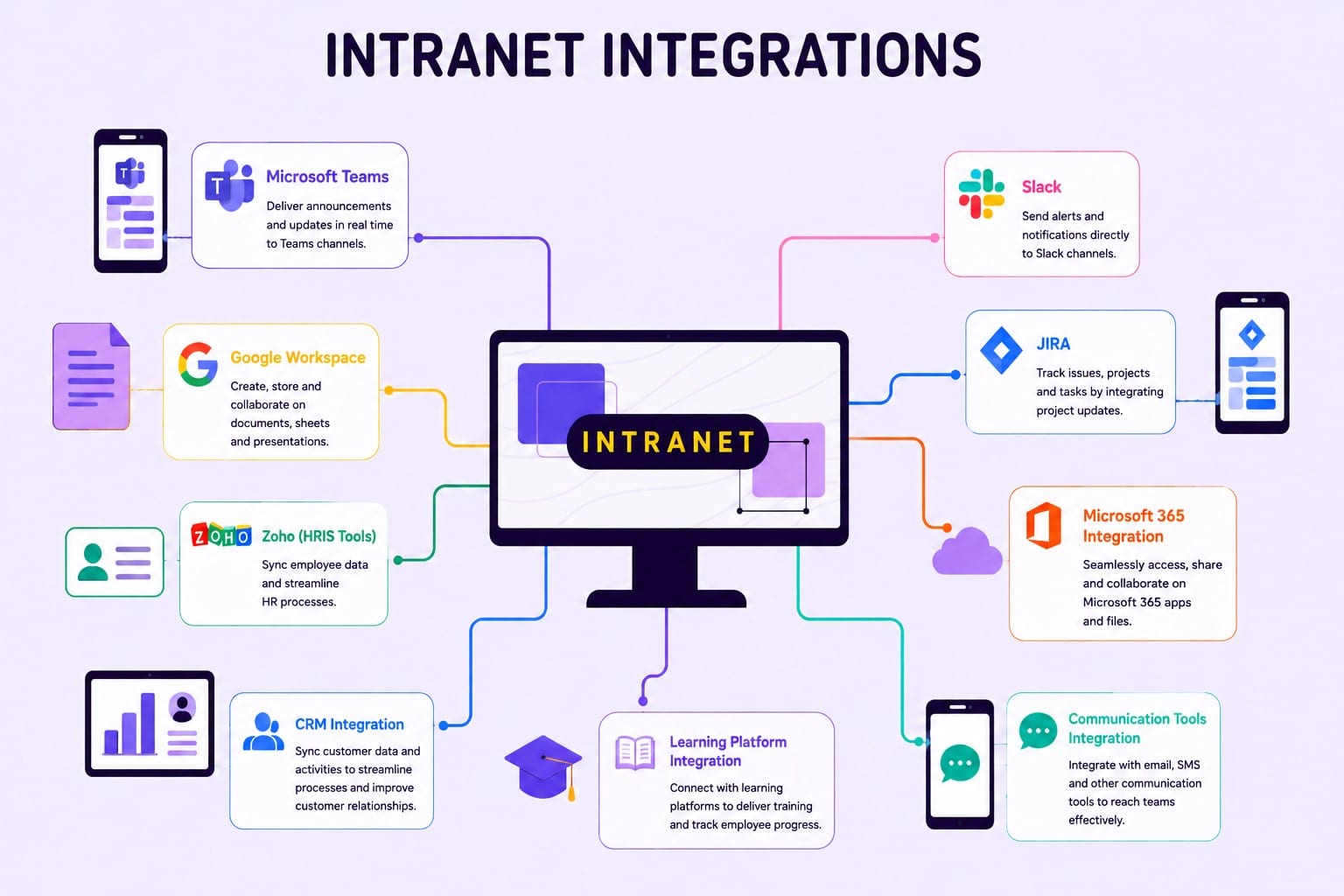
It seamlessly integrates with a wide range of business applications, including Microsoft Teams, Slack, Jira, Google Workspace, Zoho and other HRIS platforms, Microsoft 365, CRM systems, learning management platforms, and sales and finance tools such as invoice generators and expense management platforms, creating a unified and connected digital workplace. Get a deeper understanding by exploring our blog on various intranet integrations.
Key Intranet Trends to look for
The future of the digital workplace is being shaped by several emerging intranet trends that are helping organizations improve communication, employee experience, productivity, and operational efficiency. Here are some intranet trends that will shape the workplaces in future.
| Intranet Trend | Why It Matters |
| AI-Powered Intranet Experiences | Improves productivity through automation, personalization, and intelligent content delivery. |
| Hyper-Personalized Dashboards | Delivers relevant information and resources tailored to each employee’s role and needs. |
| Mobile-First Platforms | Ensures seamless access for hybrid, remote, and frontline employees. |
| Digital Workplace Integrations | Connects business tools and systems to create a unified employee experience. |
| Enterprise Search | Helps employees find information faster and improve knowledge sharing. |
| Employee Experience (EX) Focus | Enhances engagement, communication, and workplace satisfaction. |
| Low-Code Customization | Enables faster intranet updates and customization without heavy IT involvement. |
| Social & Collaborative Features | Strengthens workplace culture, collaboration, and employee connections. |
| Intranet Analytics | Provides actionable insights to improve adoption, engagement, and performance. |
| HR & Employee Service Integration | Streamlines HR processes and simplifies employee support. |
| Zero-Trust Security | Protects sensitive data while supporting modern work environments. |
| Employee Self-Service | Empowers employees to complete tasks independently and efficiently. |
| Knowledge Hubs & Microlearning | Supports continuous learning, training, and workforce development. |
| AI Chatbots & Virtual Assistants | Delivers instant support and improves access to information. |
| Experience-Led Design | Increases usability, adoption, and overall employee satisfaction. |
These trends are rapidly transforming modern intranet platforms from communication tools into comprehensive digital workplace ecosystems. Explore our blog on intranet trends to gain deeper understanding into each trend and understand help you shape better intranet strategy.
Benefits Of Intranet
An intranet creates a central place where employees can communicate, share information, and handle workflows more effectively. Below are some of the key benefits organizations gain after implementing an intranet.
| Intranet Benefit | Impact and Importance |
|---|---|
| Centralized Communication | Keeps all company updates in one place, improving communication consistency and reducing missed information. |
| Employee Collaboration | Helps teams work together more effectively, speeding up projects and improving alignment across departments. |
| Faster Information Access | Enables employees to quickly find documents, policies, and resources, saving time and boosting efficiency. |
| Document Management | Organizes files securely with version control, reducing errors and improving information governance. |
| Streamlined HR Processes | Simplifies onboarding, policy access, and employee requests, reducing administrative workload. |
| Employee Engagement | Encourages participation, recognition, and stronger workplace culture, leading to higher employee satisfaction. |
| Increased Productivity | Reduces time spent searching for information and improves workflow efficiency across teams. |
| Stronger Data Security | Protects sensitive business information through secure access controls and compliance-ready features. |
| Improved Onboarding | Gives new hires easy access to training and resources, helping them become productive faster. |
| Knowledge Sharing & Retention | Preserves organizational knowledge and makes expertise accessible to current and future employees. |
| Remote & Hybrid Work Support | Connects distributed teams through a centralized digital workplace, improving collaboration from anywhere. |
| Compliance Management | Keeps policies and regulatory documents organized, helping reduce compliance risks. |
| Reduced Operational Costs | Consolidates multiple tools into one platform, lowering software and administrative expenses. |
| Real-Time Analytics | Provides insights into employee engagement and communication effectiveness for better decision-making. |
| Scalable Business Growth | Supports organizational expansion by adapting to growing workforce and communication needs. |
Get a complete breakdown on how an intranet improves communication, collaboration, productivity, employee engagement, and operational efficiency across the organization, explore our article on intranet benefits.
What are the Top Intranet Platforms available?
Explore the below table which gives you a quick look at the top intranet solutions and how they stack up on the features that really matter.
| Platform | Best for | Key differentiator |
|---|---|---|
| HubEngage | SMBs to enterprise; frontline-heavy teams | Only fully gamified multi-channel platform; deploys in 2–5 weeks |
| Workvivo | Culture-focused mid-to-large enterprises (250+) | Social-first feed; live streaming; Zoom-native |
| Simpplr | Knowledge workers; mid-market | AI Auto-Governance Engine; fast deployment |
| Staffbase | Regulated large enterprises (1,000+) | Campaign-led comms; strong editorial workflows |
| Unily | Microsoft-centric enterprises (5,000+) | Deep SharePoint integration; highly customizable |
| Microsoft SharePoint | Enterprises standardized on Microsoft 365 | Document management; Teams/OneDrive native |
| Blink | Frontline industries: retail, hospitality, transport | Mobile-only; high adoption; no training required |
| Bloomfire | Knowledge management use cases | Powerful Q&A search; content repository |
Table 3: Intranet platform comparison by use case, and features
Want a deeper comparison of these solutions? Explore our blog on the best intranet platforms to learn more about each option, compare features in detail, and identify the right fit for your organization’s needs.
Top Intranet Challenges companies face
Let us explore common challenges using intranet that you cannot avoid at any chance.
1. Low Workforce Participation
Employees rarely use the intranet, reducing communication effectiveness and overall platform value.
2. Complicated Navigation and Unsatisfactory User Experience
Confusing menus and poor design make it difficult for employees to find information.
3. Stale and Unnecessary Content
Outdated or irrelevant content reduces trust and discourages employees from returning regularly.
4. Difficulty in Finding Information
Poor search functionality makes finding important documents and resources time-consuming.
5. Insufficient Mobile Access
Limited mobile support prevents employees from accessing information anytime and anywhere.
6. Weak Employee Engagement Levels
Employees interact less with content, reducing collaboration, feedback, and workplace connection.
7. Departmental Information Silos
Information remains isolated within departments, limiting knowledge sharing across the organization.
8. Inadequate Integration With Business Applications
Lack of integrations forces employees to switch between multiple disconnected workplace tools.
9. Limited Content Personalization for Employees
Employees receive generic content instead of information relevant to their roles.
10. Absence of Defined Governance and Ownership
Without clear ownership, content becomes outdated, inconsistent, and difficult to manage.
For a deeper understanding, you can explore our blog highlighting intranet challenges and how to overcomes them.
Intranet Best Practices
To maximize adoption and long-term value, you can follow proven intranet best practices mentioned below:
- Define clear business objectives and secure leadership support so the intranet becomes a trusted source for communication, engagement, knowledge sharing, and process improvement.
- Establish strong governance with content ownership, publishing standards, regular reviews, and department-specific knowledge hubs to keep information accurate and relevant.
- Deliver a personalized employee experience through role-based content, intuitive navigation, scalable information architecture, and AI-powered search capabilities.
- Improve productivity by enabling collaboration spaces, automating routine workflows, and integrating the intranet with core business systems such as HR, CRM, and project management tools.
- Drive long-term adoption through security, accessibility, employee training, two-way feedback channels, analytics-driven optimization, and a scalable platform that supports future growth.
If you would like to explore more intranet best practices, strategies, and expert insights, you can check out our Intranet Best Practices blog for additional guidance.
How to choose the right Intranet software for your organization?
A lot of intranet buying decisions are stalled when organizations evaluate platforms via product demos before they have a clear picture of the intranet requirements relevant to their workforce. The steps below will guide you towards selecting the right intranet platform vendor for your organization.
Start with your workforce type
Workforce composition is one of the most important filters to consider. It determines which capabilities are essential for your organization, and which ones you will end up paying for without using them. Try matching the platform to the majority of your workforce first, then work on verifying that it handles the rest.
- Desk-based and hybrid teams need strong content management, Microsoft 365 or Google Workspace integrations, and personalized news feeds by department or role.
- Frontline and deskless workers need native mobile apps, targeted push notifications, offline access, and branded app store deployment. Governance complexity is a secondary concern.
- Large distributed organizations need multi-site management, multilingual support, and analytics that surface communication gaps by location or business unit.
- Mixed workforces, which is the most common scenario, need a platform that handles both without forcing a compromise. This is where an employee portal layer becomes relevant, giving desk-based and frontline employees unified access to HR self-service and communications from one place.
| For IT decision-makers
HRIS integration depth is rarely covered in standard demos. Always confirm whether integrations are native and bidirectional, or reliant on third-party middleware. This difference matters for data governance and long-term maintenance overhead. |
Match platform scale to your organization’s complexity
Choosing a platform with more features than your organization needs creates overhead. However, if you buy one with less, you’re creating a ceiling you will hit within a year or two.
The size bands below are derived from published vendor positioning and pricing thresholds; treat them as a practical starting point for your consideration.
- Under 500 employees: Prioritize ease of deployment, low administrative overhead, and transparent per-user pricing. HubEngage, Simpplr, and Blink are the company intranet software options best suited to this scale.
- 500–5,000 employees: Multi-channel reach, HRIS integrations, and role-based targeting become important. HubEngage, Workvivo, Simpplr, and Staffbase all operate well across this range.
- 5,000+ employees: Multi-site management, advanced governance, compliance certifications, and dedicated vendor support matter most. Staffbase, Unily, and SharePoint are built for this scale.
Plan for rollout before you sign
Most intranet projects fail at adoption, and the best intranets are built around a clear rollout strategy from day one. The three practices below apply regardless of which platform you choose.
Pilot with a high-impact group first
Frontline teams or a department with a clear communication pain point are ideal starting points. Early feedback surfaces usability issues while they are still easy to fix, and early results give the broader rollout a proof point to build from.
Build a champions program
Peer-to-peer advocacy drives sustained adoption more consistently than top-down mandates. Identifying engaged employees in each department or location to lead by example shortens the time it takes for the platform to become routine rather than new.
Track the right metrics
Active users, content reach, read receipts, and push notification open rates give an early signal of whether adoption is building or stalling. These metrics also show you when you need to intervene before disengagement becomes entrenched.
HubEngage’s guided onboarding model is structured around this approach, with most organizations going live within two to five weeks. Built-in gamification supports adoption without requiring a separate change management program. For a detailed walkthrough of the rollout process, see our company intranet software guide.
Intranet Pricing and ROI
Explore the table below to understand how intranet pricing is structured, what factors influence costs, and how organizations measure ROI. Reviewing pricing alongside business outcomes will help you compare vendors more effectively and identify the best fit for your organization.
| Pricing Factor | Typical Cost Range | What Influences Cost | Expected ROI |
|---|---|---|---|
| Small Business Intranet (Under 500 Employees) | $1–$5 per user/month | User count, mobile access, basic integrations | Faster communication, reduced email dependency |
| Mid-Market Intranet (500–5,000 Employees) | $5–$12 per user/month | Multi-channel communication, HRIS integrations, analytics | Improved engagement, higher adoption, time savings |
| Enterprise Intranet (5,000+ Employees) | $20,000–$100,000+ per year | Governance, compliance, multilingual support, customizations | Lower operational costs, stronger workforce alignment |
| Implementation & Setup | Often included or $2,000–$25,000+ one-time | Data migration, branding, integrations, training | Faster rollout and reduced IT workload |
| Productivity & Communication Gains | N/A | Platform adoption and usage levels | Potential productivity improvements of 20–25% through better knowledge sharing and collaboration |
Organizations that select the right platform and drive strong adoption typically see ROI. Refer our intranet pricing guide to dive deeper.
Questions to ask every Intranet vendor
Vendor demos show the platform performing under controlled conditions, which means that they may not be the most relevant to your needs. These ten questions are designed to surface what most vendors will not raise themselves.
Our intranet providers guide walks you through how to compare intranet providers and build a shortlist that reflects your organization’s requirements.
| Question to ask | What you need |
| How quickly can we go live? | A specific timeline with named milestones and identified delay factors |
| Does the platform have native iOS and Android apps? | Native apps built for mobile-first use, with a UI designed for small screens |
| Can we reach employees without corporate email? | SMS, push notifications, and digital signage included in the base platform |
| How does content governance work? | Automated expiry dates and AI-flagged outdated pages with no manual checking required |
| What analytics does the platform provide beyond pageviews? | Communication reach, read receipts, push open rates, and zero-result search data |
| Does it integrate with our HRIS and existing tools? | Native integrations that sync automatically without custom maintenance |
| What security certifications does the platform hold? | ISO 27001 and SOC 2 Type II as a baseline; HIPAA or GDPR where your industry requires them |
| How is pricing structured, and what is excluded? | A full breakdown covering analytics, SSO, integrations, and support |
| What does ongoing support look like after go-live? | A named customer success contact with defined response expectations |
| Can you share adoption data from a comparable deployment? | A case study matching your industry and workforce type |
Table 6: Vendor evaluation questions for intranet platform selection
You can use the breakdown below to recognize potential red flags to watch out for in the vendors’ responses.
Potential red flags to watch out for in a vendor’s response
What a vendor says may matter less than how specifically they say it. Vague, generalized answers to the questions below are signs that a vendor’s platform may not perform as smoothly as their product demo suggests.
- Deployment timelines: A vendor who cannot give you a specific go-live timeline with named milestones likely has inconsistent past deployments regardless of the complexity of your needs.
- Comparable adoption data: Platform-wide averages can hide poor performance in scenarios that closely match yours. Ask specifically for a case study from your industry and workforce type.
- Data portability and exit terms: If a vendor cannot clearly explain how you get your content out if things do not work out, these terms may be buried in the contract. Confirm this detail before you sign.
- Pricing exclusions: If the proposal does not break out what is included versus what costs extra, request a fully loaded price before you compare. Analytics, SSO, and advanced integrations are commonly excluded from headline figures.
- Content governance: A vendor whose answer is “an admin reviews pages periodically” is describing a process that breaks down as your content grows. Ask how governance works when your intranet has hundreds of pages.
- Integration dependencies: If a vendor describes an integration as “supported” without specifying whether it is native or connector-based, ask directly. Connector-based integrations often introduce maintenance costs that will not appear in your initial quote.
Why organizations with Distributed Workforces choose HubEngage?
If most of your team works without a desk, a set schedule, or even a company email, HubEngage stands out. It brings together features no other platform on this list offers in one place. Most platforms require you to pick what matters most, and there’s usually a trade-off:
| Platform | What it does well | What it trades off |
| Staffbase | Strong editorial and compliance workflows | No gamification; weaker mobile reach |
| Workvivo | Social engagement and culture building | Limited multi-channel delivery outside the app |
| Blink | Frontline mobile reach | Cannot replace an intranet, recognition, or survey tool |
| SharePoint | Document governance at scale | Not built for frontline or deskless employees |
Table 5: A comparison of leading intranet platforms according to
HubEngage is the only platform that combines native multi-channel delivery across push, SMS, email, Teams, Slack, WhatsApp, and digital signage with platform-wide gamification applied to every module, not just recognition.
This combination matters because reach and adoption are two separate problems. A platform can deliver a message to every device and still see low engagement if employees have no reason to return. On the other hand, gamification solves the return problem without requiring a separate change management program.
What a HubEngage deployment replaces?
- A standalone internal email newsletter tool
- A recognition and rewards platform
- A pulse survey tool
- A digital signage management system
- A frontline mobile communications app
With HubEngage, your employees only need to download one branded app from the App Store or Google Play. They won’t need to switching between tools or separate logins for the listed tools.
However, HubEngage may not be the right fit for every organization. If document governance is your main priority and your team is primarily desk-based on Microsoft 365, SharePoint or Unily may serve you better.
See HubEngage in Action
If you have worked through this guide and HubEngage looks like a fit, the fastest way to validate that is a conversation about your needs, followed by a live demo against your workforce type, team size, and integration requirements.
Request a demo and we will walk you through a deployment scenario built around your organization.
FAQs On Intranet Software
Can a modern intranet replace SharePoint, or do they work alongside it?
They usually work alongside each other. Most of the best intranet platforms integrate with SharePoint, pulling its content into a more accessible employee-facing experience. If SharePoint is your current communications hub rather than a document backbone, a purpose-built intranet is worth evaluating as a direct replacement for that function.
What is the difference between an intranet and tools like Slack or Microsoft Teams?
Slack and Teams handle real-time conversation. An intranet is a persistent environment where employees access company resources, policies, and news on their own schedule. Most organizations run both; the intranet as the source of record, messaging tools for day-to-day communication.
How do I build an internal business case for switching intranet platforms?
Lead your case with a specific, measurable problem such as low email open rates, frontline communication gaps, or fragmented tool costs. Then, tie the proposed platform to a concrete outcome and support it with a vendor case study from a comparable organization.
Can employees access the intranet on personal devices?
Yes, on most modern cloud-based platforms. Native mobile apps allow employees to download the company app on a personal device. SSO, MFA, and role-based permissions keep content secure regardless of whether the device is corporate or personal.
What are the different ways to improve intranet adoption?
By delivering personalized content, promoting employee participation, using gamification, and measuring engagement regularly helps with increasing intranet adoption. Strong leadership support and ongoing communication also drive long-term usage and value. Explore our blog for proven tips to drive intranet adoption.
What happens to our content if we migrate from one intranet platform to another?
Structured content such as pages, documents, and knowledge bases usually migrates cleanly. Social content and engagement history is more variable. Before signing, confirm what data export options exist and if the new vendor supports migration directly as part of onboarding.
How do we keep intranet content accurate and current once the platform is live?
Automated content expiry helps, but governance needs an owner. Assign specific teams responsibility for their sections and review on a quarterly cadence. Zero-result search data is a practical signal of where content gaps are opening up before employees stop looking altogether.
How long does it realistically take to see results after launch?
Early adoption signals are visible within weeks. Meaningful shifts in communication effectiveness typically take three to six months. Platforms with built-in gamification as well as multi-channel delivery tend to reach sustained adoption faster than those relying on organic uptake alone.
Related Links
employee intranet software | Employee Intranet | Employee Portal Software | Company Intranet | Cloud Intranet | Intranet Apps | Internet vs Intranet | Intranet Search Engine | CMS Intranet | Benchmark intranet | Intranet examples