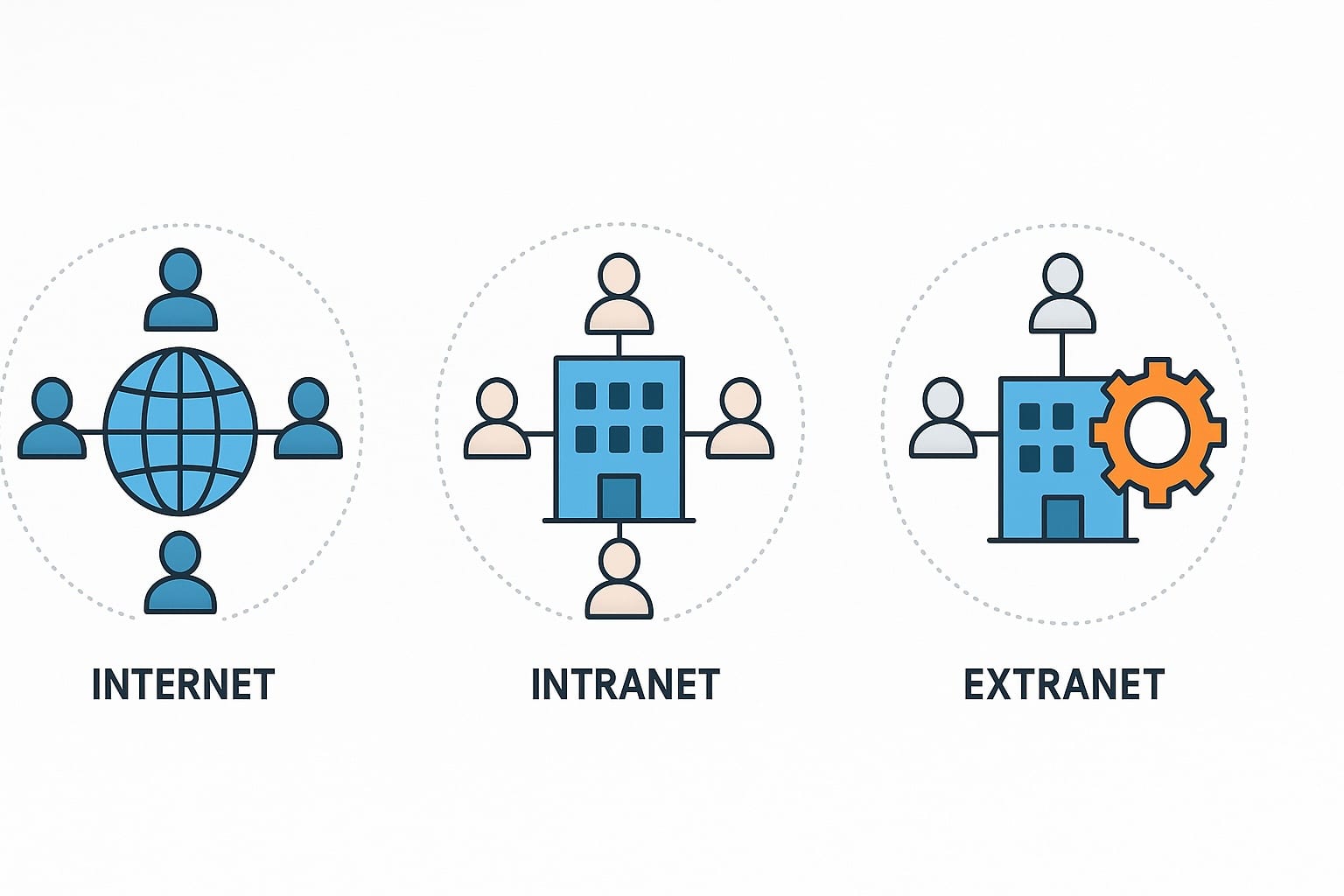
With so many networks powering your digital world, it’s understandable that you—and many organizations—might confuse intranet vs extranet vs internet. These terms sound similar, and people often use them interchangeably, but each plays a very different role in how your business communicates and operates. The internet connects your organization to the outside world, your intranet connects your employees internally, and your extranet connects you with trusted partners securely and efficiently.
For your business, understanding these differences is essential. It shapes how information flows across your teams, how secure your data remains, and how employees, partners, and even customers engage with your company. The setup you choose directly affects everything from internal communication to collaboration with vendors and stakeholders.
In this guide, we’ll walk through the differences between your intranet, your extranet, and your internet presence, highlight real-world examples, and show you how modern intranet software outpaces older, legacy networks.
What Is the Internet?
The internet is the largest public network on the planet, connecting billions of devices worldwide. For your organization, the internet is where your public-facing presence lives. It’s how customers, job seekers, partners, and anyone in the world discover your business. When someone visits your organization’s website, reads your blog, checks your support site, or interacts with your brand online, they’re doing it through the internet.
Examples of how your organization uses the internet:
- Your main company website, where people learn about who you are
- Product or service pages that help customers evaluate your offerings
- Your customer support site or help center where people search for answers
- Public resource libraries, blogs, and educational content you publish
- Marketing sites, landing pages, and social media profiles
- Public cloud applications your teams access externally (Google Drive, Slack, etc.)
Characteristics of the internet:
- Public access: Anyone with an internet connection can access your organization’s website or content.
- Vast scale: It supports billions of websites and applications globally.
- Security considerations: Because it’s open to everyone, you must use security layers like SSL certificates, firewalls, anti-virus protection, and encryption.
While the internet is essential for public communication and global visibility, it’s not designed for private, internal operations. That’s where your intranet and extranet come in, giving your employees and partners secure, structured environments your public site cannot provide.

What Is an Intranet?
An intranet is your organization’s private, internal network — a secure digital space where your employees go to stay informed, get work done, and access the tools they rely on each day. Instead of scattered files, emails, or disconnected apps, an intranet creates a central hub where your teams can collaborate, share knowledge, and find what they need without digging through multiple systems.
Common intranet use cases inside your organization:
- Company news, announcements, and policies your employees need to stay aligned
- Employee directories and org charts that help people find and connect with one another
- HR forms, training materials, onboarding resources, and compliance documents
- Secure project and team spaces — emphasizing why strong intranet security matters for protecting sensitive internal work
- Internal apps such as payroll, IT support portals, and your knowledge base
Modern intranets aren’t the static, outdated pages many organizations once used. Today’s intranets for companies give your teams mobile access, chat features, AI‑powered search, and seamless integrations with tools like Teams and Slack — making it easier for your people to stay connected wherever they work.
Characteristics of an intranet:
- Private: Accessible only to your employees or authorized internal users.
- Secure: Protected with authentication, permissions, and internal safeguards.
- Engagement‑focused: Designed to strengthen communication, culture, and collaboration.
👉 Explore intranet software to see how your organization can power better workplace communications across channels.
What Is an Extranet?
An extranet is like an intranet but with carefully controlled access for your external stakeholders such as partners, suppliers, or clients. It functions as a private network that lets you collaborate beyond your company walls while still maintaining the security you expect from an internal system.
Examples of extranet use cases:
- A manufacturer sharing real‑time inventory data with suppliers
- A university granting alumni access to specific protected resources
- A healthcare organization collaborating securely with insurance providers
- B2B portals that your distributors or resellers log into for updates and documents
Characteristics of an extranet:
- Restricted external access: Only approved outside users can log in.
- Collaboration bridge: Makes it easier to work with partners, clients, and vendors.
- Secure sharing: Permissions and authentication prevent unauthorized access.
While extranets give you a secure way to collaborate externally, they’re often more complex to manage than intranets because multiple stakeholder groups require different levels of access and permissions.
Intranet vs Internet vs Extranet: Key Differences
To make things crystal clear, here’s a side-by-side comparison of internet vs intranet vs extranet differences:
| FeatureInternetIntranetExtranet | |||
|---|---|---|---|
| Access | Public, open to anyone | Private, internal staff only | Restricted, staff + selected outsiders |
| Users | Global (billions) | Employees of one company | Employees + vendors, partners, clients |
| Security | Dependent on external protections | High, controlled by organization | High, but extended to third parties |
| Purpose | Global information sharing | Internal communication & collaboration | Secure external collaboration |
| Examples | Google, Facebook, Amazon | HR portals, company news hub | Supplier portals, B2B platforms |
Access and Security
When you compare internet vs intranet, access and security become the clearest differentiators. The internet allows open, public access—anyone can reach your organization’s website or publicly available information. Your intranet, however, is restricted to authorized employees and is protected through authentication systems, internal firewalls, and role‑based permissions. Your extranet extends this controlled access to your trusted third parties such as vendors, partners, or clients. While the internet relies heavily on user‑side protection, your intranet and extranet are secured at the organizational level, giving you significantly stronger control and protection over sensitive data.
Users and Purpose
The internet serves billions of global users and enables broad communication with the public. Your intranet, on the other hand, focuses on internal communication, collaboration, and supporting your employees’ day‑to‑day work. Your extranet sits between the two — designed specifically for secure communication and shared workflows between your company and your external stakeholders. When looking at intranet versus internet, purpose makes the distinction clear: the internet informs the world, while your intranet empowers your workforce.
Data Ownership and Control
Data on the internet is publicly distributed and often stored across decentralized servers managed by third‑party providers, meaning you have limited control over where it goes. Within your intranet, your organization fully owns and controls the flow of data, how it’s stored, who can access it, and what policies govern it. Your extranet provides partial control—you still manage the data, but you intentionally share select pieces with external stakeholders under carefully defined permissions. This makes intranets the preferred choice for managing sensitive internal content.
Connectivity and Infrastructure
The internet relies on global infrastructure—ISPs, routers, servers, and public networks. Your intranet typically operates within your company’s internal network or cloud environment, often supported by VPNs or secure hosting. Your extranet sits between the two: it uses the internet for connectivity but protects the environment through authentication layers and controlled access. Understanding these differences helps you determine the right network architecture for your business.
Content and Communication
On the internet, your content is public‑facing—such as your website, blog posts, social media, customer resources, and e‑commerce tools. On your intranet, content is private and includes HR resources, internal updates, project documentation, workflows, and collaboration spaces. Your extranet focuses on shared assets such as partner documents, supply chain resources, or customer‑specific portals. In short, your intranet content supports your employees, while your internet content supports the world.
👉 See how a company intranet fits into this picture for modern organizations.
Benefits of Using the Internet
The internet plays a critical role in how your organization shows up to the world. It’s the channel that makes your business discoverable — helping you communicate publicly, attract customers, and reach audiences at scale.
Here are the core benefits of using the internet for your organization:
- Public visibility and brand presence: Your company’s website lives on the internet, making it accessible to anyone searching for your products, services, or business information.
- Customer communication: The internet enables you to share updates, publish content, offer support, and engage prospects across multiple channels.
- Marketing and lead generation: Search engines, social media, and online ads help you drive awareness, nurture interest, and bring new customers into your pipeline.
- E‑commerce and online transactions: If you sell products or services online, the internet provides the platform for those transactions and customer interactions.
Benefits of Using an Intranet
An intranet strengthens internal communication, improves daily workflows, and gives your organization the secure, structured environment it needs to keep everyone aligned.
Here are the key benefits of using an intranet:
- Centralized information hub: Your policies, HR forms, SOPs, training materials, and announcements all live in one organized place. Employees no longer waste time searching across emails or shared drives.
- Private and secure access: Unlike the public internet, your intranet limits access to authorized employees, ensuring that sensitive company information stays protected.
- Improved internal communication: Your teams can use the intranet to share updates, cascade information, and stay aligned through structured communication channels.
- Boosted productivity and collaboration: Team spaces, project pages, file sharing, and integrated tools make it easier for your employees to work together, even across departments or locations.
- Stronger company culture: Modern intranets support recognition programs, employee social features, surveys, and engagement tools that help build a connected, informed workforce.
- Better control over content: Your organization owns and manages all data shared on the intranet—unlike the internet, where content is public and harder to govern.
Benefits of Using an Extranet
An extranet strengthens how you collaborate with partners, vendors, and clients by giving approved external stakeholders secure, permission‑based access to the information and tools they need. Instead of relying on email or unsecured file‑sharing, an extranet creates a structured, controlled environment that makes external collaboration smoother and more efficient.
Here are the key benefits of using an extranet:
- Stronger partner collaboration: You can share files, project updates, product specs, and supply chain data directly with partners in a secure, centralized environment.
- Streamlined workflows: Instead of relying on long email threads or general cloud‑sharing links, your extranet becomes a single space where communication and documents stay organized.
- Higher security than the public internet: Because access is restricted to authenticated external users, your partners interact with your content in a far safer environment than public web channels.
- Improved client experience: Customers or distributors can log in to view documents, request updates, or retrieve resources whenever they need—without contacting support for every small request.
- Better control than third‑party cloud tools: Your organization owns the data, permissions, and structure, instead of depending on public internet platforms or consumer‑grade tools.
While your intranet strengthens communication internally and the internet gives your organization global visibility, your extranet helps you collaborate efficiently and securely with stakeholders beyond your internal teams.
How Intranet Works Within an Organization
An intranet brings your entire workforce together by placing all tools, information, and communication channels in one secure, easy‑to‑access place. While the public internet gives anyone access to your organization’s external content, your intranet is designed to support the people inside your company—helping them stay connected, informed, and confident about where to find what they need.
Here’s how your intranet works within your organization and supports your employees:
- A single gateway for everything: Instead of navigating emails, shared drives, or multiple disconnected systems, your employees can log in once and access all company resources—HR forms, policies, training, project tools, and more.
- An always‑available communication hub: News feeds, updates, alerts, and announcements ensure your teams stay informed, no matter their role, shift, or location.
- Brings teams closer together: Collaboration spaces give employees a central place to share files, work on projects, ask questions, and stay aligned without relying on scattered tools.
- Integrated access to other systems: Payroll, scheduling, learning platforms, IT support tickets, and other internal tools are accessible directly through your intranet, reducing time wasted switching between systems.
- Built for every part of your workforce: Whether your employees work in the office, remotely, on the frontline, or across multiple locations, your intranet gives everyone a consistent, reliable source of truth.
In short, an intranet can connect your employees to each other and to the essential resources they rely on every day—creating a unified internal experience that the public internet simply cannot provide.
Examples of Internet and Intranet Usage
Internet Examples
When you think about how you show up to the world, the internet is where your public presence lives. This includes your organization’s website, online store, customer support pages, social media profiles, and digital marketing campaigns. These channels help you attract customers, share information widely, and communicate openly with anyone looking to learn more about your business.
Intranet Examples
Inside your organization, the intranet supports the everyday work your employees rely on—HR portals, internal news hubs, employee directories, training centers, project collaboration spaces, and document repositories. These private tools help your teams stay informed, aligned, and productive. You can also review some inspiring intranet examples to spark ideas for your own internal experience.
Extranet Examples
Your extranet becomes valuable when you need to collaborate securely with external stakeholders. Common examples include supplier portals, distributor dashboards, client reporting portals, or shared project workspaces where your partners can access documents or updates with controlled permissions.
Choosing Between Internet and Intranet or Extranet for Your Business
Which one should your company use: intranet vs extranet vs internet? The answer depends on your goals.
- Small businesses often rely heavily on the internet for cloud tools, but a basic intranet helps centralize documents and announcements.
- Mid-sized companies typically deploy intranets for internal collaboration and use extranets for vendor management.
- Large enterprises run all three: intranets for employees, extranets for partners, and of course, the public internet for marketing and e-commerce.
Industry use cases:
- Healthcare: Intranet for staff resources; extranet for insurance providers.
- Manufacturing: Intranet for workforce training; extranet for supply chain partners.
- Retail: Intranet for frontline communication; internet for e-commerce.
👉 Learn about how to find the right intranet solution provider.
How Modern Intranet Software Outpaces Traditional Networks
Traditional intranets and extranets were static, document-heavy portals. Today’s modern intranet software has transformed into an all-in-one digital workplace.
Key features include:
- Multi-channel communications: Push notifications, email, SMS, Teams, Slack.
- AI-powered search: Find policies, SOPs, or people instantly.
- Multilingual support: Serve global and diverse workforces.
- Employee engagement tools: Recognition, surveys, social feeds.
- Integration-friendly: Connect with HRIS, LMS, payroll, and productivity apps.
Modern intranet platforms are no longer just “internal websites.” They’re full-scale engagement platforms driving culture, collaboration, and productivity.
👉 Explore the employee intranet platform to see how businesses move beyond static intranets.
Future of Internet and Intranet / Extranet Technologies
The future of internet vs intranet technologies is accelerating as organizations shift toward more connected, intelligent, and secure digital ecosystems. While the internet continues to evolve as the foundation for global communication, intranets and extranets are becoming more integrated, personalized, and AI‑driven.
Here’s what the next generation of these networks will look like:
- AI‑powered personalization: Intranets will automatically surface relevant content, tasks, training, and updates based on role, behavior, and employee preferences.
- Unified digital workplaces: Instead of separate intranet, extranet, chat, and HR systems, companies will adopt integrated platforms that bring everything together in one seamless experience.
- More secure, identity‑driven access: Zero‑trust security models will redefine how employees and partners access internal or external portals, reducing dependency on VPNs.
- Expanded mobile access: Frontline and hybrid teams will rely more heavily on mobile intranet apps to stay connected from anywhere.
- Advanced automation: Routine tasks—like sharing updates, routing forms, answering FAQs, and sending reminders—will become fully automated.
- Richer external collaboration: Extranets will evolve into smarter partner ecosystems with shared dashboards, real‑time data, and frictionless communication.
The future blends the strengths of the internet, intranet, and extranet into a more intelligent, secure, and connected workplace experience—one that supports internal teams, external partners, and global audiences with equal efficiency.
Conclusion: Internet vs Intranet vs Extranet – Connecting the World Internally and Externally
The internet, intranet, and extranet each play a unique role in how you connect with the people who matter to your organization. Your internet presence helps you reach the outside world—customers, applicants, partners, and anyone who wants to learn more about your business. Your intranet brings your employees together internally, giving them a secure, unified place to stay informed and aligned. And your extranet helps you collaborate smoothly with trusted partners, vendors, and clients by extending controlled access to exactly what they need.
When you use all three intentionally, you create a more connected, efficient organization. Your internet builds awareness and trust externally, your intranet strengthens communication and productivity internally, and your extranet supports seamless collaboration beyond your company walls. Together, they form a complete digital ecosystem that keeps information flowing to the right people at the right time.
👉 Ready to see how a modern intranet can strengthen your internal and external connections? Book a demo of HubEngage today.
FAQs
What’s the difference between the Internet, Intranet, and Extranet?
The internet is public and open to all. An intranet is private and restricted to employees within a company. An extranet is a private network that extends to select external partners.
Why do companies need an intranet instead of just the internet?
An intranet provides secure, centralized communication for employees. Unlike the internet, it hosts internal policies, HR forms, training, and collaboration tools that the public should not access.
How does an extranet differ from an intranet?
While both are private, an intranet is for employees only. An extranet extends access to vendors, clients, or partners for secure collaboration beyond the organization.
Which is more secure: intranet, extranet, or internet?
The intranet is typically the most secure, since it’s limited to internal staff. An extranet is secure but adds complexity due to external access. The internet, being public, carries the highest risk without security measures like firewalls and encryption.
What is the main difference between internet and intranet?
The internet is a public, open network anyone can access, while an intranet is a private internal network used only by employees within an organization. The internet supports external communication and global visibility, whereas an intranet supports internal communication, collaboration, and secure access to company resources.
Can an intranet work without the internet?
Yes. An intranet can operate entirely within a closed internal network without internet access. However, most modern intranets use the internet for cloud hosting, remote access, integrations, and mobile connectivity. The core functionality doesn’t require the internet, but internet access often enhances it.
Is an intranet part of the internet?
Not exactly. An intranet may run on internet technologies (such as web browsers and cloud hosting), but it is not part of the public internet. It is a closed, private environment accessible only to authorized users inside an organization.
What are examples of intranet platforms?
Examples of modern intranet platforms include HubEngage, SharePoint, Simpplr, Staffbase, and Happeo. These platforms provide internal communication tools, document management, collaboration spaces, social features, and integrations with HR and productivity systems.
Who can access an intranet?
Only authorized users—typically employees—can access an intranet. Organizations may also grant access to contractors or temporary workers based on role permissions. Unlike the internet, an intranet requires login credentials and follows strict access control policies.
How secure is an intranet compared to the internet?
An intranet is significantly more secure because it operates as a private, internal network protected by authentication systems, role-based permissions, firewalls, encryption, and continuous monitoring. In contrast, the internet — specifically your organization’s public website — is accessible to anyone. While public websites are essential for visibility and communication, they also require additional security measures such as SSL certificates, web application firewalls, DDoS protection, and regular vulnerability testing to safeguard both the organization and its visitors.
What is the difference between extranet and intranet?
An intranet is used only by employees inside an organization, while an extranet extends controlled access to trusted external users such as partners, clients, or suppliers. Both are private networks, but an extranet is designed specifically for secure external collaboration.
Why do companies use intranets?
Companies use intranets to centralize communication, share important updates, store documents, streamline workflows, support employee self-service, and improve collaboration across teams. Intranets help employees stay informed, productive, and connected—especially in hybrid and multi-location workplaces.
Related Links:
Employee Intranet | Intranet Software | Employee Portal Software | Company Intranet | Cloud Intranet | Intranet Apps | Intranet Search Engine