Most internal communication teams are testing AI, yet many employees still miss updates that affect shifts, tasks, or customer service. The real challenge is not creating more content but to make sure that the right message reaches the right employee at the right time.
This is harder for frontline, deskless, hourly, remote, and distributed teams using email, apps, intranets, texts, or printed notices. That is why many companies look for internal communication trends for a distributed workforce and consolidating around platforms that connect communication, knowledge, workflows, and listening in one place.
AI internal communications can target updates, provide answers, track message reach, and identify support gaps. Our blog will help you improve communication, reduce tool sprawl, and support your distributed workforces.
Key Takeaways
- Internal communication must help employees act correctly, not simply confirm that content was published.
- Fragmented tools and channels create communication gaps that corporate publishing alone cannot solve.
- Frontline communication requires mobile access, role context, accurate timing, and simple follow-through.
- AI creates more value through targeting, routing, knowledge access, and feedback than drafting alone.
- Human oversight remains essential for sensitive, complex, and trust-related communication.
- A connected workforce platform reduces workarounds by bringing communication, support, and workflows together.
How fragmented communication impacts business operations?
Legacy programs were often built around reach. Fragmented communication slows work and creates inconsistent results. Broad updates often rely on local managers to explain details for each site, shift, or team.
Tool sprawl makes that worse. Morningstar research shows that 57% employees waste time in switching between different communication tools. When messages are spread across email, chat, intranet pages, texts, and paper notices, employees may miss deadlines, follow old processes, or ask repeated questions.

Many teams addressing this problem start by rethinking their internal communication strategy for distributed workforces and reducing the number of places employees must search. Fewer communication channels help teams act faster and more accurately every day.
AI Internal Communication: The new means of Modern Workforce Communication
AI internal communication helps frontline employees receive the right update at the right time and through the right channel. Whether it is a schedule change, safety guidance, or field support, faster access to information reduces missed tasks, delays, and rework.
In each case, communication is part of execution. If the message arrives late, lacks local relevance, or lives in the wrong tool, the operational cost shows up fast in missed tasks, inconsistent service, and avoidable rework. That is the new reality internal communications teams have to design for.
What AI changes, and what it doesn’t?
AI makes internal communication faster and more targeted by role, location, language, or shift. It can summarize updates, answer common questions, and track understanding. However, it cannot fix weak governance, unclear ownership, poor channels, or complicated employee access by itself. A team can save time with AI-generated drafts and still fail frontline employees if updates are sent through the wrong channel or require too many clicks to find. The better approach is to use AI as a system of action. That is where AI internal communications can solve operational problems instead of making more content.
AI Internal Communications Platform Features
A strong AI Internal Communications platform does more than create messages. It helps teams send the right information to the right employees, through the right channel, at the right time. Below are its common features:

AI Use Cases for a Connected Workforce
The easiest way to understand AI internal communications is by looking at how AI can be used in our daily lives. Below are some common use cases of its common use cases:

Operations and Shift Communication
AI can create targeted shift updates for supervisors, frontline workers, and support teams. It can also send reminders, request acknowledgments, and deliver messages through preferred channels.
HR Support
AI can answer common questions about benefits, policies, onboarding, and open enrollment. It can also route complex requests to HR, reducing repetitive work and improving response times.
Employee Engagement and Feedback
AI in employee engagement can analyze surveys, comments, and employee questions to identify common concerns. These insights help communication teams improve unclear messages and support specific workforce groups.
Sales Insights and Customer Communication
AI-powered insights can show sales teams what customers need, highlight common concerns, and suggest relevant follow-ups. This improves customer communication, supports faster decisions, and boosts sales efficiency.
Healthcare Knowledge Access
AI-powered chatbots and search tools help healthcare employees find current policies, training content, and approved procedures without searching across several systems..
How businesses can use AI Internal Communications Solutions?
Businesses should introduce AI Internal Communications solutions in clear stages. First, audit where messages fail, such as poor frontline reach, repeated publishing work, hard-to-find policies, or overloaded HR teams. Next, choose one or two focused use cases, including message drafting, HR FAQs, onboarding support, or policy search.
A useful checkpoint during evaluation is an internal communication software RFP template. It forces teams to clarify requirements around audience targeting, governance, integrations, analytics, and frontline access before vendor demos take over the process.

Set clear rules for content, data use, approvals, and employee privacy before rollout. Explain what is changing, who is affected, and what support is available. Start with a small pilot, then review searches, chatbot questions, manager feedback, and engagement patterns. Use these insights to improve the system and build lasting employee trust over time.
AI Internal Communication Tool ROI & Vendor Selection
The ROI case for AI internal communications gets stronger when you stop measuring vanity metrics. Opens and clicks matter, but they don’t tell you whether work got easier. Below table summarizes this for a quick check:
| KPI area | What to watch |
|---|---|
| Knowledge access | Time to find policies, repeat search terms, escalation volume |
| HR support | Repetitive inquiry volume, resolution speed, unresolved case routing |
| Onboarding | Completion of required content, manager follow-up gaps, early confusion themes |
| Frontline communication | Reach by channel, acknowledgment patterns, missed update hotspots |
| Engagement quality | Sentiment themes, participation by role, drop-offs after major announcements |
How to evaluate vendors?
A vendor should make life easier for both administrators and employees. Choose a platform that is simple for administrators and employees. Check mobile access for frontline teams, multi-channel publishing, approved AI knowledge, smooth HRIS, payroll, LMS, and workforce integrations.

Having analytics that show employee understanding, actions, and communication results over time gives a better advantage. Also using a unified employee platform ROI calculator can help you compare the cost of disconnected tools against a more integrated model.
Unify your Workforce with HubEngage
Our unified employee communication platform supports AI Internal Communications by bringing company updates, team messaging, social engagement, and employee support into one connected platform.
Organizations can send targeted announcements by role, location, or department and reach employees through multi-channels like mobile, web, email, SMS, digital signage, Microsoft Teams, and Slack.
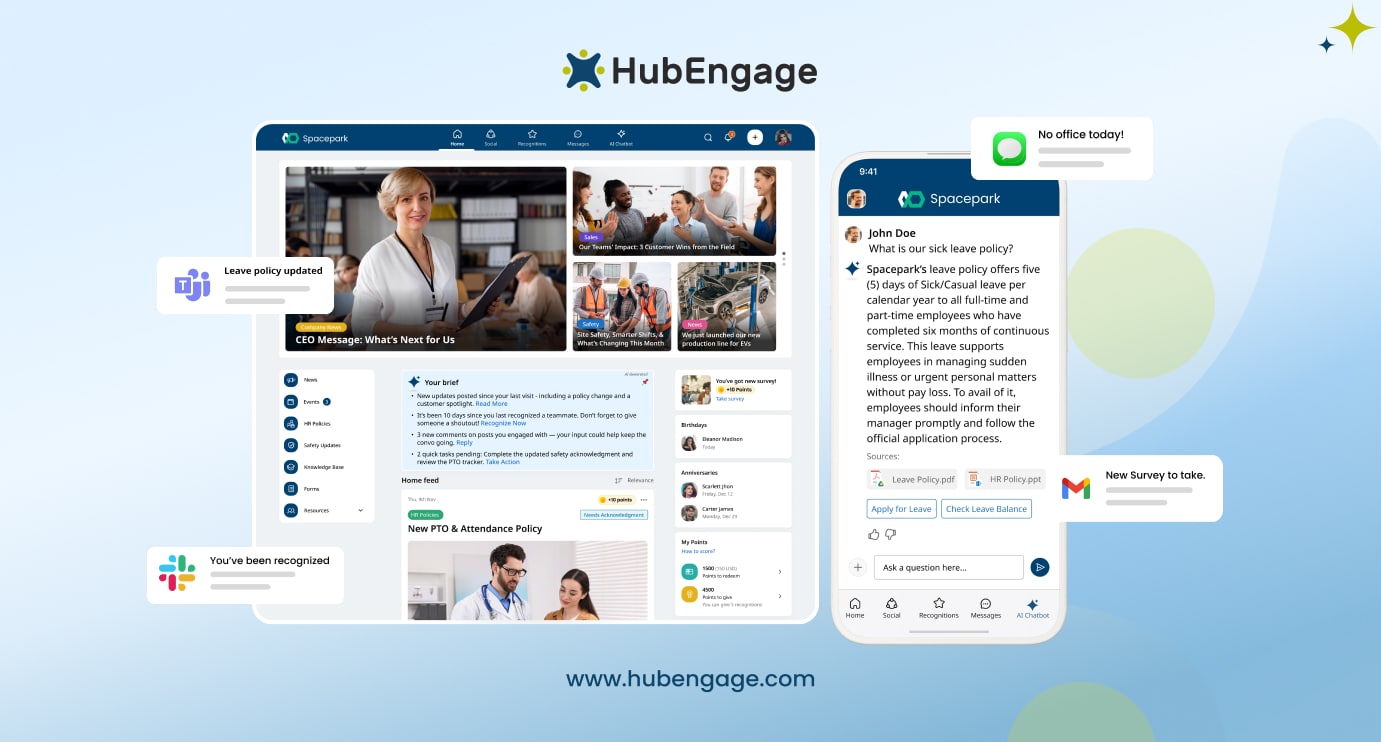
Built-in instant messaging, group chats, social feeds, likes, and comments improve everyday collaboration. HRIS, payroll, and SSO integrations keep employee data updated and simplify onboarding. An AI-powered chatbot helps employees find answers quickly.
HubEngage also supports recognition, surveys, and intranet features, with SOC 2, ISO 27001, GDPR, and HIPAA compliance for secure communication across modern workplaces.
The Future of AI in Internal Communications
As AI is evolving continuously, companies must balance speed with trust. AI can help teams create content, analyze feedback, and improve delivery, but it should not replace human judgment or empathy. Employees still expect messages to feel honest, clear, and connected to company culture.
Organizations need simple rules for AI-generated content, employee data use, and transparency. When used responsibly, AI can improve communication while keeping the human connection that builds trust between leaders and employees throughout the modern workplace.
Conclusion
AI internal communications creates the most value when it improves execution, not simply content production. With the help of AI solutions communication teams produce faster first versions.
However, the strongest results appear when organizations stop treating internal communications as a publishing function and begin managing it as an operating system for the workforce.
That shift helps close communication gaps between headquarters, local managers, and frontline employees. To see how HubEngage can support a connected communication model, request a demo to explore the HubEngage Workforce Experience Platform.
FAQs About AI Internal Communications
What is AI internal communications in practical terms?
AI internal communications uses artificial intelligence to create, personalize, deliver, search, and analyze employee messages. It helps organizations reach the right people faster, answer questions, reduce manual work, and improve communication across channels.
How does AI Internal Communications improve communication strategies?
AI internal communications improves strategy by showing which messages employees read, understand, and act on. It helps teams personalize content, choose better channels, analyze feedback, and improve timing based on real workforce behavior.
Is AI Internal Communications useful for Small Businesses?
AI internal communications is useful for businesses of every size. Small teams can automate repetitive work and employee questions, while larger organizations can manage complex audiences, locations, channels, languages, and workforce systems more effectively.
Is ethical to use AI Internal Communications?
AI internal communications can analyze employee sentiment responsibly when organizations explain how data is used, protect privacy, avoid hidden monitoring, and focus on broad workplace themes instead of tracking individual employees or sensitive personal information.
How much does AI Internal Communications cost?
The cost of AI internal communications depends on workforce size, integrations, channels, and platform features. Businesses should compare software costs with current spending on manual work, missed updates, repeated questions, and disconnected communication tools.
Will AI replace Internal Communications professionals?
AI internal communications will not replace communication professionals. It handles repetitive tasks, data analysis, and first drafts, while people provide judgment, empathy, cultural understanding, leadership guidance, and careful communication during sensitive workplace situations.
What are the risks of using AI Internal Communications?
The main risks of AI internal communications include inaccurate information, privacy concerns, bias, generic messages, weak governance, and over-automation. Human review, approved content sources, clear policies, and secure data controls help reduce these risks.
What features should an AI Internal Communications Platform include?
A strong AI internal communications platform should include audience targeting, multi-channel publishing, knowledge search, chatbots, translation, sentiment analysis, message acknowledgments, employee feedback, integrations, analytics, security controls, and mobile access for frontline workers.
How does AI Internal Communications help Frontline Employees?
AI internal communications improves frontline communication by delivering role-based and location-based updates through mobile apps, SMS, push notifications, chat, and digital signage. It also provides quick answers, translations, reminders, and acknowledgment tracking.
Related Links
internal communications software | employee communication platform | internal communication trends for a distributed workforce | ai in employee engagement | unified employee platform ROI calculator | internal communication software RFP template