Employee productivity usually gets framed as an effort problem. While companies with highly engaged workforces see an increase in profits it should change how leaders approach the issue.
If people are working inside fragmented systems, buried in scattered information, and switching between disconnected tools all day, asking them to “focus harder” won’t solve much.
The better path is to design a work environment where finding answers, completing tasks, and staying aligned take less effort. That’s where a unified employee experience approach matters. Our blog will cover the various ways you can improve employee productivity in your organization.
Key Takeaways:
- Employee productivity improves when organizations remove workplace friction, not just when employees work harder.
- Disconnected tools, scattered information, and communication silos are some of the biggest barriers to productivity.
- A unified employee experience platform helps employees find information, complete tasks, and stay aligned from one central hub.
- AI-powered search and chatbots reduce time spent looking for answers and support faster decision-making.
- Social collaboration tools help employees share knowledge, solve problems quickly, and spread best practices across teams.
- Continuous feedback through search analytics and pulse surveys helps organizations identify productivity blockers and improve employee productivity over time.
Why is Employee Productivity a system problem?
Low productivity rarely starts with laziness. It usually starts with friction. Employees lose momentum when they have to hunt for policies, ask three people where a form lives, re-enter information in multiple systems, or wait for answers that should have been available instantly.
That’s why the productivity conversation has to move beyond personal efficiency tips. Leaders who want to improve employee productivity need to look at the full work system: communication channels, search, knowledge access, workflow design, manager habits, and the quality of the employee digital experience.
A useful way to think about this is simple. Employees produce more when the system removes drag. They produce less when the system creates it. For many organizations, the problem isn’t that employees lack motivation. It’s that the digital workplace makes routine work harder than it should be.
For leaders trying to quantify the business case, a unified employee platform ROI calculator can help connect platform decisions to operational outcomes such as time saved, adoption, and reduced fragmentation. Productivity improves when employees spend less time navigating work and more time doing it.
The hidden productivity killers in an organization
Many organizations think they have a motivation problem when they have a navigation problem. Employees know what they need to do. They just can’t get to the right people, tools, or information fast enough.
One of the clearest examples is search behavior. Workplace research shows that employees who don’t need to search for the right colleague or information can save 20% of their workweek, as summarized in this employee productivity data roundup. That is a major drain, and it usually hides in plain sight.
Where productivity gets lost?
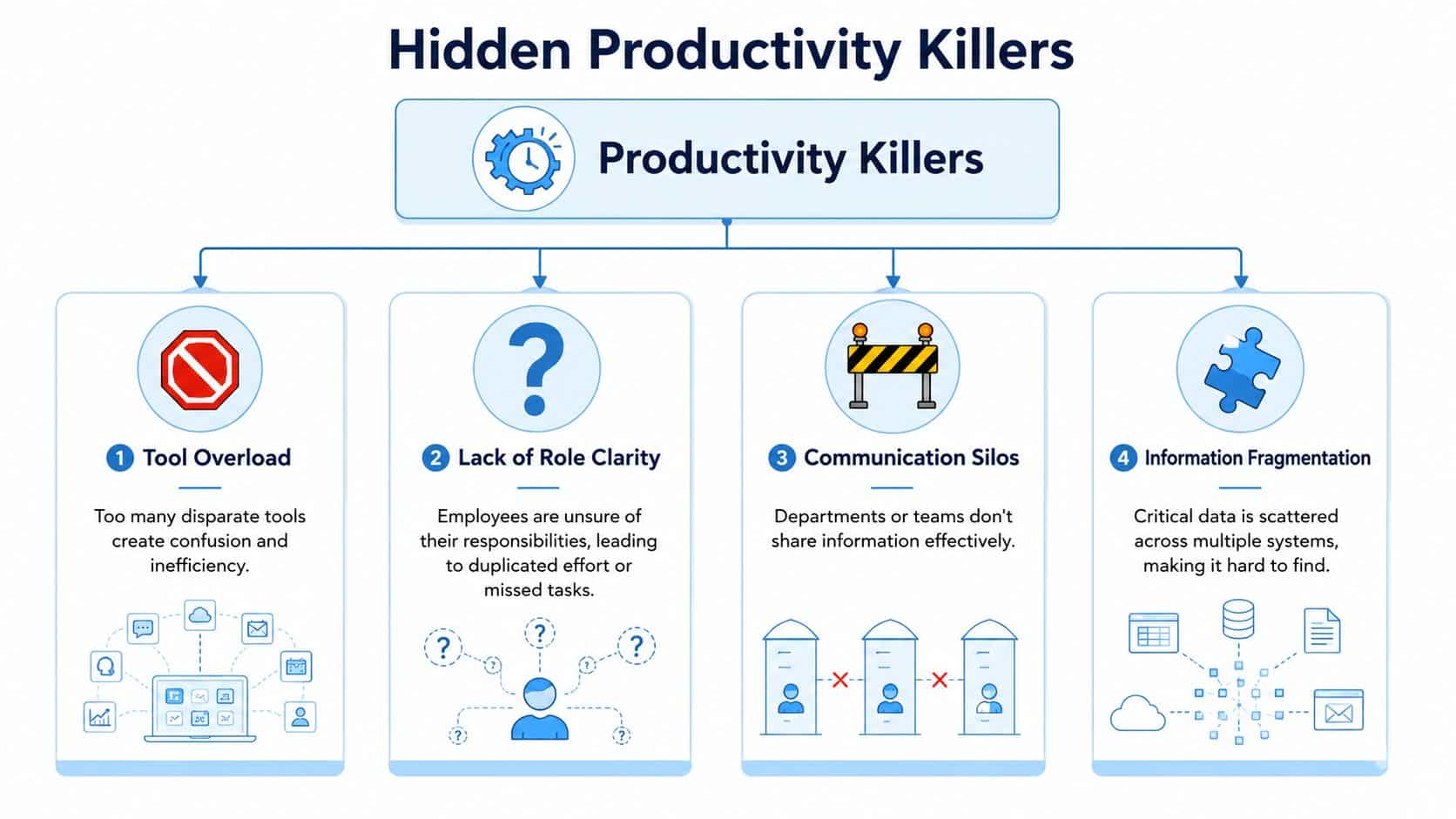
The most common blockers tend to cluster in a few areas:
- Tool overload: Employees jump between chat, email, file systems, HR tools, learning systems, scheduling apps, and team workspaces.
- Information fragmentation: Policies, procedures, forms, and updates live in different places with inconsistent naming and permissions.
- Communication silos: Teams publish updates in their own channels, which means people miss what matters outside their immediate group.
- Role confusion: When ownership is vague, work gets duplicated, delayed, or pushed into unnecessary meetings.
These issues reinforce one another. A missing policy creates a message thread. That thread creates interruptions. Interruptions create context switching. Context switching slows execution and increases rework.
What this looks like in practice?
Consider a frontline supervisor trying to answer a shift question. The schedule lives in one system, policy guidance in another, and the latest operational note was posted in a chat channel the supervisor doesn’t monitor regularly. Nothing is technically broken, but the employee experience is slow and inconsistent.
That’s why communication structure matters as much as communication volume. If you’re diagnosing friction, it helps to review common signs of lack of communication at work such as message inconsistency, unclear ownership, and delays in getting answers.
Most productivity loss doesn’t show up as one big failure. It shows up as a hundred small delays employees have learned to tolerate.
A lot of organizations respond by adding another app. That usually makes the problem worse. More tools can mean more notifications, more places to check, and more uncertainty about where the authoritative answer lives.
Unifying the Digital Workplace to Boost Productivity
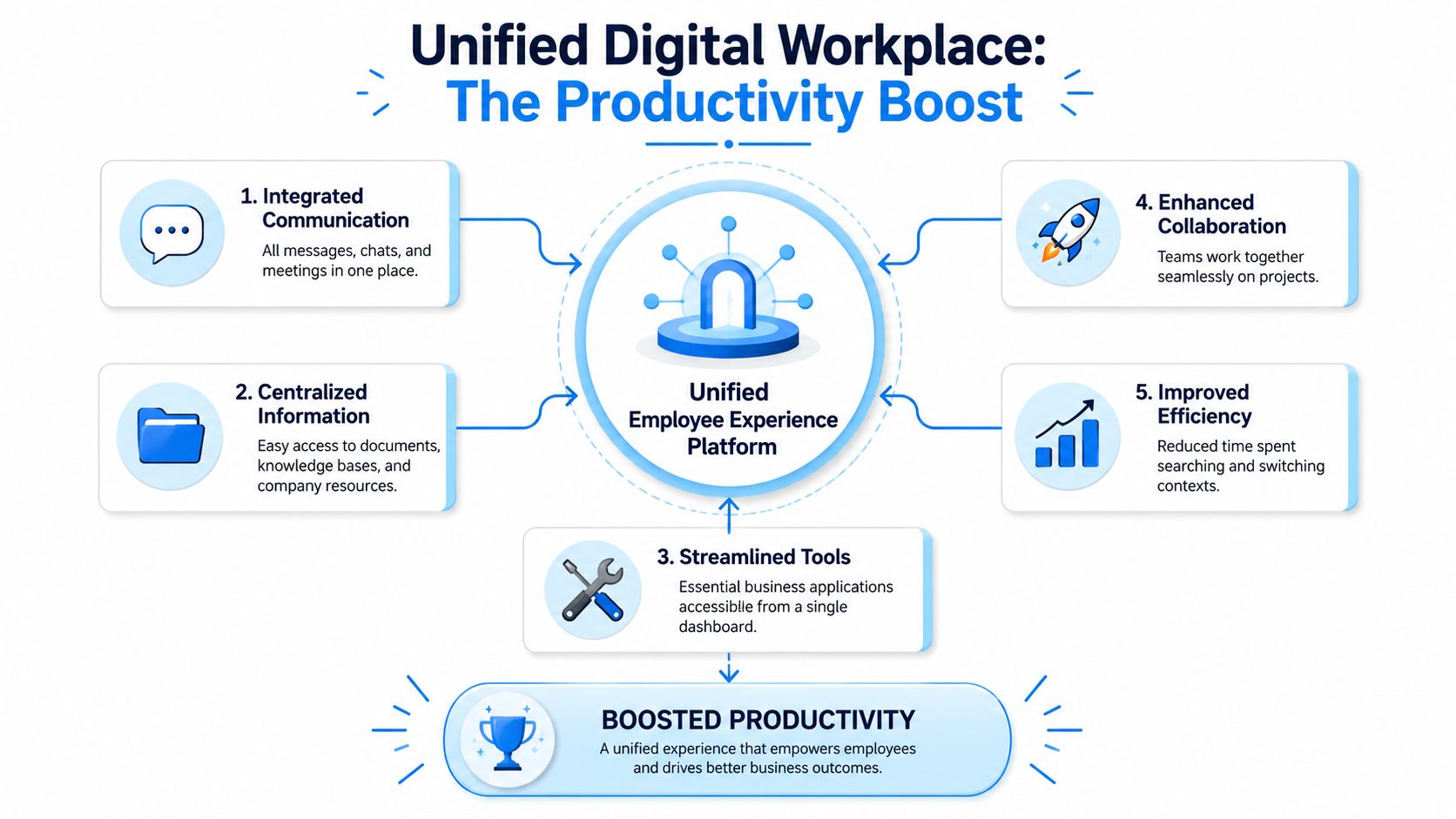
The most effective productivity move for many organizations isn’t a new time management framework. It’s unifying the digital workplace so employees can access what they need from one place.
Deloitte reports that workers satisfied with their experience at work are approximately 2 times more productive, and connects productivity improvement to reducing ancillary tasks and communication friction through AI and improved digital tools in its analysis of employee experience and productivity. That aligns with what practitioners see every day. When people can find answers quickly, complete routine steps without extra handoffs, and work from one digital front door, output improves.
What a unified platform actually means?
A unified employee experience platform isn’t just an intranet with news posts. It should operate as the daily work layer where employees can:
- Search across systems: One search experience should pull from policies, knowledge articles, documents, training, directories, and connected business systems.
- Access resources by role: A manager, nurse, technician, and office employee don’t need the same homepage or shortcuts.
- Receive targeted communications: Messages should be personalized by location, function, language, or audience segment.
- Complete routine tasks: Employees should be able to move from reading an update to taking action, whether that means acknowledging a notice, completing training, checking a schedule, or opening a form.
- Work across channels: Mobile, web, email, SMS, digital signage, Teams, and Slack should support the same communication strategy instead of acting as disconnected islands.
That structure helps reduce “work about work,” which is the admin, chasing, and coordination effort wrapped around the actual job.
The role of unified search and knowledge access
Unified search is one of the most impactful capabilities because it attacks wasted time directly. If employees can search one place and get policy answers, operational instructions, training resources, and team knowledge without guessing where content lives, they move faster and ask fewer repetitive questions. A practical setup usually includes:
| Need | Traditional state | Unified approach |
|---|---|---|
| Policy lookup | Ask HR or search multiple folders | Search once across trusted sources |
| Training access | Log into a separate learning tool | Launch from the employee hub |
| Team updates | Check email, chat, and local channels | See role-relevant updates in one feed |
| Operational tasks | Jump across point tools | Use one dashboard with connected workflows |
If you’re evaluating how communications and learning should work together, this piece on how internal platforms can simplify training and engagement is a useful companion read.
For organizations with distributed workforces, a multi-channel communication platform is often the difference between a good strategy on paper and a usable one in practice. Productivity drops fast when the message reaches headquarters but not the field.
Leveraging AI and Social Tools for Smarter Work
AI becomes useful at work when it removes waiting. Not when it produces novelty for its own sake.
An employee who needs to know the holiday policy, a safety procedure, where to submit an expense, or how to swap a shift shouldn’t have to wait for HR, a manager, or a coworker to become available. An AI chatbot inside the employee portal can answer routine questions immediately, point to the right resource, and guide the employee to the next step.

Where AI actually helps?
The strongest use cases are narrow, frequent, and operational. Examples include:
- Policy questions: “What’s the bereavement leave policy?”
- Resource discovery: “Where do I find forklift recertification training?”
- Operations support: “What’s the process for reporting a safety incident?”
- Schedule and task guidance: “When is my next shift?” or “What tasks are due today?”
Every one of those questions has a hidden labor cost when answered manually. AI reduces queue time for employees and frees HR, IT, and managers to handle exceptions instead of repeating the same answers all day.
It also gets better over time if the organization pays attention. Search queries and chatbot questions reveal what employees can’t find, where content is weak, and which topics need cleaner ownership.
For leaders exploring broader operating models, these best AI productivity systems offer useful thinking on how AI fits into day-to-day execution rather than sitting off to the side as a novelty layer.
Social tools matter too
Internal social platforms are often underestimated. Used well, they don’t create noise. They create distributed knowledge sharing.
A field team can post a workaround that saves time on a recurring process. A store manager can share a staffing tip that helps another location. A new employee can ask a question in a community and get an answer from someone who’s already solved the same problem.
That’s especially valuable in organizations where important know-how lives with experienced employees rather than in formal documentation. Social channels help surface best practices before they disappear into private chats or manager memory.
A practical AI strategy in HR and internal operations works best when it’s embedded in the employee experience, not bolted on later. This overview of AI in human resources outlines the operational side well.
Creating a Feedback Loop for Continuous Improvement
Most productivity programs fail for a simple reason. They launch as projects and then freeze. Work doesn’t stay still, so the measurement system can’t stay static either.
Happy Signals recommends moving beyond retrospective snapshots to a “real-time feedback stream” with statistical validity so teams can identify which IT or workflow changes are affecting productivity, and advises continuous refinement through an Experience Management Office in its guide to employee productivity. That’s the right mindset. Productivity improvement should operate as a closed loop: measure friction, make a change, re-measure, and keep iterating.

The two signals leaders should watch closely
The most useful signals are often the simplest.
Search and chatbot data
If employees repeatedly search for the same terms and fail to get good answers, that’s not a user problem. It’s a content and design problem. Review:
- Top unanswered searches
- Repeated policy questions
- Queries that lead to abandonment
- Topics that trigger human escalation
That data tells you what information is missing, buried, outdated, or hard to trust.
Pulse surveys
Periodic surveys give you the context that search logs can’t. They help identify whether the issue is content access, manager support, missing tools, training gaps, or process friction.
Ask direct questions employees can answer quickly, such as whether they can find what they need, whether systems support their daily work, and what slows them down most often.
What disciplined teams do differently?
Teams that improve employee productivity consistently tend to follow the same operating habits:
- Set a baseline: Identify current friction points in search, communication, and workflow.
- Prioritize one workflow at a time: Don’t try to redesign every process at once.
- Instrument the experience: Track queries, usage patterns, acknowledgments, and survey feedback.
- Close the loop visibly: When employees flag a blocker, fix it and communicate the change.
How HubEngage Powers a More Productive Workforce?
A unified platform is most useful when it reaches the whole workforce, not just office staff. That’s where many productivity strategies break down. A key challenge is reaching frontline and deskless workers, and effective programs require mobile-friendly surveys, personalized information by role or location, and channel-specific delivery rather than one-size-fits-all communication, as summarized in this workplace guidance for increasing employee productivity.
What this looks like in platform terms?
HubEngage brings communications, engagement, operations, and learning into one environment, which helps reduce the fragmentation that slows employees down.
Instead of sending workers across separate apps for announcements, surveys, social interaction, schedules, tasks, and knowledge resources, the platform centralizes those experiences in one digital hub. That matters in several practical ways:
- Unified access: Employees can go to one place for company updates, policies, tasks, schedules, and learning content.
- AI-powered assistance: Unified search and chatbot capabilities help employees get quick answers to common questions on policies, resources, operations, training, and scheduling.
- Search intelligence: Leaders can monitor what employees are searching for, see which questions are answered well, and identify where content gaps remain.
- Social knowledge sharing: Social feeds and communities let employees share best practices, ask peers for help, and spread local innovations across the organization.
- Continuous listening: Built-in surveys and pulse checks make it easier to spot missing resources, confusing processes, weak manager support, or communication breakdowns.
Why channel strategy matters?
For deskless and distributed teams, one portal on its own isn’t enough. Delivery has to match how people work. That’s why mobile, email, SMS, digital signage, Teams, and Slack support matter. The system needs to meet employees where they are while keeping the experience connected.
A centralized employee communications hub is useful here because it supports targeted delivery by audience, role, and location instead of pushing the same message to everyone in the same format.
If you want to see how this kind of unified experience works in practice, get a demo and see the platform in action at HubEngage.
Conclusion
Improving employee productivity isn’t about pushing people to work harder. It’s about removing the friction that slows them down every day.
By unifying communication, knowledge, workflows, and support tools into a connected employee experience, organizations can help employees spend less time searching and switching and more time delivering meaningful work. Productivity grows when the workplace is designed to make success easier.
To see how this works in practice, explore the HubEngage Employee Experience Platform by scheduling a personalized demo today.
Improve Employee Productivity FAQs
How do you measure productivity for knowledge workers?
Don’t reduce knowledge work to activity counts. Measure a mix of output, completion, cycle time, quality, and collaboration health. Good indicators include task completion, time-to-completion, work quality, and whether employees can access the information and tools they need without delay. The right metric set depends on the role and business outcome.
What’s the best first step to improve employee productivity?
Start with a friction audit. Review where employees lose time searching, switching tools, waiting for approvals, or chasing answers. Search logs, help requests, and short pulse surveys usually reveal the biggest blockers quickly. Solve one high-friction workflow first and build from there.
Can small and mid-sized organizations use this approach?
Yes. In fact, smaller organizations often move faster because they have fewer legacy systems and fewer governance layers. The goal isn’t to build a massive architecture. It’s to create one reliable employee hub for communication, knowledge, routine tasks, and feedback.
How do you increase adoption of a new employee platform?
Adoption rises when the platform becomes useful on day one. Put essential content there first, such as schedules, policies, forms, announcements, and training. Make search work well. Give managers a role in reinforcing usage. Then watch what employees search for and improve gaps quickly.
Do surveys really help improve productivity?
Yes, if leaders use them to fix real blockers. Surveys shouldn’t just ask about morale. They should ask whether employees can find answers, whether tools support the job, and where friction shows up most often. The value comes from acting on the feedback and showing employees what changed.