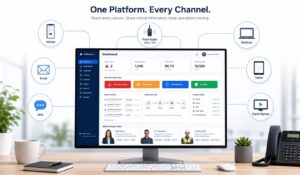
A market that’s projected to grow from USD 7.26 billion in 2026 to USD 16.76 billion by 2033, at a 12.7% CAGR, tells you something important. Multi-channel communication is no longer a side tool for announcements. It’s becoming core infrastructure for how organizations keep employees informed, aligned, and able to act across dispersed teams and shifting work environments, according to multi-channel communication services market projections.
For HR, internal comms, and operations leaders, the issue usually isn’t whether more communication is needed. It’s that communication already exists everywhere. Email for policy updates. SMS for urgent alerts. Teams or Slack for daily coordination. An intranet for documents. A mobile app for frontline workers. Digital signage in facilities. The stack keeps growing, and employees experience it as fragmentation.
A multi-channel communication platform helps unify that sprawl. Instead of treating each channel as a separate publishing job, it gives teams one place to plan, target, distribute, and measure communication. That matters when you need to reach corporate staff at desks, supervisors on the floor, and field employees who may never log into email.
Key Takeaways
-
Organizations are funding coordination across channels because fragmented communication creates operational drag.
-
HR and Ops teams feel the problem first through missed deadlines, inconsistent updates, and extra manual follow-up.
-
Unified communication uses orchestration to match the message to the right channel and audience.
-
The employee experience improves when communication feels consistent, timely, and easy to find.
-
The business return shows up in faster distribution, fewer repeat questions, and clearer measurement.

The Rise of Unified Workforce Communication
Spending trends point in one direction. Organizations are investing in systems that coordinate communication across channels because scattered tools create real operating costs for HR, internal comms, and operations teams.
The problem usually starts innocently. One team adds email for policy updates. Another adds SMS for urgent notices. IT introduces Teams or Slack. Facilities adds digital signage. Each tool solves a local problem. Over time, the stack starts to work like a building with too many entrances and no front desk. Messages still arrive, but employees are left guessing where to look, which version is current, and what requires action.
That confusion shows up differently across functions.
HR often feels it during onboarding, benefits enrollment, and policy acknowledgments. A desk-based employee may catch the email and read the intranet post. A field technician may only see a text message after a shift. A new hire may receive three partial versions of the same update in different systems. The result is more follow-up, more manual reminders, and more time spent proving that communication happened.
Operations teams run into a speed problem. A schedule change, weather alert, plant closure, or safety notice only works if the right people receive it fast and in a format they use. Sending the same update through separate tools can slow distribution and create mismatched wording across channels. In operational settings, that is more than an annoyance. It can affect staffing, compliance, and response time.
A simple rule helps here.
If employees have to guess where an update will appear, your communication process is adding friction instead of reducing it.
Unified workforce communication fixes that by adding coordination, not by forcing every message into one place. The orchestration layer works like an air traffic control tower. Email, SMS, push, chat, and signage are still separate routes, but one control point determines which route fits the audience, urgency, and context. That is how organizations move from publishing messages to managing reach.
This matters for ROI. HR teams reduce repeat questions and missed deadlines. Operations teams cut delay during urgent communications. Internal comms teams spend less time rewriting the same message for disconnected tools and more time measuring whether employees received, opened, and acted on the update.
HubEngage’s overview of a unified communications platform explains how organizations bring these systems together. The same discipline also mirrors publishing workflows, where one source message is adapted for several formats, much like the process described in this B2B content repurposing guide.
What is a Multi-Channel Communication Platform?
A multi-channel communication platform is a system that lets an organization send and manage communication across several channels from one central environment. Those channels might include email, SMS, mobile push, intranet posts, chat tools, or digital signage. The platform gives communicators one control point instead of forcing them to recreate the same update in separate tools.
A simple way to think about it is a digital post office. Without a platform, every department has its own mailbox, its own sorting method, and its own delivery habits. HR sends one version by email. Operations sends a shorter version by text. A manager posts a third version in Teams. Employees receive fragments, not one coherent message.
With a platform, the organization writes the message once, adapts it for each destination, and tracks what happened after delivery. That’s what people usually mean by orchestration. One source, many routes, controlled centrally.
What it looks like in practice?
Say HR needs to remind employees about open enrollment. The long-form explanation belongs in the intranet or employee app. A shorter summary goes out by email. A deadline reminder becomes a push notification. For employees without regular email access, SMS may be the fallback. The platform coordinates those touchpoints so the campaign feels connected instead of improvised.
This is also why content teams often borrow methods from publishing teams. If you want a useful primer on adapting one message for several formats, this B2B content repurposing guide offers a practical way to think about reusing the same core message without copying and pasting blindly.
Multichannel versus omnichannel
People often use these terms interchangeably, but they don’t mean the same thing. The architectural difference is straightforward. In multichannel setups, channels run in parallel. In omnichannel systems, those channels are connected in a single interface that preserves continuity, as explained in Twilio’s definition of multichannel and omnichannel communication.
| Aspect | Multichannel | Omnichannel |
|---|---|---|
| Channel structure | Separate parallel channels | Connected channels in one interface |
| Employee experience | May vary by channel | More continuous across channels |
| Context | Often stays inside each tool | Shared across interactions |
| Reporting | Usually split by channel | More unified performance view |
| Operational effort | More manual coordination | Lower integration overhead when designed well |
For internal comms leaders, this distinction matters because adding channels alone doesn’t solve fragmentation. If email, SMS, and mobile exist as silos, the organization still has a coordination problem. If they’re connected, teams can manage communications more consistently and track performance with less guesswork.
A useful example is real-time employee communication. Fast communication only helps when the right audience receives the right message through the right route, with enough context to act.
Core Capabilities an Employee Communication Platform Must Have
Buying a platform based on channel count alone is a mistake. The key question is whether the system helps your team reduce complexity while improving reach and control.
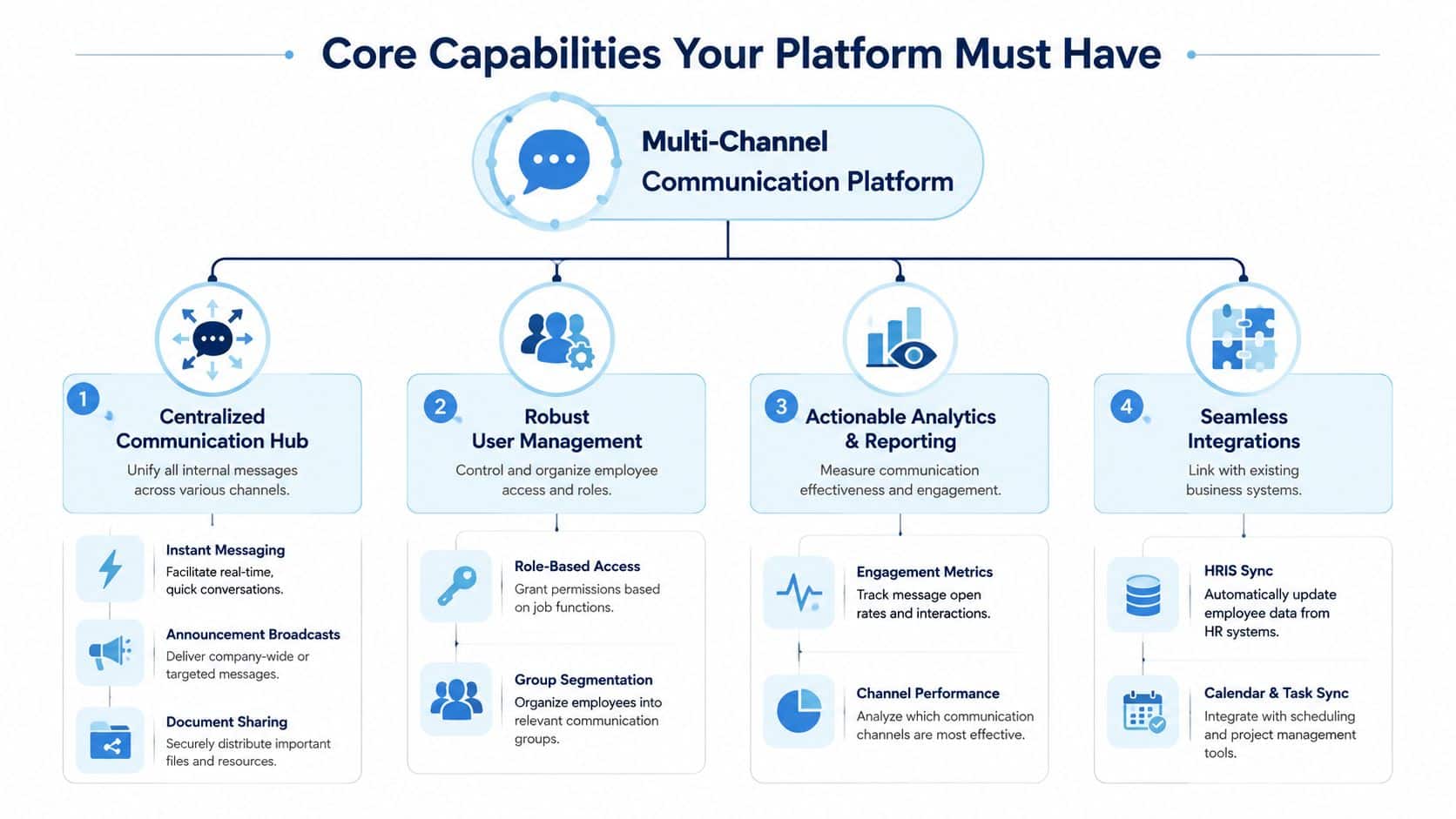
Centralized communication hub
This is the command center. Teams need one place to draft announcements, publish updates, schedule campaigns, and manage channel distribution. If communicators still have to jump between email software, texting tools, chat apps, and signage dashboards, the platform isn’t really centralizing anything.
For HR, this hub becomes the place to run onboarding communications, policy updates, and benefits reminders. For operations, it becomes the control point for urgent notices, shift communications, and manager updates.
A practical test is simple. If one message has to reach office staff by email, store associates by push notification, and plant workers by signage, can your team do that from one workflow?
Audience targeting and user management
Not every employee needs every message. Good platforms make it easy to segment by role, department, location, shift, language, or employment status.
Over-broadcasting creates noise. A regional weather advisory should go to employees in that region. A manager toolkit should go to people managers. A warehouse safety reminder should reach warehouse staff, not the finance team. Look for these controls:
- Role-based access: Admins, editors, and local managers should have clear publishing permissions.
- Dynamic groups: Audiences should update automatically as people join, move teams, or change locations.
- Targeting rules: Communicators should be able to match message type to audience without manual list building each time.
Orchestration and formatting logic
Orchestration is the layer that turns one message into a coordinated campaign. Picture an air traffic controller. The content may be the same flight plan, but each route has different timing, format, and constraints.
An email can support detail. A push notification needs brevity. SMS must be immediate and direct. Digital signage needs visual clarity and short copy. A capable platform helps the team adapt the message to each channel without rebuilding it from scratch.
Operational check: If your team rewrites the same update five times for five tools, orchestration is missing.
That’s one reason teams look for an employee communications hub rather than another standalone broadcasting tool.
Feedback, analytics, and integrations
Communication can’t stay one-way. HR teams may need pulse surveys after a policy change. Ops teams may need acknowledgment tracking after a safety alert. Leaders need reporting that shows what was delivered, what was opened, and where engagement was stronger or weaker.
The feature set should include:
- Two-way engagement: Surveys, polls, comments, reactions, or acknowledgments.
- Channel analytics: Visibility into how different channels perform for different audiences.
- HRIS integration: Employee data should sync so targeting stays current.
- Workplace integrations: Connections to tools like Microsoft Teams or Slack reduce friction for employees.
The technical base matters too. A well-built multi-channel communication platform often sits on a software-based telephony and internet calling foundation that supports voice, video, messaging, and contact access across computers and mobile devices while keeping the experience consistent, as described in Acrobits’ overview of cross-platform softphones and unified communications.
Key Benefits and ROI for Your Organization
Leaders usually ask the same question after the feature tour. What changes operationally if we unify communications?
The short answer is reach, clarity, and control. The longer answer depends on how fragmented the current stack is and how often critical communication gets missed, duplicated, or delayed.

Better reach for important information
A widely cited benchmark in multichannel research found that campaigns using three or more channels can produce a 287% higher purchase rate than single-channel campaigns, and the same research describes omnichannel approaches as generating an ROI that is almost 5 times greater than single-channel efforts. It also highlights accurate measurement of performance (61%), integrated or unified marketing technology (43%), marketing automation (33%), and unified data (27%) as critical ingredients for success, according to Infobip’s summary of multichannel communication research. The lesson for internal comms is structural. Coordinated delivery across channels increases the chance that employees will see, understand, and act on a message.
That doesn’t mean HR should copy a consumer marketing playbook. It means the underlying mechanics still apply. If a benefits reminder appears only in email, many employees will miss it. If it also appears in the employee app and as a timed reminder through another channel, reach becomes more reliable.
Lower waste from tool fragmentation
Every disconnected tool adds work. Teams duplicate content, rebuild audience lists, and compare reports that don’t line up. Managers then compensate with local workarounds such as forwarding screenshots, posting copied text in chat, or printing notices for break rooms.
A unified platform reduces that manual effort. It gives communicators one publishing process and one reporting layer. That doesn’t just save time. It improves governance because employees receive more consistent information.
For content-heavy teams, this also connects to message reuse. Founders and comms teams alike often wrestle with turning one idea into multiple useful assets. This guide on how to repurpose content for founders is relevant because the same principle helps internal teams adapt one update into app posts, email summaries, reminders, and manager talking points without losing the core message.
Stronger measurement and adjustment
The best ROI often comes after launch, not at launch. Once a platform shows which audiences respond to which channels, teams can refine their communication mix instead of relying on habit.
That’s especially useful for internal comms teams trying to prove value. If leaders want a framework for connecting communication activity to business outcomes, this piece on measuring the ROI of employee engagement and communications helps translate message performance into something more actionable.
If you can’t see which channel helped an employee take action, you can’t improve the system. You can only send more messages.
How Enterprises Use Multi-Channel Communication
The easiest way to understand a multi-channel communication platform is to watch how different teams use it on an ordinary week.

HR and internal comms examples
An HR team launches annual benefits enrollment. The main explainer lives in the employee app or intranet, where people can review plans and deadlines. Email carries the longer summary for desk-based staff. Mobile push reminds people about key cutoffs. Managers receive a short briefing so they can answer team questions consistently.
The same pattern works for onboarding. New hires don’t need a flood of disconnected messages. They need a sequence. Day one logistics may arrive as email. A mobile notification reminds them to complete required steps. The intranet or app holds welcome content, policies, and contacts. A survey later checks whether they understood what to do next.
The point isn’t volume. It’s sequencing. One journey, several touchpoints.
Operations and frontline examples
A plant manager needs to send a safety alert after a process change. The message goes out immediately by SMS to employees on shift. Digital signage in the facility displays the same notice in short form. Supervisors receive a manager version with instructions for team huddles. Later, a follow-up update in the employee app includes the full procedure.
Retail leaders use the same logic for schedule changes, store events, or weather disruptions. A mobile-first channel may be the primary path for associates, while email supports store managers with more detail. For field teams, geotargeted communication keeps messages relevant instead of flooding everyone nationally.
Why these examples matter?
The biggest misunderstanding about multi-channel communication is that it’s only about adding more outlets. In practice, enterprise teams use it to match the message, audience, and moment.
That’s what keeps channel sprawl from turning into chaos. Public guidance often says to choose a limited number of channels, let them work together, and avoid too many tools, but it rarely defines the exact tipping point, as discussed in Nextiva’s overview of multichannel communications and channel sprawl. For internal comms teams, the operational lesson is clear. More channels only help when governance decides why each one exists.
Unifying Your Workforce with HubEngage
Organizations usually notice fragmentation first in messaging. The bigger operational problem sits underneath it. HR announcements, manager updates, surveys, recognition, training, and action items often live in separate systems, so employees experience work communications as scattered pieces instead of one connected flow.
A platform approach is more useful than adding another single-purpose tool. HubEngage combines communications, engagement, operations, and learning in one workforce experience layer. For internal comms and HR teams, that means fewer handoffs between systems. For employees, it means one place to receive information, respond, and complete the next step.
Where it fits operationally
HubEngage supports communication across mobile, web, email, SMS, digital signage, Microsoft Teams, and Slack, along with audience targeting, content orchestration, analytics, surveys, recognition, and operational workflows. Orchestration works like a dispatcher for workforce communication. Instead of sending separate versions of the same message from different tools, teams manage one coordinated workflow that routes the right version to the right audience.
That matters in day-to-day operations. HR can run an open enrollment campaign that includes reminders, FAQs, manager prompts, and acknowledgment tracking from one environment. Operations teams can send urgent updates, collect confirmations, and keep routine coordination moving without stitching together multiple apps and spreadsheets.
For organizations with a large frontline population, mobile access often determines whether communication is usable. HubEngage’s employee mobile app platform gives employees a central place to receive updates, complete tasks, and access resources without relying on a desktop-first experience.
When to consider it?
This approach usually fits organizations that see clear signs of tool sprawl:
- Too many publishing steps: One update requires multiple tools, repeated formatting, and manual follow-up.
- Poor audience control: Teams depend on outdated lists, broad sends, or manager forwarding.
- Weak measurement: Reporting is split across dashboards, so HR and internal comms cannot connect delivery to employee action.
- Disconnected employee experience: Communication, feedback, and task completion happen in different places.
For internal comms leaders, the return is operational as much as technical. Teams spend less time re-posting the same message, less time chasing proof of receipt, and less time reconciling reports across systems. HR and Ops also get a clearer view of whether employees only saw the message or completed what it asked of them.
Conclusion
A multi-channel communication platform helps organizations move beyond fragmented messaging and build a more connected, responsive workforce. By centralizing communication, improving audience targeting, and coordinating delivery across channels, teams can reduce noise, increase reach, and create a more consistent employee experience. The greatest value comes from turning communication into a measurable business process rather than a collection of disconnected tools. To see this approach in action, explore the HubEngage Employee Experience Platform and schedule a personalized demo today.
Multi-Channel Communication Platform FAQs
Is a multi-channel communication platform the same as unified communications?
Not exactly. Unified communications usually refers to the communication infrastructure itself, such as voice, video, messaging, and calling across devices. A multi-channel communication platform for internal comms is more focused on orchestrating messages, campaigns, targeting, and engagement across employee-facing channels. The two ideas can overlap, but they’re not identical.
What’s the difference between a channel and an orchestration layer?
A channel is the destination. Email, SMS, mobile push, chat, and digital signage are channels. The orchestration layer is the control system that decides how one message is adapted, targeted, timed, and measured across those channels. Without orchestration, teams manage each destination separately. With it, they manage one coordinated workflow.
How do you measure success without relying on vanity metrics?
Start with business intent, not open rates. Incase the message was a policy update, measure acknowledgment and completion. If it was a benefits campaign, look at whether employees took the required next step. When it comes to a safety alert, focus on speed of delivery, manager follow-through, and whether employees confirmed receipt when needed. The best platform supports this by connecting message activity to action, not just views.
Can smaller organizations benefit from a multi-channel setup?
Yes, especially if they have frontline staff, multiple locations, or a mix of desk-based and non-desk workers. A smaller company may not need every possible channel, but it can still benefit from one system that keeps communication consistent and reduces manual work. The key is to start with a limited, intentional channel mix rather than trying to activate everything at once.
How do you prevent message fatigue?
Set channel rules. Decide what belongs in email, what counts as an urgent mobile alert, what should live in the intranet or app, and what managers should reinforce locally. Then review those rules regularly. Use more channels for importance and accessibility, not as a substitute for clear writing. Message fatigue usually comes from poor governance, duplicated content, and weak targeting. Better segmentation often solves the problem faster than sending fewer updates.
How many channels should an internal comms team use?
There isn’t a universal number. The right mix depends on workforce shape, urgency needs, and employee access patterns. For many organizations, the better question is not “How many?” but “Which channels have a distinct job?” If two channels do the same thing for the same audience, one of them may be clutter.