Managing employee time tracking across different areas like manufacturing floors, healthcare facilities, hospitality venues, etc presents unique challenges. Traditional paper timesheets create payroll headaches, compliance gaps, and administrative burdens that drain productivity.
As per PR Newswire report, improper time tracking has caused around 64K US Dollars for every employee annually. Hence, this impacts business costs, productivity and the economy.
Employee timesheet software transforms this process by automating time capture, streamlining approvals, and ensuring accurate payroll processing while meeting industry-specific requirements for remote workers and on-site teams.
In this blog we will explore key features, top tools, comparisons, and selection tips to help you choose the right timesheet software. This will improve accuracy, compliance, and workforce productivity for your organization.
Key Takeaways
- Employee timesheet software automates time tracking, improving accuracy and payroll efficiency.
- Advanced features like GPS, biometrics, and mobile apps enhance compliance and security.
- Integration with payroll and HR systems reduces manual work and errors.
- Choosing the right tool depends on business size, workforce type, and compliance needs.
- Platforms like HubEngage combine time tracking with engagement for better productivity.

What Is Employee Timesheet Software?
Employee timesheet software is a digital solution that tracks, records, and manages employee work hours automatically. Unlike traditional paper-based systems, these platforms capture time data in real-time, integrate with payroll software systems, and provide managers with instant visibility into labor costs and productivity metrics.
The software typically includes features like digital time clocking, project tracking, overtime calculations, and approval workflows. For organizations managing remote workers, virtual employees, or distributed teams across multiple locations, these systems provide centralized control over time tracking regardless of where employees work.
Modern employee timesheet software goes beyond basic time tracking. It includes GPS verification for field workers, biometric authentication for secure clocking, and mobile apps that allow remote staff to log hours from any location. This comprehensive approach addresses the complex needs of today’s workforce while maintaining accuracy and compliance.
Key features of Timesheet Solutions
While choosing the best employee timesheet software, it is very important to check the various features it offers. Let us explore them below:
Core Time Tracking Capabilities
These enable accurate tracking, ensure compliance, and improve overall workforce efficiency.
- Automated Time Capture: Digital clock-in/clock-out systems eliminate manual entry errors and provide precise time stamps
- Project-Based Tracking: Ability to allocate hours to specific projects, clients, or departments for accurate cost accounting
- Overtime Management: Automatic calculation of overtime hours based on company policies and labor regulations
- Break and Lunch Tracking: Detailed monitoring of paid and unpaid breaks to ensure compliance with labor laws
Advanced Functionality
Advanced tools enhance accuracy, security, visibility, and efficiency across modern workforce operations.
- Mobile Accessibility: Native mobile apps that allow remote workers and field staff to track time from smartphones or tablets
- GPS and Geofencing: Location verification features that ensure employees are clocking in from approved work sites
- Biometric Integration: Fingerprint or facial recognition systems that prevent time theft and buddy punching
- Real-Time Reporting: Live dashboards showing current staffing levels, labor costs, and productivity metrics
Integration and Workflow Features
Seamless integrations streamline processes, reduce errors, and enhance overall workforce efficiency.
- Approval Workflows: Multi-level approval processes that route timesheets through supervisors before payroll processing
- Schedule Integration: Connection with employee scheduling systems to track adherence and identify discrepancies
- Notification Systems: Automated alerts for missed punches, overtime thresholds, and approval deadlines
- Compliance Tracking: Built-in features to ensure adherence to FLSA, state labor laws, and industry-specific regulations
Key Timesheet Software Features Summary Table:
| Feature Category | Key Features | Benefits |
|---|---|---|
| Core Time Tracking | Automated capture, project tracking, overtime, break tracking | Improves accuracy, reduces manual errors, ensures compliance |
| Advanced Functionality | Mobile apps, GPS tracking, biometrics, real-time reporting | Enhances security, visibility, and workforce productivity |
| Integration & Workflows | Approvals, scheduling, notifications, compliance tracking | Streamlines processes, reduces admin work, ensures regulatory compliance |
Timesheet Software vs Time Tracking Tools
Understanding the distinction between employee timesheet software and basic time tracking tools helps organizations choose the right solution for their needs.
Comparison of Time Management Solutions
| Feature | Employee Timesheet Software | Basic Time Tracking Tools |
| Payroll Integration | Direct integration with payroll systems | Manual export or import required |
| Compliance Features | Built-in labor law compliance | Limited compliance support |
| Approval Workflows | Multi-level approval processes | Basic or no approval features |
| Employee Self-Service | Full employee portal access | Limited employee functionality |
| Reporting Depth | Comprehensive analytics and reporting | Basic time reports only |
| Mobile Capabilities | Full-featured mobile apps | Limited mobile functionality |
Basic employee clock in app focus primarily on recording hours worked. They work well for freelancers or small teams but lack the robust features needed for larger organizations with complex payroll requirements, multiple locations, or strict compliance needs.
The key difference lies in workflow integration. Employee timesheet software becomes part of the entire employee management ecosystem, connecting time data with scheduling, payroll, HR systems, and financial reporting. Basic time tracking tools remain isolated solutions that require manual intervention to connect with other business processes.
Top Employee Timesheet Softwares
Explore leading employee timesheet software solutions to compare features, benefits, and find the best fit for your workforce needs.
1. HubEngage
As part of an employee experience platform, time tracking enables organizations to efficiently monitor work hours, attendance, and productivity while providing managers with clear visibility into workforce trends. Employees can easily log time through mobile or web-based tools, making it suitable for both desk and field teams. Real-time tracking, automated reporting, and seamless integration with HRIS and payroll systems help reduce manual errors, improve payroll accuracy, ensure compliance, and streamline overall workforce management processes.
Key Features:
- Easy Time Tracking: Easy time logging and attendance tracking across mobile and web
- Real-Time Insights: Real-time tracking dashboards provide insights and reporting accuracy
- Automated Sync-up: Automated syncing with HRIS and payroll ensures accurate records
- Mobile Workforce Support: Supports desk and field employees with simple mobile access tools
- Improved Accuracy & Compliance: Reduces manual errors and improves compliance with accurate time data
Best For: Best for organizations needing all-in-one timesheet, communication, and engagement tools for distributed teams.
2. Beebole
Beebole is a one-stop platform for time tracking, project financials, and team planning platform that helps teams manage workloads, as well as check budgets in real time. Resource planning connects directly to the timesheet: managers assign people to projects and tasks in the planning view, that planned work carries through to each employee’s timesheet, and managers see deviations between planned and actual in real time. Finance teams get cost and margin data, project managers get budget tracking, and HR gets absence management, all without stitching together separate tools.
Key Features:
- Resource Planning: Plan workloads with real-time planned vs. actual hours using Kanban and Gantt views.
- Project Time Tracking: Track time with timers, calendars, AI suggestions, or weekly timesheets.
- Multilevel Approval Workflows: Automate sequential timesheet approvals with audit trails and approval rules.
- Custom Reporting: Create, schedule, or generate custom reports using AI and natural language.
- Native Integrations: Integrates with Asana, QuickBooks, Xero, monday.com, BambooHR, Google Calendar, Outlook Calendar, Excel, Google Sheets; plus a free API
Best for: Mid-market teams that want project time tracking, resource planning, and financial reporting for better project performance and profitability.
3. BambooHR
BambooHR is an employee timesheet and HR platform designed for mid-size organizations, combining time tracking with employee data management in one unified system. It offers mobile time tracking with GPS verification, customizable approval workflows, and advanced reporting for labor insights. This solution is ideal for healthcare and manufacturing teams seeking integrated HR, payroll accuracy, and efficient workforce management.
4. TSheets by QuickBooks
TSheets by QuickBooks is a timesheet solution for SMBs using QuickBooks, offering seamless payroll sync, GPS tracking, job costing, and kiosk mode. It streamlines field and multi-site time capture, reduces errors, and improves job profitability visibility, making it ideal for manufacturing and hospitality teams needing accurate, integrated time tracking today.
5. Deputy
Deputy is an employee timesheet software designed for shift-based industries like hospitality, healthcare, and retail. It offers mobile-first time tracking, integrated scheduling, real-time notifications, and task management features. The platform helps streamline workforce coordination, improve scheduling efficiency, and provide frontline teams with flexible, easy-to-use tools for accurate time tracking and communication.
Explore our detailed guide on employee clock-in app to compare these tools and choose the right solution for your needs.
How to choose the right Timesheet Software?
Follow these key factors to evaluate, compare, and select the best solution.
Assess Your Organization’s Specific Needs
Start by evaluating your current time tracking challenges and identifying the specific problems you need to solve. Manufacturing organizations often require integration with production systems and detailed job costing. Healthcare facilities need compliance features for break tracking and overtime regulations. Hospitality businesses benefit from mobile-first solutions that work well for shift workers.
Consider your workforce composition. Organizations with significant remote workers or virtual employees need robust mobile apps and GPS verification. Companies with primarily on-site staff might prioritize biometric time clocks and kiosk functionality.
Evaluate Integration Requirements
Payroll system compatibility: Ensure the employee timesheet software integrates directly with your existing payroll provider. Manual data transfer creates opportunities for errors and increases administrative burden.
HR System Connection: Organizations using comprehensive HR platforms benefit from integrated solutions that share employee data, reducing duplicate entry and maintaining data consistency.
Accounting software links: Direct integration with accounting systems like QuickBooks enables automatic job costing and simplified financial reporting.
Consider Compliance and Security Needs
Different industries face varying compliance requirements. Healthcare organizations must track breaks and meal periods according to specific regulations. Manufacturing companies may need to comply with union agreements regarding overtime calculations.
Security features become critical when handling sensitive employee data. Look for solutions that offer encryption, secure data storage, and audit trails that track all system access and changes.
Evaluate Total Cost of Ownership
Beyond monthly subscription fees, consider implementation costs, training requirements, and ongoing support needs. Enterprise solutions like Kronos require significant upfront investment but provide comprehensive functionality. Smaller solutions like Deputy offer lower entry costs but may require additional integrations.
Factor in the cost of time theft prevention. Organizations experiencing buddy punching or inaccurate time reporting can often justify higher software costs through improved accuracy and reduced labor expenses.
Timesheet Software Selection Checklist
| Selection Factor | What to Check |
| Business Needs | If it solve your time tracking challenges |
| Payroll Integration | Compatible with payroll, HR, accounting systems |
| Compliance & Security | Meets labor laws and ensures secure data handling |
| Cost & Budget | Fits subscription, hardware, and training budget |
| Scalability | Ability to grow with your workforce needs |
Integration with Payroll and HR Systems
Seamless Payroll Processing
Modern employee timesheet software eliminates the manual transfer of time data to payroll systems. Direct integration ensures that approved hours automatically flow into payroll calculations, reducing errors and saving administrative time.
The integration typically includes overtime calculations, different pay rates for various roles or shifts, and handling of special pay situations like holiday premiums or shift differentials. This automation becomes particularly valuable for organizations with complex pay structures or multiple locations.
HR System Synchronization
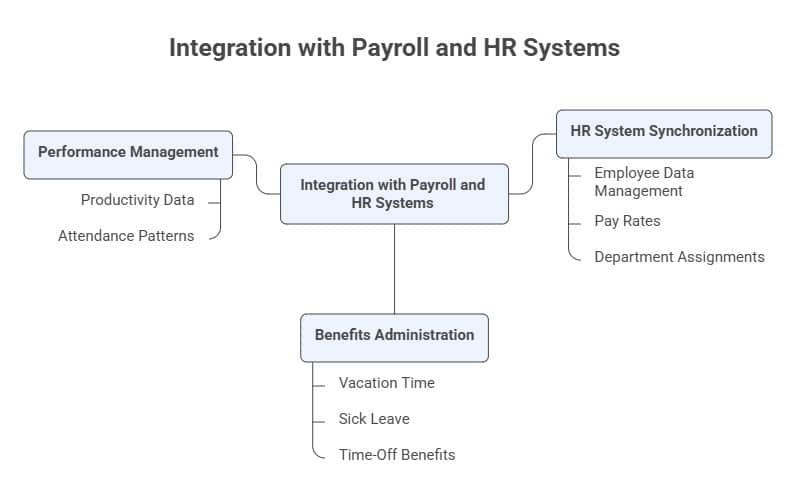
Employee Data Management: Integration with HR systems ensures that employee information, pay rates, and department assignments remain synchronized across platforms. When an employee receives a promotion or changes departments, the timesheet system automatically reflects these updates.
Benefits Administration: Connection between time tracking and benefits systems enables automatic accrual calculations for vacation time, sick leave, and other time-off benefits based on hours worked.
Performance Management: Time tracking data can feed into performance management systems, providing managers with objective data about employee productivity and attendance patterns.
Compliance and Reporting Benefits
Integrated systems provide comprehensive reporting that spans time tracking, payroll, and HR data. This unified view enables organizations to identify trends, ensure compliance with labor regulations, and make data-driven decisions about workforce management.
The integration also supports audit requirements by maintaining detailed records of all time entries, approvals, and payroll processing activities. This audit trail becomes essential during compliance reviews or legal proceedings.
ROI and Cost Considerations
Quantifying Time Tracking Benefits
Organizations typically see immediate returns from employee timesheet software through reduced administrative time and improved accuracy. Manual timesheet processing often requires 5-10 minutes per employee per pay period. Automated systems reduce this to under one minute, creating significant savings for larger organizations.
Time theft prevention provides another measurable benefit. Studies indicate that organizations lose 2-8% of total payroll to time theft through buddy punching, extended breaks, or inaccurate reporting. Biometric time clocks and GPS verification can eliminate most of these losses.
Implementation and Ongoing Costs
Software licensing: Most employee timesheet software uses per-employee monthly pricing ranging from $2-15 per employee. Enterprise solutions may require minimum user commitments or include additional fees for advanced features.
Hardware requirements: Biometric time clocks, tablets for kiosk mode, or mobile devices for field workers represent additional costs. Budget $200-800 per time clock location depending on features required.
Training and Support: Factor in training time for managers and employees, particularly when transitioning from paper-based systems. Most vendors provide implementation support, but complex deployments may require additional consulting services.
Long-Term Value Creation
Beyond immediate cost savings, employee timesheet software provides strategic value through improved data visibility and decision-making capabilities. Managers gain real-time insights into labor costs, productivity trends, and staffing optimization opportunities.
The data collected enables better workforce planning, more accurate project bidding, and identification of operational inefficiencies. These strategic benefits often exceed the direct cost savings from improved time tracking accuracy.
ROI and Cost Checklist Table
| ROI & Cost Factor | What to Evaluate? |
| Time Savings | Reduction in manual timesheet processing time |
| Payroll Accuracy | Elimination of errors and improved payroll precision |
| Time Theft Prevention | Use of biometrics or GPS to reduce payroll losses |
| Software Costs | Monthly pricing per employee and feature inclusions |
| Hardware Investment | Cost of time clocks, kiosks, or mobile devices |
| Training & Support | Ease of onboarding and vendor support availability |
| Long-Term Value | Impact on productivity, planning, and cost optimization |
Conclusion
Selecting the right employee timesheet software transforms workforce management from a administrative burden into a strategic advantage. The key lies in matching software capabilities with your organization’s specific needs. These can be mobile-first solutions for remote workers, biometric authentication for manufacturing floors, and integrated HR platforms for comprehensive employee management.
Streamline your workforce operations at HubEngage and discover how our employee experience platofrm can complement your timesheet software implementation for maximum organizational efficiency. Ready to get started? Take a demo to learn more.
Employee Timesheet Software FAQs
How does employee timesheet software prevent time theft?
Employee timesheet software prevents time theft through multiple verification methods. Biometric time clocks use fingerprint or facial recognition to ensure the correct employee is clocking in. GPS tracking verifies that remote workers are at approved locations when logging hours. Photo capture features require employees to take a selfie when clocking in from mobile devices, preventing buddy punching.
Can employee timesheet software handle complex pay rules?
Modern employee timesheet software handles sophisticated pay structures including multiple pay rates, shift differentials, overtime rules, and union agreements. The systems can apply different rates based on time of day, day of week, or specific projects. They automatically calculate overtime according to federal and state regulations, including daily overtime requirements in states like California.
The software also manages complex scenarios like on-call pay, travel time compensation, and premium rates for holidays or weekends. Custom rule engines allow organizations to configure pay calculations that match their specific policies and regulatory requirements.
How do employees access timesheet software remotely?
Remote workers access employee timesheet software through mobile apps available for iOS and Android devices. These apps provide full functionality including clock-in/clock-out, project selection, break tracking, and timesheet review. GPS verification ensures employees are at approved locations when logging time.
Web-based interfaces allow access from any device with internet connectivity. The systems maintain security through encrypted connections and user authentication. Offline functionality enables time tracking even without internet access, with data synchronizing when connectivity returns.
What integration options are available with existing systems?
Employee timesheet software typically integrates with major payroll providers like ADP, Paychex, and QuickBooks through direct API connections. HR system integrations include BambooHR, Workday, and SuccessFactors for employee data synchronization.
Accounting system connections enable automatic job costing and project tracking integration with platforms like QuickBooks, Sage, and NetSuite. Many solutions also offer custom API access for organizations with proprietary systems or specific integration requirements.
How does the software ensure compliance with labor laws?
Employee timesheet software includes built-in compliance features for federal and state labor regulations. The systems automatically track break periods, meal times, and rest requirements according to local laws. They calculate overtime correctly based on jurisdiction-specific rules and generate reports needed for compliance audits.
The software maintains detailed audit trails showing all time entries, modifications, and approvals. This documentation becomes essential during labor investigations or legal proceedings. Automatic alerts notify managers when employees approach overtime thresholds or miss required breaks.
What happens if employees forget to clock in or out?
Employee timesheet software handles missed punches through exception reporting and manager notification systems. When employees forget to clock in or out, the system flags these exceptions for manager review. Supervisors can add missing punches with appropriate documentation and approval workflows.
Many systems include automatic reminders sent to employees who forget to clock out at the end of their shifts. The software can also estimate missing punches based on scheduled hours or historical patterns, subject to manager approval before payroll processing.