Skip to content

8 Top Strategies: Microlearning For Employees

Microlearning for employees has moved from a nice-to-have format to a mainstream training strategy. One widely cited workplace learning summary reports that 72% of organizations globally had embedded microlearning into their training mix in 2025, up from 54% in 2023, while half of learning leaders and 53% of employees pointed to high workloads as a major barrier to learning at work, according to the LinkedIn Learning 2025 Workplace Report summary. That shift matters because many workforces don’t need more training hours. They need training that fits the day employees have.

For HR, internal comms, and operations leaders, microlearning works best when it’s tied to a real job task, not when it’s treated as a content trend. Short lessons can support onboarding, software rollout, safety refreshers, compliance reminders, frontline updates, and manager coaching. But they only deliver business value when the design is sharp, the delivery is accessible, and the measurement goes beyond completion.

If you’re building a broader employee development strategy, it also helps to connect microlearning with your wider talent management solutions stack so learning, communication, and performance data don’t live in silos.

Key Takeaways

  • Adoption is mainstream: Microlearning is now embedded in most corporate training mixes.
  • Time pressure is the driver: Employees need learning that fits around work, not apart from it.
  • Format alone won’t save weak training: Short content still needs relevance, reinforcement, and measurement.
  • Frontline access is often the primary challenge: Mobile, offline access, captions, and multilingual delivery matter.
  • The best programs connect learning to performance: Reduced errors, faster proficiency, and better execution matter more than views.

1. Mobile-First Microlearning Modules

Mobile-first microlearning is often the difference between theoretical access and actual use. If employees work on a shop floor, in the field, in stores, in hospitals, or across shifts, desktop-only training isn’t a learning strategy. It’s a filter that excludes the people who most need timely support.

That’s why the design standard should be simple. One task, one lesson, one action. Starbucks-style barista refreshers, retail process walk-throughs, and warehouse onboarding flows all fit this model because employees can open them quickly, act on them, and move on.

What works on mobile

Portrait orientation is usually the safer default. Scrolling beats pinching and zooming, touch targets need to be obvious, and videos should work without sound because many employees won’t be in a place where audio is practical.

The less glamorous issue is accessibility. One workplace learning guide explicitly advises teams to verify WCAG compliance, test with screen readers, ensure keyboard navigation, and provide captions and transcripts in this guide to workplace microlearning accessibility. That’s especially important for deskless and distributed workforces where connectivity, language, and device conditions vary.

Practical rule: If a module only works well on a strong office Wi-Fi connection with headphones, it isn’t truly mobile-first.

Trade-offs and implementation tips

Mobile-first doesn’t mean shrinking a desktop lesson onto a phone. This approach often leads to poor outcomes. A policy PDF, a long narrated slide deck, or a dense ten-screen click-through sequence will frustrate employees fast.

A stronger setup usually includes:

  • Silent-friendly video: Add captions so employees can learn without audio.
  • Progressive disclosure: Reveal steps one at a time instead of dumping everything at once.
  • Offline support: Let employees access core materials even with weak connectivity.
  • Role-specific paths: Separate what a store associate needs from what a district manager needs.

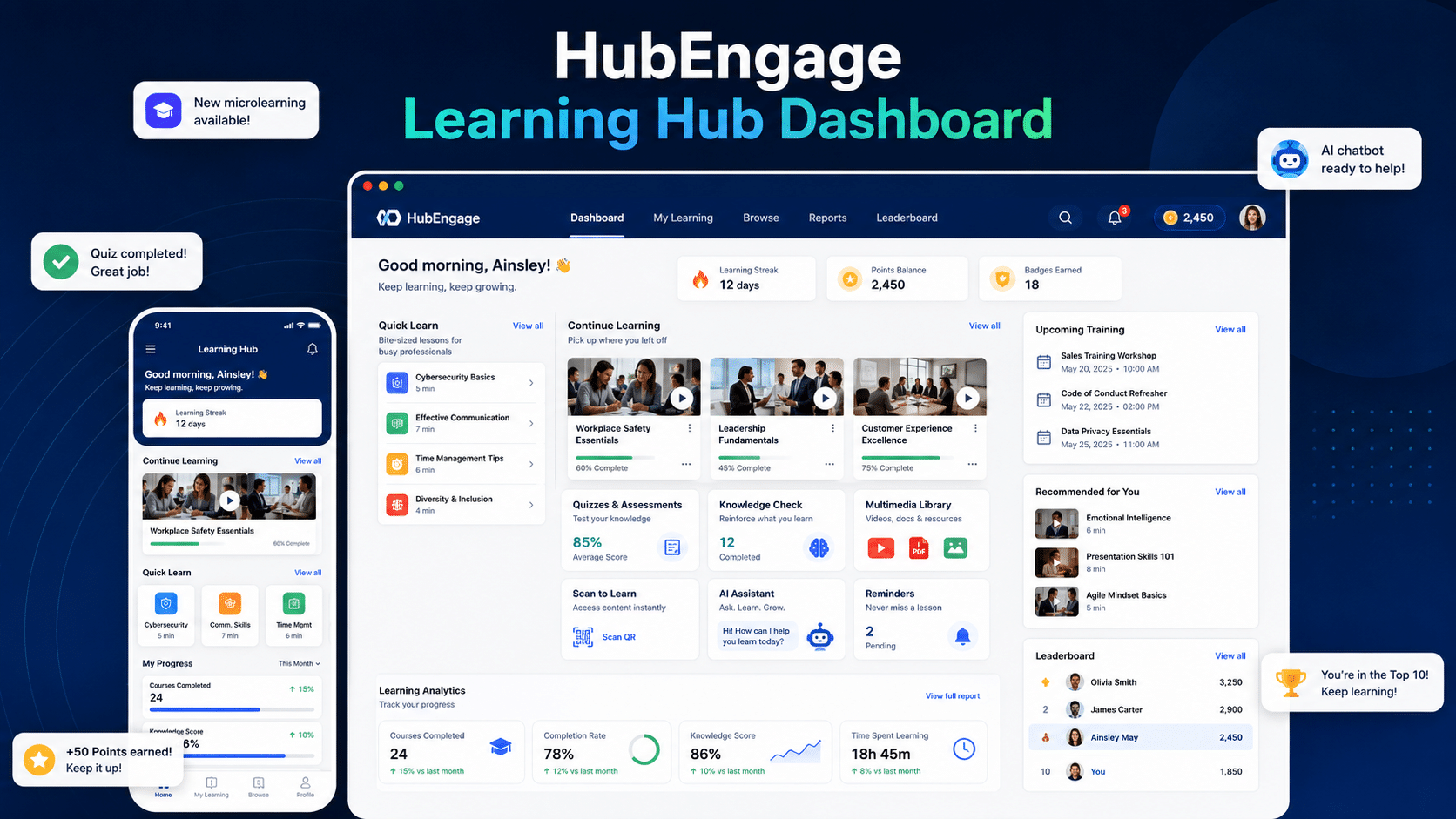
For organizations that need one place to deliver communications and learning across devices, HubEngage’s approach to mobile apps for employees and distributed workforces is relevant because microlearning only works when employees can reach it during the workday.

2. Spaced Repetition and Adaptive Learning

Employees forget fast after one-time training. The Ebbinghaus forgetting curve remains a useful reference because it explains why recall drops sharply without reinforcement, and why review timing matters more than adding more content, as summarized by the University of Waterloo’s overview of spaced practice and retrieval.

That is the case for using spaced repetition in microlearning. Instead of asking people to absorb everything in one sitting, it schedules brief retrieval points over time. Adaptive learning adds the second half of the method. It changes the next prompt, quiz, or scenario based on what the employee knows.

Used well, this is one of the more strategic microlearning methods because it improves retention without forcing everyone through the same volume. Used poorly, it becomes reminder spam with a scoring layer on top.

Where this method works best

Spaced repetition and adaptive learning earn their keep in topics where forgetting has a measurable cost. Compliance deadlines, safety steps, product specs, service standards, and manager coaching habits all fit. A missed step in these areas can create rework, audit exposure, or inconsistent customer experience.

The business value is retention over time, not short-term completion rates. The University of California, San Diego study on spaced learning and memory explains the core principle clearly. Learners retain more when practice is distributed and revisited, especially when they have to retrieve the answer rather than reread it.

Features, pros, and trade-offs

A good setup usually includes four features:

  • A short diagnostic or baseline check
  • Follow-up prompts spaced across days or weeks
  • Retrieval-based questions, not passive review
  • Difficulty or content changes based on performance

The upside is straightforward. Employees spend time on weak spots instead of repeating material they already know. L&D gets a clearer picture of where knowledge is breaking down. Managers can see whether reinforcement is improving readiness in the field.

The trade-offs are real.

Adaptive systems need decent tagging, role logic, and question design. If the content model is sloppy, personalization becomes random. Spacing also requires discipline. Too frequent, and employees ignore it. Too sparse, and recall still fades. I usually advise teams to start with one high-risk topic and tune the interval schedule before expanding.

Implementation tips that hold up in practice

Start with knowledge that employees must recall on the job, not information they can always look up later. Then build a reinforcement pattern around moments that matter. Day 1 for initial exposure, day 3 or 4 for first retrieval, week 2 for applied practice, and a later scenario for transfer is often a workable starting structure.

Question design matters as much as cadence. Use short case prompts, error spotting, sequencing, and decision questions. Multiple-choice alone can hide weak recall because employees recognize the answer without retrieving it from memory.

Visibility matters too. Employees should know why they are receiving a refresher, what skill it supports, and what happens next. Social reinforcement can help here. Teams using an enterprise social network for employee knowledge sharing can pair spaced prompts with manager follow-up, peer discussion, or role-based reminders so practice does not sit in isolation.

A practical rule helps keep this method on track. If the adaptive logic cannot explain why one employee got a harder scenario and another got a refresher, the system is too opaque to trust.

HubEngage’s emphasis on personalized employee engagement is relevant here because reinforcement cadence and follow-up prompts usually work better when they reflect role, location, and employee context rather than treating the workforce as one audience.

3. Gamification and Point-Based Learning

Gamification works in microlearning when it reinforces the right behavior. It fails when it turns learning into a race for points.

A tablet showing an employee leaderboard app next to digital badges and a stack of coins.

The design choice is straightforward. Reward fast clicks and streak protection, and employees will optimize for activity. Reward practice, accuracy, application, and helpful contribution, and the system starts supporting capability building. That trade-off matters because gamification is highly visible. Employees notice quickly whether the program recognizes real progress or just volume.

Good game mechanics versus bad ones

Salesforce Trailhead is a useful reference point because badges and progress markers are tied to specific learning paths and skill milestones. Microsoft Learn follows a similar model. In both cases, the game layer supports progression and signals achievement in a way employees can understand.

The broader case for microlearning is already established earlier in this article. Gamification should be treated as an amplifier, not the foundation. If the underlying content is weak, badges will not fix it. If the content is strong, game mechanics can improve completion rates, return visits, and peer visibility.

That distinction is where many programs go off course.

A better design principle is simple: reward behaviors the business already values. That usually means consistent participation, correct decision-making, knowledge sharing, and skill growth over time. In customer service, that may mean finishing short coaching modules and applying the right response steps. In frontline operations, it may mean repeated safety refreshers completed accurately, not quickly.

Features, pros, and trade-offs

This method is strongest when L&D needs to increase repeat engagement without adding long training sessions. Points, levels, badges, missions, and leaderboards give employees a clear signal that progress is happening. They also create useful data for managers if the scoring model reflects meaningful behaviors.

The upside is obvious. Participation becomes more visible, optional practice gets more attention, and employees have a reason to come back for another short module.

The downside is just as real. Poor scoring logic can distort behavior. Leaderboards can discourage solid performers who never reach the top. Prize-heavy systems can train employees to chase rewards instead of building skill.

Use a few rules to keep the method practical:

  • Score for quality, not just completion: Give more credit for correct answers, applied scenarios, and improvement over repeat attempts.
  • Use multiple recognition paths: Completion, mastery, coaching others, and steady progress should all count.
  • Reset competitive elements on a schedule: Weekly or monthly cycles prevent the same names from dominating.
  • Favour team challenges where culture is sensitive to ranking: Shared goals reduce the downsides of individual comparison.
  • Audit the mechanics quarterly: If employees are gaming the system or ignoring the learning objective, adjust the model.

For distributed teams, quick reinforcement can also come through a chatbot for internal employees that delivers short challenges, quiz prompts, or point updates inside the flow of work. That approach can raise participation, but only if the prompts stay relevant to the employee’s role and workload.

If your culture already uses recognition programs, it makes sense to connect learning to that system. HubEngage supports badges, points, rewards, and leaderboards for employee incentives and recognition, which can help teams tie learning participation to broader engagement efforts instead of running learning as a separate silo.

4. Peer-to-Peer Learning and Social Knowledge Sharing

Some of the best microlearning content in any company already exists. It just isn’t organized yet. It lives in supervisor tips, team chat threads, voice notes, annotated screenshots, and quick answers from experienced employees.

Peer-to-peer learning works because employees often trust examples from colleagues doing the same job. A customer support rep explaining how to de-escalate a common issue can be more useful than a polished generic module. The same goes for field technicians, nurses, store leads, and plant supervisors.

Where social learning helps most?

This method is strongest when local context matters. A manager can record a short tip on handling a seasonal rush. A technician can share a quick fix for a recurring equipment issue. A compliance lead can answer a recurring question in a discussion thread and save that explanation for future use.

The risk is accuracy. Informal knowledge can spread fast, including outdated or noncompliant advice. That’s why peer content needs light governance, especially in regulated environments.

  • Create easy templates: A short video tip, one screenshot walkthrough, or a one-question discussion prompt lowers the barrier to contribution.
  • Tag by role and topic: Searchability matters more than volume.
  • Review critical content: Let SMEs validate anything tied to safety, policy, or compliance.
  • Recognize useful contributors: People keep sharing when their expertise is visible and valued.

A social layer matters here. HubEngage offers an enterprise social network for employee communities, which can give organizations a place to organize discussions, tips, and knowledge sharing without scattering them across separate tools.

5. Just-in-Time Learning Performance Support

Microlearning becomes operational, not just instructional. Just-in-time learning gives employees help in the moment of need, while they’re doing the work.

That’s why it’s one of the strongest forms of microlearning for employees. Instead of asking people to remember everything from a course they took last month, it places the answer close to the task itself. For software rollout, process changes, and complex workflows, that matters more than course completion.

Why this method is especially effective in software adoption?

One software adoption training source recommends breaking complex topics into bite-sized segments and reports that self-paced learning can improve employee performance by 15% to 25%, while e-learning can require 40% to 60% less time than traditional classroom training, according to InfoPro Learning’s guidance on employee training for software adoption. The practical takeaway is simple. When employees can learn in small pieces as they use the system, adoption friction drops.

Examples show up everywhere. Salesforce has contextual help. Microsoft Office uses inline guidance. Customer service tools surface knowledge during conversations. Warehouse devices often provide task-specific prompts during execution.

What to build first?

Start where employees hesitate, make mistakes, or ask the same question repeatedly. System logs, support tickets, manager feedback, and exception reports usually reveal those moments.

A two-line prompt at the moment of action often beats a twenty-minute training module completed weeks earlier. Useful assets include:

  • One-screen job aids: Best for repeat tasks with clear steps.
  • Contextual prompts: Best for system navigation and decision support.
  • Quick FAQs: Best for policy questions and recurring confusion.
  • Escalation guidance: Best when employees need to know when not to proceed alone.

HubEngage’s AI chatbot for internal employees is relevant here because performance support gets much stronger when employees can ask a question in plain language and get directed to the right policy, process, or learning resource quickly.

6. Video-Based Microlearning

Short video is one of the most practical microlearning formats because it shows work, not just describes it. That matters for software steps, customer interactions, equipment checks, and manager behaviors that are hard to explain cleanly in text.

A strong micro-video teaches one thing. A weak one tries to compress an entire course into a shorter runtime and ends up becoming a rushed lecture.

What effective micro-video looks like?

Think in clips, not chapters. One video for logging a customer case. One for handling a refund exception. One for opening a shift. One for a manager’s first coaching conversation after a performance issue.

TED-Ed, Grovo, LinkedIn Learning, and HubSpot Academy have all helped normalize concise instructional video. In workplace settings, screen recordings, annotated walkthroughs, and authentic employee demos usually outperform overly produced content because they feel closer to the actual work.

A broad microlearning market view also suggests this isn’t a passing format. Mordor Intelligence estimates the market reached USD 3.32 billion in 2026 and projects growth to USD 5.81 billion by 2031 at an 11.83% CAGR, while Future Market Insights projects USD 2.0 billion by the end of 2026 and USD 7.2 billion by 2036 at a 13.5% CAGR, according to Mordor Intelligence’s microlearning market report. Those projections point to sustained enterprise demand for short-form learning, including video-heavy delivery.

Production choices that help

A few practical standards make a big difference:

  • Keep the scope narrow: One concept per clip.
  • Use captions and transcripts: They support silent viewing, accessibility, and search.
  • Show the actual interface or workflow: Don’t abstract the task if employees need procedural clarity.
  • Build playlists, not piles: Group related clips into role-based sequences.

For teams investing in short instructional media, it’s also useful to study how concise video formats are evolving in adjacent content categories, including this guide to mastering short form video in 2026.

7. Scenario-Based and Situational Microlearning

Some skills can’t be learned well through explanation alone. Ethical judgment, customer de-escalation, safety decisions, and frontline leadership all depend on context. Scenario-based microlearning works because it puts employees inside a situation and forces a choice.

That’s especially helpful when the right answer depends on trade-offs, not recall. A manager deciding how to respond to a harassment concern, or a nurse deciding when to escalate, needs judgment under pressure. Short branching scenarios can build that muscle without pulling people into long workshops every time.

The strength and the limit

Harvard ManageMentor-style leadership scenarios, clinical decision simulations, and cybersecurity labs all use this model well. They let employees see the consequence of a decision, then try again.

The catch is realism. Generic scenarios feel artificial fast. If employees can’t recognize their own environment in the prompt, the module won’t land. Good scenarios usually come from actual incidents, manager observations, support logs, or compliance reviews.

  • Use real friction points: Build around moments employees encounter.
  • Allow defensible choices: Not every scenario should be multiple choice with one obvious winner.
  • Give useful feedback: Explain why a response works, where it fails, and what to watch next time.
  • Invite reflection: The debrief often teaches as much as the decision itself.

For organizations that want discussion after the choice, HubEngage’s broader engagement features can support peer reflection and follow-up conversation around scenario outcomes, which helps reinforce learning after the moment of decision.

8. Microlearning Paths and Learning Journeys

Standalone modules are useful, but employees still need progression. That’s where microlearning paths earn their place. They organize small learning moments into a sequence that builds capability over time.

This is one of the most overlooked parts of microlearning for employees. Teams often get excited about short content, then publish dozens of disconnected pieces. Employees consume a few, ignore the rest, and never develop a clear sense of advancement.

When paths work best?

Structured journeys are especially effective for onboarding, manager development, role certification, and internal mobility. Salesforce Trailhead, Microsoft Learn, Google Cloud learning paths, and LinkedIn Learning role-based curation all show the value of sequencing. Employees need to know what comes first, what comes next, and what mastery looks like.

That structure also helps with business measurement. One corporate microlearning implementation guide makes an important point: organizations should measure microlearning with KPIs beyond completion and connect it to actual performance gaps, as discussed in this corporate microlearning implementation perspective. That’s exactly why paths matter. They make it easier to connect learning to task proficiency, behavior change, and execution quality.

How to build a path employees will actually finish?

The path should follow the job, not the org chart. Start with the tasks employees must perform, then map the knowledge, decisions, and practice moments required to do them well.

A solid path usually includes:

  • Foundations first: Basic concepts before advanced judgment.
  • Mixed formats: Video, quiz, scenario, checklist, and job aid instead of one repetitive medium.
  • Smart branching: Let proficient employees skip what they’ve already mastered.
  • Milestones: Recognize progress so the journey feels visible.

For teams that want to combine communications, learning access, recognition, and progress tracking in one environment, HubEngage can support that journey-based model through its learning and engagement capabilities.

Microlearning Strategies: 8-Point Comparison

Approach 🔄 Implementation Complexity Resource Requirements ⭐ Expected Outcomes 📊 Ideal Use Cases 💡 Key Advantages
Mobile-First Microlearning Modules Moderate, redesign for portrait, offline sync, responsive UI Moderate, mobile design/dev, media optimization, testing across devices High, improved access and completion for mobile users Frontline/distributed workers, micro-onboarding, just-in-time refreshers Optimized for on-the-go use, offline access, high completion rates
Spaced Repetition & Adaptive Learning High, AI models, analytics, content tagging and scheduling High, ML infrastructure, content mapping, ongoing data maintenance Very High, superior long-term retention and efficiency Compliance, critical knowledge, sales enablement, technical skills Personalized timing, reduced repetition, measurable retention gains
Gamification & Point-Based Learning Medium, game mechanics design, fairness and reward mapping Low–Medium, platform features, rewards budget and admin effort High (engagement), large boosts in participation; learning depth varies Behaviour change programs, engagement campaigns, recognition-driven L&D Increases motivation, social competition, easy to track participation
Peer-to-Peer Learning & Social Sharing Medium, governance, moderation, culture-building required Low–Medium, platform tools, moderation and SME time Medium–High, contextual, culturally relevant learning; variable quality Knowledge transfer, mentorship, tacit skill sharing, onboarding by peers Leverages internal expertise, fast content creation, builds community
Just-in-Time Learning (Performance Support) High, deep integration with apps/workflows and contextual triggers High, integrations, maintenance, content mapping to tasks Very High, reduces errors and time-to-productivity, improves consistency Workflow tasks, front-line operations, customer service, clinical decision support Immediate, task-focused guidance; lowers rework and supervision needs
Video-Based Microlearning Medium, production workflows, hosting and accessibility setup Medium, video production, hosting/bandwidth, captioning High, strong engagement and comprehension for visual content Procedural demos, product updates, soft skills, software walkthroughs High engagement, shareable, effective for procedural learning with captions
Scenario-Based & Situational Microlearning High, complex instructional design and branching logic High, scenario scripting, testing, iterative updates Very High, excellent transfer to real-world decision-making High-stakes decisions, leadership, customer conflict, ethics/compliance Develops judgment and critical thinking through experiential practice
Microlearning Paths & Learning Journeys High, competency mapping, sequencing, prerequisite logic High, content curation, path design, integration with HR systems High, aligned skill development and measurable progression Role-based development, certification tracks, career progression Structured progression, clear milestones, ties learning to competencies

Final Thoughts

Microlearning for employees delivers the greatest value when it becomes part of everyday work rather than a standalone training activity. Successful programs focus on relevant, bite-sized content, reinforce learning over time, and measure real behavioral outcomes instead of simple completion rates. As organizations look to support desk-based, frontline, and distributed employees more effectively, integrating learning with communication and engagement becomes increasingly important. To see how this can work in practice, explore the HubEngage Employee Experience Platform by scheduling a personalized demo.

FAQs on Microlearning for Employees

What is microlearning for employees?

Microlearning for employees is a training approach that delivers short, focused learning experiences tied to a single concept, task, or behavior. It’s commonly used for onboarding, compliance refreshers, software adoption, frontline updates, manager coaching, and just-in-time support.

Why is microlearning effective in the workplace?

It fits real work conditions better than long-form training for many use cases. Employees often face time pressure, interruptions, and competing priorities, so shorter learning moments are easier to access and apply. It’s especially useful when the content supports a clear task or decision.

What are the best formats for microlearning?

The best format depends on the need. Short videos work well for demonstrations. Quizzes and spaced repetition help with retention. Scenario-based modules support judgment. Job aids and chat-based support are effective for in-the-moment task help. Social posts and peer tips work well for local knowledge sharing.

How long should a microlearning module be?

There isn’t one ideal runtime for every case. What matters most is focus. A good module covers one objective clearly and avoids unnecessary explanation. If the lesson starts combining multiple skills or policy areas, it usually needs to be broken apart.

Is microlearning enough on its own?

Not always. It works best for reinforcement, refreshers, task support, and focused skill development. More complex capabilities, hands-on practice, leadership development, and deeper conceptual training often require a blend of methods, including coaching, workshops, or longer structured learning.

How do you measure whether microlearning is working?

Start beyond completion data. Useful measures include reduced errors, faster task proficiency, better software adoption, manager-observed behavior change, fewer repeat questions, and stronger execution in the workflow. The right KPI depends on the business problem the learning was built to solve.

What are common mistakes in microlearning programs?

The biggest mistakes are making content short but not useful, publishing disconnected modules with no path, ignoring frontline access constraints, and measuring only views or quiz scores. Another common mistake is forcing every topic into microlearning when some subjects need deeper practice and discussion.

Related Links

employee experience platforms

Get Insights

Subscribe to our weekly newsletter to get more tips on effective employee engagement and communications!

Join Our Community

Join Turn On Engagement (TOE) to interact with other employee engagement and people experience professionals. Share and get new ideas!

Princy Eliza is a digital marketing specialist with expertise in SEO, content marketing, outreach, and organic growth. She helps SaaS, technology, and B2B brands improve online visibility, attract qualified traffic, and generate sustainable business growth through data-driven strategies.
Known for developing effective SEO frameworks, content plans, and outreach campaigns, she helps organizations strengthen their digital presence and improve search performance. Princy specializes in turning complex marketing concepts into practical, actionable strategies that marketers and business leaders can easily implement. Her work is focused on research, measurable results, and long-term growth, helping brands succeed in an evolving digital landscape.

Other posts you might enjoy

Back To Top