A task management softwares transforms how you organize work and track progress, but choosing the wrong one can create more chaos than clarity. With hundreds of options promising to boost productivity, the real challenge is finding one that actually fits your workflow without overwhelming your team.
The best task management softwares depends entirely on your specific needs like team size, project complexity, and collaboration style. In this guide we will walk you through a task management softwares, its features, comparisons, etc to help you use the right software for managing your tasks.
Key Takeaways
- Task management softwares helpindividuals and teams organize, track, and complete work efficiently in one place.
- The right tool depends on your team size, workflow complexity, and collaboration needs.
- Features like task assignment, deadlines, and reminders improve productivity and accountability.
- Using a task management system reduces stress, improves focus, and keeps teams aligned.
- Always test tools with your team before choosing to ensure smooth adoption and long-term success.

What are Task Management Softwares?
A task management software is designed to help individuals and teams organize, track, and complete work efficiently. These digital tools replace traditional to-do lists and paper planners with features like deadline tracking, progress monitoring, team collaboration, and automated reminders.
Unlike simple note-taking apps, task management softwares provide structured workflows that let you break down complex projects into manageable steps. You can assign responsibilities, set priorities, track time, and monitor progress in real-time.
With a fast-paced and dynamic work environment, task management softwares plays a critical role in keeping teams organized and aligned. It helps manage shifting priorities, supports collaboration across teams, and ensures work progresses efficiently without confusion or missed deadlines.

The above image shows that successful implementation of a task management system helps with better productivity as well as decreasing stress levels.
Task Management Softwares Key Features
Modern task management softwares share several essential capabilities that separate them from basic to-do lists. Understanding these features helps you identify which ones matter most for your workflow.
Core Task Organization Features
- Task Creation and Editing: Quick input methods, rich text descriptions, and easy modification of task details
- Due Dates and Reminders: Automated notifications and deadline tracking to prevent missed commitments
- Priority Levels: Visual indicators showing which tasks need immediate attention versus those that can wait
- Categories and Tags: Organizational systems that group related tasks and make searching easier
- Subtasks and Dependencies: Breaking complex work into smaller steps and linking related activities
Collaboration and Team Features
- Task Assignment: Delegating work to specific team members with clear ownership
- Comments and Updates: Communication threads attached directly to tasks for context
- File Attachments: Storing relevant documents, images, and resources within tasks
- Progress Tracking: Visual indicators showing completion status and milestone achievement
- Team Calendars: Shared views of deadlines and scheduled work across the organization
Advanced Productivity Tools
- Time Tracking: Built-in timers and logging capabilities for accurate project billing
- Reporting and Analytics: Data visualization showing productivity patterns and bottlenecks
- Automation Rules: Recurring task creation and workflow triggers that reduce manual work
- Integration Capabilities: Connections with email, calendars, and other business tools
- Mobile Synchronization: Real-time updates across devices for on-the-go access
Best Task Management Softwares for organizations
The task management software market offers solutions for every team size and working style. Here are the leading platforms that consistently deliver results for different organizational needs.
HubEngage
Our task management tool helps your team plan, assign, and track work efficiently within the same platform used for communication and engagement. It enables better visibility into tasks, responsibilities, and progress across teams.
Managers can assign tasks with deadlines, track completion, and ensure accountability, while employees can easily manage their daily work. Real-time updates and notifications keep everyone aligned and reduce delays.
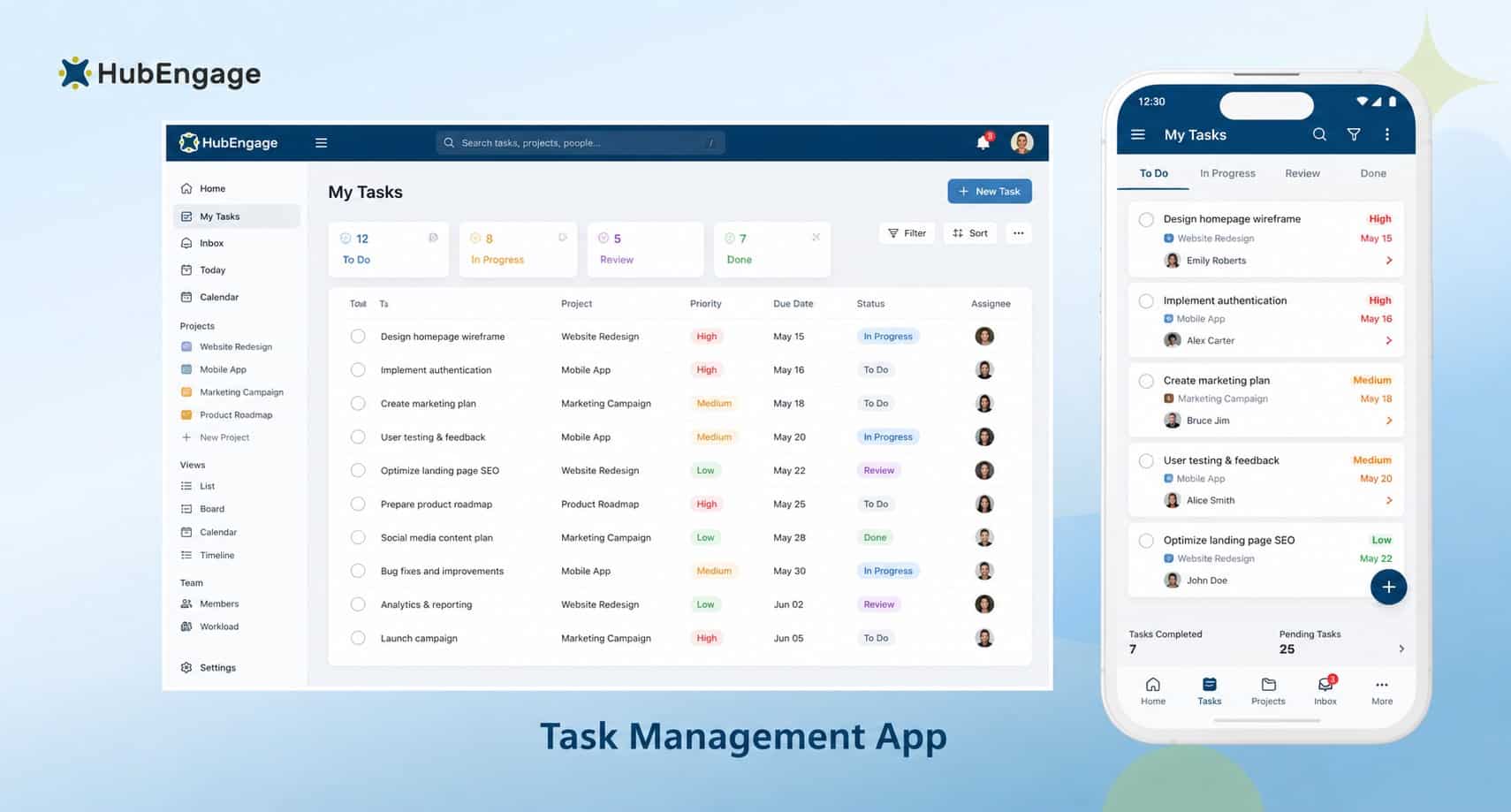
By combining tasks with communication and collaboration tools, HubEngage ensures that discussions and actions happen in one place, improving productivity and reducing tool switching.
Key Features:
- Create, assign, and track tasks with clear ownership and deadlines
- Real-time notifications keep teams aligned and reduce execution delays
- Centralized task view improves visibility across teams and projects
- Integrates communication channels to connect discussions with task actions
- Boosts accountability with status tracking, updates, and completion insights
Best for:
Teams that need a simple, integrated way to manage tasks alongside communication and collaboration.
Watch this review from Gareth Young, Director of Health, Safety, Environment, and Quality at EnerCorp, explaining why he chose HubEngage over other solutions.
“We faced challenges keeping our frontline teams informed with the right task, especially across multiple locations. After implementing HubEngage, things became much easier. Communication improved quickly, and the tasks management became much easier. It gave us a centralized space to connect as well as share updates. Overall, it helped create a more connected and productive workforce.”
Discover more real-world impact as well as success stories of our customers and what they say about HubEngage’s employee experience platform
Trello
Organizes tasks using simple Kanban boards, making it easy to visualize workflows and track progress for small teams and straightforward projects.
Key Features:
- Boards, lists, and cards
- Drag-and-drop workflow
- Basic automation
Best for:
Small teams and visual task tracking.
Asana
Helps teams manage structured projects with timelines, task dependencies, and automation, supporting better planning and coordination across growing teams.
Key Features:
- Task dependencies
- Timelines and reporting
- Workflow automation
Best for:
Medium to large teams with structured workflows.
Slack
Focuses on team communication with lightweight task coordination through reminders and integrations, helping teams stay aligned in real time.
Key Features:
- Channels and messaging
- App integrations
- Reminders and workflows
Best for:
Teams prioritizing communication and quick coordination.
Jira
It is built for agile teams to manage sprints, track issues, and handle complex technical workflows with detailed customization and reporting.
Key Features:
- Scrum and Kanban boards
- Issue tracking
- Sprint planning
Best for:
Software teams and agile project management.
Task Management Softwares Comparison
| Tool | Core Strength | Key Features | Best For | Limitations | Pricing Model |
| HubEngage | Unified task management within employee engagement platform | Task assignments, workflows, notifications, intranet integration, employee communication, mobile access | Medium to large organizations, frontline and distributed teams | May require onboarding for full platform capabilities | Custom pricing based on team size |
| Trello | Visual Kanban workflow management | Boards, lists, cards, drag-and-drop UI, power-ups (integrations), automation via Butler | Visual thinkers, small teams, project tracking | Can become cluttered for complex projects, lacks deep reporting/analytics | Freemium + Paid tiers |
| Asana | Advanced project & team management | Task dependencies, timelines (Gantt), workload management, team collaboration, automation rules, reporting dashboards | Medium to large teams, structured project workflows | Steeper learning curve, overkill for personal use | Freemium + Business/Enterprise plans |
| Slack | Team communication and lightweight task coordination | Channels, direct messages, integrations, reminders, workflow builder, app ecosystem | Teams needing real-time communication and coordination | Not a full task management tool, limited task tracking features | Freemium + Paid plans (advanced features). |
| Jira | Agile project and issue tracking for teams | Scrum and Kanban boards, issue tracking, sprint planning, workflows, reporting, integrations | Software teams, agile projects, technical workflows | Can be complex for beginners, setup requires configuration | Free tier + paid plans. |
Task Management Softwares vs Project Management Softwares
Understanding the distinction between task management softwares and project management softwares helps you choose the right tool for your organizational needs. While these categories overlap, they serve different purposes and audiences.
Scope and Complexity Differences
| Aspect | Task Management Softwares | Project Management Softwares |
| Focus | Daily tasks and workflows | Large, multi-phase projects |
| Best For | Individuals and small teams | Cross-functional teams |
| Strength | Simple and quick to use | Advanced planning and control |
| Features | To-do lists, reminders | Gantt charts, resource tracking |
When to choose Task Management Softwares?
Choose a task management softwares when your primary needs include:
- Organizing daily activities and routine work
- Managing small team assignments with clear ownership
- Tracking individual productivity and personal goals
- Coordinating simple workflows without complex dependencies
- Maintaining focus on task completion rather than project planning
When Project Management Tool is a good option?
Project management software becomes necessary when you need:
- Coordinating multiple teams across different departments
- Managing budgets, resources, and timeline constraints
- Tracking project phases with interdependent deliverables
- Generating detailed reports for stakeholders and executives
- Planning complex initiatives spanning months or years
Most teams start with task management softwares and graduate to project management software as their coordination needs grow more complex.
How to choose the right Task Management Softwares?
Selecting the best ones require evaluating your specific needs against available features. Below are some of the ways you can make the right choice.
Assess your Team Size and Structure
Choose tools based on team size. Individuals need simple features, while teams need collaboration and visibility. Small teams prefer easy apps; larger teams need permissions and reporting.
Evaluate your Workflow Complexity
Match the tool to your workflow. Simple tasks fit basic apps, while complex projects need advanced platforms. Choose flexible or structured systems based on how your team works.
Integration Requirements
Ensure your tool connects with existing apps. Integrations with email, calendars, storage, and communication tools help centralize work, reduce switching, and improve team efficiency.
Budget Considerations
Pick a tool that fits your budget. Free plans work for small teams, while paid plans offer more features. Consider total costs and expected productivity gains.
Trial and Adoption Strategy
Use free trials to test tools with your team. Gather feedback, provide basic training, and adopt gradually to ensure smooth rollout and consistent usage.
Want to dive deeper? Explore our blog to better understand how to pick the best task management softwares.
Task Management Softwares Benefits
Task management softwares deliver measurable improvements in productivity and organization when implemented thoughtfully. Let us explore these benefits for successful adoption.
Enhanced Productivity and Focus
Digital task management reduces mental load by externalizing tasks, freeing focus for meaningful work. Clear priorities and visual progress help teams concentrate on high-impact activities and maintain momentum.
Improved Team Collaboration
Shared visibility clarifies ownership and status without constant meetings. Comments and attachments keep context with each task, reducing search time and enabling faster, more aligned collaboration across teams.
Better Accountability and Tracking
Assigned ownership and deadlines create clear responsibility, while reminders prevent missed commitments. Reporting and historical data reveal patterns and bottlenecks, enabling better resource allocation and continuous process improvement.
Reduced Stress and Mental Load
Capturing tasks externally reduces anxiety about forgetting work and keeps everything organized. Automated reminders and scheduling remove constant mental tracking, lowering cognitive load and improving job satisfaction and work-life balance.
Task Management Softwares use cases
Different industries have unique task management needs:
- Healthcare: Task management supports shift-based coordination and strict compliance requirements. For example, hospitals assign patient care duties by shift, track medication schedules, and monitor safety checklists in one system, reducing errors and improving cross-team coordination.
- Manufacturing: Task management streamlines operations, maintenance, and frontline execution. For example, factories schedule preventive maintenance, assign production tasks, and track shop-floor activities centrally, helping teams maintain efficiency, reduce downtime, and quickly respond to operational issues.
- Remote Teams: Task management enables structured collaboration across distributed teams. For example, a remote marketing team assigns campaign tasks, tracks deadlines, and collaborates asynchronously in shared dashboards, ensuring visibility, accountability, and alignment across different time zones.
- HR Teams: Task management organizes employee engagement and internal communication workflows. For example, HR teams plan surveys, manage onboarding checklists, and track communication campaigns within a single platform, ensuring consistent execution and better employee experience outcomes.
Conclusion
The best task management softwares supports your workflow without getting in the way. Focus on finding a platform that matches your team’s working style rather than chasing the most features or lowest price.
HubEngage helps simplify team task management by bringing together communication, engagement, and workforce operations in one platform. It enables organizations to stay connected, aligned, and more productive.
Explore HubEngage with a quick demo to see how it streamlines task management, improves team alignment, and helps you choose the right solution confidently.
Task Management Softwares FAQs
How do task management softwares improve productivity?
They centralize tasks, reduce mental load, provide reminders, and improve prioritization. This helps users focus on execution rather than remembering tasks.
How much should I expect to pay for task management softwares?
Most task management softwares offer free plans with basic features for small teams. Paid plans typically range from $5 to $25+ per user monthly, depending on features.
What is the difference between task management and project management tools?
Task management focuses on individual to-dos, while project management tools handle complex workflows, team collaboration, timelines, and dependencies.
How long does it take for teams to fully adopt a new task management system?
Typical adoption timelines range from 2-8 weeks depending on team size, existing processes, and change management approach. Simple apps like HubEngage see faster adoption than complex platforms available in the market.
Should I choose a particular task management softwares or an all-in-one platform?
Specialized apps offer focused functionality and better user experience, while all-in-one platforms provide convenience. Choose based on your need for simplicity or performance, and ensure strong integrations if combining tools for a seamless workflow.
How do I ensure team members actually use task management softwares consistently?
Successful adoption depends on leadership actively using the tool and reinforcing it in workflows. Make it the single source of truth, avoid parallel systems, and provide ongoing training, regular check-ins, and feedback to drive consistent team usage.