Creating an employee schedule for distributed teams is more complex than assigning shifts. Employees may work across locations, time zones, departments, and flexible arrangements, including remote, onsite, or rotating roles.
Effective scheduling improves productivity, controls labor costs, and supports workforce management with ease. With a structured system and modern scheduling tools, the process becomes easier and efficient.
Our blog explains how to create an employee schedule for distributed teams, common challenges, mistakes to avoid, and ways to keep employees updated on schedule changes.
Key Takeaways
- Employee scheduling assigns the right people to the right shifts based on business needs, availability, and labor rules.
- A good schedule reduces gaps, overtime costs, conflicts, and employee turnover.
- Scheduling software automates shift planning, availability tracking, communication, and compliance.
- Effective scheduling needs workforce data, clear rules, proper coverage, and open communication.
- Involving employees in scheduling improves satisfaction, reduces conflicts, and boosts retention.
- Integrating scheduling tools with payroll, HR, and time tracking improves accuracy and compliance.

What are the challenges Distributed Teams face while creating an Employee Schedule?
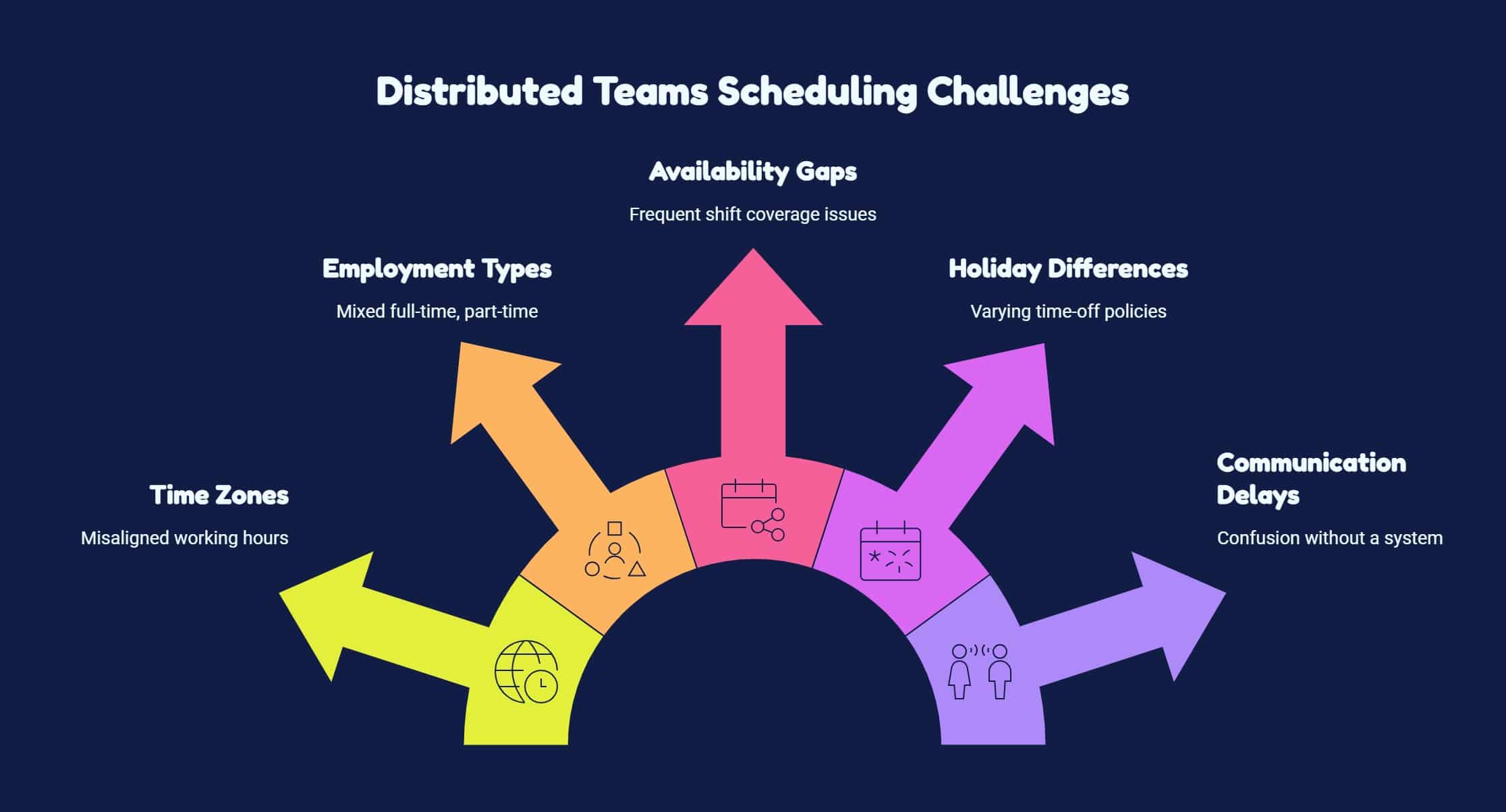
Poor employee scheduling for distributed teams creates costly operational inefficiencies and delays significantly. According to NIOSH, efficiency has been found to decline by 10%–15% due to disruption in scheduling. Here are some common scheduling challenges that are faced by distributed teams:
How to create an Employee Work Schedule?
Here are some simple ways to create an employee schedule which is effective for a distributed workforce.
1) Know Your Team
Understanding your team is the foundation of how to create an employee schedule that actually works. When you know skills, availability, and limitations, you can assign shifts more accurately and avoid last-minute staffing issues.
- Build complete employee profiles with key work details
- Match skills and certifications to shift requirements
- Use availability data to prevent scheduling conflicts
2) Build Shifts Around Your Best Employees
Strong employee schedules are built around reliable performers who can stabilize each shift. When experienced staff are placed strategically, they support newer employees and ensure consistent productivity across all distributed locations.
- Assign experienced employees to high-demand shifts first
- Balance teams by mixing senior and new employees
- Spread top talent across locations for stability
3) Have a Backup staff plan
Having well-planned employee scheduling programs can still face unexpected disruptions, so it is important to prepare a backup staffing plan with reliable part-time staff, cross-trained employees, and on-call workers ready to step in quickly.
- trained part-time staff
- cross-trained employees
- on-call workers
4) Establish a Team-Wide Communication Method
A clear communication system is essential when learning how to create an employee schedule for distributed teams. It ensures everyone sees the same updates, reducing confusion and missed shifts caused by scattered communication channels.
- Centralize all schedule updates in one platform
- Enable real-time access for all employees
- Reduce errors caused by multiple communication tools
5) Get the Schedule Out Quickly
Publishing schedules early is a key step in how to create an employee schedule that supports both business needs and employee planning. It reduces stress, improves coverage, and allows time for adjustments before shifts begin.
- Share schedules at least two weeks in advance
- Use cloud tools for instant updates and access
- Notify employees immediately when changes occur
6) Get Employees to Do Some of the Work Scheduling
Involving employees in scheduling helps reduce manager workload and increases engagement. When employees participate in choosing shifts, they feel more in control while managers still maintain oversight of coverage and staffing quality.
- Allow employees to select available shifts
- Set minimum staffing rules for each shift
- Keep final approval with managers for control
7) Use the Best Tool for the Job
Basic tools like spreadsheets can work, but distributed teams perform better with dedicated ai staff scheduling which centralizes availability, shift planning, updates, and communication across locations, reducing manual effort and improving accuracy in real time.
- Centralized scheduling data
- Real-time updates & communication
- Multi-location time zone support
8) Let Employees Find Their Own Substitutes
Allowing employees to manage shift swaps simplifies how to create an employee schedule that stays flexible. It reduces manager workload while ensuring shifts are still covered by qualified and approved team members.
- Employees post open shifts when unavailable
- Qualified coworkers request to cover shifts
- Managers approve swaps based on requirements
9) Create an Availability Chart
An availability chart provides a quick view of employees who may be able to cover an open shift. Your chart might include:
| Employee | Location | Time Zone | Available Days | Available Hours | Role/Skill |
|---|---|---|---|---|---|
| Employee A | Boston | ET | Mon–Fri | 8 AM–4 PM | Support |
| Employee B | Denver | MT | Tue–Sat | 10 AM–6 PM | Support |
| Employee C | Remote | PT | Mon–Thu | 7 AM–3 PM | Supervisor |
Keep the chart updated when employee availability changes. When someone calls out, managers can quickly identify potential replacements instead of contacting the entire workforce.
10) Honor Work Preferences and Time-Off Requests as Much as Possible
Respecting employee preferences improves satisfaction and retention while making scheduling smoother. When managers consistently consider availability and time-off requests, they reduce conflicts and build trust across distributed teams.
- Collect all availability and time-off in one system
- Factor in regional holidays and personal needs
- Balance preferences with operational requirements
Things to Avoid When Creating a Work Schedule
Even with a good scheduling process, a few mistakes can create unnecessary problems.
| Possible Mistake | Action to take |
|---|---|
| Last-minute posting | Publish employee schedules early so employees can plan ahead. |
| Ignoring time-off requests | Track employee leave requests in one system to avoid scheduling conflicts. |
| Unofficial shift swapping | Take manager approval for all shift changes to prevent staffing gaps, and overtime issues. |
| Unequal shift distribution | Distribute shifts to avoid extra work thereby, improving team balance and morale. |
How HubEngage Helps You Create an Employee Schedule Easily
Our employee experience platform comes with employee scheduling module which helps companies manage employee scheduling for distributed teams easily.
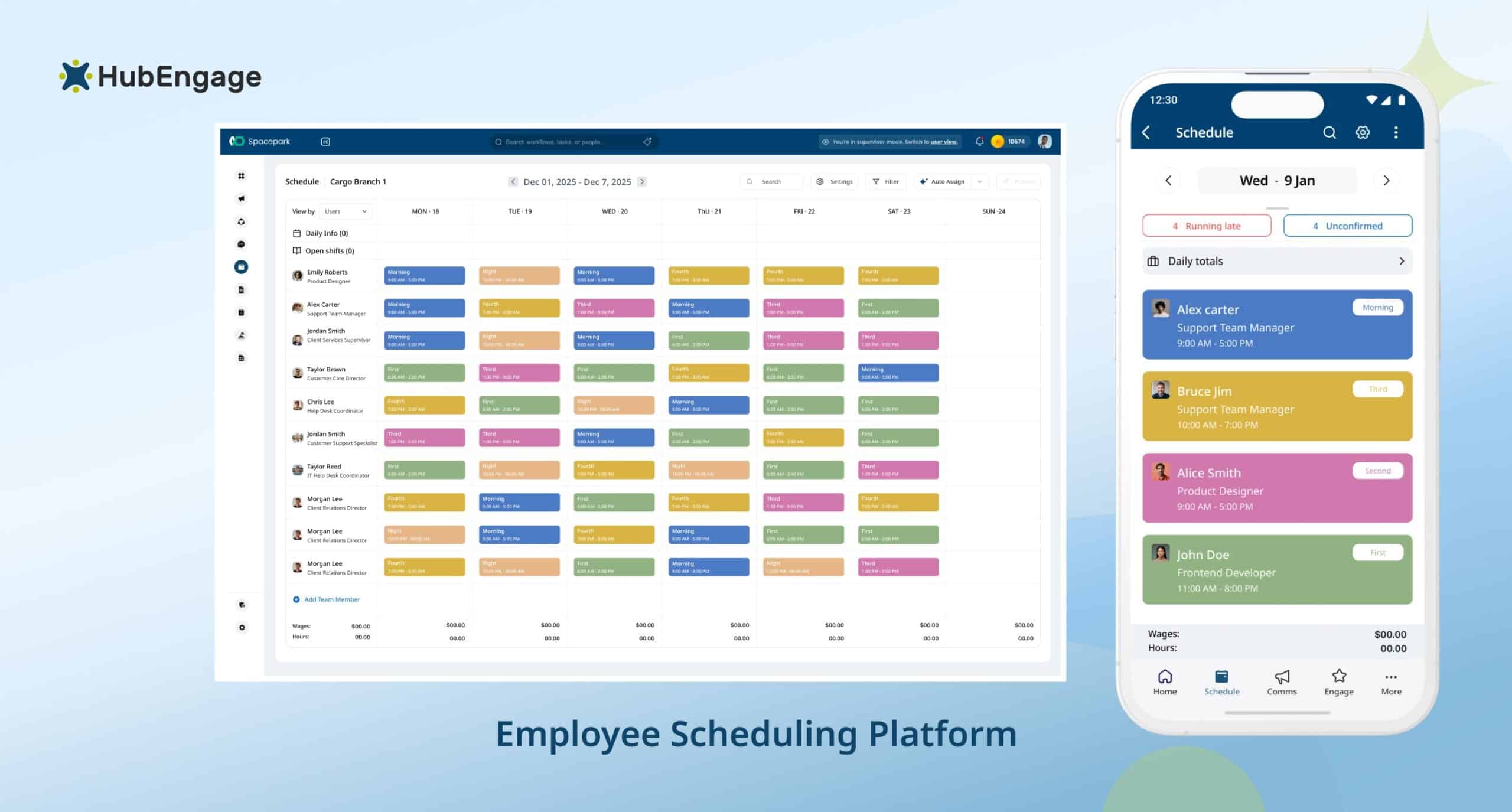
The unified tool shows up all schedules and keeps employees updated through mobile access, SMS, email, push notifications, and digital displays. Managers can create and update shifts in real time while employees stay informed anywhere.
Integrated with HR and workforce systems, it improves accuracy and reduces confusion. With real-time alerts and mobile-first access, our tool ensures better coordination, fewer missed shifts, and smoother communication across teams.
Conclusion
Creating an effective employee schedule for distributed teams needs clear visibility into availability, skills, time zones, and shift needs.
When you build balanced schedules, plan ahead, and streamline communication, you reduce conflicts and improve team productivity.
A unified system helps managers stay organized while keeping employees informed in real time.
To simplify employee scheduling, explore the HubEngage Employee Experience Platform by taking a quick demo today.
FAQs On How To Create An Employee Schedule?
How to Create an Employee Schedule Template?
An employee schedule template is made by setting columns for employee name, role, and days of the week. Fill in shift times under each day, then reuse the blank format weekly. This saves time and keeps scheduling consistent and organized.
How to create an employee work schedule for 5 employees?
Start by listing out their availability, roles, and skills first. Then match them to required shifts based on coverage needs, balance hours fairly, and ensure backup options. A simple spreadsheet works well for small teams.
How to Create an Employee Schedule in Excel?
In Excel, list employees in rows and days in columns, then enter shift times in each cell. Add total hours, role, and location columns. Use formulas and formatting to track hours, avoid conflicts, and ensure proper shift coverage.
How to Create an Employee Work Schedule for Healthcare Industry?
Start by identifying staffing needs by department and shift. Use healthcare staff scheduling software to assign employees, track certifications, balance workloads, manage time off, ensure compliance, and maintain backup coverage.
What Information Do You Need to Create an Employee Schedule?
To create an employee schedule, you need employee availability, job roles, skills, location, time-off requests, and working-hour limits. You also need shift requirements. This helps assign the right people, avoid conflicts, and ensure full shift coverage.
Related Links
workforce management | employee scheduling programs | employee scheduling software | healthcare staff scheduling software | ai staff scheduling | staff scheduling template |