Building staff schedules in spreadsheets often creates more problems than it solves. Managers fix one open shift, then face another change, expired certification, unfair weekend rotation, or last-minute request. Employees want quick answers, while payroll needs accurate data.
AI staff scheduling helps bring these moving parts together. It can review employee availability, skills, labor rules, demand patterns, and time-off requests faster than manual scheduling. It also helps frontline, deskless, hourly, remote, and distributed teams stay informed through one connected process. Instead of treating scheduling as a separate task, businesses can link it with communication, workforce support, and daily operations.
Our blog will help you understand how AI scheduling works, its benefits, and how to implement it successfully across your organization. It also fits naturally into the broader shift toward AI-supported HR operations covered in our perspective on the power of AI in human resources.
Key Takeaways
- Manual scheduling becomes unreliable as locations, roles, rules, and employee preferences increase.
- AI staff scheduling reduces the time managers spend creating and correcting schedules.
- Better scheduling improves workforce coverage, labor compliance, communication, and employee trust.
- AI can predict staffing demand, detect conflicts, and recommend suitable employees for each shift.
- Successful implementation depends on clean data, documented rules, manager training, and employee adoption.
- Scheduling delivers more value when connected with communication, payroll, HR, learning, and workforce operations.

Beyond the Spreadsheet: The New Era of AI Staff Scheduling
Traditional staff scheduling often becomes confusing because managers use spreadsheets, emails, texts, and memory to track shifts. AI scheduling tools save professionals an average of 3.6 hours per week on calendar and schedule administration, and 67% of knowledge workers cite scheduling conflicts as a top-three time drain, according to these AI in HR statistics.
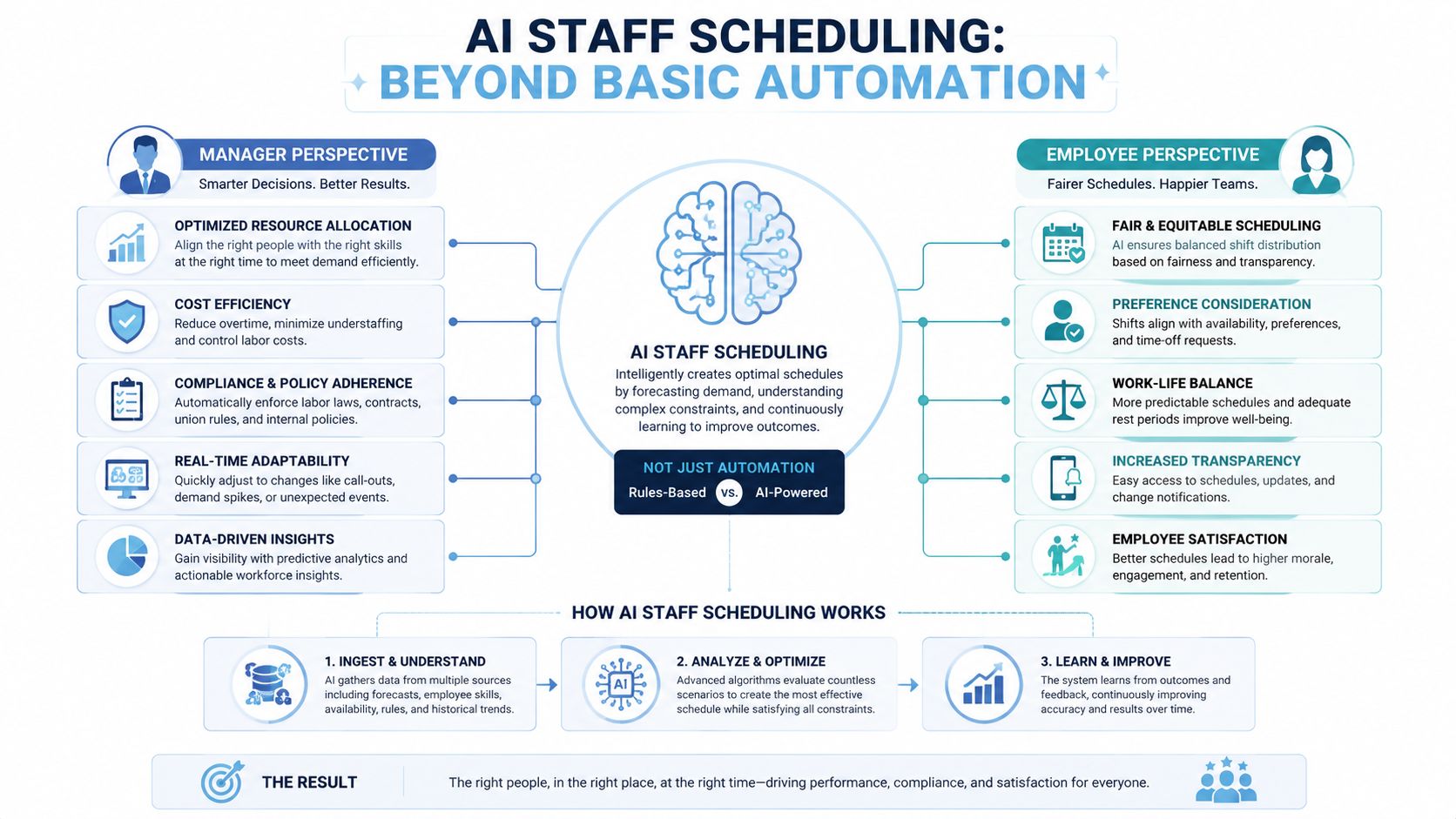
AI staff scheduling improves this process by studying demand history, employee data, and workplace rules. It can build compliant schedules quickly, detect conflicts, and suggest replacements before publishing. Instead of following fixed rules only, AI adjusts to changing conditions and helps managers make faster, smarter decisions.
What Managers See?
It helps managers focus on important exceptions instead of building every shift manually. They can review coverage risks, approve swaps with better information, and use demand forecasts to prevent overstaffing or understaffing.
What Employees See?
AI staff scheduling gives employees clearer, fairer, and more flexible schedules. They can update availability, request time off, swap shifts, and view assignments based on skills, preferences, and workplace rules.
For organizations that want scheduling tied into broader workforce workflows, use AI-powered workforce management software that connects scheduling with the systems employees already use day to day.
Core AI Techniques that gives Smart Schedules
AI staff scheduling uses three main techniques to build smarter schedules. Predictive analytics studies past demand and staffing patterns to estimate future coverage needs. Machine learning reviews earlier results to learn which employee assignments work best. Optimization then balances hard rules, employee preferences, and business priorities to create the final roster.
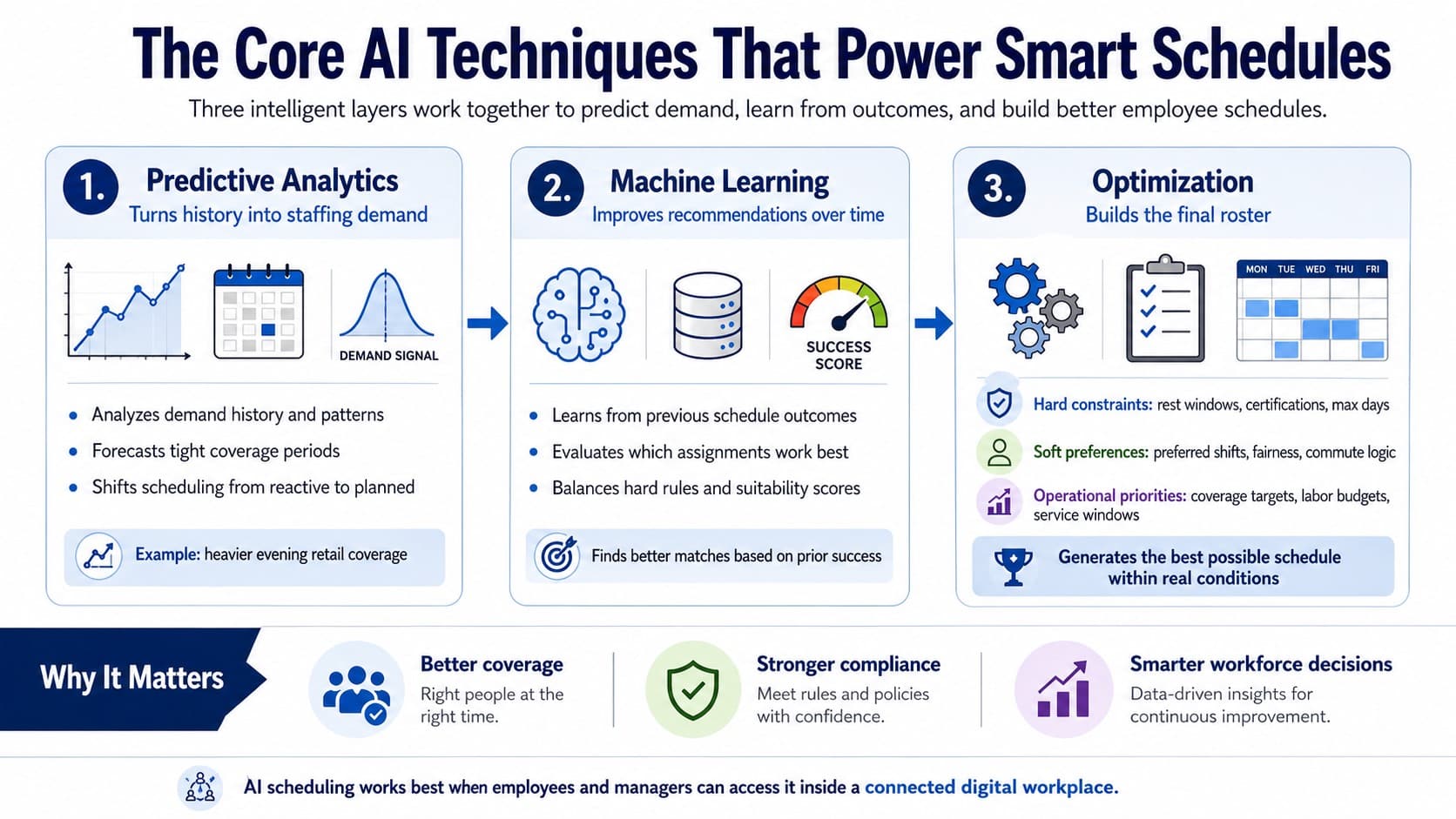
These tools help managers move from reactive changes to planned staffing. Strong results still depend on clean data, clear rules, and easy access for managers and employees every day. Hence connected digital workplaces such as AI-powered workplaces are becoming more relevant to scheduling decisions.
Business Benefits and Key Performance Indicators
AI staff scheduling creates business value by improving costs, efficiency, and employee experience. Leaders should track these measures closely.
| KPI | What it tells you |
|---|---|
| Schedule build time | How much manager time is being recovered |
| Schedule adherence | Whether employees can actually work the assigned plan |
| Last-minute fill rate | How often open shifts get covered without disruption |
| Conflict rate | How often the system catches compliance or availability issues before publish |
Stronger schedules reduce unnecessary overtime, recover manager time, and improve daily coverage. Employee measures also matter, including schedule satisfaction, swap difficulty, and preference matching.

When teams use clear KPIs, they can make better decisions, improve retention, respond faster to change, and build more reliable workforce operations successfully over time.
Workforce intelligence platforms help operations leaders move beyond anecdotal scheduling complaints and into measurable analysis, especially when paired with workforce analytics software.
How to implement AI Staff Scheduling?
Implement AI staff scheduling in clear phases to reduce risk and build trust. Start by reviewing current scheduling problems, setting goals, and cleaning employee data. Run a small pilot in shadow mode so managers can compare AI suggestions with their own decisions.
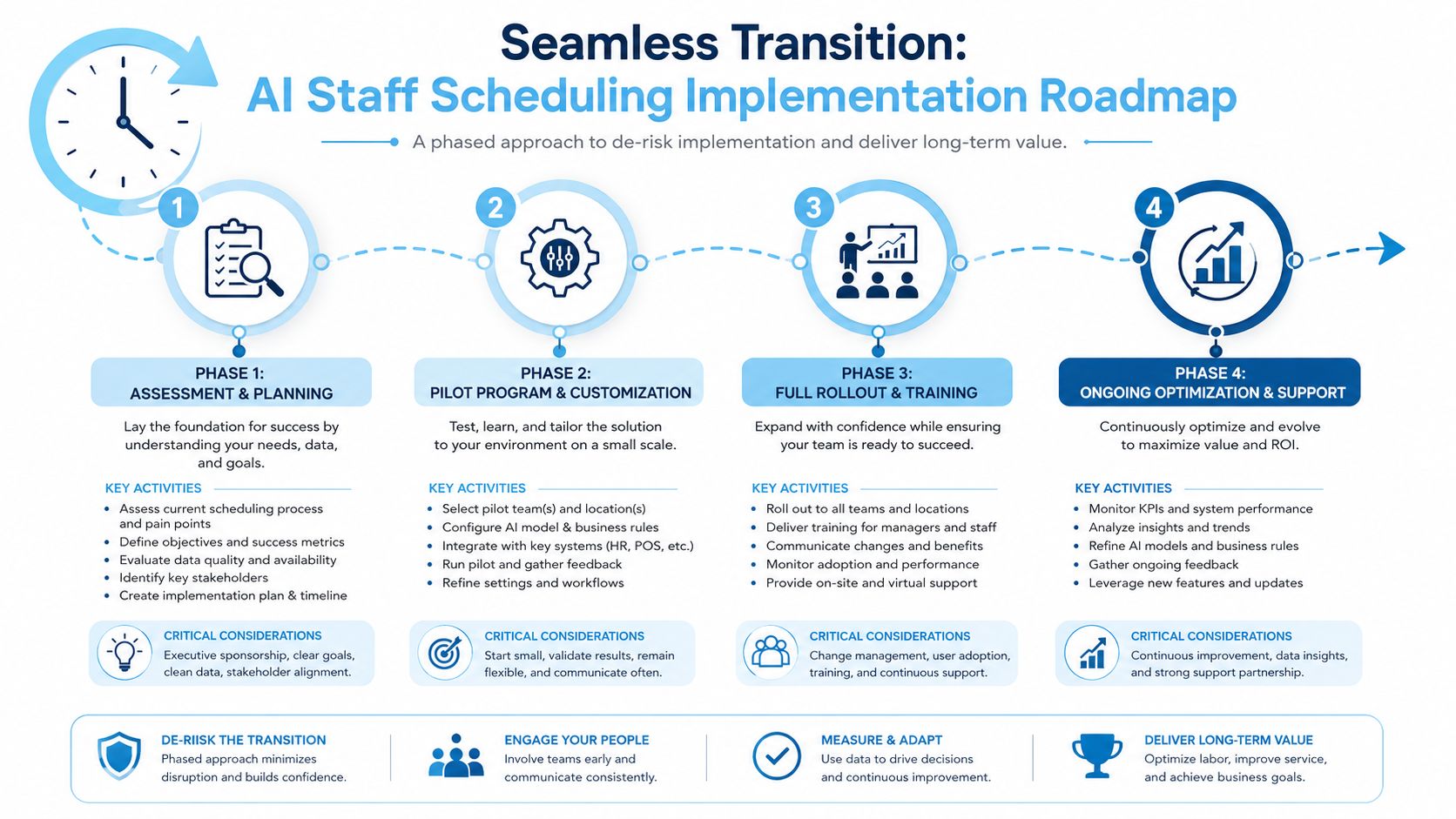
Fix missing rules, weak data, and fairness concerns before full rollout. Train managers and employees well. Also connect the system with HR, payroll, learning, and communication tools, then track results, gather feedback, and improve the process over time for success. For larger organizations especially, enterprise connectivity through workforce system integrations is what turns a scheduling tool into part of a usable workflow.
How HubEngage connects Staff Scheduling with Employee Experience?
We provide flexible staff scheduling within our employee experience platform, helping businesses plan and manage shifts across different teams and locations. Managers can create, assign, and change schedules in real time, so employees always know their working hours and daily responsibilities.
Built for today’s workforce, our employee scheduling software offers mobile access for frontline and deskless employees. They can check shifts, receive updates, and stay informed from anywhere. Real-time notifications and multi-channel messages quickly share schedule changes, helping reduce confusion, delays, and missed shifts.
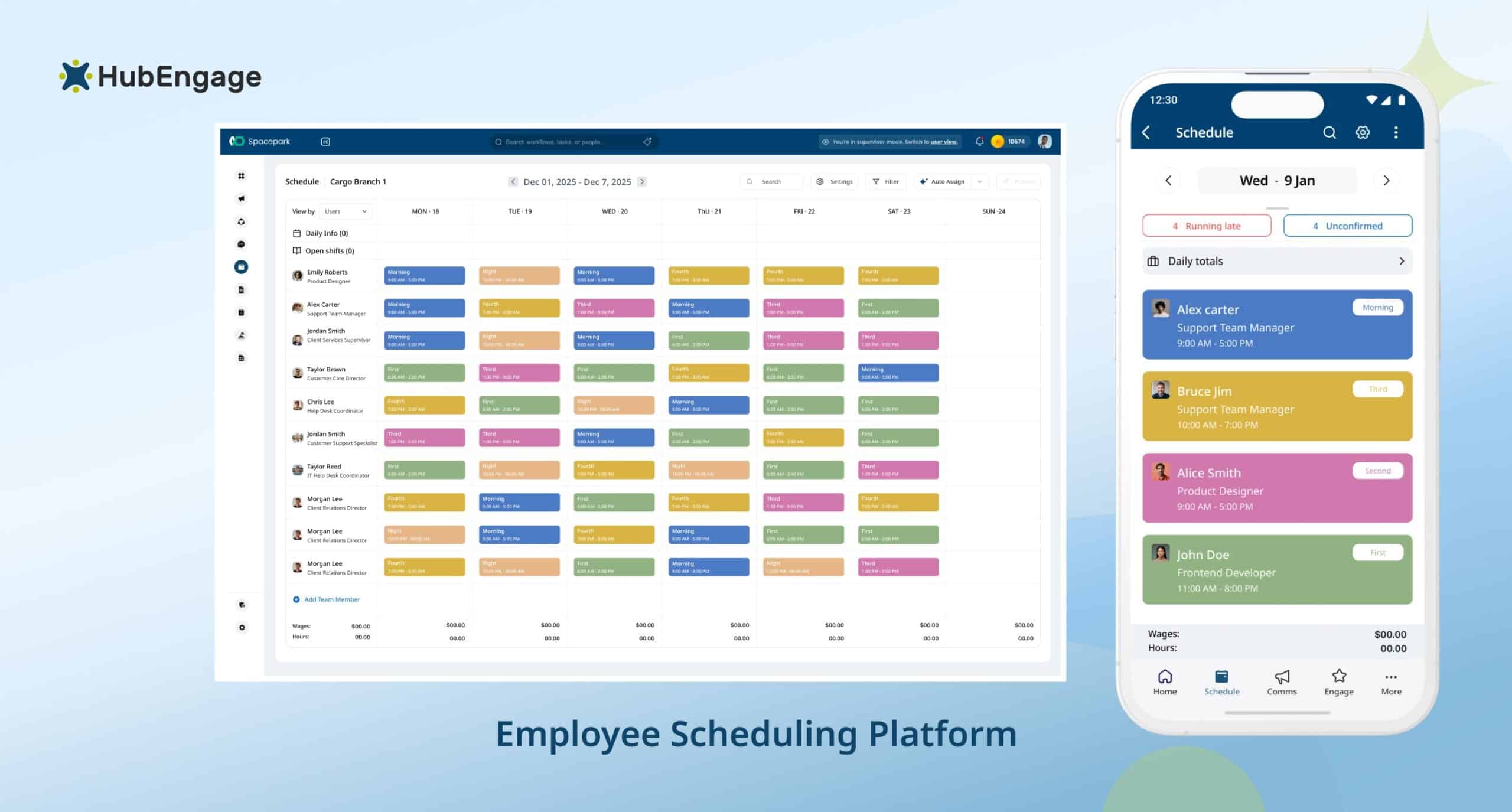
HubEngage connects with HRIS and employee data systems to create accurate schedules based on roles, locations, and availability. Because scheduling is part of the wider platform, it also works smoothly with communication, task management, and engagement tools to improve workforce coordination.
Key Features:
- Create, assign, and update schedules in real time across teams and locations
- Give frontline employees simple mobile access to their shifts
- Send instant schedule change notifications through multiple communication channels
- Connect with HRIS data for accurate role-based scheduling
- Share alerts through mobile, email, SMS, and digital signage
10 Best AI Staff Scheduling Softwares For Distributed Teams
Explore the leading AI staff scheduling tools for small businesses and distributed teams managing shifts.
| S. No. | Name | Best For |
|---|---|---|
| 1 | HubEngage | Workforce experience and operations |
| 2 | monday AI Work Platform | Custom automated schedules |
| 3 | Hybrid Hero | Desk and room booking |
| 4 | Deputy | Dynamic shift swapping |
| 5 | Oracle | Compliance-focused scheduling |
| 6 | TimeHero | Task-based scheduling |
| 7 | Workday | Enterprise HR integration |
| 8 | Motion | AI task prioritization |
| 9 | Reclaim | Automated calendar syncing |
| 10 | Sling | Team communication |
Conclusion
AI staff scheduling helps organizations replace spreadsheets, reduce manager workload, improve shift coverage, and create fairer employee schedules. Its value grows when scheduling connects with communication, time tracking, payroll, learning, and workforce analytics.
Success still depends on accurate data, clear rules, manager oversight, and consistent employee adoption. By treating scheduling as part of the wider employee experience, businesses can improve efficiency and workforce trust.
Our Employee Experience Platform can easily help you achieve these business needs. Sign up for a demo session and explore what our platform helps you with better workforce management.
FAQs on AI Staff Scheduling
Can a small business use AI staff scheduling successfully?
Yes. Small businesses can use AI staff scheduling successfully when employee records, availability, job roles, and shift rules are accurate. Starting with one team or location helps managers test results, fix issues, and build trust.
How should leaders evaluate an AI scheduling rollout?
Leaders should compare schedule build time, overtime, coverage, conflicts, manager overrides, and employee satisfaction before and after launch. They should also confirm data quality, documented rules, system adoption, integrations, and manager review processes.
What data does an AI scheduling system need?
AI scheduling systems need accurate employee availability, job roles, skills, certifications, labor rules, time-off requests, location details, working-hour limits, demand history, and previous schedule results to recommend reliable and compliant shift plans.
Does AI staff scheduling replace managers?
No. AI staff scheduling supports managers rather than replacing them. It handles routine schedule building, detects conflicts, and suggests coverage options, while managers review exceptions, address employee needs, and make final workforce decisions.
Which industries benefit most from AI staff scheduling?
AI staff scheduling benefits industries with hourly teams, changing demand, multiple locations, or strict skill requirements. Retail, hospitality, restaurants, healthcare, manufacturing, logistics, warehousing, field services, education, and public services often gain the most.
Related Links
employee scheduling software | the power of AI in human resources | AI-powered workforce management software | AI-powered workplaces | workforce analytics software | workforce system integrations