Managing employee schedules across multiple shifts, departments, and locations often feels like a weekly puzzle. Spreadsheets and paper schedules quickly fall apart with last-minute changes, but online employee scheduling software brings structure, saves time, and adds flexibility. Wondering how? Let us understand this with an example.
Every Monday morning, Jake, an operations manager at a growing retail chain, sat at his desk with a cup of coffee and a familiar sense of dread. What looked like a simple task creating the weekly schedule quickly turned into a frustrating puzzle.
Employees called in with last-minute leave requests, others wanted to swap shifts, and different store locations had completely different staffing needs. His spreadsheets were filled with edits, crossed-out names, and endless notes, yet mistakes still slipped through.
By the time he finalized the schedule, hours had passed and even then, changes kept coming. A single update meant reworking everything again. It wasn’t just time-consuming but it was very tiring.
Then came a turning point. Jake discovered online employee scheduling software, and what once felt chaotic started becoming structured, predictable, and efficient. Tasks that took hours were now completed in minutes, and employees finally had the flexibility and clarity they needed.
In this blog, we will explore how online employee scheduling software transforms scheduling from a weekly headache into a streamlined, efficient process and how your organization can benefit from it.

Key Takeaways
- Online employee scheduling software simplifies complex workforce planning across multiple shifts and locations.
- Automation reduces schedule creation time and minimizes human errors significantly.
- Real-time updates and notifications improve communication and reduce confusion.
- Integration with payroll and HR systems ensures seamless operations and accuracy.
- Employee self-service features boost satisfaction and reduce administrative workload.
- Data-driven insights help optimize labor costs and improve scheduling efficiency.
- Choosing the right platform depends on business size, complexity, and integration needs.
What is an Online Employee Scheduling Software?
Online employee scheduling software is a cloud-based platform that automates the creation, distribution, and management of employee work schedules. Unlike traditional paper schedules or basic spreadsheets, these systems handle complex scheduling scenarios like shift rotations, availability tracking, time-off management, and labor cost optimization in real-time.
The software operates through web browsers and mobile apps, allowing managers to build schedules from anywhere while employees can view their shifts, request time off, and pick up additional hours instantly. Most platforms integrate with payroll systems, making the transition from scheduling to payment seamless.
Core Components of Scheduling Platforms
| Component | Function | Business Impact |
|---|---|---|
| Schedule Builder | Drag-and-drop interface for creating shifts | Reduces scheduling time from hours to minutes |
| Availability Management | Tracks when employees can work | Prevents scheduling conflicts before they happen |
| Time-Off Requests | Digital system for vacation and sick leave | Eliminates paper forms and email chains |
| Shift Trading | Allows employees to swap shifts independently | Reduces manager involvement in routine changes |
| Labor Cost Tracking | Monitors overtime and budget compliance | Prevents unexpected labor cost overruns |
| Mobile Access | Apps for schedule viewing and updates | Increases employee engagement and reduces calls |
Essential Scheduling Software Features
Modern online employee scheduling software includes several must-have capabilities that distinguish professional platforms from basic calendar tools.
Automated Schedule Generation
Advanced platforms can build entire schedules based on business rules, employee availability, and historical patterns. The system considers factors like required certifications, preferred shifts, and labor budget constraints to create optimized schedules automatically.
Real-Time Communication
Instant notifications keep everyone informed about schedule changes, shift reminders, and important announcements. Employees receive alerts through the mobile app, email, or text messages based on their preferences.
Compliance Monitoring
The software tracks labor law requirements like break times, maximum consecutive hours, and overtime thresholds. This feature is particularly valuable for healthcare and hospitality organizations dealing with complex regulations.
Integration Capabilities
Professional scheduling platforms connect with payroll systems, HR databases, and point-of-sale systems. This integration eliminates double data entry and ensures accurate time tracking for payroll processing.
Top Online Scheduling Software Comparison
The scheduling software market includes solutions for every business size and industry. Here are some of the best employee scheduling tools to consider:
1. HubEngage
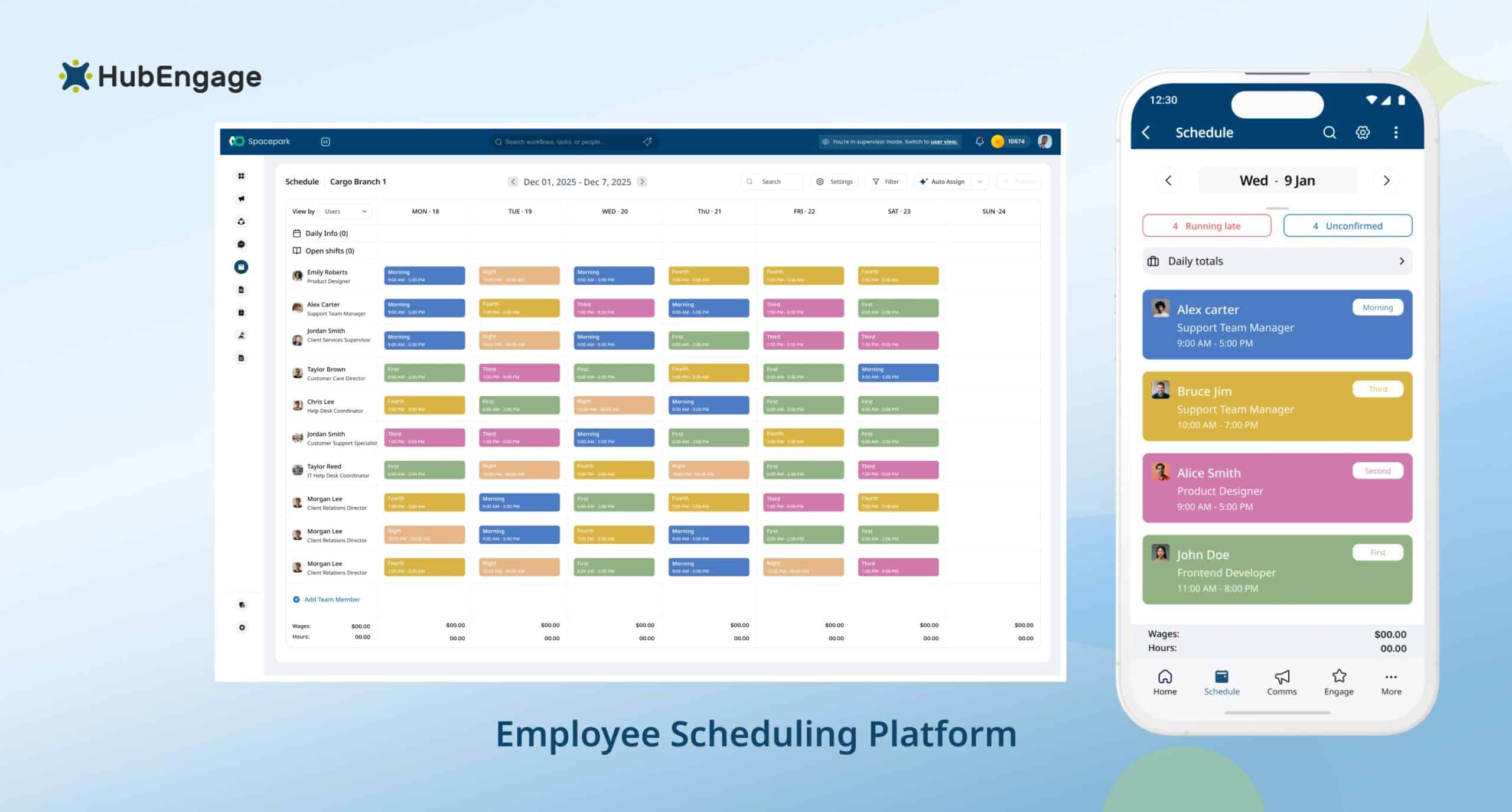
HubEngage offers a flexible scheduling solution as part of its employee experience platform, helping organizations efficiently plan and manage workforce schedules across teams and locations. It allows managers to create, assign, and update schedules in real time, ensuring employees always have visibility into their shifts and responsibilities.
Designed for modern workplaces, the platform supports mobile-first access so frontline and deskless workers can view schedules, receive updates, and stay informed on the go. With real-time notifications and multi-channel communication, any schedule changes are instantly shared, reducing confusion and missed shifts.
Integrated with HRIS and employee data systems, HubEngage ensures accurate scheduling aligned with roles, locations, and availability. As part of the broader platform, scheduling connects seamlessly with communication, tasks, and engagement tools for better workforce coordination.
Features:
-
- Create and manage schedules with real-time updates across teams
- Mobile-first access lets frontline employees view shifts anytime easily
- Send instant notifications for schedule changes across all channels
- Integrates with HRIS to align schedules with roles accurately
- Multi-channel alerts via mobile, email, SMS, and digital signage
Pros:
-
- All in one employee engagement platform solution
- Strong communication and workforce engagement features
- Scalable for growing organizations and enterprises.
Cons:
-
- Includes features beyond basic scheduling requirements.
- May require onboarding for full feature utilization
2. Deputy
Deputy is a popular workforce management tool designed for shift-based businesses. It simplifies scheduling, time tracking, and compliance while offering strong mobile capabilities for employees and managers.
Features:
-
- Auto scheduling based on availability and demand
- Time tracking with integrated attendance monitoring system
- Compliance tools for labor laws and regulations
- Mobile app for employee scheduling and communication
- Integrations with payroll and HR software systems
Pros:
-
- Easy to use with intuitive user interface
- Strong automation reduces manual scheduling efforts
- Excellent mobile experience for managers employees
Cons:
-
- Limited customization for complex business requirements
- Additional features increase overall subscription pricing
- Reporting features may feel limited for enterprises
- Requires stable internet connection for optimal use
3. When I Work
When I Work focuses on simple scheduling and team communication. It is ideal for small to mid-sized businesses looking for an intuitive and easy-to-deploy scheduling solution.
Features:
-
- Employee scheduling with drag and drop interface
- Team messaging for quick communication and updates
- Time tracking with attendance and shift monitoring
- Mobile access for schedule viewing and updates
- Shift swapping for flexible workforce management
Pros:
-
- User friendly platform with minimal learning curve
- Quick setup suitable for small businesses teams
- Affordable pricing for growing teams organizations
Cons:
-
- Limited advanced features for complex scheduling needs
- Basic reporting lacks deep analytics capabilities insights
- Fewer integrations compared to enterprise level platforms
- Not ideal for large scale workforce management
4. Homebase
Homebase is designed for small businesses and hourly teams. It offers scheduling, time tracking, and hiring tools in a simple interface with free basic plans.
Features:
-
- Scheduling tools for hourly employees and teams
- Time clock system with attendance tracking features
- Hiring tools for onboarding and applicant tracking
- Team messaging for internal communication updates
- Payroll integrations for streamlined payment processing
Pros:
-
- Free plan available for small teams businesses
- Easy setup with simple intuitive user interface
- Ideal for hourly workforce management needs
Cons:
-
- Limited scalability for growing enterprise businesses
- Advanced features locked behind paid subscription plans
- Customization options limited for complex scheduling needs
- Reporting features basic compared to competitors tools
5. Shiftboard
Shiftboard is built for complex workforce scheduling, especially in industries like healthcare and manufacturing. It handles compliance and large workforce needs effectively.
Features:
-
- Advanced scheduling for complex workforce requirements needs
- Compliance management for industry regulations enforcement tracking
- Reporting tools for workforce analytics and insights
- Workforce analytics for performance and labor optimization
- Integrations with enterprise HR and payroll systems
Pros:
-
- Handles complex scheduling scenarios efficiently effectively well
- Strong compliance features for regulated industries businesses
- Suitable for large organizations with multiple locations
Cons:
-
- Steeper learning curve for new users onboarding
- Higher cost compared to basic scheduling tools
- Implementation process may take longer for setup
- Interface may feel complex for small teams
6. ZoomShift
ZoomShift is a simple scheduling solution for small businesses and hourly employees. It focuses on ease of use and essential scheduling features.
Features:
-
- Employee scheduling with simple easy to use interface
- Time tracking for accurate attendance and payroll processing
- Shift reminders sent via notifications to employees
- Reporting tools for scheduling and labor insights
- Mobile access for managing schedules on the go
Pros:
-
- Affordable pricing suitable for small businesses teams
- Easy to use with minimal training required
- Quick onboarding process for new users adoption
Cons:
-
- Limited advanced features for growing organizations needs
- Fewer integrations compared to enterprise scheduling tools
- Reporting capabilities not very detailed or customizable
- Not suitable for complex workforce scheduling scenarios
7. Sling
Sling is a scheduling and communication platform designed for shift-based teams. It includes messaging tools alongside scheduling features to improve team coordination.
Features:
-
- Scheduling tools for shift planning and management
- Messaging system for team communication and updates
- Task management for assigning and tracking work tasks
- Time tracking for attendance and work hours monitoring
- Mobile app for managing schedules and communication
Pros:
-
- Free version available for small teams businesses
- Strong communication features improve team coordination effectively
- Easy to use with simple scheduling interface
Cons:
-
- Interface can feel cluttered for new users initially
- Limited analytics and reporting features for insights
- Some advanced features require paid subscription upgrades
- Not ideal for highly complex scheduling requirements
8. Humanity
Humanity offers flexible scheduling with strong forecasting and reporting tools. It is suitable for businesses needing data-driven scheduling decisions.
Features:
-
- Scheduling tools with flexible workforce management options
- Forecasting tools for demand based staffing planning
- Reporting features for workforce analytics and insights
- Compliance tools for labor laws and regulations tracking
- Integrations with payroll and HR management systems
Pros:
-
- Advanced analytics supports data driven decision making
- Flexible scheduling options for various industries needs
- Strong forecasting improves staffing efficiency accuracy
Cons:
-
- Pricing higher compared to basic scheduling tools
- Setup process can be complex for new users
- Requires training to fully utilize advanced features
- Interface may feel overwhelming for small teams
9. Planday
Planday is designed for industries like hospitality and retail. It focuses on workforce management, communication, and compliance.
Features:
-
- Scheduling tools for shift based workforce management
- Communication tools for team collaboration and updates
- Payroll integration for seamless salary processing workflows
- Reporting tools for labor cost and performance insights
- Mobile app for managing schedules and communication
Pros:
-
- Industry specific features for hospitality retail businesses
- Good compliance tools for labor law adherence
- User friendly interface for daily scheduling tasks
Cons:
-
- Limited customization options for unique business needs
- Pricing can vary depending on features and usage
- Reporting capabilities may not suit large enterprises
- Requires training for full feature utilization benefits
10. 7shifts
7shifts is tailored for restaurant scheduling. It helps manage staff scheduling, labor costs, and team communication efficiently.
Features:
-
- Scheduling tools designed specifically for restaurant operations
- Labor cost tracking for optimized workforce budgeting
- Team messaging for communication between staff members
- Reporting tools for performance and scheduling insights
- Integrations with POS and payroll systems platforms
Pros:
-
- Built specifically for restaurant industry workforce needs
- Strong labor tracking improves cost control efficiency
- Easy to use for restaurant managers staff
Cons:
-
- Industry specific limits use outside hospitality sectors
- Limited features for non restaurant businesses operations
- Customization options may be restricted for users
- Reporting features basic compared to enterprise tools
How to choose the right Scheduling Platform?
Selecting online employee scheduling software requires evaluating your specific operational needs against available features and budget constraints.
Start with Your Scheduling Complexity
Simple businesses with consistent schedules need basic tools, while organizations with multiple shifts, locations, or compliance requirements need advanced features. Consider factors like shift rotations, on-call scheduling, and union rules that affect your scheduling process.
Evaluate Integration Requirements
Your scheduling platform should connect seamlessly with existing systems. Payroll integration is essential for most businesses, while point-of-sale integration matters for retail and restaurant operations. HR system connections help maintain consistent employee data across platforms.
Consider Employee Experience
The best scheduling software gets adopted quickly by your team. Look for intuitive mobile apps, clear schedule displays, and easy shift management features. Employee self-service capabilities like time-off requests and shift trading reduce administrative burden on managers.
Budget for Total Cost of Ownership
Beyond monthly subscription fees, consider implementation costs, training time, and ongoing support needs. Some platforms charge per employee, while others use flat monthly rates. Factor in potential savings from reduced scheduling time and improved labor cost control.
Implementation and Integration Considerations
Successfully deploying online employee scheduling software requires careful planning and systematic rollout to ensure smooth adoption across your organization.
Pre-Implementation Planning
Identify pain points like last-minute coverage issues or overtime tracking problems that the new system should address.
Data Migration Strategy
Prepare clean data files with employee details, availability preferences, and any existing schedule patterns. This preparation accelerates the setup process and reduces errors.
Training and Adoption
Plan separate training sessions for managers and employees, focusing on their specific use cases. Managers need to understand schedule creation and reporting features. While employees primarily need mobile app training for viewing schedules and requesting changes.
Integration Testing
Test all system connections before going live, especially payroll and time tracking integrations. Verify that hours transfer correctly and that any custom rules or overtime calculations work as expected.
Implementation Checklist Snapshot
| Step | Focus Area | Key Outcome |
|---|---|---|
| Planning | Identify scheduling challenges | Clear goals for system setup |
| Data Migration | Clean and import employee data | Faster and error-free setup |
| Training | Educate managers and employees | Smooth adoption and usage |
| Testing | Validate integrations and rules | Accurate scheduling and payroll sync |
Pro Tip: Run parallel systems for 2–3 weeks during implementation. This approach allows you to verify accuracy while maintaining familiar backup processes.
ROI and Cost-Benefit Analysis
Online employee scheduling software delivers measurable returns through reduced administrative time, improved labor cost control, and decreased scheduling conflicts.
Time Savings Calculation
Most managers spend 2–8 hours weekly creating and managing schedules manually. Online scheduling software typically reduces this to 30–60 minutes per week. For a manager earning $25 per hour, this represents $125–200 in weekly time savings.
Labor Cost Optimization
Automated overtime alerts and labor budget tracking help prevent unexpected payroll costs. Companies typically see 5–15% reductions in overtime expenses through better schedule planning and real-time cost visibility.
Reduced Turnover Impact
Flexible scheduling and employee self-service features improve job satisfaction, leading to lower turnover rates. Given that replacing an hourly employee costs approximately $1,500–3,000, even small turnover improvements generate significant savings.
Compliance Cost Avoidance
Automated break scheduling and overtime tracking help prevent labor law violations that can result in fines and legal costs. This protection is particularly valuable for organizations in regulated industries.
Online Scheduling Software ROI Snapshot
| Benefit Area | Key Impact | Typical Result |
|---|---|---|
| Time Savings | Reduces manual scheduling effort | Saves 2–6 hours weekly |
| Labor Cost Control | Prevents overtime overspending | Cuts costs by 5–15% |
| Employee Retention | Improves satisfaction and flexibility | Reduces turnover costs |
| Compliance | Avoids legal penalties and errors | Ensures labor law adherence |
Best Practices for Scheduling Management
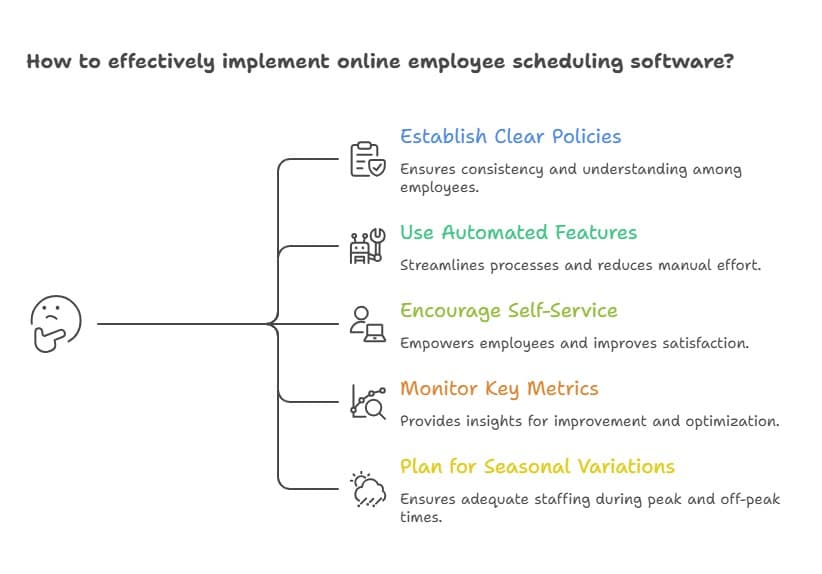
Effective online employee scheduling software implementation requires following proven strategies that maximize both system capabilities and employee satisfaction.
- Establish clear scheduling policies
- Use automated features strategically
- Encourage employee self-service
- Monitor key metrics
- Plan for seasonal variations
Essential Scheduling Resources and Tools
Beyond core scheduling software, several additional resources support effective workforce management and scheduling optimization.
- Industry associations and standards: Organizations like SHRM provide guidelines on fair scheduling, compliance, and workforce practices, helping businesses align policies with industry benchmarks and improve workforce management strategies.
- Labor law resources: Government sources such as the The Department of Labor offers up-to-date regulations on overtime, breaks, and scheduling laws, ensuring businesses remain compliant and avoid legal risks.
- Training and certification programs: These programs help managers build scheduling expertise, understand workforce optimization, and effectively use scheduling tools to improve operational efficiency.
- Analytics and reporting tools: Advanced tools provide insights into labor costs, productivity trends, and scheduling efficiency, enabling data-driven decisions and continuous process improvement.
Quick Overview of Scheduling Resources
| Resource Type | Purpose | Key Benefit | Example Use Case |
|---|---|---|---|
| Industry Standards | Provides best practices and compliance frameworks | Ensures fair and structured scheduling policies | Aligning workforce policies with SHRM guidelines |
| Labor Law Resources | Offers legal guidelines on scheduling and overtime | Helps avoid penalties and legal risks | Ensuring compliance with break and overtime rules |
| Training Programs | Builds scheduling and workforce management skills | Improves efficiency and manager expertise | Training managers on scheduling tools and processes |
| Analytics Tools | Tracks performance and labor data | Enables data-driven decisions | Monitoring overtime trends and staffing efficiency |
Conclusion
Online employee scheduling software transforms workforce management from a time-consuming administrative task into a strategic advantage. The right platform reduces scheduling conflicts, improves employee satisfaction, and provides the flexibility modern businesses need to adapt quickly to changing demands.
Streamline your employee scheduling using HubEngage employee experience platform to unify communications, engagement, and workforce operations to create schedules that work for everyone while reducing administrative overhead. Get a quick demo to discover more about our software.
FAQs on Online Employee Scheduling Software
How secure is cloud-based scheduling data?
Professional scheduling platforms use enterprise-grade security including data encryption, secure servers, and regular security audits. Most platforms comply with industry standards like SOC 2 and maintain data backups across multiple locations.
Can an online employee scheduling software handle complex union requirements?
Yes, advanced platforms accommodate union rules including seniority-based scheduling, specific break requirements, and overtime distribution policies.
What happens if the software goes down during a busy shift?
Most platforms offer 99.9% uptime, ensuring reliability. They provide offline access so employees can still view schedules, minimizing disruption during unexpected outages or connectivity issues.
How long does implementation typically take?
Basic implementations take two to four weeks, including setup and training, while complex deployments with integrations or multiple locations may require six to eight weeks.
Do employees need smartphones to use an online employee scheduling software?
No, employees do not need smartphones because most platforms provide web-based access that works across computers, tablets, and basic mobile devices with internet connectivity reliably.
How does the software handle last-minute schedule changes?
Modern scheduling platforms notify employees about changes using push notifications, SMS, and email, while tracking acknowledgments to ensure teams informed and coverage gaps are avoided.
Related Links
employee scheduling programs | shift scheduling app | employee scheduling and time tracking software